
Introduction
The McGrey MOVE Compact is an 8-inch battery-powered active PA speaker designed for versatile use in various settings such as events, parties, and presentations. It offers powerful sound, flexible connectivity, and portability. This manual provides essential information for the safe and efficient operation of your device.
Safety Instructions
- Read all instructions carefully before using the device.
- Keep this manual for future reference.
- Do not expose the device to rain or moisture to prevent fire or electric shock.
- Do not block any ventilation openings. Install in accordance with the manufacturer's instructions.
- Do not install near any heat sources such as radiators, heat registers, stoves, or other apparatus (including amplifiers) that produce heat.
- Protect the power cord from being walked on or pinched, particularly at plugs, convenience receptacles, and the point where they exit from the apparatus.
- Only use attachments/accessories specified by the manufacturer.
- Unplug this apparatus during lightning storms or when unused for long periods of time.
- Refer all servicing to qualified service personnel. Servicing is required when the apparatus has been damaged in any way.
Product Overview
The McGrey MOVE Compact speaker combines portability with powerful audio performance, making it suitable for a wide range of applications.

Key Features:
- Mobile & Independent: Integrated lithium battery provides up to 8 hours of operation.
- Powerful 2-Way Sound: 8-inch woofer and 1-inch compression driver deliver 95 W RMS and up to 115 dB SPL.
- Bluetooth & TWS: Wireless streaming via Bluetooth 5.0. TWS function allows stereo pairing of two systems.
- Professional Connections: 2x XLR Line Combo inputs, Cinch, 3.5 mm AUX, and XLR output. Optional 48V phantom power.
- Intelligent DSP: Voicing Modes (Music, Speech, Monitor, Sub), Feedback Eliminator, and Talkover function.

Setup
1. Charging the Battery
Before first use, fully charge the integrated lithium battery. Connect the power cable to the AC input on the rear panel and plug it into a suitable power outlet. The battery level indicator on the control panel will show the charging status. A full charge takes approximately 3 hours.
2. Placement
Position the speaker according to your needs. The MOVE Compact can be placed:
- On a stand: For wider sound dispersion over a distance.
- Angled upright: Ideal for close proximity listening or as a personal monitor.
- Angled horizontally: Suitable for use as a stage monitor.
3. Initial Power On
After charging, ensure all volume controls are set to minimum. Press the main power switch on the rear panel to turn on the speaker.
Operating

1. Connecting Audio Sources
The MOVE Compact offers various input options:
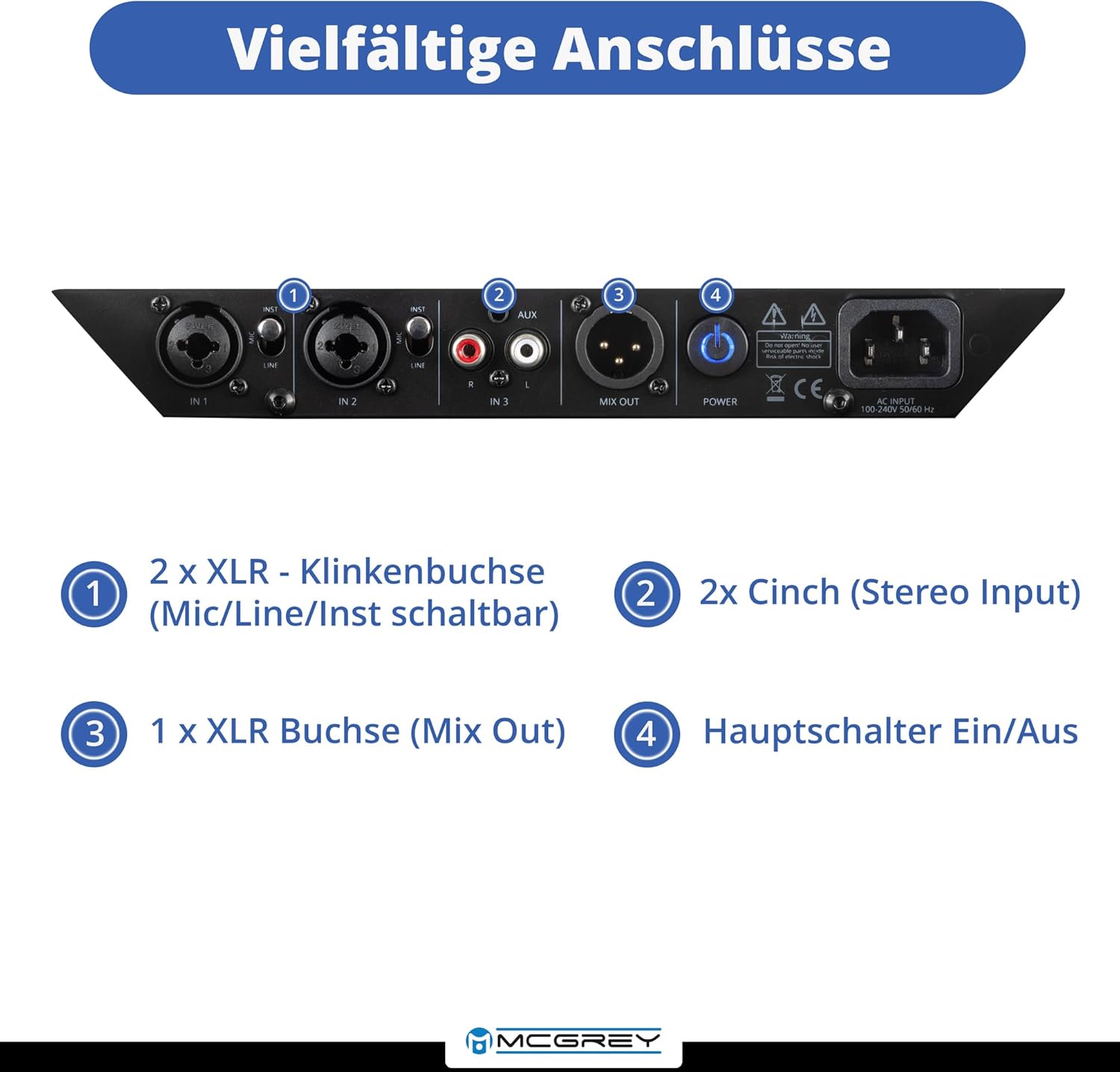
- XLR Line Combo Inputs (CH 1, CH 2): Use these for microphones, instruments, or line-level signals. The input type (Mic/Line/Inst) is switchable.
- Cinch (RCA) Stereo Input (CH 3): Connect devices like CD players or DJ mixers.
- 3.5 mm AUX Input (CH 3): For connecting smartphones, tablets, or other portable audio devices.
- XLR Mix Out: Use this output to send the mixed signal to other PA systems or recording devices.
2. Bluetooth Pairing & TWS Function
- Bluetooth Pairing: Activate Bluetooth on your smartphone or tablet. On the MOVE Compact, select the Bluetooth input. The speaker will appear as 'McGrey MOVE Compact' in your device's Bluetooth list. Select it to pair.
- TWS (True Wireless Stereo) Function: To achieve stereo sound with two MOVE Compact speakers, ensure both speakers are powered on and not connected to any other Bluetooth device. On one speaker, activate the TWS pairing mode (refer to the control panel for the specific button). The two speakers will automatically connect, with one acting as the left channel and the other as the right.

3. Using DSP Modes & Effects
- Voicing Modes: Select from 'Music', 'Speech', 'Monitor', or 'Sub' to optimize the speaker's sound profile for your specific application.
- Feedback Eliminator: Activate this function to reduce unwanted audio feedback, especially when using microphones.
- Talkover Function: When activated, this feature automatically lowers the background music volume when a microphone signal is detected, ideal for announcements or presentations.
- Reverb Effect: Apply reverb to your audio signals for added depth and ambiance.
- Bass Boost: Engage this feature for enhanced low-frequency response.
4. Adjusting Volume and EQ
Use the individual volume controls for each channel to balance your audio sources. The 2-band EQ (Treble and Bass) for each input channel allows you to fine-tune the tone.
Maintenance
1. Cleaning
Wipe the exterior of the speaker with a soft, dry cloth. Do not use abrasive cleaners, waxes, or solvents. Ensure no liquids enter the speaker grille or control panel.
2. Battery Care
To prolong battery life, avoid fully discharging the battery frequently. If storing the speaker for an extended period, charge the battery to approximately 50-70% and recharge it every few months.
3. Storage
Store the speaker in a cool, dry place away from direct sunlight and extreme temperatures. Protect it from dust and moisture.
Troubleshooting
- No Sound: Check power connection, ensure speaker is on, verify input source connections, check volume levels on both the speaker and the source device.
- Distorted Sound: Reduce input volume from the source device or the speaker's channel volume. Check for proper cable connections.
- Bluetooth Pairing Issues: Ensure the speaker is in Bluetooth pairing mode. Turn off and on Bluetooth on your source device. Make sure no other devices are connected to the speaker via Bluetooth.
- Feedback: Activate the Feedback Eliminator. Reduce microphone gain. Reposition the microphone or speaker.
- Short Battery Life: Ensure the battery is fully charged. Battery performance may decrease over time with usage.
Specifications
| Feature | Specification |
|---|---|
| Brand | McGrey |
| Model | MOVE Compact |
| Output Power | 95 Watt RMS (up to 190W Peak) |
| Loudness Level | 115 Decibel |
| Connectivity Technology | XLR, RCA, AUX, Bluetooth 5.0 |
| Audio Inputs | 2x XLR/Jack Combo, Cinch (RCA), 3.5 mm AUX |
| Audio Output | 1x XLR Mix Out |
| Number of Channels | 4 |
| Power Source | Battery Powered (Lithium Battery 11.1V 6600 mAh) |
| Battery Life | Up to 8 hours (at moderate volume) |
| Charging Time | Approx. 3 hours |
| Compatible Devices | Microphones, Musical Instruments, Mixers, Smartphones, Tablets |
| Color | Black |
| Material | Plastic |
| Item Dimensions (LxWxH) | 39.5 x 27.0 x 28.0 cm (from description) / 35 x 40 x 70 cm (from specs) - Note: Discrepancy in source data, using description's compact dimensions. |
| Item Weight | 6.9 kg (from description) / 14.5 kg (from specs) - Note: Discrepancy in source data, using description's lighter weight for portability. |
| Manufacturer Item Number | 00102639 |
| ASIN | B0GPDCV3MN |
Warranty and Support
For warranty information and technical support, please refer to the documentation provided with your purchase or contact McGrey customer service. Keep your proof of purchase for any warranty claims.

