
1. Introduction
This manual provides essential information for the safe and efficient operation, installation, and maintenance of your Hitachi 1.5 Ton 3 Star Inverter Split AC, model RAS.D318PCD2BM. Please read this manual thoroughly before using the air conditioner and retain it for future reference.
2. Safety Information
Always follow basic safety precautions to reduce the risk of fire, electric shock, or injury.
- Ensure the air conditioner is installed by a qualified technician according to local electrical codes.
- Do not operate the unit with wet hands or when standing on a wet surface.
- Disconnect power before cleaning or performing any maintenance.
- Keep children away from the unit and remote control.
- Do not insert objects into the air outlet or inlet.
- Use only the specified refrigerant (R32).
3. Product Overview
The Hitachi 1.5 Ton 3 Star Inverter Split AC is designed for efficient cooling with advanced features.
Key Features:
- Inverter Compressor: Provides faster cooling and lower energy consumption by adjusting power based on heat load.
- EEV Precision Cool Technology: Accurately monitors cooling requirements and regulates refrigerant flow.
- Capacity: 1.5 Ton, suitable for rooms up to 150 sq. ft., effective up to 54°C ambient temperature.
- 4-Way Swing: Ensures uniform air distribution across the room.
- 550 CFM IDU Airflow: Powerful and uniform cooling.
- Low Noise Level: Operates at 34 dBA for quiet comfort.
- Xpandable Plus Technology: Flexible cooling performance that responds to changing conditions.
- Ice Clean (Frost Wash Technology): For odor-free, hygienic air.
- Built-in Wi-Fi Technology (airCloud Go): For smart control and remote operation.
- 3-in-1 Smart View Display: Provides clear operational feedback.
- Long Air Throw: Up to 24 meters.
- Octa Sensor Technology: Advanced intelligent cooling.
- Anti-Bacterial Mesh Filter: Ensures cleaner air.
- 100% Copper Condenser Coil: For faster cooling, low maintenance, and durability.
- Nano Tech Ultra coating on IDU: Protects against rust and corrosion.
- Refrigerant Gas: R32 (Environmental Friendly - No Ozone Depletion Potential).

Figure 1: Overview of Hitachi AC key features including airCloud Go, Xpandable+ technology, Ice Clean, 3-in-1 SmartView Display, Protective coatings, 4-Way Swing, Long Air Throw, and Octa Sensor Technology.

Figure 2: Front view of the Hitachi Indoor Unit, showcasing its sleek design.
4. Setup and Installation
The Hitachi Split AC requires professional installation. The package includes the necessary components for installation.
Included Components:
- 1 Indoor Unit
- 1 Outdoor Unit
- Inter Connecting Copper Pipe (3m length)
- 1 Remote Control
- Drain Pipe
Ensure the installation area is suitable for a split system air conditioner, requiring both an indoor and an outdoor unit. Refer to the installation guide provided by the technician for detailed instructions.

Figure 3: Dimensions of the Indoor and Outdoor Units, along with the energy efficiency label and remote control.
5. Operating Instructions
Your Hitachi AC can be controlled via the included remote control or through the built-in Wi-Fi (airCloud Go) feature.
Remote Control Operation:
- Power On/Off: Press the power button to turn the unit on or off.
- Temperature Adjustment: Use the temperature up/down buttons to set your desired temperature.
- Mode Selection: Cycle through modes like Cool, Fan, Dry, etc., using the mode button.
- Fan Speed: Adjust fan speed as needed.
- Swing Function: Activate the 4-Way Swing for optimal air distribution.
Smart Control with airCloud Go (Wi-Fi Enabled):
The built-in Wi-Fi technology allows for smart control of your AC. Download the airCloud Go app on your smartphone to access features such as:
- Energy Tracker: Monitor daily, weekly, monthly, or annual energy costs. Set budget limits and receive alerts.
- Voice Control: Integrate with smart home assistants for voice commands.
- Remote Activation of FrostWash: Activate the Ice Clean function remotely.
- Smart Fence: Automatically turn the AC on/off based on your proximity to home.
- Error Code Support: Receive clear error codes and connect with service providers via the app.

Figure 4: Features of the airCloud Go app, including Energy Tracker, Voice Control, FrostWash activation, and Smart Fence.
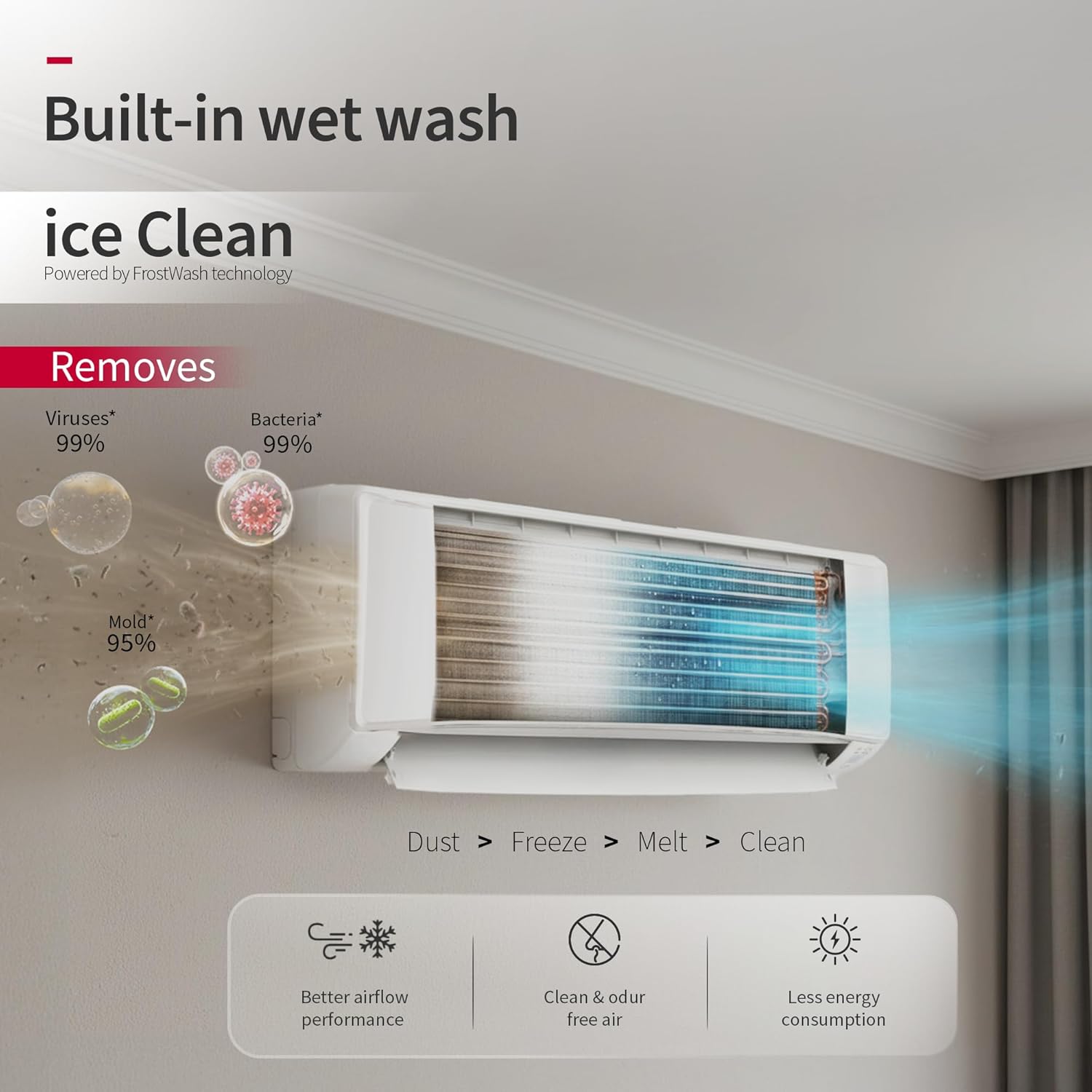
Figure 5: Illustration of the 4-Way Swing feature, demonstrating how air is distributed both horizontally and vertically for uniform cooling.
6. Maintenance
Regular maintenance ensures optimal performance and longevity of your air conditioner.
Filter Cleaning:
- The unit features a Filter Clean Indicator to remind you when to clean the Anti-Bacterial Mesh Filter.
- Turn off the AC and disconnect power before opening the front panel.
- Remove the pre-filters and clean them with a soft brush or vacuum cleaner. For heavy dirt, wash with lukewarm water and mild detergent, then air dry completely before reinserting.
Ice Clean (Frost Wash Technology):
This feature helps maintain internal coil cleanliness by freezing and then melting frost to wash away dust and bacteria, ensuring hygienic air and better airflow performance.
- Activate Ice Clean via the remote control or the airCloud Go app.
- The process involves freezing the coil, melting the ice to wash away impurities, and then drying the coil.

Figure 6: Diagram illustrating the Ice Clean (FrostWash) technology, showing how it removes dust, viruses, bacteria, and mold from the indoor unit coil.
7. Troubleshooting
If you encounter issues with your AC, refer to the following common troubleshooting steps. For complex problems, contact customer support.
| Problem | Possible Cause | Solution |
|---|---|---|
| AC does not turn on | No power, tripped circuit breaker, remote control batteries low. | Check power supply, reset circuit breaker, replace remote batteries. |
| Insufficient cooling | Dirty air filters, blocked outdoor unit, wrong mode selected, room too large. | Clean air filters, clear obstructions from outdoor unit, select 'Cool' mode, ensure room size is within capacity. |
| Unusual noise | Loose parts, foreign objects, unit not level. | Check for loose parts, remove foreign objects, ensure unit is level. If noise persists, contact service. |
| Water leakage from indoor unit | Blocked drain pipe, improper installation. | Check and clear drain pipe. If issue persists, contact a qualified technician. |
| Wi-Fi connectivity issues | Router issues, incorrect Wi-Fi settings, app malfunction. | Restart router, reconfigure Wi-Fi settings in the app, reinstall airCloud Go app. |
8. Specifications
| Feature | Detail |
|---|---|
| Brand | Hitachi |
| Model Name | IKASU 3600WTXL |
| Model Number | RAS.D318PCD2BM |
| Capacity | 1.5 Tons |
| Cooling Power | 16380 British Thermal Units |
| Energy Rating | 3 Star (BEE Star Rating) |
| Annual Energy Consumption | 864.39 Kilowatt Hours |
| ISEER Value | 4.30 |
| Noise Level | 34 Decibels |
| Refrigerant | R-32 |
| Filter Type | Pre-Filter (Anti-Bacterial Mesh Filter) |
| Condenser Coil | 100% Copper |
| Special Features | 24m Long Air Throw, 4 Way Swing, Ice Clean Cooling, Octa Sensor, WiFi Enabled, Xpandable Plus Technology, 3 in 1 Smart View Display |
| Product Dimensions (IDU) | 23D x 95W x 29.4H Centimeters |
| Product Dimensions (ODU) | 29D x 75W x 55H Centimeters |
| Item Weight (Total) | 34000 Grams (IDU: 10Kg, ODU: 24Kg) |
| Voltage | 230 Volts |
| Wattage | 1530 Watts |
| Control Method | Remote, Wi-Fi (airCloud Go App) |
| Country Of Origin | India |
9. Warranty Information
Your Hitachi air conditioner comes with a comprehensive warranty to ensure peace of mind.
- Standard Warranty: 1 year comprehensive warranty from the date of invoice.
- Compressor Warranty: 5 years on the compressor.
- Extended Warranty Option: An additional 4 years beyond the standard warranty is available for purchase at ₹299+GST. This extended warranty covers parts only.
- Service Inclusions (1st Year): Includes 2 Wet & 2 Dry services with free gas charging for compressor/coil issues.
- Service Inclusions (2nd-5th Year): Parts are covered; however, visit and labor charges apply.
To claim warranty services, please retain your Amazon invoice as proof of purchase.
10. Support & Contact Information
For any queries, technical assistance, or service requests, please contact Hitachi customer care:
- Customer Care Number: 7567884848
- Email: customercare@jci-hitachi.com
- Manufacturer: Bosch Home Comfort India Limited, JCH-IN., Hitachi Complex, Karannagar, Kadi. Dist. Mehsana- 382715. Gujarat. India.
You can also find the user manual and additional support resources on the official Hitachi website.


