
Introduction
This manual provides essential instructions for the safe and efficient operation, maintenance, and troubleshooting of your NutriChef Slushie Machine, model NCSLUSHM1BK. Please read this manual thoroughly before first use and retain it for future reference.
The NutriChef Slushie Machine is designed for home use, featuring RapidChill Technology to freeze liquids without the need for ice, ensuring rich flavor and consistent results. It offers a 64 oz. capacity and includes 7 preset modes (Slush, Spiked, Milkshake, Frappe, Frozen Juice, Night Mode, Rinse) along with 10 adjustable texture settings. The appliance is equipped with a touch panel, digital temperature display, container-lock safety system, and overheat protection for safe and user-friendly operation.
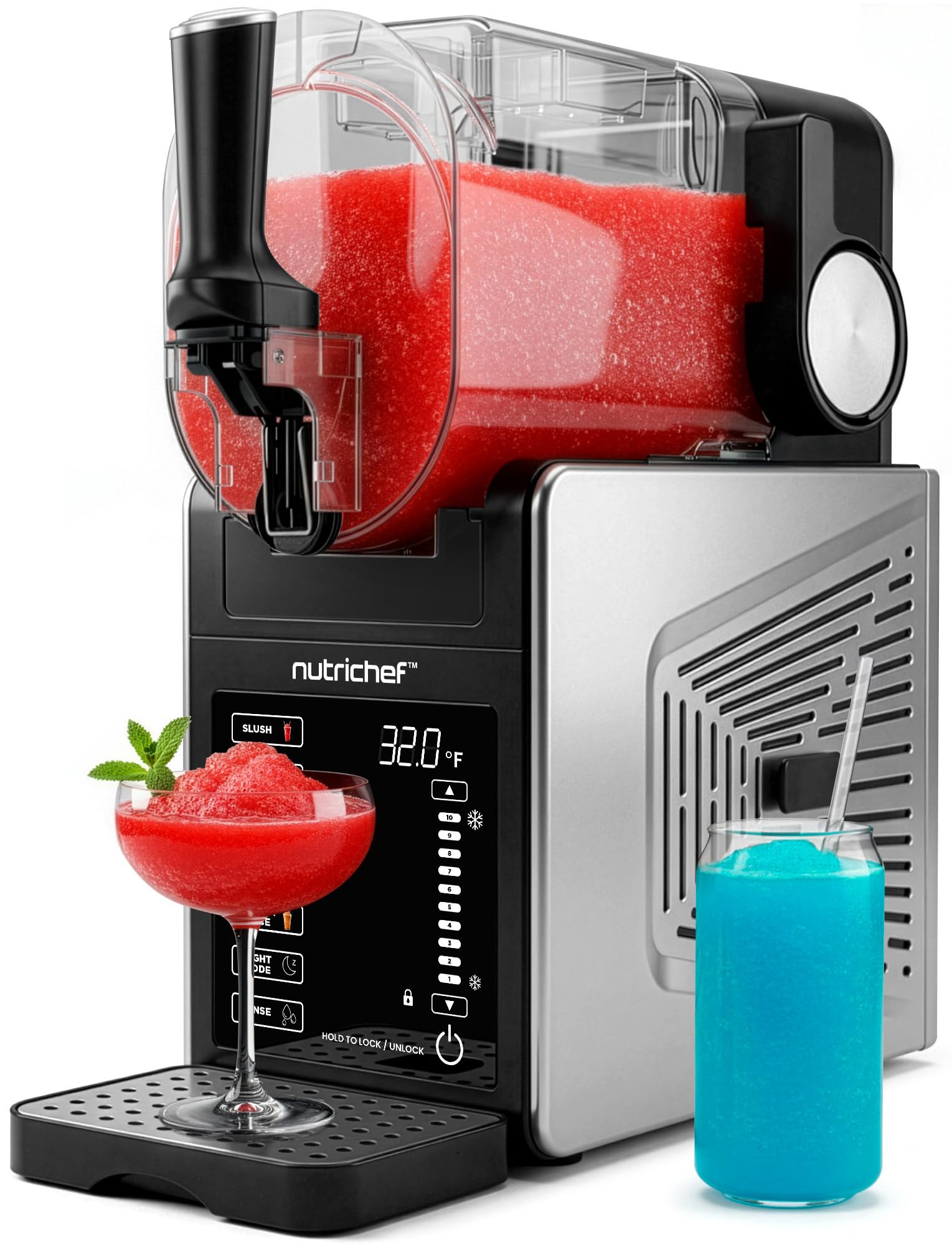
Image: The NutriChef Slushie Machine in operation, preparing various frozen beverages.
Important Safety Information
To reduce the risk of fire, electric shock, or injury, always follow basic safety precautions when using electrical appliances.
- Read all instructions before operating the appliance.
- Keep the appliance out of reach of children.
- Do not immerse the main unit, cord, or plug in water or other liquids.
- Ensure the appliance is placed on a stable, level, and dry surface.
- Unplug the appliance from the outlet when not in use, before assembling or disassembling parts, and before cleaning.
- Avoid contact with moving parts.
- Do not operate any appliance with a damaged cord or plug, or after the appliance malfunctions or has been damaged in any manner.
- Do not use outdoors.
- Ensure proper ventilation around the machine during operation.
Product Components
Familiarize yourself with the parts of your NutriChef Slushie Machine:
- Main Unit: Houses the motor and cooling system.
- Liquid Container (64 oz.): Transparent container for holding liquids to be frozen.
- Mixing Paddle: Rotates inside the container to create slush consistency.
- Dispensing Spout: For serving frozen beverages.
- Drip Tray: Collects any drips from the dispensing spout.
- Control Panel: Features a touch interface with a color display, preset mode buttons, and temperature/texture controls.
Setup
- Unpack: Carefully remove all components from the packaging.
- Placement: Place the main unit on a stable, level, and dry countertop or surface, ensuring adequate space for ventilation around the machine.
- Initial Cleaning: Before first use, wash all removable parts (liquid container, mixing paddle, and drip tray) with warm, soapy water. Rinse thoroughly and dry completely. Wipe the exterior of the main unit with a damp cloth.
- Assemble: Insert the mixing paddle into the liquid container. Securely attach the liquid container to the main unit, ensuring it locks into place. Place the drip tray under the dispensing spout.
- Refrigerant Settling: If the machine has been transported horizontally, allow it to stand upright for at least 2 hours before plugging it in. This allows the refrigerant to settle, preventing potential damage.
- Power Connection: Plug the power cord into a grounded electrical outlet.
Operating Instructions
General Operation
- Ensure the liquid container is securely locked onto the main unit.
- Pour your desired liquid into the container. Do not exceed the MAX FILL line (64 oz. capacity).
- Close the container lid securely.
- Press the Power button on the control panel to turn on the machine.

Image: Diagram illustrating the RapidChill Technology and 12-hour runtime of the NutriChef Slushie Machine.
Selecting a Preset Mode
The machine offers 7 preset modes for various frozen beverages:
- Slush: For classic frozen slushies.
- Spiked: Optimized for alcoholic frozen drinks.
- Milkshake: For creamy, thick milkshakes.
- Frappe: Ideal for coffee-based frozen drinks.
- Frozen Juice: For fruit juice-based frozen treats.
- Night Mode: Maintains beverages at a chilled temperature (37.4–39.2°F) for extended periods.
- Rinse: For automatic cleaning (see Maintenance section).
Select the desired mode by pressing the corresponding button on the touch panel. The machine will begin processing automatically.
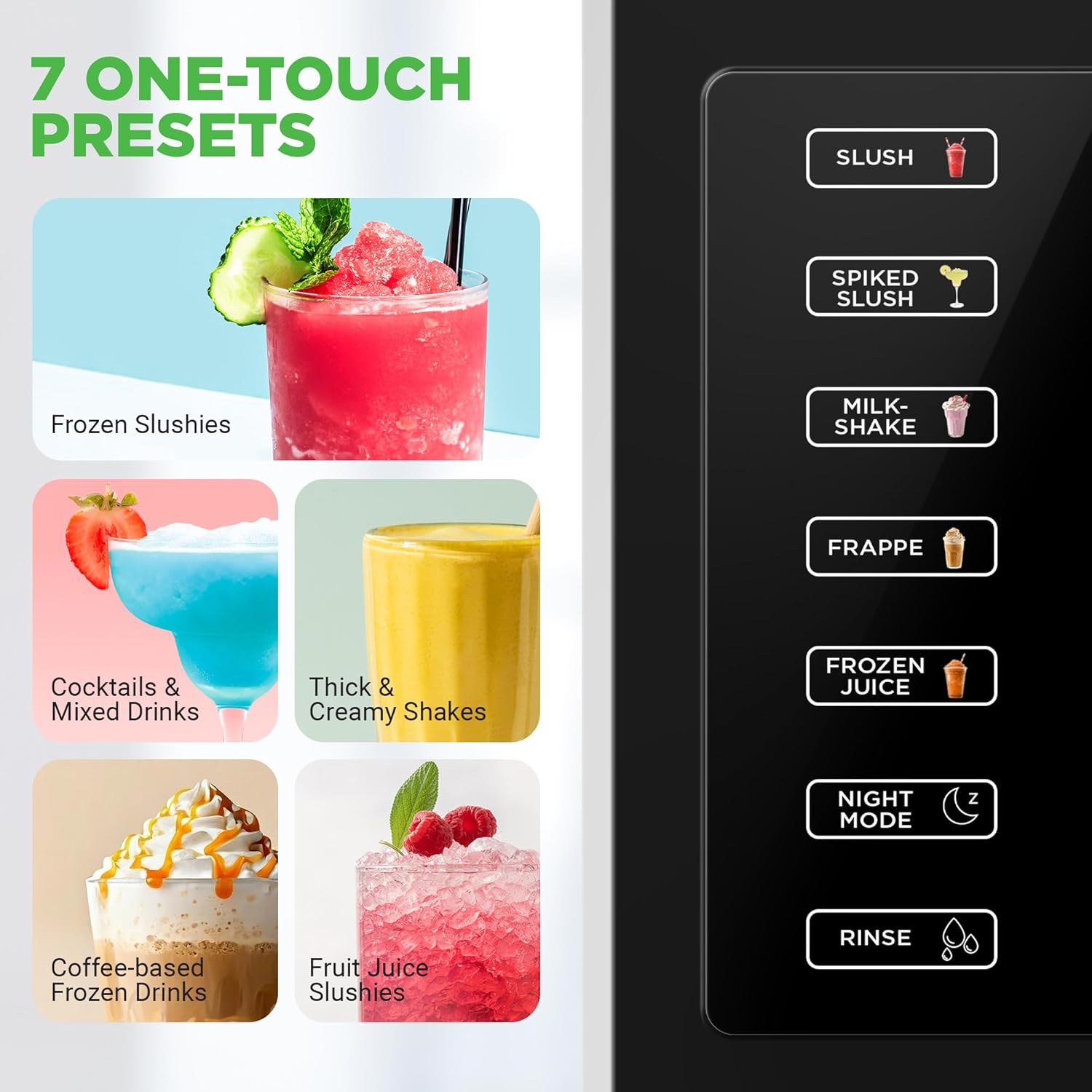
Image: Close-up of the control panel showing the 7 one-touch preset options.
Adjusting Texture
The machine features 10 adjustable texture settings. During operation, use the up and down arrow buttons on the control panel to customize the consistency of your drink, from a smooth, drinkable texture to a spoon-thick frozen consistency.

Image: The NutriChef Slushie Machine displaying various texture levels, from smooth to thick.
Dispensing
Once your frozen beverage has reached the desired consistency, place a cup or glass under the dispensing spout. Pull the dispensing lever forward to release the drink. Push the lever back to stop dispensing.
Video Demonstrations
Video: This video demonstrates the NutriChef Slushie Machine in a home setting, showcasing its ease of use for creating various frozen drinks.
Video: An official demonstration of the NutriChef Slushie Machine, model NCSLUSHM1BK, highlighting its features and operation.
Maintenance and Cleaning
Regular cleaning ensures optimal performance and longevity of your NutriChef Slushie Machine.
Daily Cleaning
- After each use, ensure the container is empty.
- Select the 'Rinse' mode on the control panel. This initiates an automatic cleaning cycle to flush the internal components.
- Once the rinse cycle is complete, unplug the machine from the power outlet.
- Disassemble the liquid container, mixing paddle, and drip tray.
- Wash these removable parts with warm, soapy water. They are also dishwasher-safe for convenience.
- Wipe the exterior of the main unit with a damp cloth. Do not use abrasive cleaners or immerse the main unit in water.
- Ensure all parts are completely dry before reassembly or storage to prevent mold or mildew.

Image: The control panel showing the 'Rinse' mode and dishwasher-safe removable parts for easy cleaning.
Deep Cleaning
Periodically, perform a more thorough deep clean. This involves disassembling all removable parts and carefully inspecting them for any residue buildup. Use a small brush if necessary to clean hard-to-reach areas. Ensure all seals and gaskets are clean and properly seated before reassembly.
Troubleshooting
If you encounter issues with your NutriChef Slushie Machine, refer to the following common problems and solutions:
| Problem | Possible Cause | Solution |
|---|---|---|
| Machine does not turn on. | Power cord not connected; outlet not working; liquid container not securely locked. | Check power cord connection. Test the outlet with another appliance. Ensure the liquid container is properly seated and locked. |
| Liquid is not freezing or freezing slowly. | Ambient temperature too high; incorrect mode selected; liquid lacks sufficient sugar content. | Ensure the machine is in a cool, well-ventilated area. Verify the correct freezing mode (e.g., Slush, Spiked) is selected. Liquids require a minimum sugar level to freeze properly in slushie machines. Adjust recipe if necessary. |
| Machine is leaking. | Seals or gaskets improperly seated; liquid container not correctly assembled or locked. | Disassemble and reassemble the liquid container, ensuring all seals and gaskets are correctly in place and the container is securely locked. |
| Unusual noise during operation. | Obstruction in mixing paddle area; machine not on a stable surface. | Unplug the machine and check for any foreign objects around the mixing paddle. Ensure the machine is placed on a flat, stable surface. |
If the problem persists after attempting these solutions, please contact NutriChef customer support.
Specifications
- Model Number: NCSLUSHM1BK
- Product Dimensions: 7.09 x 16.85 x 16.73 inches
- Item Weight: 29.3 pounds
- Liquid Container Capacity: 64 oz.
- Technology: RapidChill Technology (No ice needed)
- Preset Modes: 7 (Slush, Spiked, Milkshake, Frappe, Frozen Juice, Night Mode, Rinse)
- Texture Settings: 10 adjustable levels
- Night Mode Temperature Range: 37.4–39.2°F

Image: The NutriChef Slushie Machine with its dimensions and capacity details highlighted.
Warranty and Support
For detailed warranty information, product registration, or technical support, please visit the official NutriChef website or contact their customer service department. Keep your purchase receipt as proof of purchase for any warranty claims.
NutriChef Official Website: Visit the NutriChef Store on Amazon