
1. Introduction
This manual provides essential information for setting up, operating, maintaining, and troubleshooting your new OPPO K14x 5G smartphone. Please read this guide thoroughly to ensure optimal performance and longevity of your device.
The OPPO K14x 5G features a MediaTek Dimensity 6300 processor, a 6.75-inch OLED display, a 50 MP AI main camera, and a 6500 mAh battery, designed for reliable daily use.
2. Device Overview
Familiarize yourself with the physical components of your OPPO K14x 5G.

Image 2.1: Front view of the OPPO K14x 5G, showcasing the display and front camera.

Image 2.2: Back view of the OPPO K14x 5G in Ice Blue, highlighting the dual camera module and OPPO branding.

Image 2.3: Side view of the OPPO K14x 5G, showing the power button (with integrated fingerprint sensor) and volume rocker.
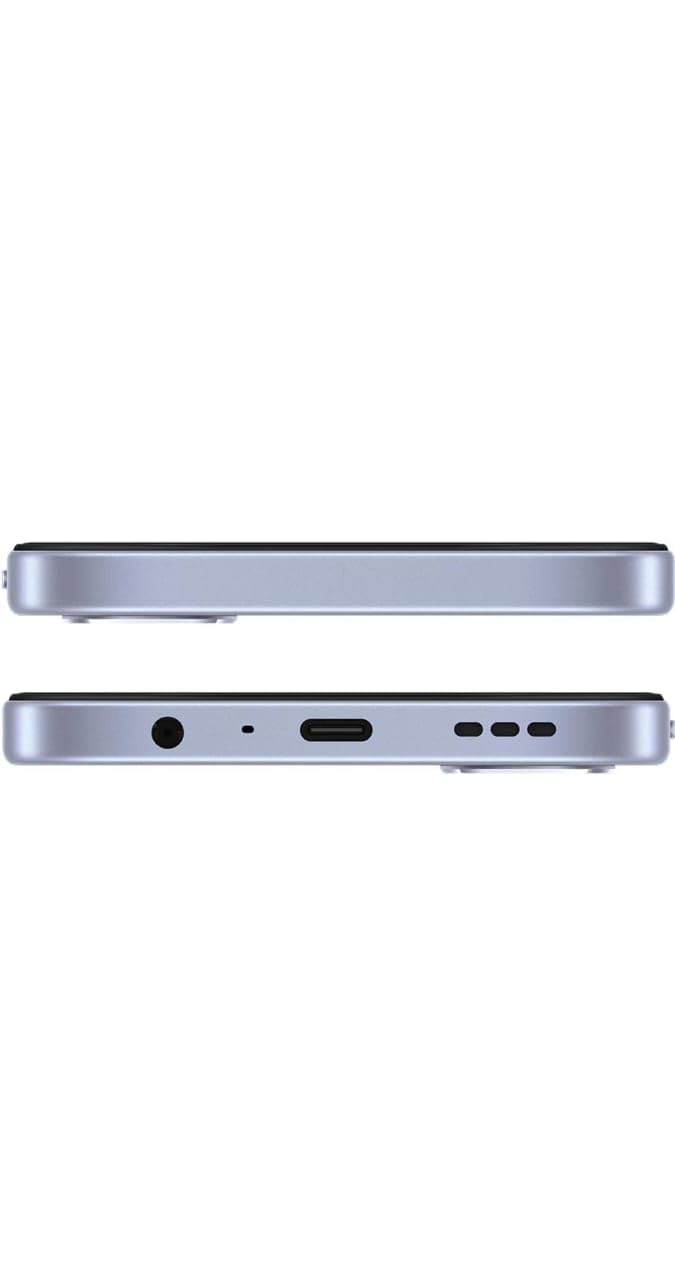
Image 2.4: Bottom view of the OPPO K14x 5G, featuring the USB Type-C port, speaker grille, and 3.5mm headphone jack.
3. Setup
3.1. Unboxing and Initial Inspection
Upon opening the package, verify that all contents are present and undamaged:
- OPPO K14x 5G Smartphone
- Headset
- USB Cable (Type-C)
- Power Adapter
- SIM Tray Ejector
- Phone Case
3.2. Inserting the SIM Card
- Locate the SIM card tray on the side of your device.
- Insert the SIM tray ejector tool into the small hole next to the tray and press gently until the tray pops out.
- Place your Nano-SIM card(s) into the tray with the gold contacts facing down. Ensure proper orientation.
- Carefully reinsert the SIM tray into the phone until it clicks into place.
3.3. Initial Charging and Power On
Before first use, it is recommended to fully charge your device.
- Connect the USB Type-C cable to the phone's charging port and the power adapter.
- Plug the power adapter into a wall outlet. The phone supports 45W fast charging.
- Once sufficiently charged, press and hold the Power button (located on the side) until the OPPO logo appears.
- Follow the on-screen instructions to complete the initial setup, including language selection, Wi-Fi connection, and Google account setup.

Image 3.1: The OPPO K14x 5G highlighting its 6500mAh long-lasting battery and 45W Fast Charge capability.
4. Operating Instructions
4.1. Basic Navigation
- Touchscreen Gestures: Tap to select, swipe to scroll, pinch to zoom.
- Power Button: Press to wake/sleep the screen. Press and hold to power off or restart.
- Volume Buttons: Adjust media volume, call volume, or notification volume.
- Fingerprint Sensor: Integrated into the power button for secure unlocking.
4.2. Calls and Messaging
To make a call, open the Phone app, enter the number, and tap the call icon. To send a message, open the Messages app, tap 'Start chat', enter the recipient, and type your message.
4.3. Camera Usage
The OPPO K14x 5G features a 50 MP AI + 2 MP rear camera and a 5 MP front camera.
- Open the Camera app.
- Select your desired mode (Photo, Video, Portrait, etc.).
- Tap the shutter button to capture an image or start/stop video recording.
- Use the on-screen controls to switch between front and rear cameras, adjust zoom, or apply filters.
4.4. Connectivity
- 5G Network: The device supports 5G cellular technology for faster data speeds. Ensure you have a 5G-enabled SIM and plan.
- Wi-Fi: Connect to wireless networks via Settings > Wi-Fi.
- Bluetooth: Pair with wireless accessories like headphones or speakers via Settings > Bluetooth.
- USB Type-C: For charging and data transfer.
4.5. Battery Management
The 6500 mAh battery provides extended usage. To optimize battery life:
- Adjust screen brightness.
- Close unused apps running in the background.
- Enable Battery Saver mode when needed.
- Use the provided 45W fast charger for quick recharges.
5. Maintenance
5.1. Cleaning Your Device
Use a soft, lint-free cloth to clean the screen and body of your phone. Avoid harsh chemicals or abrasive materials.
5.2. Software Updates
Regularly check for and install software updates to ensure your device has the latest features, security patches, and performance improvements. Go to Settings > About device > Software update.
5.3. Battery Care
To prolong battery lifespan, avoid exposing the phone to extreme temperatures. Do not let the battery completely drain frequently.
5.4. Storage Management
Your device comes with 128 GB of internal storage. Regularly clear unnecessary files, uninstall unused apps, and back up important data to free up space.
5.5. Water and Dust Resistance
The OPPO K14x 5G is rated IP64 for water and dust resistance. This means it is protected against dust ingress and splashing water from any direction. However, it is not waterproof. Avoid submerging the device in water.

Image 5.1: The OPPO K14x 5G demonstrating its IP64 water and dust resistance.
6. Troubleshooting
6.1. Common Issues and Solutions
- Device not turning on: Ensure the battery is charged. Press and hold the power button for at least 10 seconds.
- Apps crashing or freezing: Close the app and reopen it. Clear the app's cache (Settings > Apps > [App Name] > Storage > Clear cache). Restart the phone.
- Network connectivity issues: Check if Airplane Mode is off. Restart the phone. Reset network settings (Settings > System > Reset options > Reset Wi-Fi, mobile & Bluetooth).
- Slow performance: Close background apps. Clear storage space. Restart the device.
6.2. Factory Reset
If issues persist, a factory reset may be necessary. This will erase all data on your phone, so ensure you have backed up important information first.
- Go to Settings > System > Reset options.
- Select 'Erase all data (factory reset)'.
- Confirm your decision and enter your PIN/password if prompted.
7. Specifications
| Feature | Specification |
|---|---|
| Brand | OPPO |
| Model | K14x 5G |
| Operating System | Android 15 |
| Processor | MediaTek Dimensity 6300 (2.4 GHz) |
| RAM | 4 GB |
| Internal Storage | 128 GB |
| Display Size | 6.75 inches (17.15 cm) |
| Display Type | OLED |
| Maximum Display Resolution | 720 x 1600 |
| Rear Camera | 50 MP AI + 2 MP |
| Front Camera | 5 MP |
| Battery Capacity | 6500 mAh |
| Charging | 45W Fast Charge |
| Connectivity | 5G, USB Type-C |
| Water & Dust Resistance | IP64 |
| Dimensions | 17.5 x 0.9 x 5.7 Centimeters |
| Weight | 500 Grams |
8. Warranty and Support
8.1. Warranty Information
Your OPPO K14x 5G smartphone comes with a 1-year manufacturer warranty from the date of purchase. This warranty covers manufacturing defects. Please retain your proof of purchase for warranty claims.
8.2. Customer Support
For technical assistance, service, or warranty claims, please contact OPPO customer support. You can find contact details on the official OPPO website or through the support section in your phone's settings.
Manufacturer: Oppo Mobiles India Private Limited
