
Important Safety Instructions
Please read all instructions carefully before using the EvoSpark Vibration Plate. Retain this manual for future reference.
- Consult a physician before starting any new exercise program, especially if you have pre-existing medical conditions.
- Do not use the machine if you are pregnant, have a pacemaker, or suffer from severe heart conditions, epilepsy, or acute thrombosis.
- Ensure the machine is placed on a flat, stable surface.
- Keep children and pets away from the machine during operation.
- Do not insert any objects into the machine's openings.
- Unplug the machine when not in use and before cleaning.
- Do not use the machine if the power cord or plug is damaged.
Product Overview
The EvoSpark Dual Motor Vibration Plate is designed to provide whole-body vibration for exercise and relaxation. It features dual motors for varied vibration patterns, multiple speed adjustments, and integrated Bluetooth speakers.

The package includes the vibration plate, a power cord, a remote control, a user manual, and resistance bands for upper body workouts.

The device is equipped with powerful dual motors (60W and 150W) for effective and quiet operation, ensuring a low failure rate and extensive experimental testing for durability.
Setup
- Unpacking: Carefully remove all components from the packaging. Inspect for any damage.
- Placement: Place the vibration plate on a firm, level surface. Ensure there is enough space around the machine for safe exercise.
- Power Connection: Connect the power cord to the machine and then to a grounded electrical outlet.
- Remote Control: Insert batteries into the remote control (if not pre-installed).
Operating Instructions
Powering On/Off
Locate the main power switch on the side or back of the unit. Flip it to the 'ON' position. The display panel will illuminate. To turn off, flip the switch to 'OFF'.
Using the Control Panel and Remote

The control panel on the machine and the remote control allow you to adjust settings. Use the 'Power' button to start or stop the vibration. Use the '+' and '-' buttons to increase or decrease the vibration speed (levels 1-120). The display shows the current speed and time.
Vibration Modes
The plate offers different vibration zones: Walking (Speed 1-40 for comfortable workout, beginner-friendly), Jogging (Speed 41-80 for moderate exercise, easy fat burning), and Running (Speed 81-120 for high-frequency exercise, rhythmic sweating). Position your feet accordingly on the plate to target different intensities.
Bluetooth Pairing

The EvoSpark Vibration Plate includes built-in Bluetooth speakers. To connect, activate Bluetooth on your smartphone or other device and search for 'Music-017D'. Pair with the device to play music during your workout.
Exercise Guide
The vibration plate can be used for various exercises to target different muscle groups and achieve different fitness goals. Always maintain proper posture and listen to your body.
Core Strengthening (Plank)
For a plank exercise, place your forearms on the vibration plate, keeping your body in a straight line from head to heels. Engage your core muscles. The vibration intensifies the workout, targeting your abdominal and back muscles effectively.
Lower Body Workout (Squats)
Stand on the vibration plate with your feet shoulder-width apart. Perform squats while the machine is vibrating. This enhances muscle activation in your glutes, thighs, and calves. You can adjust the depth of your squat to control intensity.
Full Body Engagement with Resistance Bands

Attach the provided resistance bands to the designated hooks on the machine. While standing or squatting on the plate, perform exercises such as bicep curls, tricep extensions, shoulder presses, or rows. The combination of vibration and resistance training provides a comprehensive full-body workout.
Magnet Health Massage
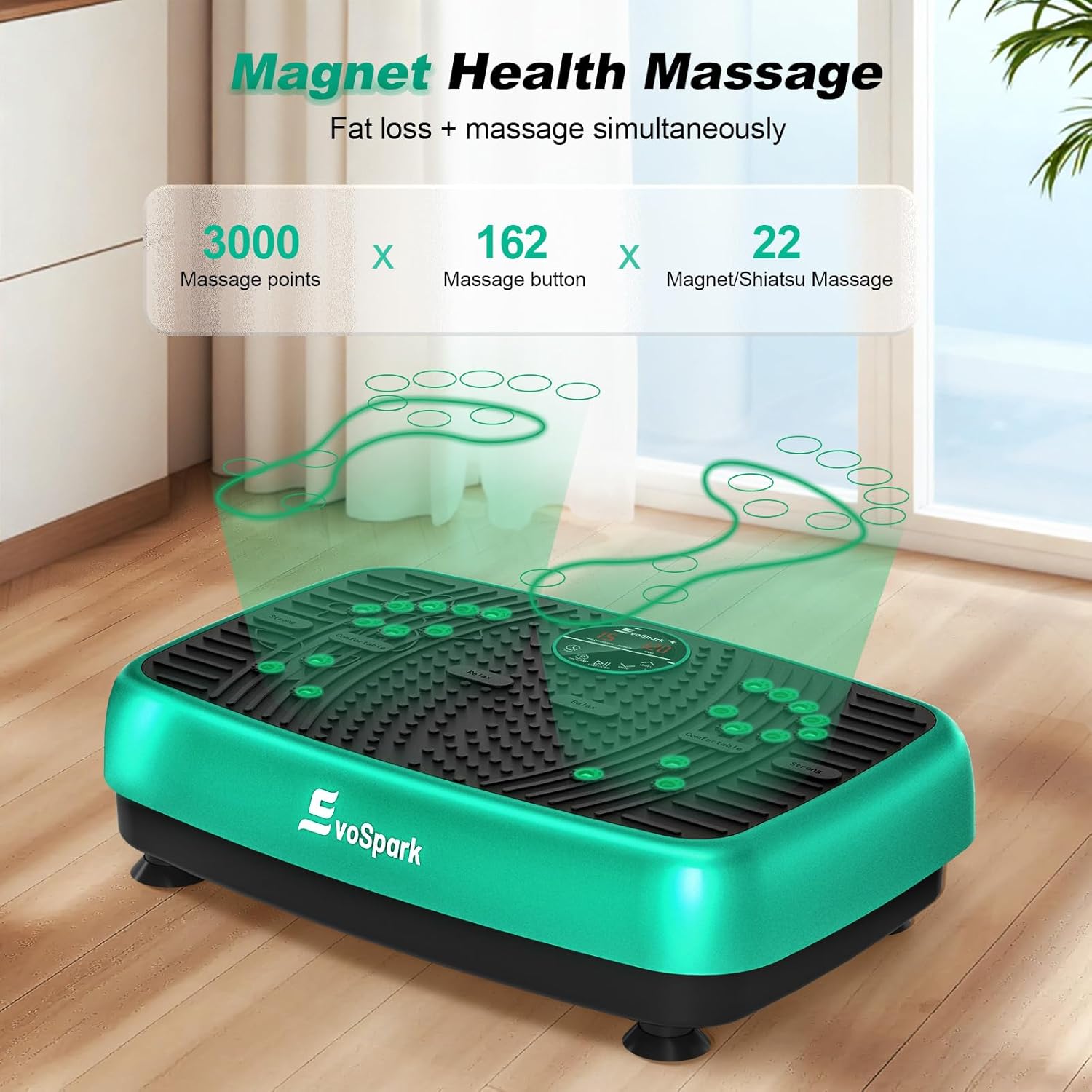
The surface of the vibration plate features 3000 massage points, 162 massage buttons, and 22 magnet/shiatsu massage areas. These are designed to provide a therapeutic massage experience, stimulating circulation and aiding in lymphatic drainage while you exercise or relax.
Maintenance
Cleaning
Always unplug the machine before cleaning. Wipe the surface of the vibration plate with a soft, damp cloth. Do not use abrasive cleaners or solvents. Ensure no liquid enters the internal components.
Storage
Store the machine in a cool, dry place away from direct sunlight and extreme temperatures. Keep it covered to prevent dust accumulation. Do not place heavy objects on top of the machine.
Troubleshooting
- Machine does not power on: Check if the power cord is securely plugged into both the machine and the electrical outlet. Ensure the main power switch is in the 'ON' position.
- No vibration: Verify that the machine is powered on and the 'Power' button on the control panel or remote has been pressed. Check the speed setting.
- Remote control not working: Ensure batteries are correctly inserted and are not depleted. Point the remote directly at the machine's receiver.
- Bluetooth connection issues: Make sure Bluetooth is enabled on your device and the machine is powered on. Try restarting both devices.
If issues persist, please contact customer support.
Specifications
| Item Package Dimensions L x W x H | 22.48 x 16.18 x 7.32 inches |
| Package Weight | 8.09 Kilograms |
| Brand Name | EvoSpark |
| Model Name | 1297872011 |
| Color | Vibration Plate- Green |
| Suggested Users | unisex-adult |
| Manufacturer | EvoSpark |
| Part Number | JTF017D-D |
| Style | Vibration Plate- Green |
| ASIN | B0G5YDGCK8 |
| Date First Available | December 30, 2025 |
| UPC | 723884475053 |
Warranty and Support
EvoSpark products are manufactured to high-quality standards. For warranty information, product support, or to report any issues, please refer to the contact details provided on the EvoSpark official website or your purchase documentation. Please have your model number (JTF017D-D) and purchase date ready when contacting support.


