
Introduction
Thank you for purchasing the VANBAR CP03pro Portable CarPlay Display Mount. This manual provides detailed instructions for the proper setup, operation, and maintenance of your device. Please read this manual thoroughly before use to ensure optimal performance and safety.
Package Contents
Before proceeding with installation, please verify that all components are present in the package:
- Suction Cup Base
- Mount Bracket
- Display Holder
- User Manual (this document)
Setup and Installation
Follow these steps to properly install the VANBAR CP03pro mount in your vehicle.
1. Choose an Installation Location
Select a flat, clean area on your dashboard that does not obstruct your view of the road or interfere with airbags. Ensure the surface is free of dust and grease for optimal suction.
2. Attach the Suction Cup Base
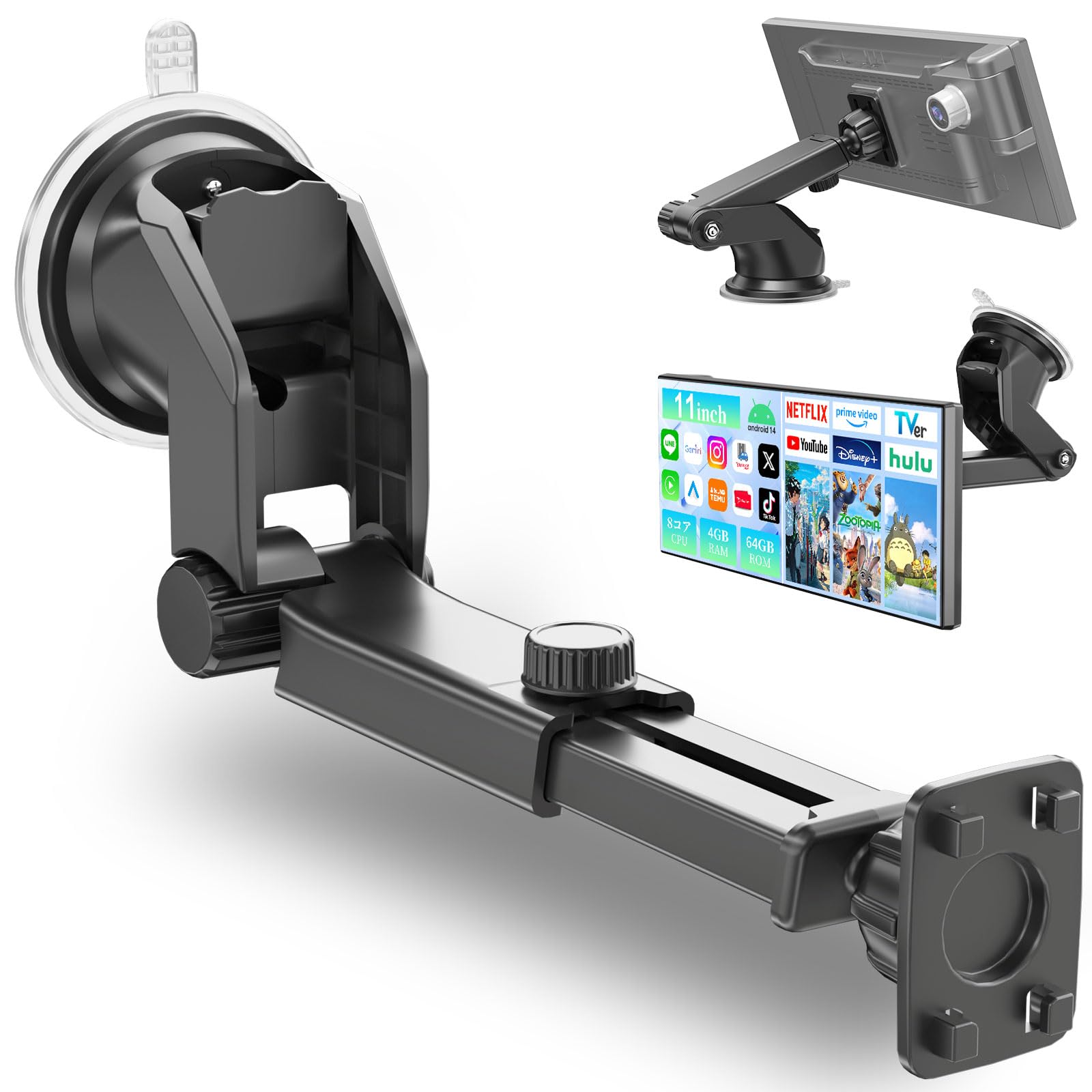
Place the suction cup base firmly onto the chosen dashboard surface. Press down on the base while flipping the locking lever (if present) to create a strong vacuum seal. Verify that the base is securely attached and does not wobble.
3. Assemble the Mount Bracket and Display Holder
Connect the mount bracket to the suction cup base. Then, attach the display holder to the mount bracket. Ensure all connections are tight and secure. The mount bracket allows for 360-degree rotation and multi-angle adjustment.
4. Mount Your CarPlay Display
Carefully place your portable Apple CarPlay display into the display holder. Adjust the holder's clamps or grips to firmly secure the display without applying excessive pressure. Ensure the display is stable and does not obstruct any buttons or ports.
Operating Instructions
The VANBAR CP03pro mount is designed for ease of use and optimal viewing during driving.
Adjusting the Viewing Angle
The mount features a 360-degree rotatable suction cup and multi-angle adjustment points. Loosen the adjustment knobs or joints, position your display to the desired viewing angle for optimal visibility, and then tighten the knobs/joints to secure it. This allows for comfortable and safe viewing without obstructing your line of sight.
Connecting Your CarPlay Device
Once your display is securely mounted, connect your Apple CarPlay compatible device (e.g., iPhone) to the display audio system as per the display's own instructions. The mount provides a stable platform for your CarPlay experience.
Maintenance
Regular maintenance ensures the longevity and reliable performance of your VANBAR CP03pro mount.
- Cleaning: Wipe the mount and suction cup with a soft, damp cloth. Do not use abrasive cleaners or solvents, as these can damage the materials.
- Suction Cup Care: Periodically clean the suction cup and the dashboard surface to maintain a strong seal. If the suction cup loses adhesion, wash it with warm water and let it air dry before reattaching.
- Inspection: Regularly check all joints and connections for tightness. Tighten any loose parts to prevent wobbling or detachment during driving.
Troubleshooting
This section addresses common issues you might encounter with the mount.
- Mount is not sticking to the dashboard:
- Ensure the dashboard surface is clean, dry, and smooth.
- Clean the suction cup with warm water and let it air dry.
- Press firmly on the suction cup while engaging the locking lever.
- Avoid porous or textured surfaces.
- Display wobbles or feels unstable:
- Check that the suction cup base is securely attached to the dashboard.
- Ensure all adjustment knobs and joints on the mount bracket and display holder are tightened.
- Verify that your display is properly seated and clamped within the holder.
- Difficulty adjusting the angle:
- Loosen the adjustment knobs or joints before attempting to change the angle.
- Do not force adjustments; if stiff, check for any obstructions.
Specifications
| Brand | VANBAR |
| Model Number | CP03pro |
| Color | Black |
| Mounting Type | Suction Mount |
| Compatible Devices | 7-inch display audio, Apple CarPlay compatible display audio, car navigation systems, portable CarPlay displays, in-car display audio |
| Compatible Phone Models | iPhone 14, 14 Pro, 14 Pro Max, 13, 13 Pro, 13 Pro Max, 12, 12 Pro, 12 Pro Max, 11, 11 Pro, 11 Pro Max, Xs, Xs Max, Xr, X, 8, 8 Plus, SE |
| Maximum Load Capacity | 500 grams |
| Product Dimensions | 12 x 12 x 15 cm |
| Product Weight | 200 grams |
| Material | Acrylonitrile Butadiene Styrene, Aluminum, Silicone |
| Vehicle Type Compatibility | Passenger cars, SUVs, trucks, vans |
| Waterproof | No |
Warranty and Support
The VANBAR CP03pro comes with a 1-year manufacturer warranty from the date of purchase. This warranty covers defects in materials and workmanship under normal use.
For warranty claims, technical support, or any inquiries regarding your product, please contact VANBAR customer service through the retailer where you purchased the product or visit the official VANBAR website. Please have your purchase receipt and product model number (CP03pro) ready when contacting support.
Note: The warranty does not cover damage caused by misuse, accidents, unauthorized modifications, or normal wear and tear.