
Introduction
This manual provides essential information for the safe and efficient operation, setup, and maintenance of your AZZUNO 65Amps Plasma Cutter, Model CUT-65L-P. Please read this manual thoroughly before operating the machine to ensure proper use and to prevent injury or damage.
Safety Information
Plasma cutting involves high temperatures, electricity, and compressed air. Always follow safety precautions to prevent accidents.
- Personal Protective Equipment (PPE): Always wear a welding helmet with appropriate shade, flame-resistant clothing, welding gloves, and safety shoes. Protect bystanders with welding screens.
- Electrical Safety: Ensure the machine is properly grounded. Do not operate in wet conditions. Inspect power cords for damage before each use. Use the correct voltage (110V or 220V) as indicated on the machine.
- Fire Hazards: Keep flammable materials away from the cutting area. Have a fire extinguisher readily available. Hot metal and sparks can cause fires.
- Fumes and Gases: Ensure adequate ventilation to avoid inhaling fumes. Use a fume extractor if necessary.
- Compressed Air: Ensure the air compressor is rated for the required pressure and flow. Always use clean, dry air.
- Non-Touch Pilot Arc: While the non-touch pilot arc minimizes consumable wear, maintain a safe distance from the workpiece and ensure proper grounding.
Packing List
Verify that all items are present in the package upon unboxing:

Image: Overview of the included consumables kit, showing nozzles, electrodes, shield cups, swirl baffles, and wire guides.
- AZZUNO CUT-65L-P Plasma Cutter Unit
- Plasma Cutting Torch
- Ground Clamp
- Air Regulator (Built-in)
- Power Cord (110V/220V compatible)
- Consumables Kit (33 Pcs):
- 10 × Electrodes
- 10 × Nozzles
- 3 × Shield Cups
- 5 × Swirl Baffles
- 5 × Wire Guides
- Instruction Manual (this document)
Setup
Follow these steps to set up your plasma cutter for first use.
1. Power Connection
- Ensure the plasma cutter is switched OFF.
- Connect the power cord to the appropriate 110V or 220V power outlet. The machine supports dual voltage.
- Verify the power source matches the machine's requirements.

Image: Rear view of the plasma cutter showing the power input and the built-in air connector with a 220V power plug. The air connector is pre-assembled.
2. Air Compressor Connection
- Connect your air compressor hose to the "GAS IN" port on the plasma cutter.
- Secure the connection with a hose band if necessary.
- Ensure the air compressor provides clean, dry, oil-free air at the recommended pressure (refer to specifications for PSI).
Note: The AZZUNO CUT-65L-P features a built-in air regulator, simplifying setup as no external regulator installation is needed.
3. Torch and Ground Clamp Connection
- Connect the plasma torch cable to the designated port on the front panel of the machine.
- Connect the ground clamp cable to the ground terminal on the machine.
- Attach the ground clamp securely to the workpiece or work table, ensuring good electrical contact.
4. Consumables Installation
Proper installation of consumables is crucial for optimal performance and cut quality.

Image: Exploded view diagram showing the assembly order of plasma torch consumables: Shield Cup, Nozzle, Electrode, Swirl Baffle, and Wire Guide.
- Unscrew the shield cup from the torch head.
- Insert the electrode into its receptacle.
- Place the swirl baffle over the electrode.
- Screw on the nozzle.
- Finally, screw the shield cup back onto the torch head.
- If using, attach the wire guide to the shield cup.
Operation
Understand the controls and cutting modes for effective plasma cutting.
1. Control Panel Overview

Image: Close-up of the plasma cutter's large LED display showing amperage (65A), PSI (98 PSI), voltage selection (110V/220V), and mode indicators (TEST AIR, PRE-FLOW, POST-FLOW, 2T/4T).
- Large LED Display: Shows current amperage, air pressure (PSI), and selected cutting modes.
- Amperage Adjustment Knob: Used to set the cutting current.
- Voltage Selector: Automatically detects or allows manual selection between 110V and 220V.
- Mode Buttons:
- TEST AIR: Checks airflow without initiating an arc.
- PRE-FLOW: Controls gas delay before arc ignition (0.1-1s).
- POST-FLOW: Sets cooling time after cutting (1-10s).
2. Air Pressure Warning System
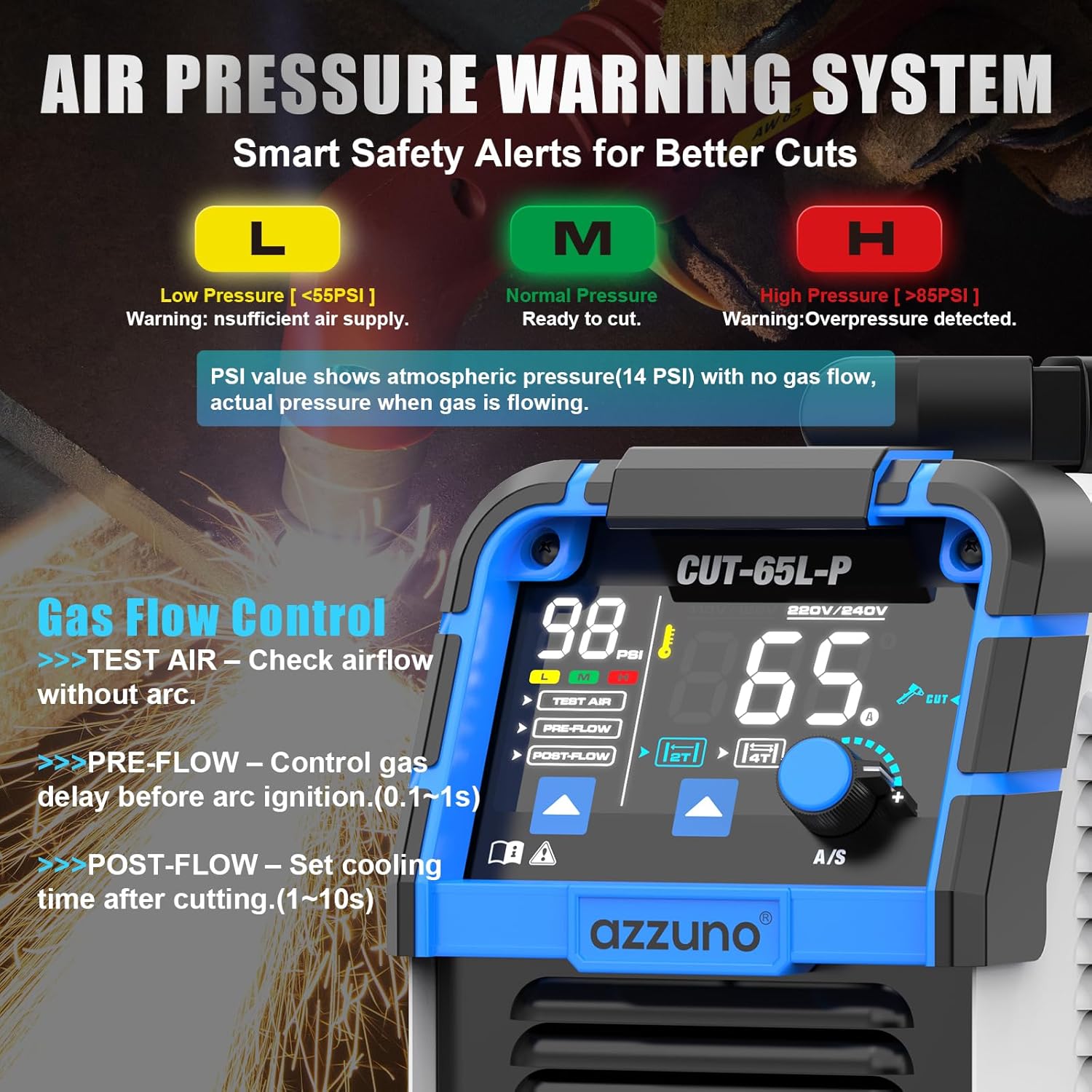
Image: Diagram illustrating the air pressure warning system with 'L' (Low Pressure, <55PSI), 'M' (Normal Pressure, Ready to cut), and 'H' (High Pressure, >85PSI) indicators. Also shows gas flow control settings.
- L (Low Pressure): Indicates insufficient air supply (below 55 PSI). Adjust compressor or check connections.
- M (Normal Pressure): Indicates optimal air pressure for cutting.
- H (High Pressure): Indicates overpressure detected (above 85 PSI). Reduce compressor output or check regulator.
Note: The PSI value shown on the display without gas flow represents atmospheric pressure (e.g., 14 PSI). The actual pressure is displayed when gas is flowing during operation.
3. 2T/4T Torch Control

Image: Explanation of 2T and 4T functions. 2T: Press and hold trigger for cutting. 4T: Press once to start, release to continue cutting, press again to stop.
- 2T (Two-Touch) Mode: Press and hold the torch trigger to cut. Release the trigger to stop cutting. Ideal for short cuts and precise control.
- 4T (Four-Touch) Mode: Press the trigger once to start the arc, then release. The arc will continue until the trigger is pressed again to stop. Suitable for longer cuts to reduce finger fatigue.
4. Non-Touch Pilot Arc Cutting

Image: Illustrates the non-touch pilot arc feature and provides clean cut and max cut capacities for 110V and 220V, including examples of clean and max cuts on metal plates.
- The non-touch pilot arc ignites without direct contact with the workpiece. This allows for cutting on painted, rusted, or uneven surfaces and extends consumable life.
- Maintain a small standoff distance between the torch nozzle and the workpiece for optimal cutting.
5. Cutting Procedure
- Ensure all safety precautions are in place.
- Turn on the plasma cutter and air compressor.
- Set the desired amperage based on the material thickness and type.
- Select 2T or 4T mode as appropriate for your cut.
- Perform a "TEST AIR" check to confirm airflow.
- Position the torch over the starting point of the cut, maintaining a slight standoff.
- Initiate the arc by pressing the torch trigger (2T) or pressing and releasing (4T).
- Move the torch steadily along the cutting line. Observe the arc and molten metal to ensure a clean cut.
- Once the cut is complete, release the trigger (2T) or press it again (4T) to extinguish the arc.
- Allow the workpiece to cool before handling.

Image: Plasma torch cutting through metal mesh, demonstrating stable arc and no sticking, indicating suitability for cutting expanded metal and perforated mesh.
Maintenance
Regular maintenance ensures the longevity and optimal performance of your plasma cutter.
- Consumables Replacement: Regularly inspect and replace worn electrodes, nozzles, and shield cups. Worn consumables lead to poor cut quality and can damage the torch.
- Air System:
- Drain moisture from the air compressor tank daily.
- Check and clean the air filter on the plasma cutter's built-in regulator periodically.
- Ensure air lines are free of leaks and kinks.
- Cleaning: Keep the machine clean and free of dust and metal particles. Use compressed air to blow out internal components if necessary (ensure power is disconnected).
- Cables and Connections: Inspect all cables (power, torch, ground) for cuts, fraying, or loose connections before each use.
- Storage: Store the plasma cutter in a dry, clean environment when not in use.
Troubleshooting
Refer to this section for common issues and their solutions.
| Problem | Possible Cause | Solution |
|---|---|---|
| Machine does not power on. | No power supply; faulty power cord; machine switch off. | Check power outlet, power cord, and ensure the machine's power switch is ON. |
| No arc ignition. | No air pressure; worn consumables; poor ground connection; torch trigger issue. | Check air supply and pressure. Replace consumables. Ensure ground clamp has good contact. Check torch trigger functionality. |
| Poor cut quality (rough, dross, incomplete). | Worn consumables; incorrect amperage/air pressure; too fast/slow travel speed; incorrect standoff distance. | Replace consumables. Adjust amperage and air pressure. Optimize travel speed. Maintain proper standoff. |
| Air pressure warning (L or H). | Insufficient or excessive air supply from compressor; clogged air filter. | Adjust air compressor output. Check air lines. Clean or replace air filter. |
| Torch overheating. | Exceeding duty cycle; insufficient post-flow cooling. | Allow machine to cool down. Increase POST-FLOW time. |
Specifications
| Feature | Detail |
|---|---|
| Model | CUT-65L-P |
| Input Voltage | 110V / 220V Dual Voltage |
| Amperage | 65 Amps |
| Pilot Arc Type | High-Frequency Non-Touch Pilot Arc |
| Clean Cut Capacity (110V) | 3/8" (10 mm) @85PSI |
| Max Cut Capacity (110V) | 1/2" (12 mm) @85PSI |
| Clean Cut Capacity (220V) | 3/4" (20 mm) @85PSI |
| Max Cut Capacity (220V) | 1" (25 mm) @98PSI |
| Technology | IGBT Inverter, Air Sensor Technology |
| Display | Large LED Display |
| Cutting Modes | TEST AIR, PRE-FLOW, POST-FLOW, 2T/4T |
| Consumables Included | 10 Electrodes, 10 Nozzles, 3 Shield Cups, 5 Swirl Baffles, 5 Wire Guides |
Warranty & Support
AZZUNO products are manufactured to high-quality standards. For warranty information, please refer to the warranty card included with your product or visit the official AZZUNO website. Keep your purchase receipt as proof of purchase.
For technical support, troubleshooting assistance, or to order replacement parts, please contact AZZUNO customer service through the contact information provided on the official website or your purchase documentation.
Online Resources: For additional support and product information, visit the AZZUNO Store on Amazon.

