
Introduction
Welcome to the ganopterygon TK09 Kids Smart Watch user manual. This guide provides detailed instructions on how to set up, operate, and maintain your new smartwatch. Designed for children aged 6-12, the TK09 combines fun educational features with essential health and utility functions, all within a durable and user-friendly design.
What's in the Box
- Smart Watch (TK09)
- Charging Cable
- User Manual (this document)
- Watch Band
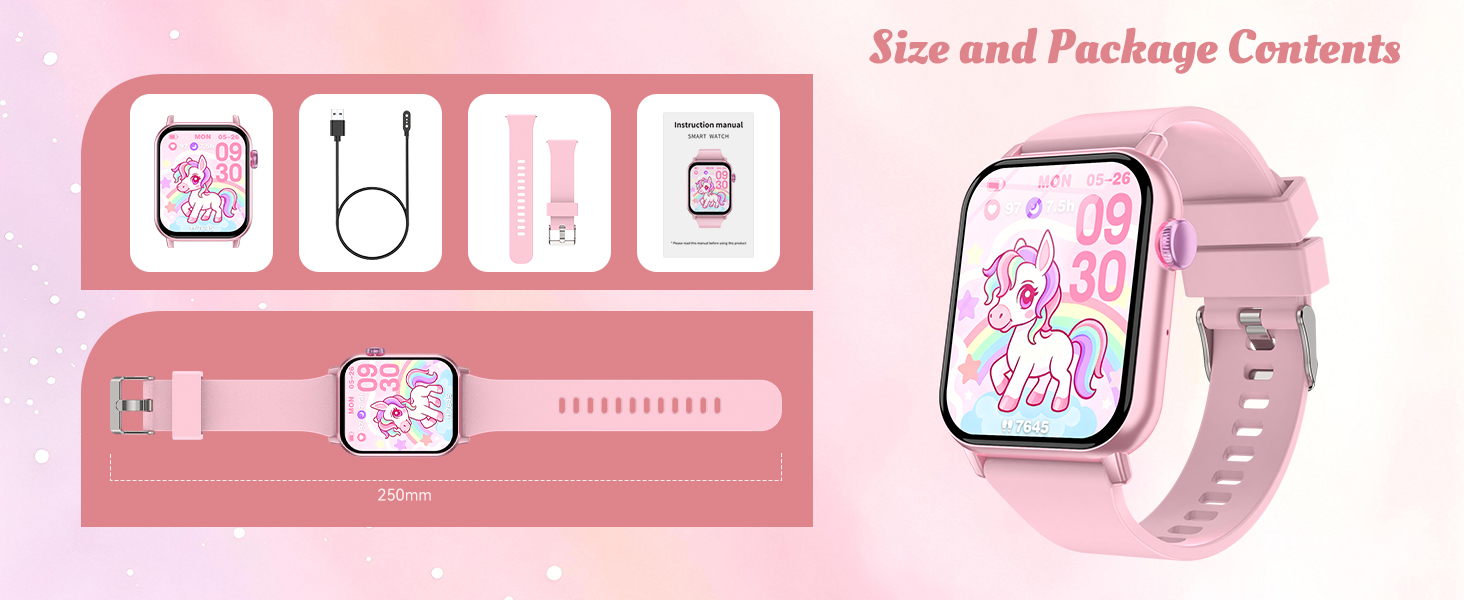
Image: Contents of the ganopterygon TK09 Kids Smart Watch package.
Setup
1. Charging the Smart Watch
Before initial use, fully charge the smartwatch. Connect the magnetic charging cable to the charging port on the back of the watch. Plug the USB end of the cable into a compatible USB power adapter (not included) or a computer's USB port. The watch will display a charging indicator.
Video: Demonstrates how to charge the smartwatch using the magnetic charging cable. The charger attaches easily to the back of the watch.
2. Power On/Off
- To Power On: Press and hold the side button until the screen lights up.
- To Power Off: Press and hold the side button, then select the power off option on the screen.
3. Adjusting the Watch Band
The silicone watch band is adjustable to fit various wrist sizes. Use the buckle and the multiple holes on the strap to find a comfortable and secure fit for the wearer.
Video: Shows how to easily adjust the silicone watch band for a comfortable fit.
4. Initial Settings (Language, Date & Time)
Upon first power-on or after a reset, fully charge the watch and then select the language and set the correct date and time. Navigate through the settings menu using the touch screen to configure these options.
Operating Instructions
Navigating the Interface
The TK09 Smart Watch features an HD touch screen for easy navigation. Swipe left, right, up, or down to access different apps and settings. Tap on an icon to open an application.

Image: Overview of the smartwatch interface with various app icons.
1. Interactive Puzzle Games
The watch includes 12 built-in puzzle games designed to develop intelligence, hand-eye coordination, and reaction ability. Tap the 'Games' icon to access the game selection.

Image: Child interacting with a puzzle game on the smartwatch.
2. Health & Fitness Tracking
- Step Counter: Tracks daily steps and exercise duration. Access via the 'Activity' icon.
- Heart Rate Monitor: Measures heart rate. Tap the 'Heart Rate' icon to initiate a reading.
- Sleep Tracker: Monitors sleep patterns to help promote healthy rest. Access via the 'Sleep' icon.

Image: Demonstrates sleep and heart rate tracking features.
3. Educational & Utility Features
- Flashlight: A built-in flashlight for convenience and safety.
- Music Player: Enjoy pre-loaded or transferred music.
- Audiobooks: Access audio stories for learning and entertainment.
- Study Cards: Educational tools to aid learning.
- Calculator: A basic calculator for quick computations.
- Alarm Clock: Set alarms for reminders or waking up.
- Stopwatch & Timer: Useful for timing activities or games.
- Calendar: View dates and manage schedules.
- Camera (Shutter): The watch has a camera function. Note: For full functionality, it may require Bluetooth connection to a smartphone.
- Habit Tracking: Helps children develop good habits.

Image: Demonstrates audiobooks and study cards features.
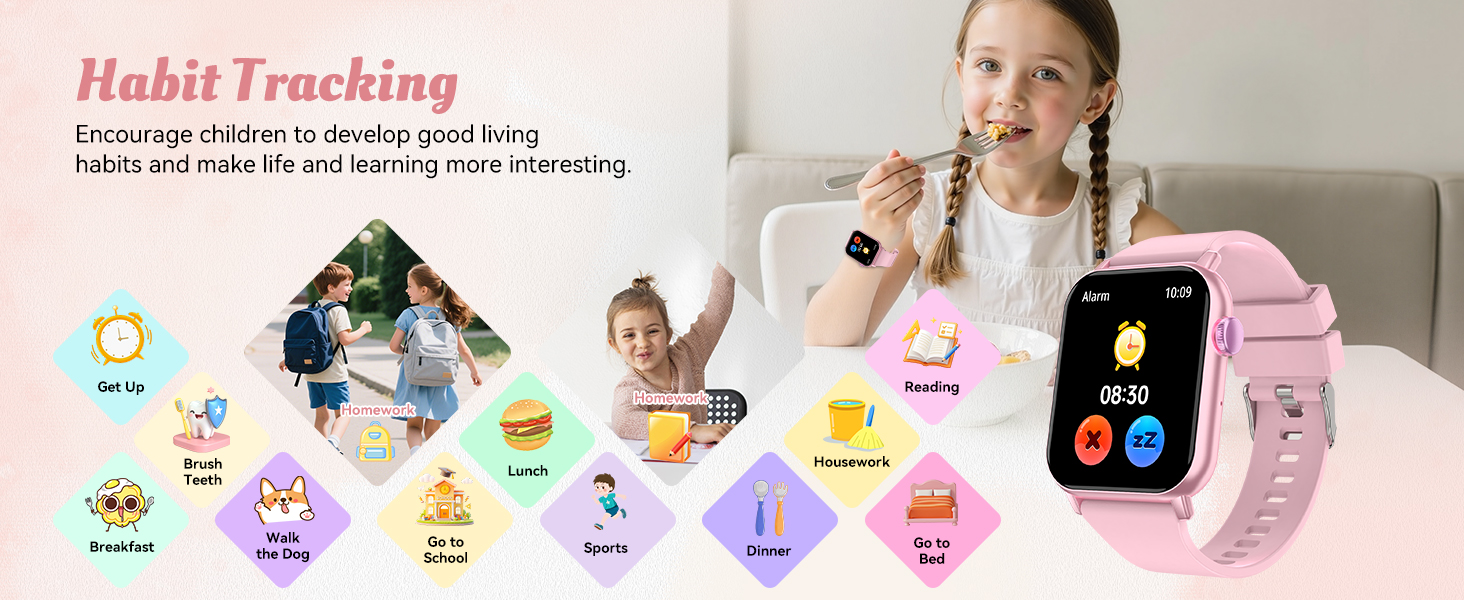
Image: Illustration of the habit tracking feature.
Video: Demonstrates various features of the smartwatch including games, calculator, stopwatch, and timer.
Maintenance
Water Resistance (IP68)
The ganopterygon TK09 Smart Watch is IP68 waterproof, meaning it can withstand splashes, rain, and brief immersion in water up to 3 feet. It is suitable for daily activities like washing hands or light bathing. Avoid prolonged submersion or hot water exposure.

Image: Child using the smartwatch while playing in water, highlighting its IP68 waterproof rating.
Cleaning
Wipe the watch screen and band with a soft, damp cloth. Avoid using harsh chemicals or abrasive materials that could damage the device.
Battery Care
To prolong battery life, avoid fully discharging the watch frequently. Charge it regularly. The battery provides 5-7 days of normal use and up to 30 days of standby time.
Troubleshooting
- Watch is unresponsive or stuck: Try restarting the watch by pressing and holding the side button. If unresponsive, allow the battery to fully drain and then recharge it.
- Screen not turning on: Ensure the watch is charged. Connect it to the charger and wait a few minutes before attempting to power it on again.
- Heart rate or step counter inaccurate: Ensure the watch is worn snugly on the wrist, not too loose or too tight. Clean the sensors on the back of the watch.
- Camera not working with phone: Ensure Bluetooth is enabled on both the watch and the paired smartphone. Check the smartphone's settings for app permissions related to the watch.
Specifications
| Brand | ganopterygon |
| Model Name | TK09 |
| Operating System | Android 5.0+, iOS 9.0+ |
| Memory Storage Capacity | 1 GB |
| Battery Capacity | 350 Milliamp Hours |
| Battery Life (Normal Use) | 5-7 Days |
| Battery Life (Standby) | 30 Days |
| Battery Charge Time | 2 Hours |
| Connectivity Technology | Bluetooth |
| Screen Size | 1.83 Inches |
| Display Type | LCD |
| Resolution | 240 x 280 |
| Water Resistance Level | IP68 Waterproof (up to 3 feet) |
| Item Weight | 50 Grams |
| Target Audience | Boys, Girls, Unisex Kids |
Warranty and Support
The ganopterygon TK09 Smart Watch comes with a 2-Year Manufacturer Warranty. For any support inquiries, troubleshooting assistance, or warranty claims, please refer to the contact information provided in the original packaging or on the manufacturer's official website.