
1. Setup and Assembly
This section provides instructions for the initial assembly of your Misodo F30 Electric Dirt Bike. It is recommended to watch the full installation video before beginning.
Video: General Installation Guide for the Misodo F30 Electric Dirt Bike. This video demonstrates the complete assembly process.
1.1 Front Wheel Installation
Carefully attach the front wheel to the fork. Ensure the brake rotor aligns correctly with the caliper. Secure the wheel using the provided nuts and washers.

Image: A person installing the front wheel onto the ebike fork, securing it with nuts.
1.2 Fender Installation
Install the front and rear fenders. Attach the front fender to the fork using the designated screws. The rear fender attaches to the frame above the rear wheel.
Image: A person attaching the front fender to the ebike, aligning it over the wheel.
1.3 Headlight Installation
Mount the headlight to the front of the bike. Connect the headlight cable to the corresponding port on the bike's wiring harness.
Image: A person connecting the headlight wiring and mounting the headlight to the ebike frame.
1.4 Pedal Installation
Attach the pedals to the crank arms. Note that pedals are typically marked 'L' for left and 'R' for right. Ensure they are tightened securely.
Image: A person screwing a pedal into the crank arm of the ebike.
1.5 Battery Installation
Insert the 48V 20Ah battery into its designated compartment. Ensure it is securely locked in place to prevent movement during operation.
Image: A person inserting the battery into the ebike frame and securing it.
2. Operating Instructions
2.1 Power On/Off and NFC Unlock
To power on the ebike, press and hold the power button. For keyless operation, use the NFC card by tapping it on the display. The display will activate, indicating the bike is ready for use.
Video: Demonstrates powering on the ebike and unlocking it using the NFC card.
2.2 Adjusting PAS Levels
The Pedal Assist System (PAS) offers multiple levels of motor assistance. Use the '+' and '-' buttons on the control panel to cycle through the 5 PAS levels, adjusting the power output to your preference.

Image: Close-up of the LCD smart screen showing battery level, speed, PAS level, and other indicators.
2.3 Cruise Control Mode
To activate cruise control, turn the throttle to your desired speed and hold it steady for 10 seconds. The ebike will then maintain this speed. To exit cruise control, engage the rear brake.
Video: Instructions on how to activate and deactivate the cruise control mode.
2.4 Switching Mileage Units
To switch between kilometers and miles on the display, enter the settings interface by pressing and holding both the '+' and '-' buttons. Navigate to parameter P02 using the 'i' button, then switch to your desired unit and confirm by pressing and holding '+' and '-' together.
Video: Guide to changing the mileage unit (km/h to mph) on the ebike display.
2.5 USB-C Charging Port
The control panel features a USB-C port for charging external devices such as smartphones during your ride. Simply connect your device using a compatible USB-C cable.
Video: Demonstrates how to use the USB-C charging port on the ebike's control panel.
2.6 Riding Modes
The Misodo F30 offers versatile riding options:
- Pure Electric Mode: Utilizes motor power only, no pedaling required.
- Pedal Assist (PAS) Mode: The motor assists your pedaling effort. Features 5-speed PAS levels.
- Cruise Mode: Maintains a set speed without throttle input (see 2.3).
- Boost Mode: Provides maximum motor assistance for quick acceleration or climbing.
- Manual Riding Mode: Ride as a traditional bicycle without motor assistance.

Image: Visual representation of Pure Electric, PAS, Cruise Control, Walk Assist, and Bike modes.
3. Maintenance
3.1 Battery Care
The 48V 20Ah lithium battery provides up to 100 miles in PAS mode. For optimal battery life, charge it regularly (6-8 hours for a full charge) and avoid complete discharge. Store the battery in a cool, dry place when not in use. The battery is detachable for convenient charging.

Image: Illustration of the ebike's removable battery, highlighting its capacity and charging time.
3.2 Brake System
The ebike is equipped with upgraded dual brakes for enhanced safety. Regularly inspect brake pads for wear and ensure brake levers provide firm and responsive stopping power. Adjust or replace components as needed to maintain optimal braking performance.

Image: A rider on the Misodo F30 Electric Dirt Bike, showcasing the bike's design and dual brakes.
3.3 Tire Care
The 20" x 4.0" fat tires are designed for various terrains. Maintain proper tire pressure as specified on the tire sidewall. Regularly check for punctures, cuts, or excessive wear. Proper tire maintenance ensures traction and extends tire life.

Image: Detailed view of the 20-inch off-road tire, illustrating its tread pattern and suitability for rural, mountain, beach, and snow roads.
3.4 General Inspection
Periodically inspect all bolts, nuts, and fasteners for tightness. Check the suspension system for proper function and lubrication. Keep the ebike clean and free from dirt and debris, especially around moving parts and electrical connections.
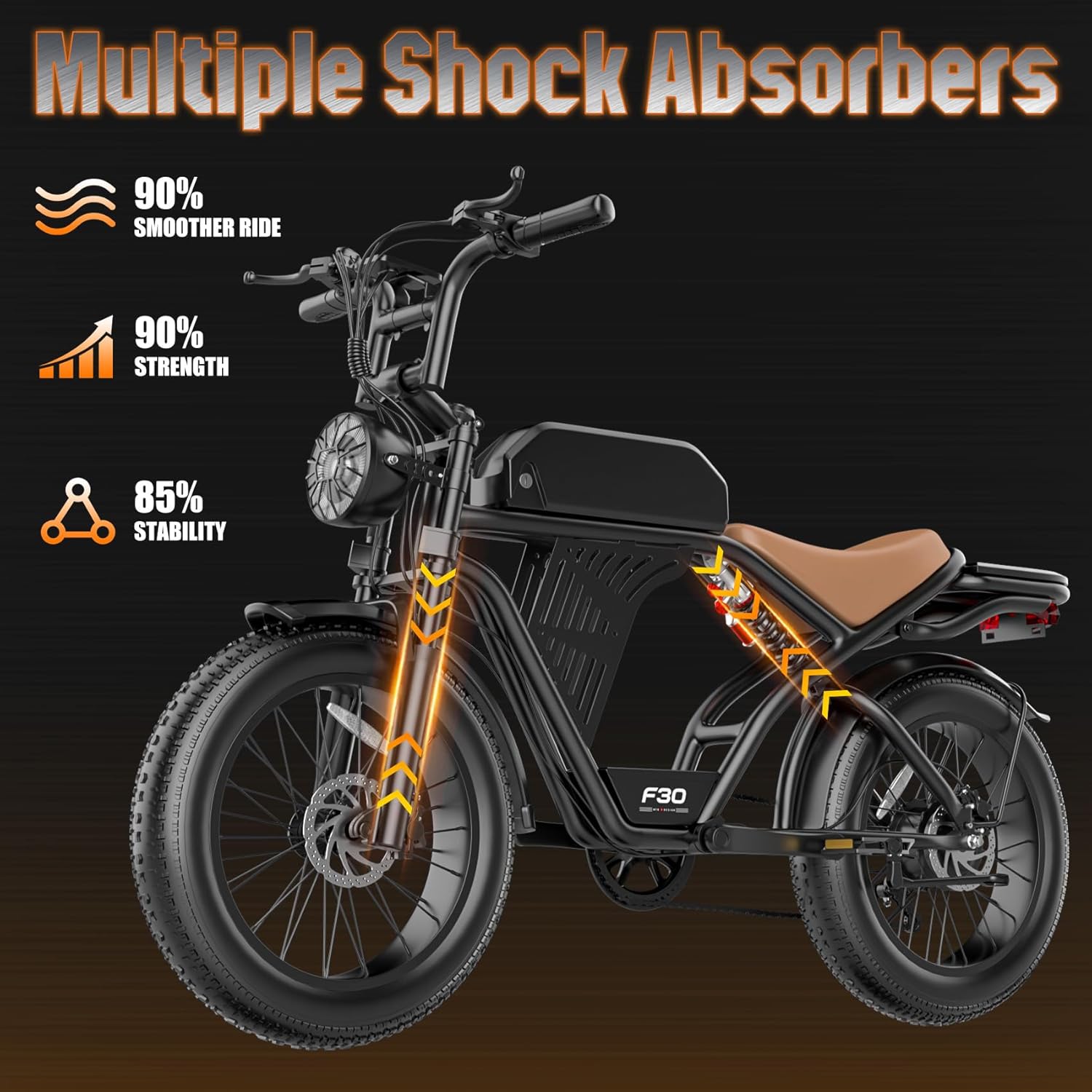
Image: The Misodo F30 ebike with arrows indicating the location of multiple shock absorbers, emphasizing a smoother ride and increased stability.
4. Troubleshooting
| Problem | Possible Cause | Solution |
|---|---|---|
| Ebike does not power on | Low battery, loose battery connection, power button not pressed correctly. | Charge the battery. Ensure the battery is fully inserted and locked. Press and hold the power button firmly. |
| Motor not assisting in PAS mode | PAS level set to 0, brake levers engaged, motor connection issue. | Increase PAS level using '+' button. Release brake levers. Check motor cable connections. |
| Brakes feel weak or spongy | Worn brake pads, air in hydraulic lines, misaligned calipers. | Inspect and replace brake pads. Bleed hydraulic brakes (professional service recommended). Adjust caliper alignment. |
| Tire loses air quickly | Puncture, valve stem issue, improper tire seating. | Inspect tire for punctures and repair/replace tube. Check valve stem for leaks. Ensure tire is properly seated on the rim. |
| Display not working correctly | Loose cable connection, software glitch. | Check display cable connections. Try restarting the ebike. If issues persist, contact support. |
5. Specifications
- Model: Misodo F30
- Motor: Peak 2500W Brushless Motor (750W Continuous)
- Max Speed: Up to 32 MPH
- Battery: 48V 20Ah Lithium Battery
- Range: Up to 100 Miles (PAS Mode)
- Charging Time: 6-8 Hours
- Tires: 20" x 4.0" Fat Tires
- Suspension: Dual Front Forks and Seat Shock Absorbers
- Brakes: Dual Brakes
- Riding Modes: Pure Electric, Pedal Assist (5 levels), Cruise, Boost, Manual
- Display: Intelligent LCD Display
- Unlock Method: NFC & Password
- Item Weight: 81.2 lbs
- Max Load Capacity: 365 lbs
- Recommended Rider Height: 5'3" - 6'3"
- Frame Material: Alloy Steel
- Included Components: Ebike Lock*1, Installation Tool Set*1, NFC Card*2
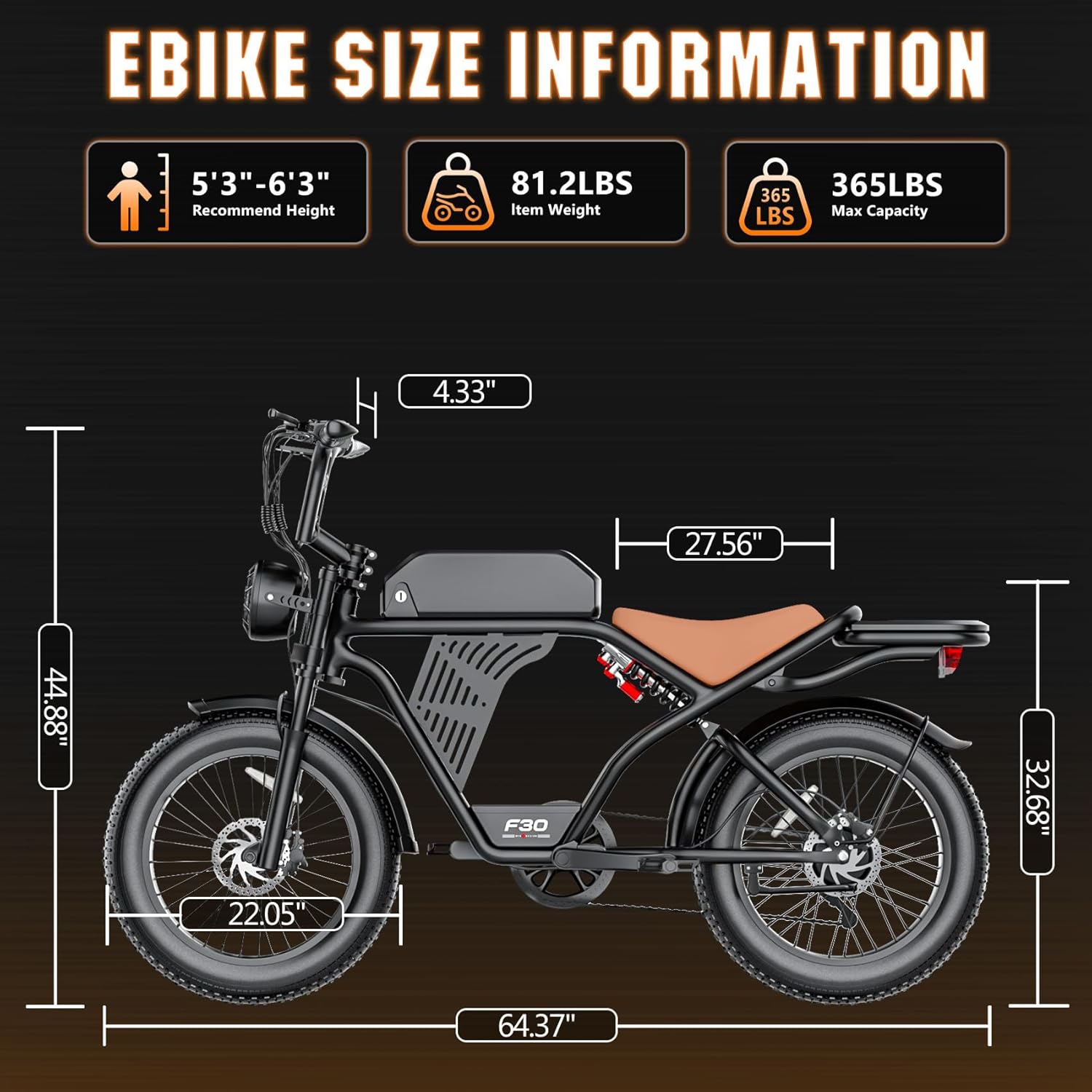
Image: Detailed size information and weight capacity for the Misodo F30 ebike.
6. Warranty
The Misodo F30 Electric Dirt Bike comes with a 36-month warranty. This warranty covers manufacturing defects and ensures long-term peace of mind. Please retain your proof of purchase for warranty claims.
7. Support
For any questions, technical assistance, or warranty claims, please contact Misodo Support. We are committed to providing a safe and satisfying riding experience and are always here to help.
You can typically find contact information through your order details or by visiting the official Misodo store page on Amazon.