
Introduction
This manual provides comprehensive instructions for the assembly, operation, and maintenance of your Garvee 63 Inch TV Stand Dresser. Please read all instructions carefully before assembly and use to ensure safe and proper functionality. Keep this manual for future reference.
The Garvee 63 Inch TV Stand Dresser is designed to provide versatile storage and a stable platform for televisions up to 75 inches. It features a durable metal frame, a solid wood top, and 14 fabric drawers for organized storage.
Safety Information
- Weight Capacity: Do not exceed the maximum weight capacity of 110 lbs (50 kg) for the top surface. Each large drawer has a capacity of 22 lbs (10 kg), and each small drawer has a capacity of 18 lbs (8 kg).
- Anti-Tip Kit: Always install the included anti-tip kit to prevent accidental tipping, especially in households with children or pets.
- Placement: Place the TV stand on a level, stable surface. Uneven surfaces can compromise stability.
- Electrical Safety: When using the integrated AC outlets and USB ports, ensure that connected devices do not exceed the specified power limits. Do not expose the power strip to moisture.
- Assembly: Ensure all screws and fasteners are securely tightened before use. Periodically check and re-tighten as necessary.
Setup and Assembly
1. Unpacking and Component Check
Carefully remove all components from the packaging. Lay them out on a soft, clean surface to prevent scratches. Verify that all parts listed below are present. If any parts are missing or damaged, do not proceed with assembly and contact customer support.
Included Components:
- 1 x 14 Drawers Dresser Frame
- 1 x Accessory Kit (screws, tools, etc.)
- 1 x Anti-Tip Kit
- 1 x Instructions (this manual)
- 14 x Fabric Drawers (various sizes)
2. Assembly Instructions
Follow the step-by-step diagrams provided in the separate assembly guide (if included) or the detailed instructions below. It is recommended to have two people for assembly.
- Assemble the metal frame components according to the provided diagrams, ensuring all connections are secure.
- Attach the solid wood top to the assembled frame using the designated screws.
- Insert the fabric drawers into their respective slots. Ensure they slide smoothly.
- Install the anti-tip kit to a wall stud using the provided hardware. Secure the TV stand to the anti-tip kit.
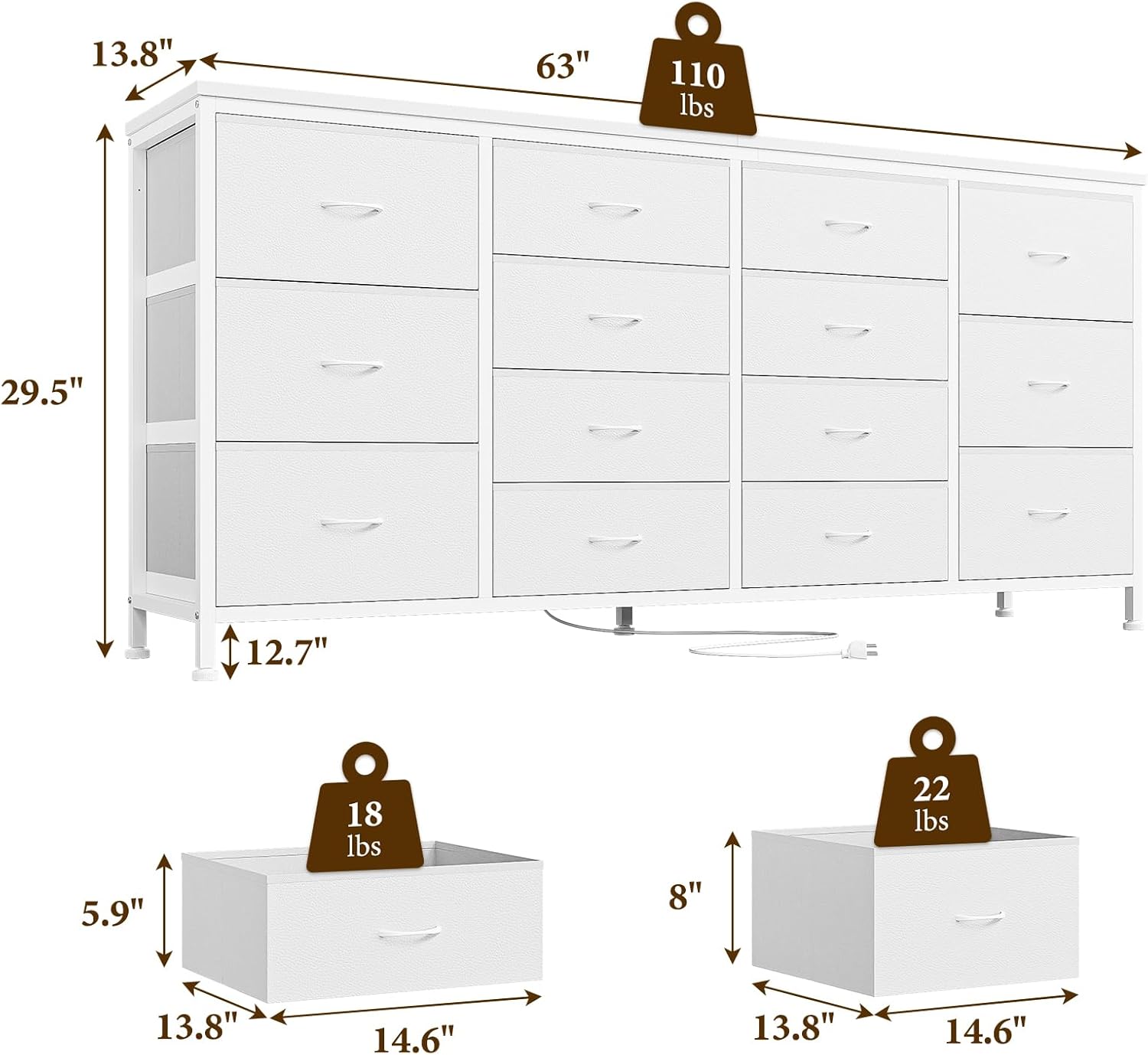
Figure 1: Product Dimensions and Weight Capacities. The top surface supports up to 110 lbs. Small drawers support 18 lbs, large drawers support 22 lbs.
Operation
1. Using the Storage Drawers
The Garvee TV stand features 14 fabric drawers designed for organizing various items. The drawers are lightweight and can be easily pulled out and pushed in. Distribute weight evenly within the drawers and do not overload them beyond their specified capacity.

Figure 2: Example of organized storage within the 14 fabric drawers.
2. Power Outlets and USB Ports
The TV stand includes integrated 2 AC outlets and 2 USB ports for convenient power access. To use these, ensure the power cord from the TV stand is plugged into a functional wall outlet.
- Plug electronic devices into the AC outlets for power.
- Connect USB-compatible devices to the USB ports for charging.
Important:
- Do not exceed the maximum power rating of the integrated power strip.
- Avoid spilling liquids near the power outlets.
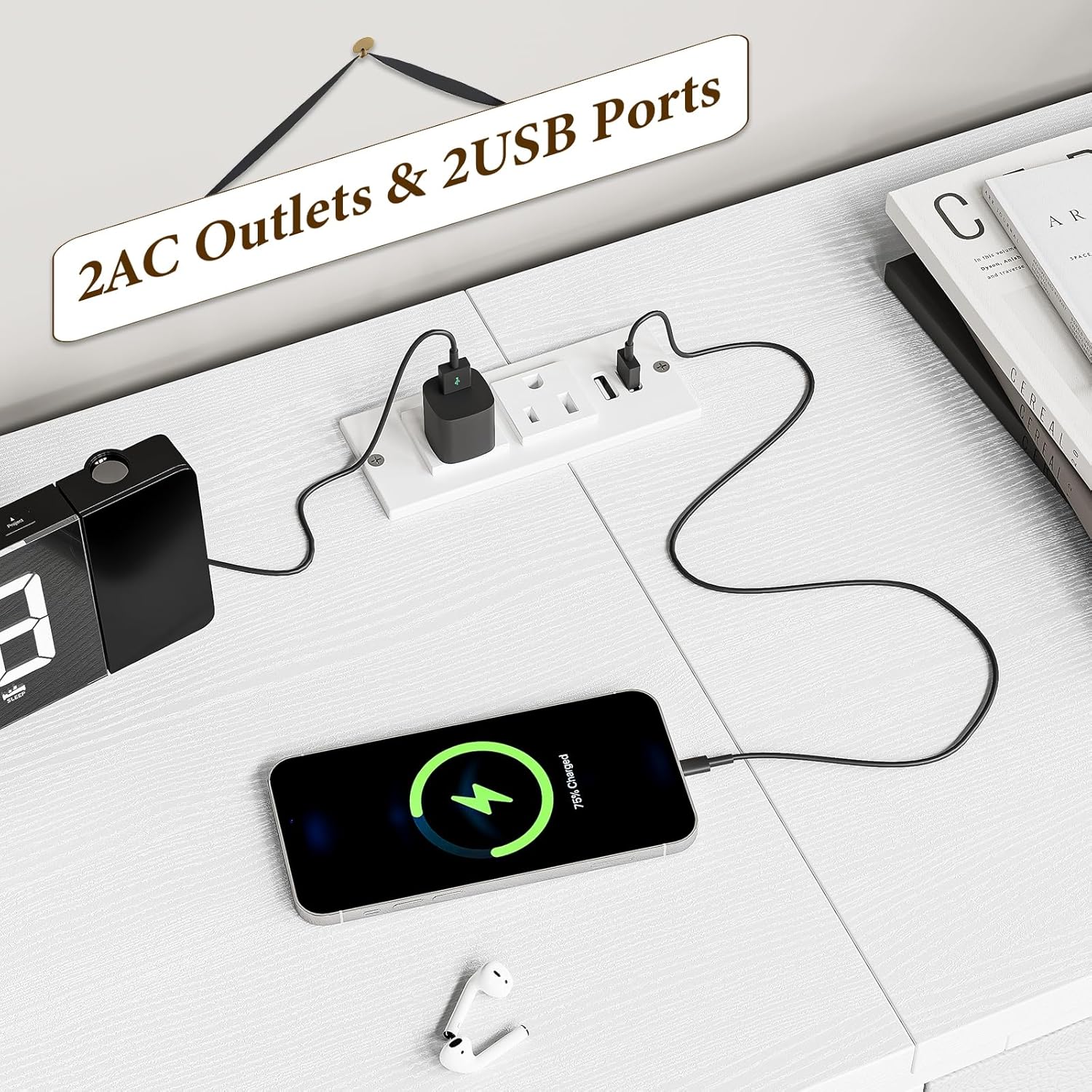
Figure 3: Integrated 2 AC Outlets and 2 USB Ports for device charging and power.
3. TV Placement
The top surface is designed to accommodate televisions up to 75 inches. Ensure the TV's base fits securely on the stand and that its weight does not exceed the 110 lbs (50 kg) capacity.

Figure 4: Garvee TV Stand supporting a large television.
Maintenance
1. Cleaning
- Wood Top: Wipe with a soft, damp cloth. Avoid harsh chemicals or abrasive cleaners that may damage the finish.
- Metal Frame: Clean with a soft cloth and mild detergent if necessary. Dry thoroughly to prevent rust.
- Fabric Drawers: Spot clean with a damp cloth and mild soap. Allow to air dry completely. Do not machine wash or tumble dry.
2. General Care
- Periodically check all screws and fasteners to ensure they remain tight. Re-tighten if loose.
- Avoid exposing the TV stand to direct sunlight or extreme temperature changes, which can affect the wood and fabric.
- Do not drag the unit when moving; lift it to prevent damage to the legs and frame.
Troubleshooting
| Problem | Possible Cause | Solution |
|---|---|---|
| TV stand is wobbly or unstable. | Uneven floor; loose fasteners; anti-tip kit not installed. | Ensure the stand is on a level surface. Check and tighten all assembly screws. Install the anti-tip kit securely to a wall stud. |
| Drawers do not slide smoothly. | Drawer overloaded; fabric caught; frame misalignment. | Reduce drawer contents. Check for any fabric obstructions. Verify frame assembly is correct and square. |
| Power outlets/USB ports not working. | Power cord not plugged in; wall outlet not functional; overloaded circuit. | Ensure the TV stand's power cord is fully plugged into a working wall outlet. Test the wall outlet with another device. Reduce the number of connected devices if overloaded. |
Specifications
- Brand: Garvee
- Model Name: TVStand_PHO_16OGJD03dX
- Material: Wood (top), Metal (frame), Fabric (drawers)
- Color: White
- Item Dimensions (L x W x H): 63 x 13.8 x 29.5 inches
- Item Weight: 48.72 Pounds
- Top Surface Weight Capacity: 110 lbs
- Large Drawer Weight Capacity: 22 lbs
- Small Drawer Weight Capacity: 18 lbs
- TV Size Compatibility: Up to 75 inches
- Included Components: 14 Drawers Dresser, Accessory Kit, Anti-Tip Kit, Instructions
- Power Outlets: 2 AC Outlets
- USB Ports: 2 USB Ports
- Assembly Required: Yes
Warranty and Support
Garvee products are manufactured to high-quality standards. For specific warranty details, please refer to the warranty card included with your purchase or visit the official Garvee website. If you encounter any issues or require assistance with your product, please contact Garvee customer support through the retailer where the product was purchased or via the contact information provided on the Garvee brand store page.
Garvee Brand Store: Visit Garvee Store on Amazon