
1. Introduction
The Inito Fertility Monitor is an advanced at-home device designed to help women track and understand their fertility cycle by measuring key hormones. This monitor connects wirelessly to your iOS or Android device, providing personalized insights into your unique hormonal patterns. By tracking Estrogen, Luteinizing Hormone (LH), Pregnanediol Glucuronide (PdG), and Follicle-Stimulating Hormone (FSH), Inito helps you identify your fertile window and confirm ovulation.
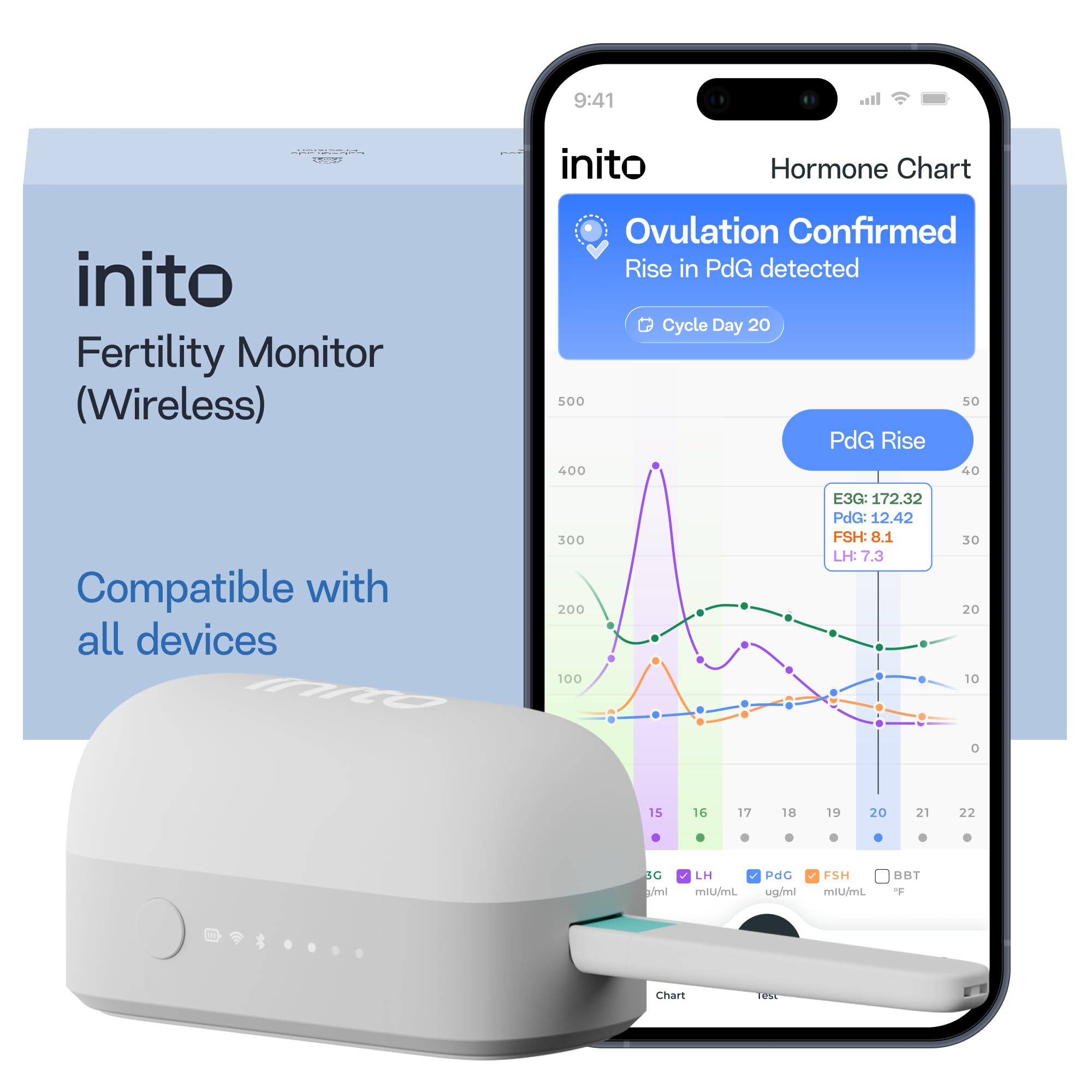
Figure 1: The Inito Fertility Monitor and associated components.
2. What's in the Box
Your Inito Fertility Monitor kit includes the following items:
- Inito Fertility Monitor (Wireless Reader): The main device for reading test strips.
- 15 Inito Fertility Test Strips: For measuring hormone levels.
- Quick Starter Guide: A brief guide to get you started.
- Free Access to Inito App: Available for download on iOS and Android devices.

Figure 2: Complete Inito home fertility kit contents.
3. Setup
Follow these steps to set up your Inito Fertility Monitor:
- Download the Inito App: Search for 'Inito' in the Apple App Store (for iOS) or Google Play Store (for Android) and download the free application.
- Create Your Account: Open the Inito app and follow the on-screen instructions to create a new user account. You will be prompted to enter some basic cycle information.
- Pair Your Monitor: Ensure your smartphone's Bluetooth is enabled. In the Inito app, navigate to the device pairing section and follow the prompts to connect your Inito Fertility Monitor. The app will guide you through the process.
- Initial Calibration: The app may require an initial calibration or setup process. Follow all instructions carefully to ensure accurate readings.
4. Operating Instructions
The Inito testing process is designed to be simple and integrate into your morning routine. It involves three main steps: Dip, Test, and Go.
4.1. The 3-Step Testing Process
- DIP: Collect a urine sample in a clean, dry cup. Dip the absorbent tip of an Inito Fertility Test Strip into the urine for 15 seconds. Ensure the urine does not go past the MAX line.
- TEST: Immediately after dipping, insert the test strip into the Inito Fertility Monitor. Ensure it is fully inserted until it clicks into place. Place the monitor on a flat, stable surface.
- GO: Open the Inito app on your smartphone. The app will automatically detect the monitor and begin the reading process. Do not remove the strip or move the monitor until the app indicates the test is complete and results are ready. This usually takes about 10 minutes.

Figure 3: Dipping the test strip.

Figure 4: Inserting the test strip into the monitor.

Figure 5: Viewing results on the Inito app.
4.2. When to Test
The Inito app will provide personalized recommendations on when to start testing based on your cycle length. Generally, you will begin testing a few days after your period ends and continue daily until ovulation is confirmed.
5. Understanding Your Results
The Inito Fertility Monitor measures four key hormones to provide a comprehensive view of your cycle:
- Estrogen (E3G): Helps identify your full 6-day fertile window.
- Luteinizing Hormone (LH): Predicts when you will ovulate (LH surge).
- PdG (urine metabolite of Progesterone): Confirms that you have ovulated.
- Follicle-Stimulating Hormone (FSH): Tracks your follicle growth.

Figure 6: The four hormones measured by Inito on a single strip.
The Inito app provides clear, easy-to-understand charts and interpretations of your hormone levels. It will indicate your fertile window, peak fertility, and confirm ovulation based on the rise in PdG levels. You can track your cycle progress and share these insights with your healthcare provider.

Figure 7: Inito app displaying confirmed ovulation and hormone trends.
6. Maintenance and Care
- Monitor Cleaning: Gently wipe the Inito Fertility Monitor with a soft, dry cloth. Do not use water or cleaning solutions directly on the device. Ensure no moisture enters the strip insertion slot.
- Storage: Store the monitor and test strips in a cool, dry place away from direct sunlight and moisture. Keep test strips in their sealed pouches until immediately before use.
- Battery: The Inito monitor uses a rechargeable Lithium Ion battery. Charge the device as needed using the provided cable or a compatible USB charger.
7. Troubleshooting
- Monitor Not Connecting to App: Ensure Bluetooth is enabled on your phone. Make sure the monitor is charged. Try restarting both the app and your phone.
- Error Message During Test: Ensure the test strip is inserted correctly and fully. Check that the monitor is on a flat, stable surface. Do not move the monitor during testing. If errors persist, contact Inito support.
- Inconsistent Readings: Ensure you are testing at the same time each day (first-morning urine is recommended). Avoid excessive fluid intake before testing. Ensure test strips are not expired and have been stored correctly.
- App Not Displaying Data: Check your internet connection. Ensure the app is updated to the latest version.
8. Specifications
| Feature | Detail |
|---|---|
| Model Number | IWR_SP_BKP |
| Package Dimensions | 7.48 x 6.77 x 2.8 inches |
| Item Weight | 1.1 pounds |
| Batteries | 1 Lithium Ion battery (included) |
| Unit Count | 15 Count (test strips) |
| Connectivity | Wireless (Bluetooth) |
| Compatibility | iOS & Android devices |
9. Important Information
9.1. Legal Disclaimer
Statements regarding dietary supplements and fertility monitors have not been evaluated by the FDA and are not intended to diagnose, treat, cure, or prevent any disease or health condition. Always consult with a healthcare professional for medical advice.
10. Warranty and Support
For detailed warranty information, product support, and frequently asked questions, please visit the official Inito website or contact their customer service directly. Contact details can typically be found on the product packaging or the Inito app.