
Introduction
This manual provides detailed instructions for the safe and efficient operation of your Flytec V802 Pro GPS Bait Boat. The V802 Pro model incorporates advanced GPS technology and a Beidou intelligent calibration system for precise positioning, allowing you to save up to 4 different fishing areas and 160 anchor points. It features multiple safety functions including one-key return, low battery return, control loss return, and out-of-range return. Please read this manual thoroughly before using the product to ensure optimal performance and longevity.
Safety Information
Always observe the following safety precautions to prevent injury or damage to the product:
- Do not operate the bait boat in strong winds or adverse weather conditions.
- Ensure all components are securely attached before operation.
- Keep hands and loose clothing away from propellers during operation.
- Do not use the boat near swimmers or in areas with heavy boat traffic.
- Regularly check the battery levels of both the boat and the remote control.
- Store the boat and batteries in a cool, dry place away from direct sunlight.
- Only use the provided charging cable and battery for the device.
Package Contents
Verify that all items are present in the package:
- Bait Boat (x1)
- Boat Battery (7.4V 12000 mAh) (x1)
- Antennas (x2)
- Remote Control (x1)
- Remote Battery Cover Screw (x1)
- Remote Strap (x1)
- Remote Handle (x2)
- USB Charging Cable (x1)
- User Manual (x1)
- Spare Propeller (x2)
Setup
1. Battery Installation
Boat Battery: Open the battery compartment on the bait boat. Connect the 7.4V 12000 mAh battery to the boat's power connector. Securely close the compartment.
Remote Control Battery: Open the battery cover on the back of the remote control. Insert 4x AA 1.5V batteries (not included) according to the polarity markings. Close the cover and secure it with the provided screw.
2. Antenna Installation
Screw the two antennas onto their designated ports on the bait boat. Ensure they are firmly attached for optimal signal reception.

Image: The Flytec V802 Pro bait boat with its remote control, illustrating the boat's design, dual antennas, and bait hoppers. The remote control is shown in the foreground.
3. Initial Charging
Before first use, fully charge the boat battery using the provided USB charging cable. The charging time is approximately 8 hours. Do not overcharge the battery.
4. Pairing the Remote Control
Turn on the bait boat, then turn on the remote control. The remote control will automatically attempt to pair with the boat. A successful connection will be indicated by a specific light or sound signal (refer to the remote control's display or indicator lights for details).
Operating Instructions
1. Basic Controls
- Forward/Backward: Use the left joystick on the remote control to move the boat forward or backward.
- Left/Right Turn: Use the right joystick to steer the boat left or right.
- Automatic Direction Correction: The built-in high-precision gyroscope automatically corrects the boat's direction, ensuring stable movement even in varying water conditions.
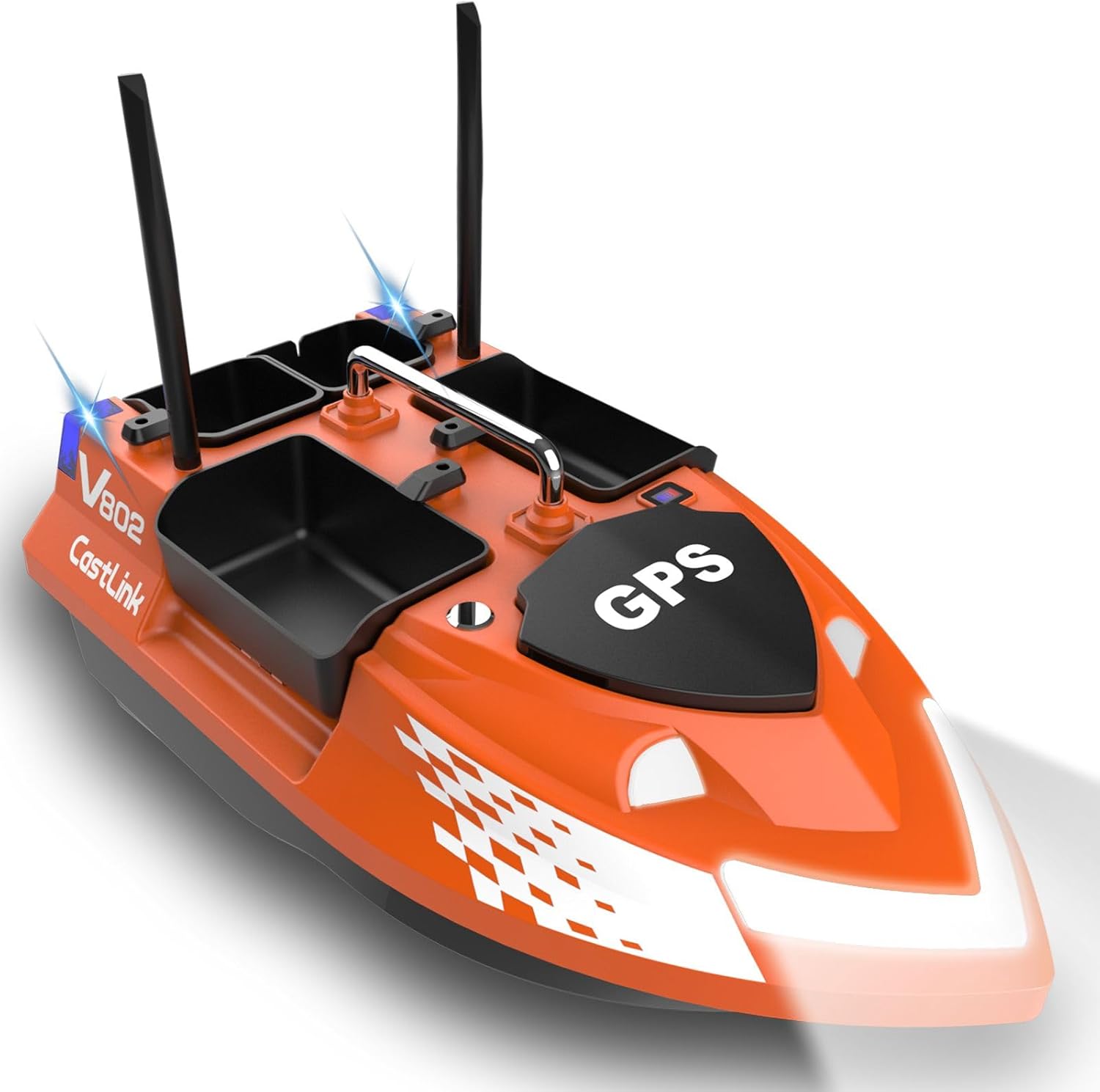
Image: An overhead view of the Flytec V802 Pro bait boat, highlighting the central GPS module and the four independent bait hoppers.
2. GPS Functions and Navigation
- Setting Anchor Points: The Beidou intelligent calibration system allows for precise positioning. You can save up to 4 fishing areas and a total of 160 anchor points. Refer to the remote control's display for instructions on how to mark and save these points.
- Cruise Control: Activate cruise control for the boat to travel in a straight line at a constant speed. This feature enhances bait delivery efficiency.
- Automatic Navigation Between Points: The boat can be programmed to navigate automatically between saved anchor points.
- One-Key Return: Press the "One-Key Return" button on the remote control to automatically bring the boat back to its starting point.
- Safety Return Functions: The boat is equipped with automatic return functions for low battery, loss of control signal, and exceeding the operational range.
- Real-time Distance Measurement: The remote control provides real-time distance information, allowing for precise measurement of the boat's position.
3. Bait Hopper Operation
The V802 Pro features 4 independent bait hoppers. Each hopper can be controlled separately via the remote control, allowing for flexible baiting strategies. Load your bait into the hoppers and use the corresponding buttons on the remote to release the bait at your desired location.

Image: A rear-angled perspective of the bait boat, showcasing the four distinct bait hoppers and the rear signal lights.
4. Hook Attachment and Line Release
The boat includes a mechanism at the rear for attaching a hook and releasing fishing line. This allows for precise placement of your fishing tackle. Secure your hook or line to the designated release mechanism and activate it via the remote control when at the desired drop-off point.

Image: A front-angled view of the bait boat, highlighting the bright front navigation lights and the open bait hoppers.
5. Lighting System
The boat is equipped with high-brightness navigation lights at the front for night operation and signal lights at the rear. These lights can operate in two modes: constant or flash. Use the remote control to activate and switch between modes as needed for visibility and signaling.

Image: A slightly different front-angled view of the bait boat, focusing on its sleek front design and the prominent GPS module cover.
6. Fish Finder Compatibility
The V802 Pro is designed with a sensor mounting area at the rear, allowing for an optional fish finder upgrade. This upgrade can enhance your fishing efficiency by detecting fish locations.
Official Product Videos
No official product videos were found in the provided product data. For visual guides, please refer to the manufacturer's official website or support channels.
Maintenance
- Cleaning: After each use, clean the boat with a soft, damp cloth. Ensure no debris is caught in the propellers or bait hoppers. Do not use harsh chemicals.
- Battery Care: Always fully charge the boat battery before storage if it will not be used for an extended period. Do not leave batteries fully discharged. Remove batteries from the remote control if not in use for a long time.
- Storage: Store the bait boat and remote control in a dry, cool environment, away from direct sunlight and extreme temperatures.
- Propeller Check: Periodically inspect the propellers for damage or entanglement. Replace damaged propellers with the provided spares.
Troubleshooting
| Problem | Possible Cause | Solution |
|---|---|---|
| Boat does not respond to remote control. | Low battery in boat or remote; remote not paired; out of range. | Charge batteries; re-pair remote; bring boat closer to remote. |
| Bait hoppers do not open. | Mechanism jammed; low battery; remote signal issue. | Check for obstructions; charge battery; ensure strong signal. |
| Boat moves erratically. | Propeller entangled; gyroscope calibration issue; strong currents. | Check propellers for debris; re-calibrate gyroscope (refer to full manual); avoid strong currents. |
| GPS positioning is inaccurate. | Poor satellite signal; interference; initial calibration needed. | Operate in open areas; ensure no obstructions; perform Beidou intelligent calibration. |
Technical Specifications
| Feature | Value |
|---|---|
| Brand | Flytec |
| Model | V802 Pro |
| Color | Orange |
| Material | ABS Plastic + Electronic Components |
| Control Distance | 500 m |
| Speed | 250 m/min (approx. 25 Km/h) |
| Motor | Dual 390 Motor |
| Remote Control Battery | AA 1.5V x4 (not included) |
| Boat Battery | 7.4V 12000 mAh |
| Charge Time | 8 hours |
| Usage Time | 4 hours |
| Dimensions | 52.7 × 26.4 × 50 cm |
| Weight | 2608 g |
| Carrying Capacity | 3 kg |
| Point Recording | 4 fishing areas, 160 points total |
Warranty and Support
For warranty information and technical support, please refer to the documentation provided at the time of purchase or contact your retailer. Keep your proof of purchase for any warranty claims.


