
Introduction
This manual provides instructions for the safe and effective use of your MIPOW Miffy BrushGo i4 Slim Electric Toothbrush. Please read this manual thoroughly before first use and retain it for future reference.
Package Contents
- 1x SlimPro i4 Electric Toothbrush
- 1x Magnetic Travel Case
- 1x Ceramic Holder Dock
- 1x USB Charge Cable
- 2x Brush Heads

Image: All components included in the MIPOW Miffy BrushGo i4 Slim Electric Toothbrush package.
Setup
1. Charging the Toothbrush
- Connect the USB charge cable to the charging port at the bottom of the toothbrush.
- Plug the other end of the USB cable into a compatible USB power adapter (not included) or a computer's USB port.
- The battery indicator light will illuminate to show charging status. A full charge provides up to 45 days of use.

Image: USB charging port on the toothbrush.
2. Attaching the Brush Head
- Align the brush head with the metal shaft on the toothbrush handle.
- Push the brush head down firmly until it clicks into place.
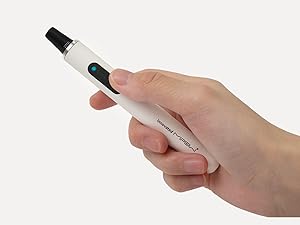
Image: Illustration of attaching a brush head.
Operating Instructions
1. Power On/Off and Mode Selection
- Press the power button to turn on the toothbrush. It will start in the last used mode.
- Press the power button repeatedly to cycle through the three cleaning modes:
- Clean Mode: Standard cleaning for daily use.
- White Mode: For polishing and stain removal.
- Gum Care Mode: Gentle massage for sensitive gums.
- To turn off the toothbrush, press and hold the power button for 2 seconds, or cycle through all modes until it turns off.

Image: Power button and mode indicator on the toothbrush handle.
2. Brushing Technique
Apply a small amount of toothpaste to the brush head. Place the brush at a 45-degree angle to your gums and gently move it across your teeth. The toothbrush features a 2-minute smart timer with 30-second interval pauses to guide you to brush all four quadrants of your mouth evenly.
Video: Demonstration of the MIPOW Miffy BrushGo i4 Electric Toothbrush in use, highlighting its features and design.
Maintenance
1. Cleaning
- After each use, rinse the brush head thoroughly under running water.
- Wipe the toothbrush handle with a damp cloth. Do not immerse the handle in water.
- The ceramic holder dock is designed with ventilation for fast drying and can be cleaned with water and mild soap.

Image: Rinsing the toothbrush head after use.
2. Brush Head Replacement
For optimal cleaning performance and hygiene, replace the brush head every 3 months, or sooner if the bristles become frayed. To replace, pull the old brush head off the handle and push a new one on.

Image: Detached brush head for replacement.
Troubleshooting
Toothbrush does not turn on or charge
- Ensure the USB charging cable is securely connected to both the toothbrush and a working power source.
- Check if the power adapter or USB port is functional.
- Allow the toothbrush to charge for at least 24 hours for the first charge or if the battery is completely depleted.
Vibrations feel weak or inconsistent
- Ensure the brush head is securely attached to the handle.
- The battery might be low. Recharge the toothbrush.
- Replace the brush head if bristles are worn or damaged.
Specifications
| Feature | Detail |
|---|---|
| Model Number | CI900-MF |
| Vibrations Per Minute (VPM) | 20,000 |
| Cleaning Modes | 3 (Clean, White, Gum Care) |
| Battery Life | Up to 45 days on a single charge |
| Charging Type | USB Rechargeable |
| Waterproof Rating | IPX7 |
| Dimensions | 9.5 x 2.4 x 2.4 inches |
| Weight | 8.15 ounces |
| Bristle Material | Nylon |
| Included Accessories | Magnetic Travel Case, Ceramic Holder Dock, USB Charge Cable, 2 Brush Heads |
Warranty and Support
For warranty information and customer support, please refer to the official MIPOW website or contact your retailer. Keep your proof of purchase for any warranty claims.