
UNI-T UPO1082HD
UNI-T UPO1082HD Digital Oscilloscope User Manual
Model: UPO1082HD
1. Product Overview
The UNI-T UPO1082HD is an 80 MHz, 2-channel digital oscilloscope featuring 12-bit resolution and a 1.25 GSa/s sampling rate. This instrument is part of the UPO1000HD series, designed for precise signal analysis in various applications.
Key features include:
- 12-bit High Resolution: Provides 16 times more vertical detail than standard 8-bit oscilloscopes for enhanced measurement precision.
- Deep Memory and Fast Capture: 100 Mpts memory depth for long signal acquisitions without reducing the sampling rate, and a waveform capture rate of 1,000,000 Wfms/s to reveal rare glitches and intermittent anomalies.
- Integrated Protocol Decoding: Built-in serial bus analysis for UART, I2C, SPI, CAN, and LIN, with time-correlated decoding overlay on waveforms for simplified system debugging.
- Touchscreen Interface: A 7-inch capacitive touchscreen with gesture control for intuitive waveform navigation.
- Connectivity: USB, LAN, and HDMI connectivity for versatile laboratory integration.
- Multi-functional: Integrates seven tools including oscilloscope, spectrum and protocol analyzers, DVM, frequency meter, power analysis, and logic functions.
- Portable Power: Can be powered via USB-C, offering portability.
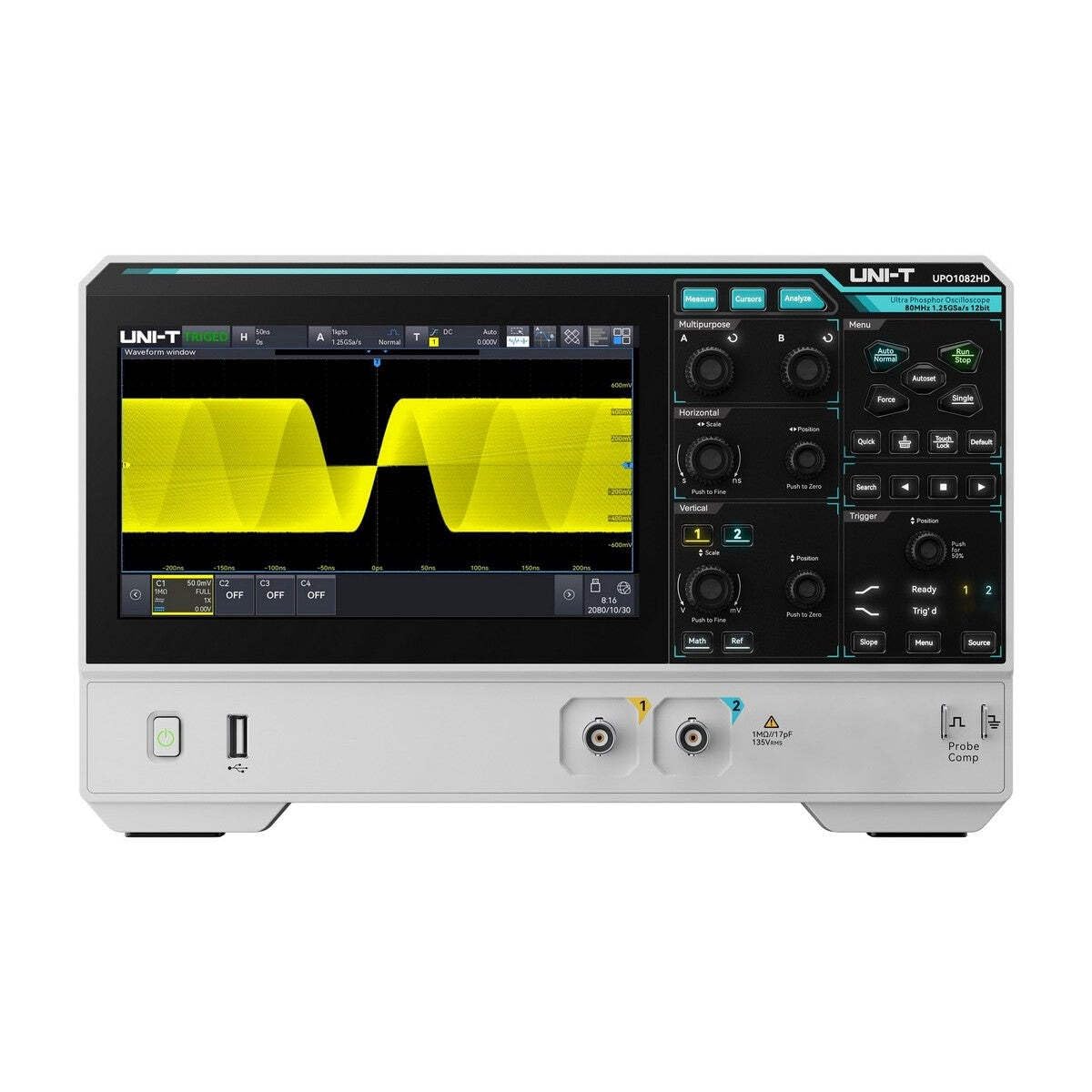
Figure 1: Front view of the UNI-T UPO1082HD Digital Oscilloscope. This image shows the main display, control knobs, and input ports.
2. Setup Instructions
- Unpacking: Carefully remove the oscilloscope and all accessories from the packaging. Verify that all components listed in the packing list are present, including probes, power cable, and documentation.
- Power Connection: Connect the provided power adapter to the USB-C port on the rear of the oscilloscope and then to a suitable power outlet. Alternatively, for portable use, connect a compatible USB-C power bank.
- Initial Power On: Press the power button located on the front panel. The device will perform a self-test and boot up.
- Probe Compensation: Before taking measurements, it is recommended to compensate the probes. Connect a probe to Channel 1 (CH1) and attach the probe tip to the 'Probe Comp' output and the ground clip to the ground terminal. Adjust the probe compensation screw until a perfect square wave is displayed on the screen. Repeat for other probes and channels as needed.

Figure 2: Rear view showing USB-C power input, demonstrating connection to a portable power bank.
3. Operating Instructions
3.1 Basic Waveform Display
- Connecting Signals: Connect your signal source to the desired input channel (CH1 or CH2) using a BNC cable and probe.
- Auto Set: Press the Auto button to automatically adjust the vertical and horizontal settings for a stable waveform display.
- Manual Adjustments: Use the vertical (Volts/Div) and horizontal (Sec/Div) knobs to manually scale the waveform. The position knobs allow you to move the waveform vertically and horizontally.
- Triggering: Use the trigger controls to stabilize repetitive waveforms. Adjust the trigger level and mode (Edge, Pulse, Video, etc.) as needed.

Figure 3: Oscilloscope display showing a typical waveform.
3.2 Advanced Features
- Touchscreen Navigation: Utilize the 7-inch capacitive touchscreen for intuitive control. Pinch-to-zoom, drag-to-pan, and tap-to-select gestures simplify waveform analysis and menu navigation.
- Protocol Decoding: Access the protocol decoding functions via the menu to analyze serial bus communications (UART, I2C, SPI, CAN, LIN). Configure the bus parameters and view decoded data directly on the screen.
- Measurement Functions: Press the Measure button to display automatic measurements such as frequency, period, Vpp, Vrms, etc.
- Storage and Connectivity: Use the USB port to save waveforms and screenshots to a USB drive. Connect via LAN for remote control and data transfer. The HDMI output allows for external display connection.

Figure 4: Oscilloscope with an on-screen menu for feature selection.
4. Maintenance
- Cleaning: Use a soft, dry cloth to clean the exterior of the oscilloscope. For stubborn dirt, a slightly damp cloth with mild detergent can be used. Avoid abrasive cleaners or solvents.
- Probe Care: Handle probes carefully. Avoid bending or stressing the probe tips and cables. Store probes in a clean, dry place when not in use.
- Ventilation: Ensure that the ventilation grilles on the sides and rear of the device are not obstructed to prevent overheating.
- Software Updates: Periodically check the UNI-T website for firmware updates to ensure optimal performance and access to new features.

Figure 5: Side view highlighting the ventilation grilles.
5. Troubleshooting
| Problem | Possible Cause | Solution |
|---|---|---|
| No power | Power cable not connected; power outlet faulty; power adapter issue. | Check power cable connection; try a different outlet; ensure power adapter is functional. |
| No waveform displayed | Probe not connected; signal source off; vertical/horizontal scale incorrect; trigger not set. | Connect probe correctly; ensure signal source is active; press Auto or adjust scales manually; adjust trigger settings. |
| Unstable waveform | Incorrect trigger settings; noisy signal. | Adjust trigger level and mode; ensure proper grounding; use shielded cables. |
| Touchscreen unresponsive | Temporary software glitch; screen dirty. | Restart the device; clean the screen with a soft cloth. |
6. Specifications
- Model: UPO1082HD
- Manufacturer: UNI-T
- Bandwidth: 80 MHz
- Channels: 2
- Resolution: 12-bit ADC
- Sampling Rate: 1.25 GSa/s
- Memory Depth: 100 Mpts
- Waveform Capture Rate: 1,000,000 wfms/s
- Display: 7-inch Capacitive Touchscreen
- Connectivity: USB, LAN, HDMI
- Product Dimensions: 25.4 x 35.56 x 45.72 cm
- Weight: 4.54 kg
- Manufacturer Reference ID: 181100200144X

Figure 6: Rear panel showing connectivity options.
7. Warranty and Support
The UNI-T UPO1082HD Digital Oscilloscope comes with a 5-year warranty upon product registration (3 years standard + 2 years extended). Please refer to the warranty card included with your product for detailed terms and conditions.
For technical support, service, or warranty claims, please contact your local UNI-T distributor or visit the official UNI-T website for contact information. Free PC software for waveform analysis and reports is available for download from the manufacturer's website.
Always ensure you have your product model number (UPO1082HD) and manufacturer reference ID (181100200144X) ready when contacting support.
Related documentsUPO1082HD


Ask a question about this manual
Ask about setup, troubleshooting, compatibility, parts, safety, or missing instructions. Manuals+ will review the question and use this page’s manual context to help answer it.