
1. Introduction and Overview
The ISDT MP305B is an ultra-compact, lightweight, and portable linear DC power supply designed for precision electronics testing, laboratory use, and battery charging. It features a 30V 5A 150W output, built-in battery, and programmable functions, making it suitable for field testing, engineering, and hobbyist applications. Its linear regulation ensures ultra-low noise and high precision output, distinguishing it from traditional switching power supplies.
2. Package Contents
Verify that all items listed below are present in your package:
- 1× ISDT MP305 Portable Power Supply
- 1× Product Manual (this document)
- 1× Banana Plug to Wire Adapter and alligator clips with wires
- 1× USB C to C Cable with Emark Chip
- 2× MR30 Connector Parts
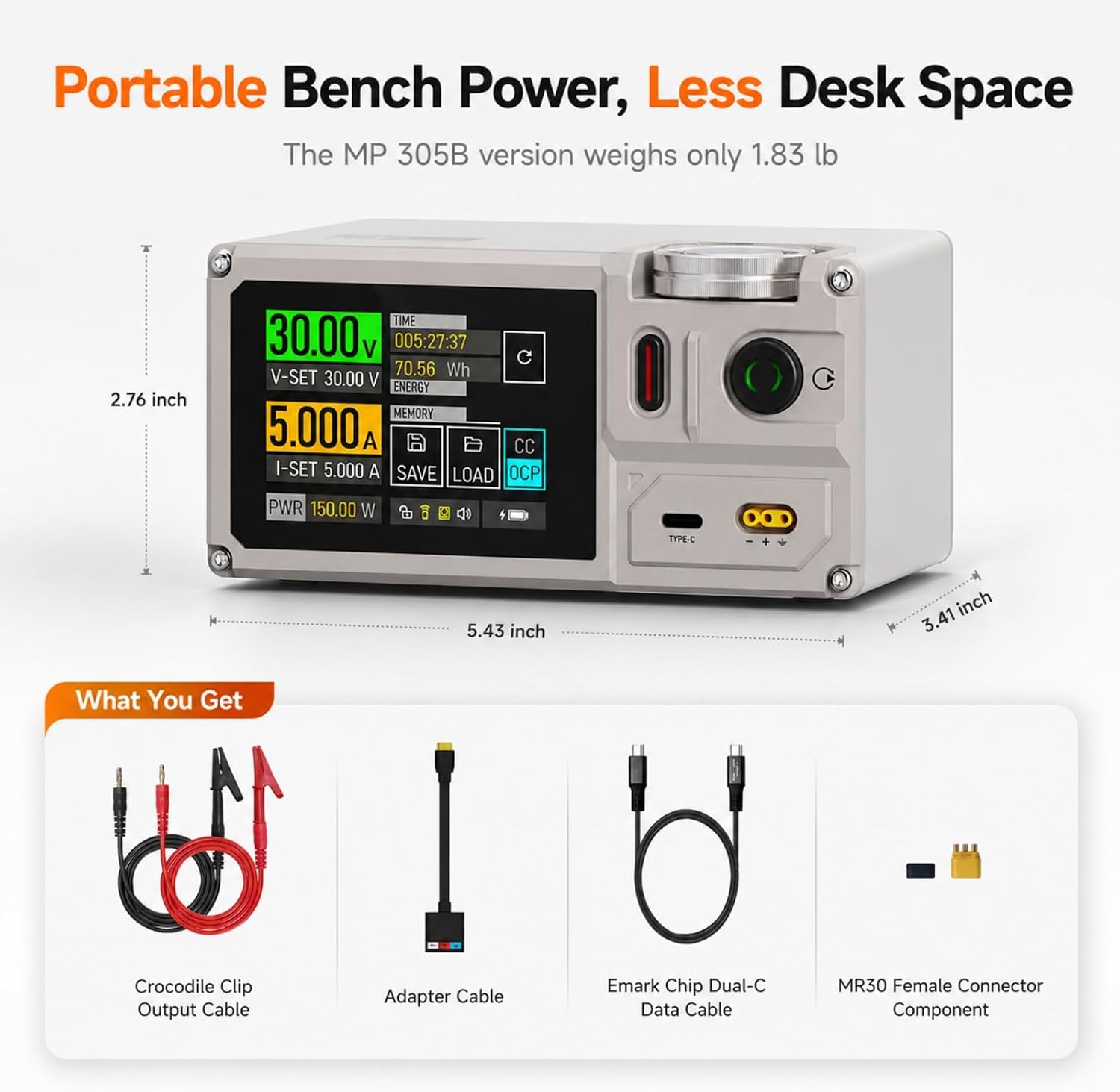
Figure 2.1: ISDT MP305B with included accessories: crocodile clip output cable, adapter cable, Emark chip dual-C data cable, and MR30 female connector component.
3. Product Features
The ISDT MP305B offers a range of advanced features:
- Ultra-Compact and Lightweight Design: Integrated innovative circuit design delivers true lab benchtop power supply performance in an ultra-compact form factor (138 x 86.5 x 70 mm). Built-in 70.56Wh Li-ion battery enables portable operation for field testing and mobile electronics work.
- True Linear Regulation: Provides clean, ultra-stable 30V 5A linear output with extremely low noise (Voltage < 2 mVrms, Current < 3 mArms) and high accuracy. Ideal for sensitive electronics testing, analog circuits, and audio equipment.
- Programmable Power Supply: Save 10 parameter sets and create custom output sequences with 100 programmable points. Customize voltage and current to create your own Power Delivery Object (PDO) profiles.
- Universal Battery Charger: Functions as both a precision variable power supply and a smart charger. Supports multiple battery chemistries including Li-Ion, LiHV, LiFePO4, NiMH, NiCd, and Pb batteries.
- Smart Desktop Power: Professional control interface with a responsive 2.8-inch IPS touchscreen, precision rotary encoder, and mobile app connectivity for remote control, real-time monitoring, and firmware updates. Dual output options include MR30 port and USB-C PD output.

Figure 3.1: Portable Linear Bench Power Supply capabilities.

Figure 3.2: Lab-Grade Performance metrics.
4. Safety Information
To ensure safe operation and prevent damage to the device or connected equipment, observe the following safety precautions:
- Do not operate the device in wet or damp conditions.
- Ensure proper ventilation to prevent overheating.
- Always connect the load before applying power.
- Do not exceed the maximum output voltage (30V) or current (5A).
- The device includes built-in safety protections:
- Overvoltage Protection (OVP)
- Overcurrent Protection (OCP)
- Overload Protection (OPP)
- Short Circuit Protection (SCP)
- Reverse Polarity Protection (RPP)
- Temperature Protection (OTP)

Figure 4.1: Built-in Safety Protections.
5. Setup
Follow these steps to set up your ISDT MP305B power supply:
- Unpack: Carefully remove all components from the packaging.
- Initial Charge (Optional): If using the built-in battery, ensure it is sufficiently charged. Connect the device to a USB-C power source using the provided USB C to C cable.
- Connect Output Cables: Use the banana plug to wire adapter and alligator clips to connect to your desired load. Ensure correct polarity. The MR30 port can also be used for output.
- Power On: Press and hold the power button until the screen illuminates.

Figure 5.1: Connecting the power supply to a circuit board.
6. Operating Instructions
The ISDT MP305B features a responsive 2.8-inch IPS touchscreen and a precision rotary encoder for intuitive control.
6.1 Basic Operation
- Power On/Off: Press and hold the power button.
- Setting Voltage and Current: On the main screen, tap the voltage (V-SET) or current (I-SET) display. Use the rotary encoder to adjust the value, or use the touchscreen keypad for precise input. Confirm your selection.
- Output Control: Tap the output button (usually indicated by a power symbol) to enable or disable the power output to your connected load.
- Monitoring: The screen displays real-time voltage, current, and power output.
6.2 Interface Overview
The touchscreen interface provides access to various settings and functions. Navigate through menus by tapping icons and using the rotary encoder for selection and adjustment.

Figure 6.1: Main Interface Overview.

Figure 6.2: Precision Touchscreen Control.
7. Programmable Functions
The MP305B allows for advanced programming to automate power delivery sequences.
7.1 Saving and Loading Parameters
- The device can save up to 10 parameter sets (memory groups).
- To save current settings, navigate to the 'SAVE' option on the main screen and select a memory slot.
- To load saved settings, navigate to the 'LOAD' option and select the desired memory slot.
7.2 Custom Output Sequences (PDO Profiles)
Create custom output sequences with up to 100 programmable points per group. This feature is ideal for testing devices that require varying voltage and current over time.
- Access the programming menu via the touchscreen.
- Define voltage, current, and duration for each step in the sequence.
- Save the sequence as a PDO profile.
- Execute the programmed sequence to automate testing.
Note: Programming functions may require operation via a mobile app or web interface for full functionality.

Figure 7.1: Programmable DC Power Supply interface.
8. Battery Charging
The MP305B can function as a universal smart charger for various battery types.
8.1 Supported Battery Chemistries
The device supports charging for:
- Li-Ion (Lithium-Ion)
- LiHV (High Voltage Lithium)
- LiFePO4 (Lithium Iron Phosphate)
- NiMH (Nickel-Metal Hydride)
- NiCd (Nickel-Cadmium)
- Pb (Lead-Acid)
8.2 Charging Procedure
- Connect the battery to the appropriate output port (MR30 or via adapter).
- Navigate to the 'Charge Setting' menu on the touchscreen.
- Select the correct battery chemistry (e.g., LiPo, Li-Ion, NiMH).
- Adjust charging parameters such as cell count (if applicable) and charging current.
- Initiate charging. Monitor the charging process on the display.

Figure 8.1: Regulated Power for Battery Charging interface.
9. Connectivity and Software
The ISDT MP305B offers advanced connectivity options for enhanced control and monitoring.
9.1 Mobile App and Remote Control
Connect your MP305B to a mobile device (iOS/Android) or computer (Windows/macOS/Linux) via Bluetooth or USB for remote control and real-time data monitoring. The dedicated app allows for:
- Setting output parameters remotely.
- Viewing real-time voltage, current, and power data.
- Managing and executing programmable sequences.
- Performing firmware updates (OTA).

Figure 9.1: Multi-platform online operation.
9.2 USB-C PD Output
The USB-C port supports Power Delivery (PD) output, allowing the MP305B to act as a PD source for compatible devices. It supports multiple protocols including PD3.0/3.1/3.2 and can read E-Mark chip protocols in USB-C cables.

Figure 9.2: USB-C PD output in use.
9.3 Official Product Video
Video 9.1: This video demonstrates the ISDT MP305B power supply's user interface and connectivity features, including how to add and connect devices via its smart desktop power capabilities.
10. Maintenance
Proper maintenance ensures the longevity and optimal performance of your ISDT MP305B.
- Cleaning: Use a soft, dry cloth to clean the exterior of the device. Do not use abrasive cleaners or solvents.
- Storage: Store the device in a cool, dry place away from direct sunlight and extreme temperatures.
- Battery Care: If storing for extended periods, ensure the internal battery is charged to approximately 50% to prolong its lifespan.
- Firmware Updates: Regularly check for and install firmware updates via the mobile app or web interface to ensure the device has the latest features and bug fixes.
11. Troubleshooting
If you encounter issues with your ISDT MP305B, refer to the following common problems and solutions:
- Device does not power on:
- Ensure the internal battery is charged or connect the device to an external USB-C power source.
- Press and hold the power button for a few seconds.
- No output voltage/current:
- Check if the output is enabled on the screen.
- Verify that the voltage and current limits are set correctly and are not at zero.
- Inspect output cables for proper connection and continuity.
- Check for any active protection (OVP, OCP, etc.) indicated on the display.
- Inaccurate readings:
- Ensure connections are secure and free from corrosion.
- Consider performing a factory reset if issues persist (refer to the device settings menu).
- Connectivity issues with app:
- Ensure Bluetooth is enabled on both the device and your mobile phone/computer.
- Restart both the MP305B and the app.
- Check for app updates.
If the problem persists, contact customer support for assistance.
12. Specifications
| Specification | Value |
|---|---|
| Brand | ISDT |
| Model Number | MP305B |
| Product Dimensions | 2.76"D x 3.41"W x 2.76"H (138 x 86.5 x 70 mm) |
| Item Weight | 1.8 pounds |
| Output Voltage | 0-30V DC |
| Output Current | 0-5A |
| Max Output Power | 150W |
| Voltage Resolution | 0.01V |
| Current Resolution | 0.001A |
| Noise (Voltage) | < 2 mVrms |
| Noise (Current) | < 3 mArms |
| Built-in Battery | 14.4V, 4900mAh, 70.56Wh Li-ion |
| Display | 2.8-inch IPS Touchscreen |
| Output Ports | MR30, USB-C PD |
| Compatible Devices | Windows, macOS, iOS, Android, Linux, devices with Li-Ion, LiHV, LiFePO4, NiMH, NiCd, and Pb batteries |
| Safety Protections | OVP, OCP, OPP, SCP, RPP, OTP |
| Certifications | CE, FCC, RoHS |
13. Warranty and Support
The ISDT MP305B Portable Linear DC Power Supply comes with a one-year warranty from the date of purchase, covering manufacturing defects and workmanship.
For technical support, warranty claims, or any inquiries regarding the product, please contact ISDT customer service through their official website or the retailer where the product was purchased. Please have your purchase receipt and product model number (MP305B) ready when contacting support.