
1. Introduction
Thank you for choosing the Generic A1522 Electric Cordless Massager. This device is designed to provide targeted muscle relief and relaxation for various body parts, including the back and neck. Featuring a portable design, long battery life, and multiple vibration patterns, it offers a convenient solution for daily wellness. Please read this manual thoroughly before use to ensure proper operation and maintenance.
2. Safety Information
- Do not use the massager on swollen, inflamed, or injured skin areas.
- Consult a physician before use if you are pregnant, have a pacemaker, or have any medical conditions.
- Keep out of reach of children.
- Do not disassemble or attempt to repair the device yourself. Contact customer support for assistance.
- Ensure the charging port is dry before connecting the charging cable.
- Avoid prolonged use on a single area to prevent discomfort.
3. Package Contents
- 1 x Generic A1522 Electric Cordless Massager
- 1 x USB Type-C Charging Cable
- 1 x Carrying Case
- 1 x User Manual
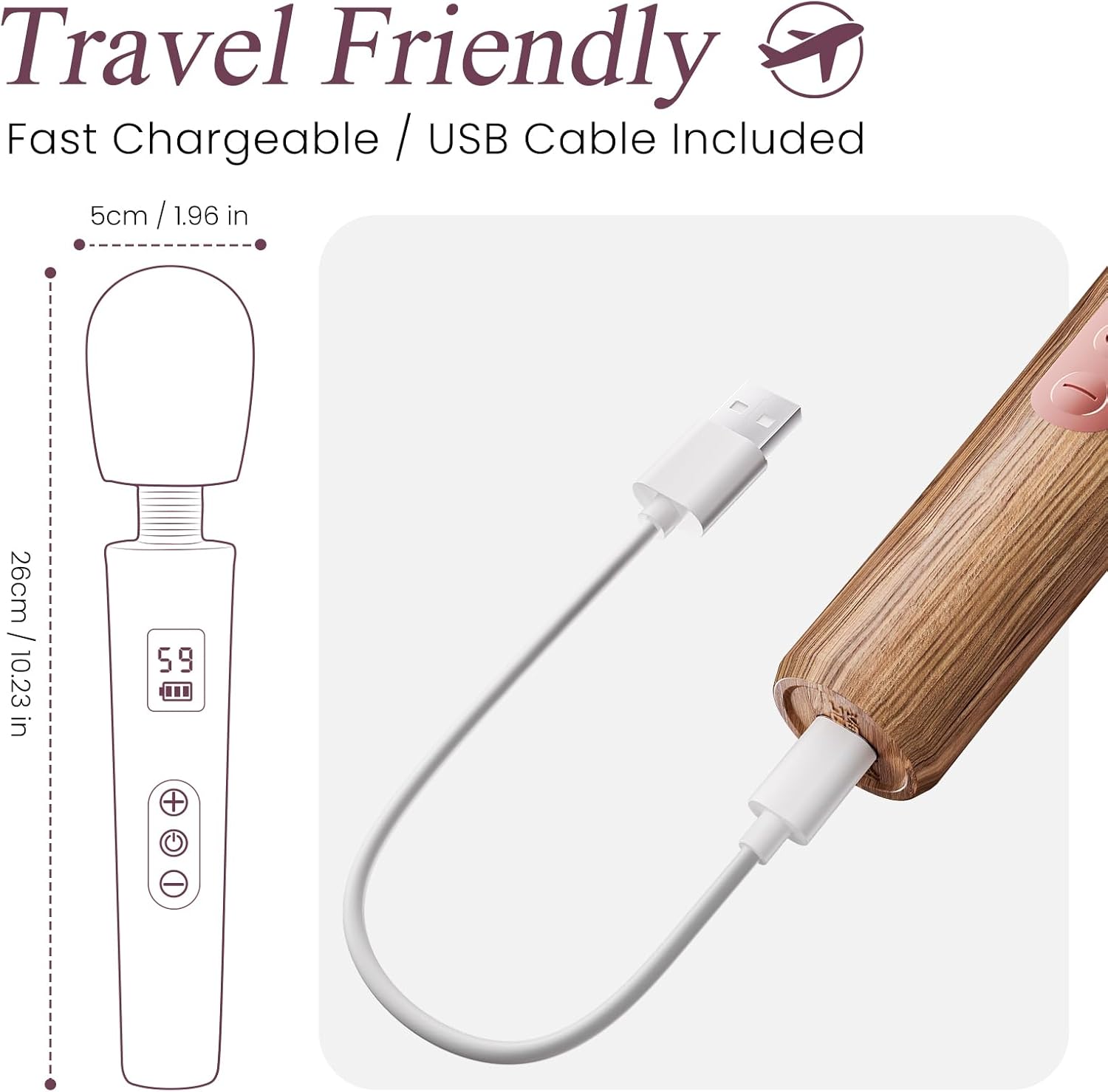
Figure 3.1: The massager shown with its included USB charging cable, highlighting its compact and travel-friendly design.
4. Product Overview
The A1522 massager features a body-safe silicone head and an intuitive control panel for ease of use.

Figure 4.1: The massager's flexible head made of luxury silicone and the integrated LED display on the handle.
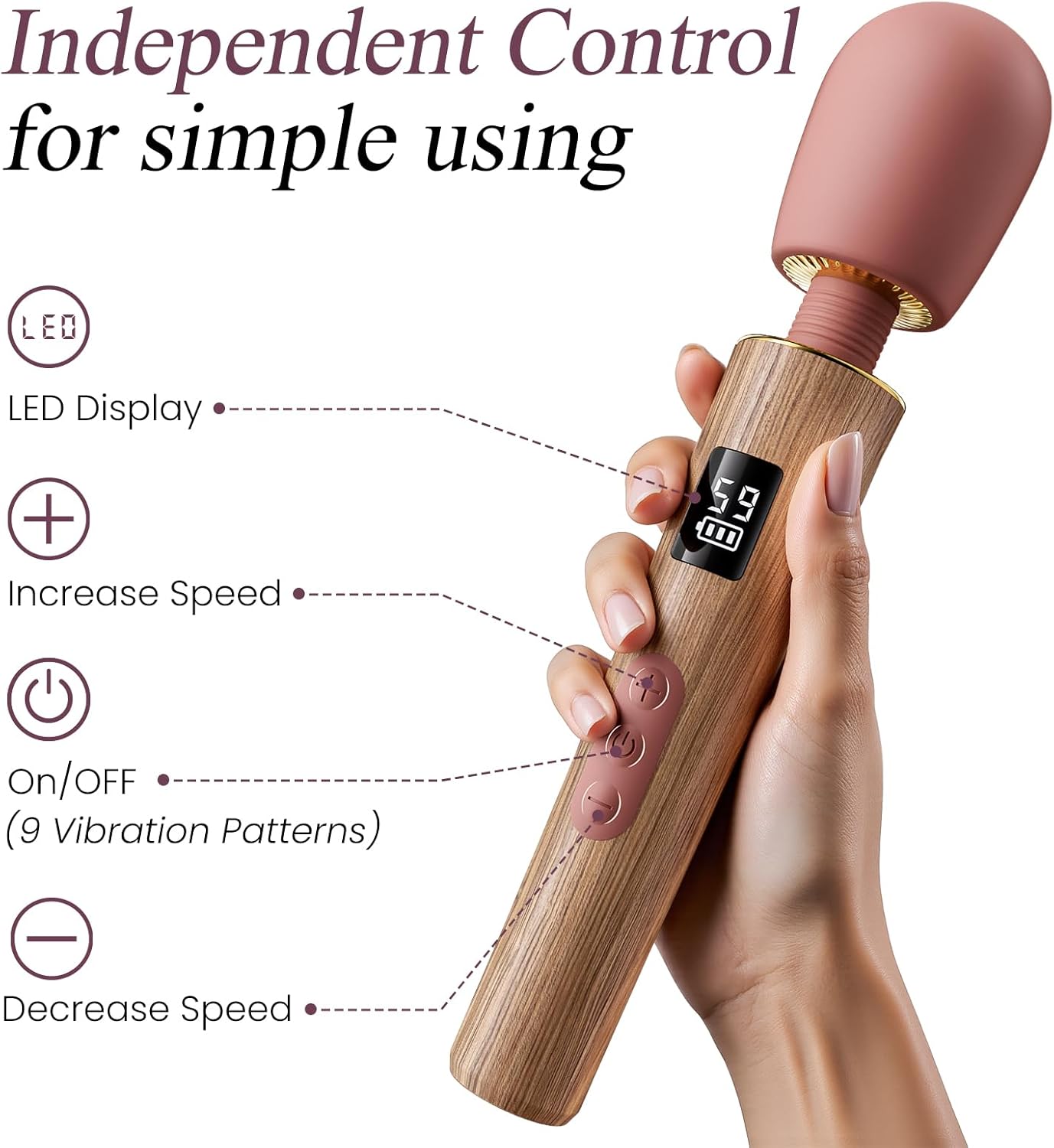
Figure 4.2: Detailed view of the control panel, including the LED display, power button, and buttons for increasing and decreasing speed.
Components:
- Flexible Head: Made from body-safe silicone for comfortable contact.
- LED Display: Shows current speed level and battery status.
- Power Button: Turns the device on/off and cycles through vibration patterns.
- Speed Increase Button (+): Increases the vibration speed.
- Speed Decrease Button (-): Decreases the vibration speed.
- Charging Port: Type-C port located at the base for recharging.
5. Setup
Before first use, fully charge the massager. Refer to the 'Charging' section for detailed instructions.
6. Charging
The massager is equipped with a built-in rechargeable battery. A full charge provides up to 8 hours of use.
- Locate the Type-C charging port at the base of the massager.
- Ensure the port is dry before connecting the charging cable.
- Insert the Type-C end of the provided USB cable into the massager's charging port.
- Connect the USB-A end of the cable to a compatible USB power adapter (not included) or a computer USB port.
- The LED display will indicate charging status. A full charge typically takes approximately 60 minutes.
- Once fully charged, disconnect the charging cable.

Figure 6.1: Visual representation of the massager's working time (180 minutes) and charging time (60 minutes).
7. Operation
The A1522 massager offers 9 distinct vibration patterns and 5 adjustable speed levels for a customized experience.

Figure 7.1: The massager's capabilities, including 9 vibration patterns, 5 speed levels, and quiet operation below 60dB.
Using the Massager:
- Power On/Off: Press and hold the Power button (⏻) for 2 seconds to turn the massager on or off.
- Change Vibration Pattern: While the massager is on, short press the Power button (⏻) to cycle through the 9 available vibration patterns. The LED display will show the current pattern.
- Adjust Speed Level: Use the Speed Increase button (+) to increase the vibration speed or the Speed Decrease button (-) to lower it. There are 5 speed levels. The LED display will show the current speed.
- Application: Gently apply the flexible head to the desired body area. Move the massager slowly and steadily.
- Session Duration: It is recommended to use the massager for 10-15 minutes per session on any given area.
8. Maintenance and Cleaning
The A1522 massager features an IPX6 waterproof design, allowing for easy cleaning.

Figure 8.1: The massager demonstrating its IPX6 waterproof capability, suitable for rinsing under water.
Cleaning Instructions:
- After each use, clean the massager with mild soap and warm water.
- Rinse thoroughly under running water.
- Wipe dry with a soft, lint-free cloth.
- Do not use alcohol, gasoline, or abrasive cleaners, as these may damage the silicone material.
- Store the massager in its carrying case in a cool, dry place away from direct sunlight.
9. Troubleshooting
| Problem | Possible Cause | Solution |
|---|---|---|
| Massager does not turn on. | Battery is depleted. | Charge the massager fully. |
| Vibration is weak or inconsistent. | Low battery. | Recharge the massager. |
| Massager does not charge. | Charging cable or adapter faulty; charging port obstructed. | Try a different USB cable or power adapter. Ensure the charging port is clean and dry. |
| Buttons are unresponsive. | Device malfunction. | Try resetting the device by fully discharging and then recharging. If the issue persists, contact customer support. |
10. Specifications
- Model: A1522
- Material: Body-safe Silicone
- Vibration Patterns: 9
- Speed Levels: 5
- Noise Level: <60dB
- Battery: Built-in Rechargeable (up to 8 hours working time)
- Charging Time: Approximately 60 minutes
- Charging Type: USB Type-C
- Waterproof Rating: IPX6
- Dimensions: 7.48 x 1.58 x 1.57 inches (approximate)
- Weight: 4.23 ounces (approximate)
- Manufacturer: Generic
11. Warranty and Support
Specific warranty information for the Generic A1522 Electric Cordless Massager is not provided in the product data. For any product inquiries, technical support, or warranty claims, please contact the retailer or manufacturer directly through their official support channels.


