
Temprium SAC001-B-12K
Temprium 12000 BTU Mini Split AC/Heating System User Manual
Model: SAC001-B-12K | Brand: Temprium
1. Introduction
This manual provides essential information for the safe and efficient operation, installation, and maintenance of your Temprium 12000 BTU Mini Split AC/Heating System. Please read this manual thoroughly before installation and use, and keep it for future reference. This system offers 12,000 BTU cooling and 12,300 BTU heating, suitable for spaces up to 750 sq. ft., featuring 22 SEER2 energy efficiency, DC Inverter technology, and R32 refrigerant.

Image: Temprium Mini Split AC providing comfort in a modern living space, highlighting 12000 BTU cooling and 12300 BTU heating capacity for up to 750 sq.ft.
Key Features:
- 22 SEER2 Energy Efficiency: Advanced DC Inverter technology for stable temperatures and reduced energy consumption.
- 5-in-1 Comfort System: Integrates cooling, heating, dehumidifier, fan, and auto modes.
- Smart Control: WiFi and Alexa compatible for remote and voice control.
- Ultra-Quiet Operation: Operates as low as 23 dB, with Sleep Mode for undisturbed nights.
- Self-Cleaning Function: Features 5th-Gen Auto-Cleaning for improved air quality and system longevity.
Video: Overview of the Temprium Mini Split AC, highlighting its high efficiency and smart control features for modern home comfort.
2. Setup and Installation
Professional installation by a licensed HVAC technician is strongly recommended for optimal performance, safety, and long-term reliability. This ensures proper refrigerant handling, electrical connections, and system calibration.
Package Contents:

Image: Detailed view of the Temprium Mini Split AC package contents, including indoor unit, outdoor unit, remote control, mounting bracket, installation diagram, drain hose, communication cable, AAA batteries, copper lines, wall cap, tape, putty, and power cable.
The system ships in two boxes. Verify all accessories against the packing list upon receipt.
Installation Steps Overview:
- Indoor Unit Placement: Ensure the wall can support the unit's weight. Maintain at least 5.9 inches (15cm) from the ceiling, 7.9 inches (20cm) from side walls, and 98.4 inches (250cm) above the floor.
- Mounting Plate Installation: Securely fix the mounting plate to the wall using expansion bolts, ensuring it is perfectly horizontal with a spirit level.
- Wall Hole Drilling: Drill a hole through the wall for the pipes, ensuring a 5 to 10-degree downward slope to the outside for proper condensate drainage.
- Wiring Connections: Open the wiring terminal cover on the indoor unit. Refer to the wiring diagram and connect wires to their corresponding terminals, tightening screws with a torque screwdriver.
- Drain Hose and Copper Pipe Connections: Securely attach the drain hose and connect the copper pipes, ensuring smooth, undamaged flare ends and proper thread engagement with a torque wrench.
- Insulation and Bundling: Wrap connected flare joints with insulation and use strapping tape to bundle the drain hose, cables, and copper pipes tightly.
- Pipe Routing: Carefully pass the bundled pipes and cables through the wall hole, ensuring pipes are not twisted and the drain hose maintains a downward slope. Use pipe protection rings and sealing compound.
- Indoor Unit Mounting: Lift and hook the indoor unit onto the mounting plate, shifting it gently to ensure secure engagement.
- Outdoor Unit Placement: Place the outdoor unit on a firm, level surface. Ensure minimum clearances: 12 inches in front, 4 inches at the air inlet side, and 20 inches above for heat dissipation and maintenance.
- Outdoor Unit Wiring: Open the wiring terminal cover on the outdoor unit. Thread the power cord and connect power and communication wires to their corresponding terminals, following the wiring diagram.
- Outdoor Unit Copper Pipe Connections: Hand-tighten connecting nuts, then use a torque wrench for final tightening.
- System Evacuation: Before opening service valves, evacuate the connected piping system using a vacuum pump and manifold gauge until vacuum is achieved.
- Open Service Valves: Fully open the liquid and gas service valves on the outdoor unit using a hex wrench. Install and tighten all valve covers.
- Final Checks: Neaten and secure outdoor piping and cables. Power the system and perform a test run using the remote to check for smooth operation and proper cooling/heating.
Video: Detailed installation guide for the Temprium Mini Split AC, covering unboxing, tool requirements, indoor and outdoor unit setup, wiring, and pipe connections.
3. Operating Instructions
Your Temprium Mini Split AC offers multiple modes and smart features for personalized comfort. Control is available via the included remote, a dedicated WiFi app, or voice commands with Alexa.
Operating Modes:
- Cool Mode: Provides cooling down to 60°F.
- Heat Mode: Provides heating up to 90°F, operating in outdoor temperatures as low as 5°F.
- Dehumidifier Mode: Removes up to 2.1 pints of moisture per hour.
- Fan Mode: Circulates air without heating or cooling, with 5 adjustable wind speeds (Low, Mid, High, Turbo, Auto).
- Auto Mode: Automatically adjusts settings for optimal comfort.

Image: Remote control displaying various operating modes (Cool, Heat, Dry, Fan, Auto) and their corresponding icons, illustrating the 5-in-1 functionality of the Temprium Mini Split AC.
Smart Features:
- WiFi & Alexa Compatibility: Control your unit remotely via the mobile app or hands-free with Alexa voice commands.
- 24-Hour Timer: Schedule operation for convenience and energy savings.
- Sleep Mode: Reduces operating speed and adjusts temperature for optimal comfort and quietness (as low as 23 dB), with dimmable display light.
- Health Mode: Enhances air quality.
- ECO Mode: Optimizes energy usage.
- Anti-F Mode: Prevents mold and mildew growth.
- I-Feel: Remote control senses temperature at its location for precise comfort.
- 4D Air Flow: Ensures even air distribution.
- Child Lock: Prevents unintended changes to settings.

Image: A person using a smartphone app to control the Temprium Mini Split AC, with an Alexa device nearby, demonstrating WiFi and voice control capabilities.
4. Maintenance
Regular cleaning and maintenance are crucial for ensuring the longevity, efficiency, and optimal performance of your Temprium Mini Split AC. Always turn off and unplug the unit before performing any cleaning or maintenance.
Exterior Cleaning:
Wipe the exterior of the unit with a soft, damp cloth. Avoid using harsh chemicals or excessive water.
Air Filter Cleaning:
- Gently pull the air filter upwards and out from the unit.
- Rinse the filter thoroughly with clean water.
- Allow the filter to air dry completely in a dry location before reinserting.
- Important: Never operate the unit without the air filter installed.
Self-Cleaning Function (iClean):
Regularly use the iClean self-cleaning function via the remote control. This feature helps keep the internal evaporator clean and dry, preventing mold and extending the unit's lifespan. The 5th-Gen Auto-Cleaning system includes 135°F high-temperature sterilization for up to 99.9% sterilization efficiency.

Image: Diagram illustrating the 5th-Gen Auto-Cleaning System of the Temprium Mini Split AC, showing steps like condense, deep freeze, melt & wash, and 135°C sterilization, along with a removable and washable filter.
Video: Guide on routine and deep cleaning tips for the Temprium Mini Split AC, demonstrating how to clean the exterior, remove and wash air filters, and utilize the iClean self-cleaning function.
5. Troubleshooting
If you encounter issues with your Temprium Mini Split AC, please refer to the following common troubleshooting steps. For more complex problems, contact customer support.
Common Issues:
- Unit not turning on: Check power supply, ensure the unit is plugged in, and circuit breaker is not tripped.
- Insufficient cooling/heating: Verify correct mode selection and temperature settings. Ensure air filters are clean and not obstructed. Check for open windows or doors.
- Unusual noises: Minor noises during operation are normal. If loud or persistent, check for loose parts or contact support.
- Water leakage: Ensure the drain hose is properly connected and not clogged. Check for proper installation slope.
- Remote control not working: Replace batteries. Ensure no obstructions between remote and unit.
6. Specifications
Detailed technical specifications for the Temprium 12000 BTU Mini Split AC/Heating System.
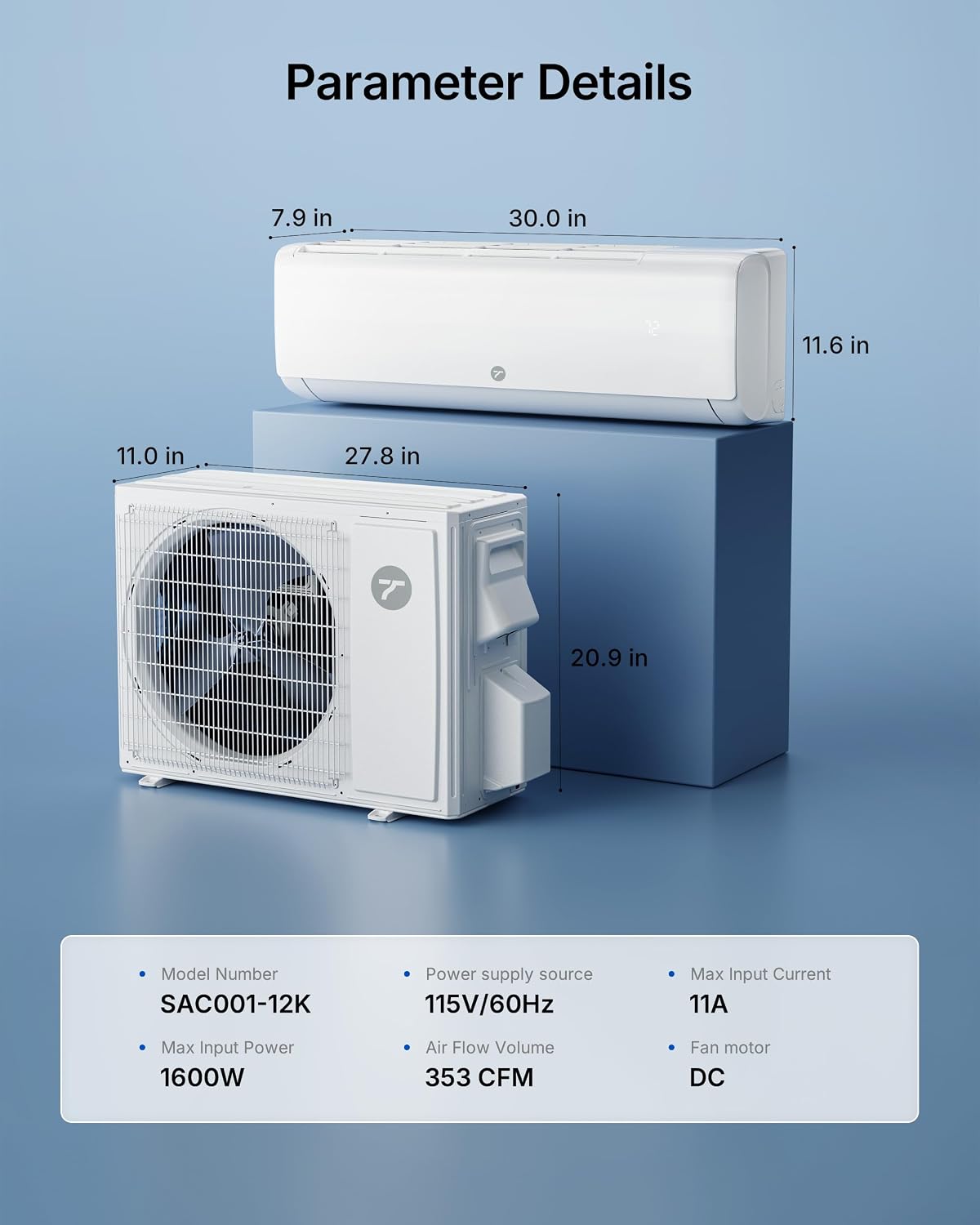
Image: Technical diagram displaying the dimensions of both the indoor and outdoor units of the Temprium Mini Split AC, along with key parameters like model number, power supply, max input power, air flow volume, max input current, and fan motor type.
| Feature | Specification |
|---|---|
| Brand | Temprium |
| Model Name | 12K 115V Mini Split AC |
| Model Number | SAC001-B-12K |
| Cooling Power | 12000 British Thermal Units |
| Heating Capacity | 12300 British Thermal Units |
| Coverage Area | Up to 750 Sq.Ft |
| Seasonal Energy Efficiency Ratio (SEER2) | 22.0 |
| Voltage | 115 Volts |
| Noise Level | 23 Decibels (Ultra Quiet) |
| Refrigerant | R-32 |
| Product Dimensions (Indoor Unit) | 7.9"D x 30"W x 11.6"H |
| Item Weight | 63.5 Pounds |
| Control Method | Remote, App Control, Voice Control (Alexa Compatible) |
| Special Features | 2.1 Pints Dehumidifying Per Hour, Auto Clean (135°F High Temperature Sterilization), Health Function, ECO Mode, 4 Way Swing, 26ft Ultra-Long Airflow, 353 CFM Airflow Volume, Fast Cooling/Heating, Inverter Compressor, Energy Efficient, Sleep Mode |
7. Warranty and Support
Temprium is committed to providing reliable products and excellent customer service.
Warranty Information:
This system includes a 3-year limited warranty from Temprium, providing dependable customer support for added peace of mind after purchase. The manufacturer's warranty is 1 year.
Customer Support:
- Lifetime Technical Support: Access to technical assistance and installation guidance.
- Direct Manufacturer Access: Connect directly with the manufacturer for support.
- Multilingual Help: Support available in various languages.
- Contact: For any questions or assistance, please refer to the contact information provided in your product packaging or visit the official Temprium website.
Related documentsSAC001-B-12K


Ask a question about this manual
Ask about setup, troubleshooting, compatibility, parts, safety, or missing instructions. Manuals+ will review the question and use this page’s manual context to help answer it.