
1. Safety Information
Before operating your Hopepeak T10 Electric Trike Bike, please read this manual thoroughly. Failure to follow instructions and safety guidelines may result in serious injury or damage to the product. Always wear a helmet and appropriate safety gear when riding. Ensure all components are correctly assembled and secured before each use. Regularly inspect brakes, tires, and battery for proper function.
- Always wear a certified helmet and other protective gear.
- Perform a pre-ride inspection: check tire pressure, brake function, and battery charge.
- Adhere to local traffic laws and regulations.
- Do not ride under the influence of alcohol or drugs.
- Avoid riding in adverse weather conditions or on slippery surfaces.
2. Package Contents
Your Hopepeak T10 Electric Trike Bike package should contain the following items:
- Hopepeak T10 Electric Trike Bike (partially assembled)
- 48V 10.4AH Removable Battery
- Battery Charger
- Front Wheel
- Front Fender
- Front Basket
- Rear Fenders (2)
- Rear Basket
- Seat with Backrest
- Pedals (2)
- Assembly Tools (wrenches, hex keys)
- User Manual

Image: All components of the Hopepeak T10 Electric Trike Bike laid out for assembly.
3. Setup
Follow these steps to assemble your Hopepeak T10 Electric Trike Bike. For a visual guide, refer to the installation video below.
Video: Hopepeak T10 Electric Trike Bike Installation Guide. This video provides a step-by-step visual walkthrough of the assembly process.
- Unpacking and Preparation (Video: 0:00 - 0:05): Carefully remove the trike and all components from the packaging. Remove all protective wrapping and foam.
- Unfolding the Frame (Video: 0:16 - 0:22): Unfold the main frame of the trike and secure the folding mechanism latch.
- Install the Handlebar (Video: 0:23 - 0:51): Insert the handlebar stem into the front fork tube. Adjust the height to your preference and secure it using the quick-release lever and tightening bolt.
- Install the Front Wheel (Video: 0:52 - 1:15): Align the front wheel with the fork and insert the axle. Secure it with the provided nuts and ensure the disc brake rotor is correctly seated in the caliper.
- Install the Front Fender (Video: 1:16 - 1:41): Attach the front fender to the front fork using the screws and hex key. Ensure it is centered over the wheel.
- Install the Front Basket (Video: 1:42 - 1:55): Mount the front basket to the designated bracket on the handlebar stem using the provided hardware.
- Install the Rear Fenders (Video: 1:56 - 2:27): Attach the two rear fenders over the rear wheels using the provided screws and brackets.
- Install the Rear Basket (Video: 2:28 - 3:14): Assemble the rear basket and secure it to the rear rack of the trike using the bolts and nuts.
- Install the Seat (Video: 3:15 - 3:27): Insert the seat post into the frame's seat tube. Adjust the height and angle for comfort, then secure it with the quick-release clamp.
- Install the Pedals (Video: 3:28 - 3:43): Identify the left (L) and right (R) pedals. Screw them into the corresponding crank arms. Remember that the left pedal screws counter-clockwise.
- Connect Cables (Video: 3:50 - 3:58): Connect any disconnected electrical cables, ensuring they click securely into place.
- Battery Installation and Charging (Video: 3:59 - 4:24): Insert the removable battery into its compartment and lock it. Connect the charger to the battery port and a power outlet. The indicator light on the charger will show charging status (red for charging, green for fully charged).
4. Operating Instructions
Familiarize yourself with the controls and functions of your Hopepeak T10 Electric Trike Bike for a safe and enjoyable ride.
4.1 Powering On/Off
- To Power On: Insert the key into the battery lock, turn it to the 'ON' position, then press and hold the power button on the handlebar display.
- To Power Off: Press and hold the power button on the display until it turns off. Turn the key to the 'OFF' position and remove it for security.
4.2 Display Functions (Video: 4:28 - 4:38)

Image: Smart LCD Display showing current speed, battery level, and pedal-assist level.
The LCD display provides essential riding information:
- Speed: Current riding speed (MPH/KMH).
- Battery Level: Indicates remaining battery charge.
- PAS Level: Pedal-Assist System level (0-5).
- Trip/ODO: Trip distance and Odometer (total distance).
- Headlight Indicator: Shows if the headlight is on.
4.3 Riding Modes
The Hopepeak T10 offers versatile riding options:
- Manual Mode: Ride like a traditional bicycle using pedal power only.
- Pedal-Assist Mode (PAS): The motor provides assistance as you pedal. Adjust the PAS level (1-5) on the display to control the amount of assistance.
- Full Electric Mode: Use the throttle to engage the motor without pedaling.
4.4 Braking System
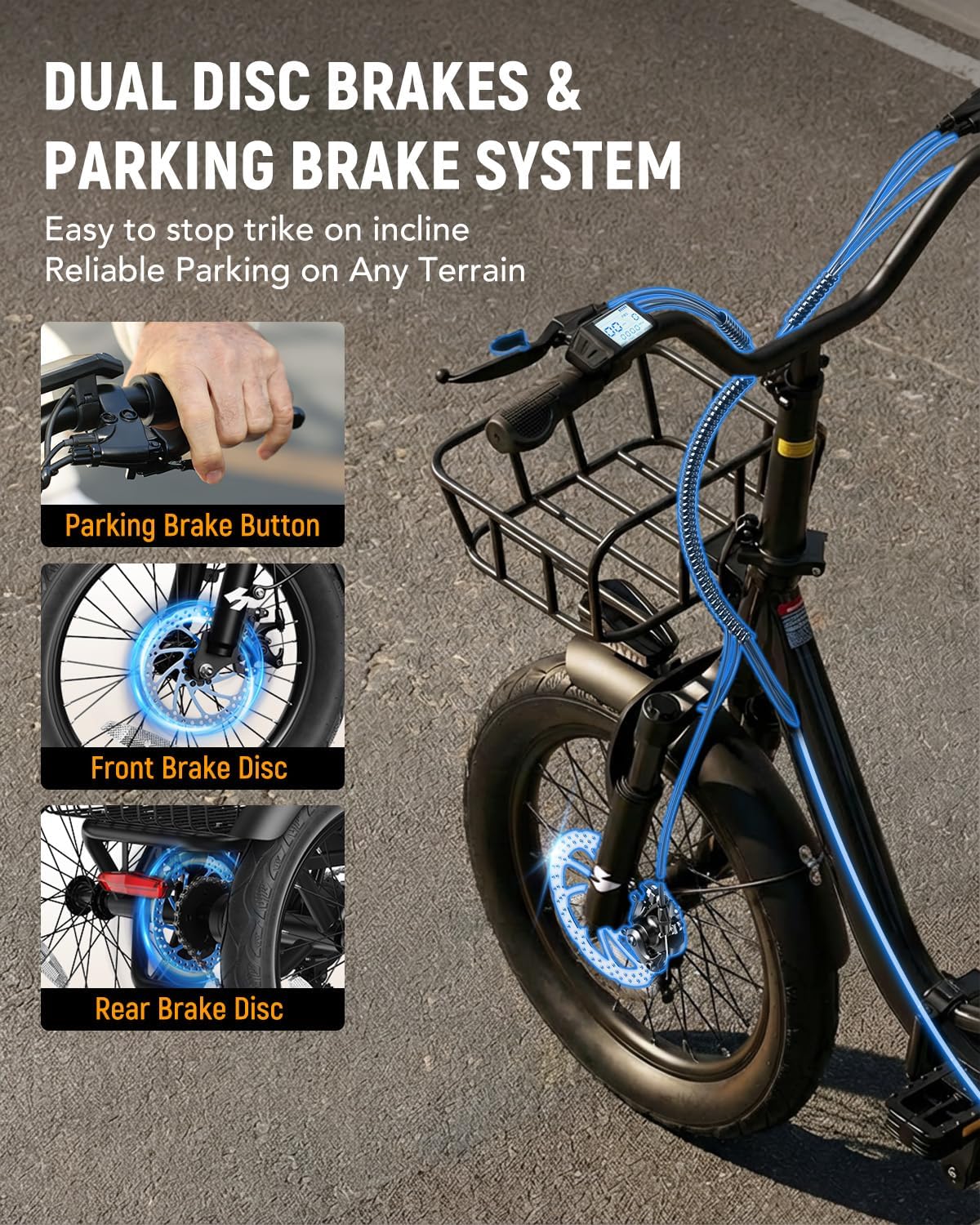
Image: Close-up of the dual disc brakes and the parking brake lever on the handlebar.
The trike is equipped with dual disc brakes for reliable stopping power and a parking brake for stability when stationary.
- Disc Brakes: Squeeze the brake levers on the handlebars to engage the front and rear disc brakes.
- Parking Brake: Engage the parking brake lever (typically a small button or switch on one of the brake levers) to lock the brakes when parked, especially on inclines.
4.5 Folding Mechanism
The Hopepeak T10 features a foldable frame for easy storage and transport. To fold, locate the main folding latch on the frame (as shown in the setup video at 0:19), disengage it, and carefully fold the frame. Ensure the latch is securely re-engaged when unfolding for riding.
5. Maintenance
Regular maintenance ensures the longevity and safe operation of your electric trike.
- Battery Care: Charge the battery fully after each ride. Store the battery in a cool, dry place and charge it at least once a month if not in use to maintain its health.
- Tire Pressure: Check tire pressure before each ride. Maintain recommended PSI (usually indicated on the tire sidewall) for optimal performance and safety.
- Brake Inspection: Regularly check brake pads for wear and brake levers for proper tension. Adjust or replace as needed.
- Cleaning: Clean the trike with a damp cloth. Avoid using high-pressure water jets directly on electrical components.
- Chain Lubrication: Lubricate the chain periodically to ensure smooth operation and prevent rust.
- Fastener Check: Periodically check all bolts, nuts, and quick-release levers to ensure they are tight and secure.
6. Troubleshooting
This section addresses common issues you might encounter with your Hopepeak T10 Electric Trike Bike.
| Problem | Possible Cause | Solution |
|---|---|---|
| Motor not engaging/No power | Battery low or off; loose cable connection; display off. | Check battery charge and ensure it's turned on. Verify all electrical connections are secure. Turn on the display. |
| Battery not charging | Charger not connected properly; faulty charger/battery. | Ensure charger is securely plugged into both the battery and wall outlet. Check charger indicator light. Contact support if issue persists. |
| Brakes feel weak | Worn brake pads; loose brake cable; air in hydraulic system (if applicable). | Inspect brake pads and replace if worn. Adjust brake cable tension. For hydraulic brakes, professional service may be required. |
| Unusual noises during ride | Loose components; dry chain; tire rubbing. | Check all fasteners. Lubricate the chain. Inspect tires and fenders for rubbing. |
7. Specifications
Key technical specifications for the Hopepeak T10 Electric Trike Bike:
| Feature | Detail |
|---|---|
| Bike Type | Electric Trike Bike |
| Motor | 1200W Brushless Motor (Peak) |
| Top Speed | Up to 18 MPH |
| Battery | 48V 10.4AH Removable Battery (499.2WH Capacity) |
| Max Range | Up to 55 Miles (Pedal-Assist Mode) |
| Wheel Size | 20 Inches (Fat Tires) |
| Frame Material | Carbon Steel |
| Brake Style | Dual Disc Brakes with Parking Brake |
| Suspension | Front Fork Suspension |
| Load Capacity | Up to 400 lbs |
| Rider Height Range | 5'1" - 6'3" |
| Special Features | Folding Frame, Step-Thru Design, Rear Differential, Smart LCD Display, Front & Rear Lights, Front & Rear Baskets, Cushioned Seat with Backrest |
8. Warranty and Support
Your Hopepeak T10 Electric Trike Bike may be eligible for a 2-Year Protection Plan, offering extended coverage beyond the standard manufacturer's warranty. Please refer to your purchase documentation for specific warranty details and registration instructions.
8.1 Customer Support
For technical assistance, warranty claims, or general inquiries, please contact Hopepeak customer support. Refer to the contact information provided in your product packaging or on the official Hopepeak website.