
1. Product Overview
The Afidano L6 Electric Cigar Humidor Cabinet is engineered to provide an optimal environment for the long-term aging and storage of cigars. This unit features an integrated climate control system that includes humidity regulation, PTC heating, fan cooling, and dehumidification, ensuring stable temperature and humidity levels essential for cigar preservation. The cabinet's construction utilizes a solid wood frame and a Spanish cedar interior, which naturally assists in moisture absorption and enhances cigar aroma. Its sophisticated design, characterized by a high-gloss piano black finish, incorporates a user-friendly digital control panel for precise monitoring and adjustment of environmental settings.
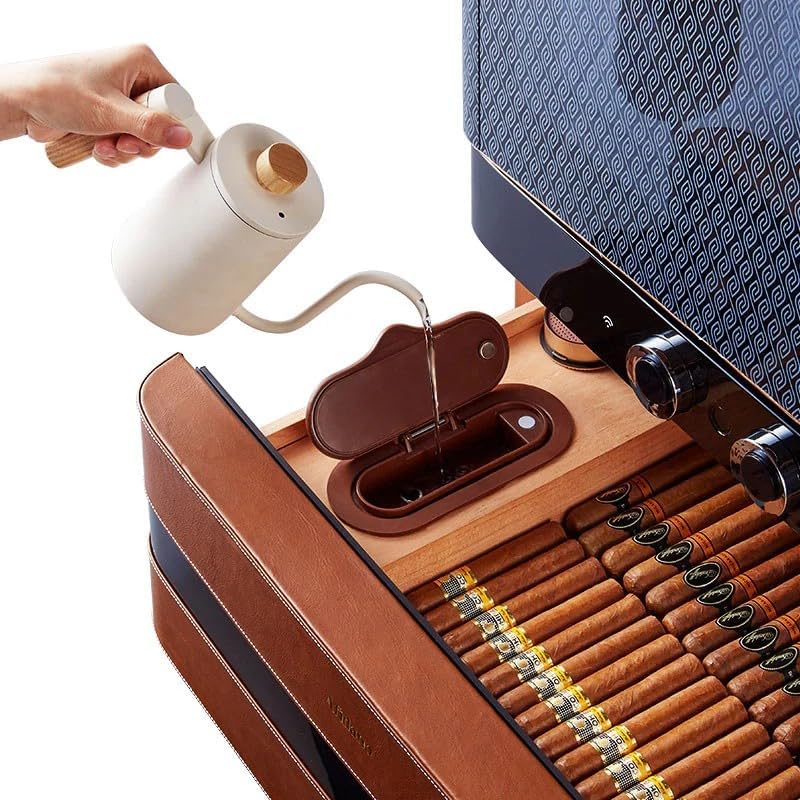
Figure 1: Exterior view of the Afidano L6 Electric Cigar Humidor Cabinet.
Video 1: An overview of the Afidano L6 Cigar Humidor, showcasing its design and features in a showroom setting.
2. Setup Instructions
2.1 Unpacking and Placement
- Carefully remove the humidor from its packaging. Inspect for any shipping damage.
- Place the humidor on a stable, level surface away from direct sunlight, heat sources, or areas with significant temperature fluctuations. Ensure adequate ventilation around the unit.
- Allow the humidor to stand upright for at least 24 hours before plugging it in, especially if it was transported horizontally. This allows refrigerants to settle.
2.2 Initial Cleaning
- Wipe the interior and exterior surfaces with a soft, damp cloth. Avoid abrasive cleaners or solvents.
- Ensure the Spanish cedar shelves and drawers are clean and free of any dust or debris.
2.3 Power Connection
- Connect the power cord to a grounded electrical outlet.
- Turn on the humidor using the main power switch, if present, or by interacting with the digital control panel.
2.4 Seasoning the Humidor
Before storing cigars, the Spanish cedar interior must be properly seasoned to prevent it from absorbing moisture from your cigars. This process typically takes 3-7 days.
- Fill the water reservoir with distilled water. Ensure the water level alarm is not triggered.
- Set the desired humidity level (e.g., 70%) and temperature (e.g., 68°F or 20°C) on the digital control panel.
- Allow the humidor to run until the internal humidity stabilizes at the set level. This may take several days. Do not place cigars inside during this period.
- Once stable, the humidor is ready for cigar storage.

Figure 2: Illustration of filling the water reservoir with distilled water for humidification.
3. Operating Instructions
3.1 Digital Control Panel
The Afidano L6 features a smart digital control panel for precise management of the internal environment.
- Temperature Setting: Use the temperature controls to set your desired temperature between 60–71°F (16–22°C). The system will automatically maintain this range using PTC heating and fan cooling.
- Humidity Setting: Adjust the humidity controls to your preferred level, typically between 60–75%. The integrated humidity control and dehumidification functions will work to achieve and maintain this range.
- Monitoring: The digital LED screen displays current temperature and humidity levels, allowing for easy monitoring.

Figure 3: Close-up of the digital control panel, showing temperature and humidity displays, and the fingerprint lock sensor.
3.2 Fingerprint Lock
The humidor is equipped with a fingerprint lock for secure access.
- Refer to the separate fingerprint lock setup guide for initial registration of fingerprints.
- To unlock, place your registered finger on the sensor. The lock will disengage, allowing the door to be opened.
3.3 APP Control
Manage your humidor settings remotely using the dedicated mobile application.
- Download the Afidano app from your device's app store.
- Follow the in-app instructions to pair your humidor with your mobile device.
- Through the app, you can monitor current conditions, adjust temperature and humidity settings, and receive alerts.

Figure 4: The Afidano mobile application interface shown on a smartphone, demonstrating remote control capabilities.
3.4 Loading Cigars
- Arrange cigars on the Spanish cedar shelves and in the drawers. Ensure proper air circulation by not overcrowding the humidor.
- The cleverly arranged drawers and shelves, combined with designed openings, optimize air circulation for smooth airflow within the cabinet.

Figure 5: Interior view of the humidor, displaying cigars neatly organized on Spanish cedar shelves and in drawers.
4. Maintenance
4.1 Water Reservoir Refilling
- Monitor the water level in the reservoir regularly. The unit may have a water level alarm to indicate when refilling is needed.
- Always use distilled water to prevent mineral buildup and ensure proper humidification.
- Carefully pour distilled water into the designated reservoir opening. Avoid overfilling.
4.2 Cleaning
- Exterior: Wipe the exterior surfaces with a soft, dry, or slightly damp cloth. Avoid harsh chemicals that could damage the finish.
- Interior: Periodically remove cigars, shelves, and drawers. Wipe the interior with a clean, damp cloth (distilled water only). Allow to air dry completely before returning components and cigars.
- Spanish Cedar: Do not use cleaning agents on Spanish cedar. If necessary, gently wipe with a cloth dampened with distilled water.
4.3 Odor Prevention
- The all-wood construction helps prevent odors. Avoid introducing items with strong scents into the humidor.
- If an unusual odor develops, remove all cigars and components, clean the interior as described above, and allow it to air out for a day before reassembling.
5. Troubleshooting
| Problem | Possible Cause | Solution |
|---|---|---|
| Humidity too low | Low water in reservoir; door not sealed; ambient conditions too dry. | Refill water reservoir with distilled water. Check door seal for obstructions. Ensure humidor is not in an excessively dry environment. |
| Humidity too high | Overfilled reservoir; ambient conditions too humid; dehumidification not active. | Check reservoir level. Ensure humidor is not in an excessively humid environment. Verify dehumidification setting on control panel. |
| Temperature not stable | Door left open; humidor near heat source/AC vent; fan obstruction. | Ensure door is closed securely. Relocate humidor away from extreme temperature sources. Check for any obstructions to internal fans. |
| Digital display not working | Power issue; loose connection. | Check power cord connection. Ensure outlet is functional. If problem persists, contact customer support. |
| Fingerprint lock not responding | Unregistered fingerprint; sensor dirty; temporary malfunction. | Ensure a registered finger is used. Clean the sensor. Try again after a few moments. If persistent, refer to the fingerprint lock guide or contact support. |
6. Specifications
| Feature | Detail |
|---|---|
| Model | L6 |
| Product Dimensions | 23.4"W x 23.6"D x 65.4"H |
| Cigar Capacity | 1500+ |
| Product Weight | 200.6 lbs |
| Temperature Range | 62°F - 74°F (±1.8°F) / 16.6°C - 23.3°C (±1°C) |
| Humidity Range | 60% - 75% (±3%) |
| Power | 60W |
| Noise Level | 43 dB |
| Drawers Material | Spanish Cedar |
| Number of Drawers | 8 |
| Temperature Control | Screen Knob |
| Interior Lighting | Top and Sides (x2), Sides (x1) |
| APP Control | Yes |
| Fingerprint Lock | Yes |
| Water Level Alarm | Yes |
7. Warranty and Support
For detailed warranty information, please refer to the warranty card included with your product or contact Afidano customer support directly. Keep your purchase receipt as proof of purchase for any warranty claims.
For technical assistance, troubleshooting beyond this manual, or spare parts, please contact the manufacturer's customer service department.

