
Samsung Galaxy S26 Ultra
Samsung Galaxy S26 Ultra 5G User Manual
Model: Galaxy S26 Ultra
1. Product Overview
The Samsung Galaxy S26 Ultra 5G is a high-performance smartphone designed for advanced users, featuring a built-in privacy display, advanced AI capabilities, a 200MP camera system, and a powerful Snapdragon 8 Elite Gen 5 processor. This manual provides essential information for setting up, operating, and maintaining your device.
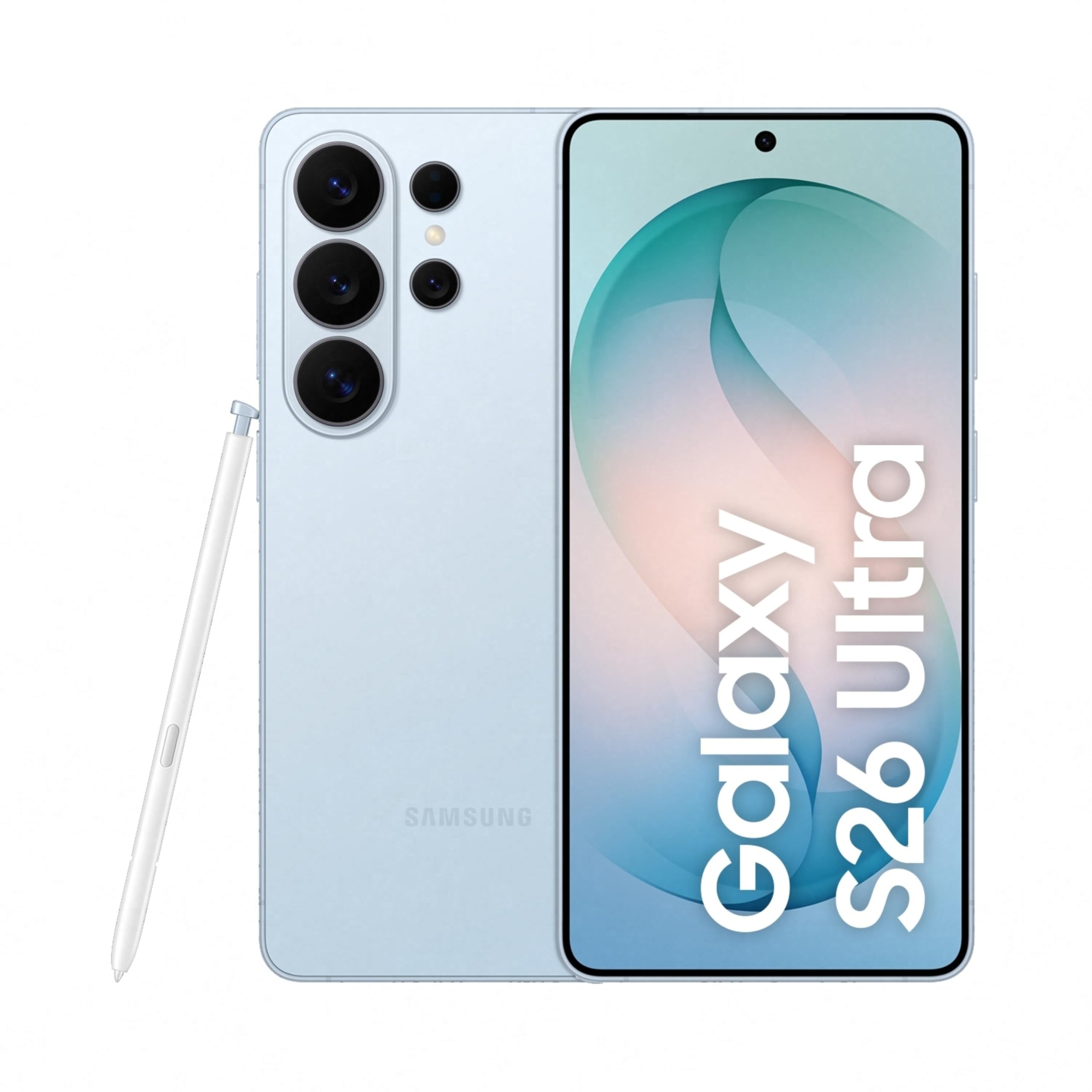
Image: Samsung Galaxy S26 Ultra 5G smartphone in Sky Blue, showcasing its sleek design and camera module.
2. Initial Setup
2.1. What's in the Box
Your Samsung Galaxy S26 Ultra 5G package includes the following items:
- Smartphone (Samsung Galaxy S26 Ultra 5G)
- Data Cable (Type C to C)
- SIM Ejection Pin
- Quick Start Guide
- S Pen
2.2. Inserting the SIM Card
- Locate the SIM card tray on the side of your device.
- Insert the SIM ejection pin into the small hole next to the tray to open it.
- Place your Nano SIM card(s) into the tray with the gold contacts facing down. The device supports Dual SIM.
- Gently push the tray back into the slot until it clicks into place.
2.3. Initial Power On and Configuration
- Press and hold the Power button until the Samsung logo appears.
- Follow the on-screen instructions to select your language, connect to Wi-Fi, and set up your Google account.
- Configure biometric security features such as fingerprint recognition.
3. Operating Your Device
3.1. Basic Navigation
The Galaxy S26 Ultra operates on Android 16 with One UI 8.5. Use the touchscreen with stylus support for navigation. Swipe gestures and on-screen buttons are standard for Android devices.

Image: Screenshot of the One UI 8.5 interface, showing various app icons and widgets.
3.2. Privacy Display
The Galaxy S26 Ultra features a built-in Privacy Display. When activated, the screen's pixels dynamically adjust to keep the display visible when viewed straight on, but appear dimmed when seen from the side. This feature helps protect your personal information in public places.
- To activate: Navigate to Settings and locate the Privacy Display options.
- Customize viewability settings to suit your preferences.
- You can choose to hide the full screen from side view or activate it only for notifications or specific applications.

Image: A demonstration of the Privacy Display, showing how content is visible from the front but obscured from the side.
3.3. Camera Features
The device is equipped with a versatile camera system:
- Rear Cameras: 200 MP Wide, 50 MP Ultra Wide, 50 MP Telephoto (5x Optical Zoom), 10 MP Telephoto (3x Optical Zoom).
- Front Camera: 12 MP.
- Shooting Modes: Dual Recording, Food, Hyperlapse, Night, Panorama, Photo, Portrait, Portrait Video, Pro, Pro Video, Single Take, Slow Motion, Video.
- Nightography: Capture clear and detailed videos even in low-light environments.
- Horizontal Lock: Maintain a steady frame during video recording, even when moving.
- Space Zoom: Utilize 100x AI-powered Space Zoom for enhanced clarity at a distance.

Image: Diagram illustrating the camera specifications and lens capabilities of the Galaxy S26 Ultra.

Image: Example photos demonstrating the clarity and detail captured using the Nightography feature in low-light conditions.
3.4. AI Features
The Galaxy S26 Ultra integrates advanced AI features to enhance user experience:
- Photo Assist: Edit photos using simple prompts.
- Creative Studio: Generate personalized stickers from photos with ease.
- Now Nudge: Receive intelligent, real-time suggestions and reduce steps in daily tasks.
- Finder: Quickly search for information on your home screen without opening specific apps.

Image: A phone screen displaying the Photo Assist feature, showing options to edit an image of a dog.

Image: A phone screen demonstrating the sticker generation feature, creating various stickers from a single photo of a dog.
4. Performance and Battery
4.1. Processor and Cooling
The Galaxy S26 Ultra is powered by the Snapdragon 8 Elite Gen 5 processor, customized for Galaxy devices. It features an improved NPU, GPU, and CPU for smoother graphics and faster AI performance. A newly designed Vapor Chamber efficiently dissipates heat, ensuring sustained performance during demanding tasks like gaming.

Image: Diagram showing the NPU, GPU, and CPU components of the customized Snapdragon processor, highlighting performance improvements.
4.2. Battery Life and Charging
The device is equipped with a 5000 mAh battery, optimized for all-day use. It supports Super Fast Charging 3.0 (up to 60W) and Super Fast Wireless Charging (up to 25W). You can achieve up to 75% charge in approximately 30 minutes with Super Fast Charging 3.0.

Image: Graphic indicating that the device can charge up to 75% in approximately 30 minutes.
5. Maintenance and Care
To ensure the longevity and optimal performance of your Galaxy S26 Ultra, follow these maintenance guidelines:
- Cleaning: Use a soft, lint-free cloth to clean the screen and body. Avoid abrasive materials or harsh chemicals.
- Water Resistance: The device is water-resistant. However, avoid intentional submersion in water or exposure to high-pressure water jets. Dry thoroughly if it gets wet.
- Software Updates: Regularly check for and install software updates to benefit from the latest features, security patches, and performance improvements.
- Battery Care: Avoid extreme temperatures. For optimal battery health, try to keep the charge between 20% and 80% when possible.
- Storage: Periodically clear unnecessary files and apps to maintain optimal storage and performance.
6. Troubleshooting Common Issues
If you encounter issues with your device, try the following solutions:
- Device Not Responding: Press and hold the Power button and Volume Down button simultaneously for about 7-10 seconds to force restart the device.
- Battery Draining Quickly:
- Check battery usage in Settings to identify power-hungry apps.
- Reduce screen brightness or enable power-saving mode.
- Close unused apps running in the background.
- Network Connectivity Issues:
- Toggle Airplane Mode on and off.
- Restart your device.
- Check your SIM card is properly inserted.
- Reset network settings in Settings > General management > Reset > Reset network settings.
- App Crashing or Freezing:
- Clear the app's cache and data in Settings > Apps > [App Name] > Storage.
- Uninstall and reinstall the app.
- Ensure the app is updated to its latest version.
- Fingerprint Sensor Not Working:
- Ensure your finger and the sensor are clean and dry.
- Re-register your fingerprints in Settings > Biometrics and security > Fingerprints.
For more detailed troubleshooting or persistent issues, refer to the official Samsung support website or contact customer service.
7. Technical Specifications
| Feature | Specification |
|---|---|
| Brand | Samsung |
| Model | Galaxy S26 Ultra |
| Operating System | Android 16 |
| Processor | Snapdragon 8 Elite Gen 5 (4.74 GHz) |
| RAM | 12 GB |
| Storage Capacity | 256 GB |
| Display | 6.9 Inches AMOLED, 3120 x 1440 Resolution, 120Hz Refresh Rate, 499 PPI |
| Rear Camera Resolution | 200 MP, 50 MP, 50 MP, 10 MP |
| Front Camera Resolution | 12 MP |
| Battery Capacity | 5000 Milliamp Hours |
| Charging | Super Fast Charging 3.0 (up to 60W), Super Fast Wireless Charging (up to 25W) |
| SIM Card Type | Dual Nano SIM |
| Connectivity | 5G, Bluetooth, NFC, USB Type C, Wi-Fi |
| Biometric Security | Fingerprint Recognition |
| Water Resistance | Water Resistant |
| Dimensions | 8 x 78 x 164 Millimeters |
| Weight | 214 Grams |
| Box Contents | Smartphone, Data Cable (Type C to C), SIM Ejection Pin, Quick Start Guide, S Pen |
8. Warranty and Support
8.1. Warranty Information
Your Samsung Galaxy S26 Ultra 5G comes with a 1-year manufacturer warranty for the device and 6 months for in-box accessories from the date of purchase. Please retain your proof of purchase for warranty claims.
8.2. Customer Support
For technical assistance, service, or warranty inquiries, please contact Samsung Customer Support:
- Manufacturer: Samsung India Electronics Pvt ltd
- Address: 6th Floor, DLF Centre, Sansad Marg, New Delhi - 110001, India
- Email: support.india@samsung.com
- Visit the official Samsung support website for FAQs and additional resources.

Image: Samsung Knox Vault logo, representing the device's robust security features.
Related Documents - Galaxy S26 Ultra
 |
Samsung Galaxy S26 Series Pre-Order Offer Terms and Conditions Detailed terms and conditions for the Samsung Galaxy S26 Ultra, S26 Plus, and S26 pre-order offer, including pricing, discounts, and Samsung Care+ benefits for purchases from the Samsung Online Store. |
 |
Samsung Galaxy S26 Series Cashback Promotion Terms and Conditions Terms and conditions for the Samsung Galaxy S26 Series cashback promotion in Switzerland and Liechtenstein, valid from May 11, 2026, to June 7, 2026. |
 |
Termini e Condizioni Promozione SAMSUNG +Valore - Samsung Galaxy S26 Series Documento ufficiale con i termini e le condizioni per la promozione SAMSUNG +Valore, valida per l'acquisto di Samsung Galaxy S26 Series, che include la valutazione di dispositivi usati. Scopri i requisiti, il periodo promozionale e i valori di valutazione. |
 |
Regulamin Promocji: Odkup smartfonów Samsung Galaxy S26, S26+, S26 Ultra Oficjalny regulamin promocji Samsung dotyczącej odkupu starych smartfonów przy zakupie modeli Galaxy S26, S26+ oraz S26 Ultra. Sprawdź zasady, terminy i korzyści. |
 |
Samsung Galaxy Book Go User Manual Comprehensive user manual for the Samsung Galaxy Book Go, detailing setup, features, operations, settings, and safety guidelines for this Windows 10 laptop. Includes information on keyboard, touchpad, connectivity, applications, and system maintenance. |
 |
Guía de Usuario Samsung Galaxy S26, S26+, S26 Ultra: Funciones y Configuración Explore la Guía de Usuario completa para Samsung Galaxy S26, S26+, y S26 Ultra. Aprenda sobre configuración, funciones, aplicaciones, ajustes y más para su dispositivo. |
Ask a question about this manual
Ask about setup, troubleshooting, compatibility, parts, safety, or missing instructions. Manuals+ will review the question and use this page’s manual context to help answer it.