
1. Introduction
This manual provides essential information for the safe assembly, operation, and maintenance of your MAJOR FITNESS Drone MAX Power Rack. Please read all instructions carefully before use to ensure proper function and to prevent injury.
The Drone MAX Power Rack is an all-in-one home gym solution designed for comprehensive strength training. It integrates a heavy-duty power rack, dual lat pulldown/low row stations, and a multi-grip pull-up bar, offering a versatile setup for various exercises.
2. Safety Information
WARNING: Failure to follow these safety instructions may result in serious injury or death.
- Consult a physician before starting any exercise program.
- Ensure all bolts, nuts, and connections are securely tightened before each use.
- Do not exceed the maximum weight capacity of 2500 lbs.
- Keep children and pets away from the equipment during operation.
- Perform regular inspections for wear and tear on cables, pulleys, and structural components.
- Use spotters when lifting heavy weights, especially during squats and bench presses.
- Ensure adequate space around the power rack for safe operation.
- Wear appropriate athletic footwear and clothing.
- Stop exercising immediately if you feel pain, dizziness, or nausea.
3. Components List
Verify all parts are present before beginning assembly. Refer to the detailed parts diagram in the separate assembly guide for identification.
- Main Power Rack Frame (2"x2" 14-gauge alloy steel)
- Dual Lat Pulldown/Low Row System
- Multi-Grip Pull-Up Bar
- Integrated Weight Stacks
- J-Cups (18 adjustable positions)
- Safety Spotter Arms
- Cable Handles and Attachments
- Assembly Hardware (bolts, washers, nuts)

Figure 3.1: Detailed view of key components including the pulley system, J-cups, and multi-grip pull-up bar.
4. Setup and Assembly
Assembly requires two people and approximately 4-6 hours. Ensure you have adequate space and the necessary tools (not included, typically wrenches and an Allen key set).
- Unpack Components: Carefully remove all parts from the packaging and lay them out. Verify against the components list.
- Assemble Base Frame: Connect the base stabilizers to the uprights using the provided hardware. Do not fully tighten bolts until the entire frame is assembled.
- Install Uprights: Secure the main uprights to the base.
- Attach Crossmembers: Connect the top crossmembers and the multi-grip pull-up bar.
- Install Pulley System: Mount the dual pulley system components, ensuring cables are routed correctly through all pulleys. Refer to the cable routing diagram in the assembly guide.
- Add Weight Stacks: Carefully insert the weight plates into their designated slots.
- Attach Accessories: Install J-cups, safety spotter arms, and any other accessories.
- Final Tightening: Once all components are in place, systematically tighten all bolts and nuts.
- Stability Check: Gently shake the assembled rack to ensure stability. Re-tighten any loose connections.

Figure 4.1: Assembled Drone MAX Power Rack with overall dimensions (62.9" W x 60.4" D x 85.6" H).
5. Operating Instructions
5.1. Adjusting J-Cups and Safety Spotter Arms
The Drone MAX features 18 adjustable J-Cup positions and corresponding safety spotter arm positions. To adjust:
- Remove the pin from the desired J-cup or spotter arm.
- Slide the J-cup or spotter arm to the desired height on the upright.
- Re-insert the pin completely through the upright and the J-cup/spotter arm. Ensure the pin is fully seated and secure.
5.2. Using the Dual Cable System
The dual cable system offers 18 pulley height settings and both 1:1 and 2:1 pulley ratios for varied resistance.
- Adjusting Pulley Height: Pull the adjustment pin, slide the pulley carriage to the desired height, and release the pin to lock it in place.
- Selecting Pulley Ratio: The system allows for both 1:1 (true weight) and 2:1 (half weight, smoother movement) ratios. Consult the assembly guide for specific instructions on switching ratios if applicable, or note that the system may automatically adjust based on attachment points.
- Attaching Accessories: Use the carabiners to attach various cable handles, ropes, or bars to the cable ends.
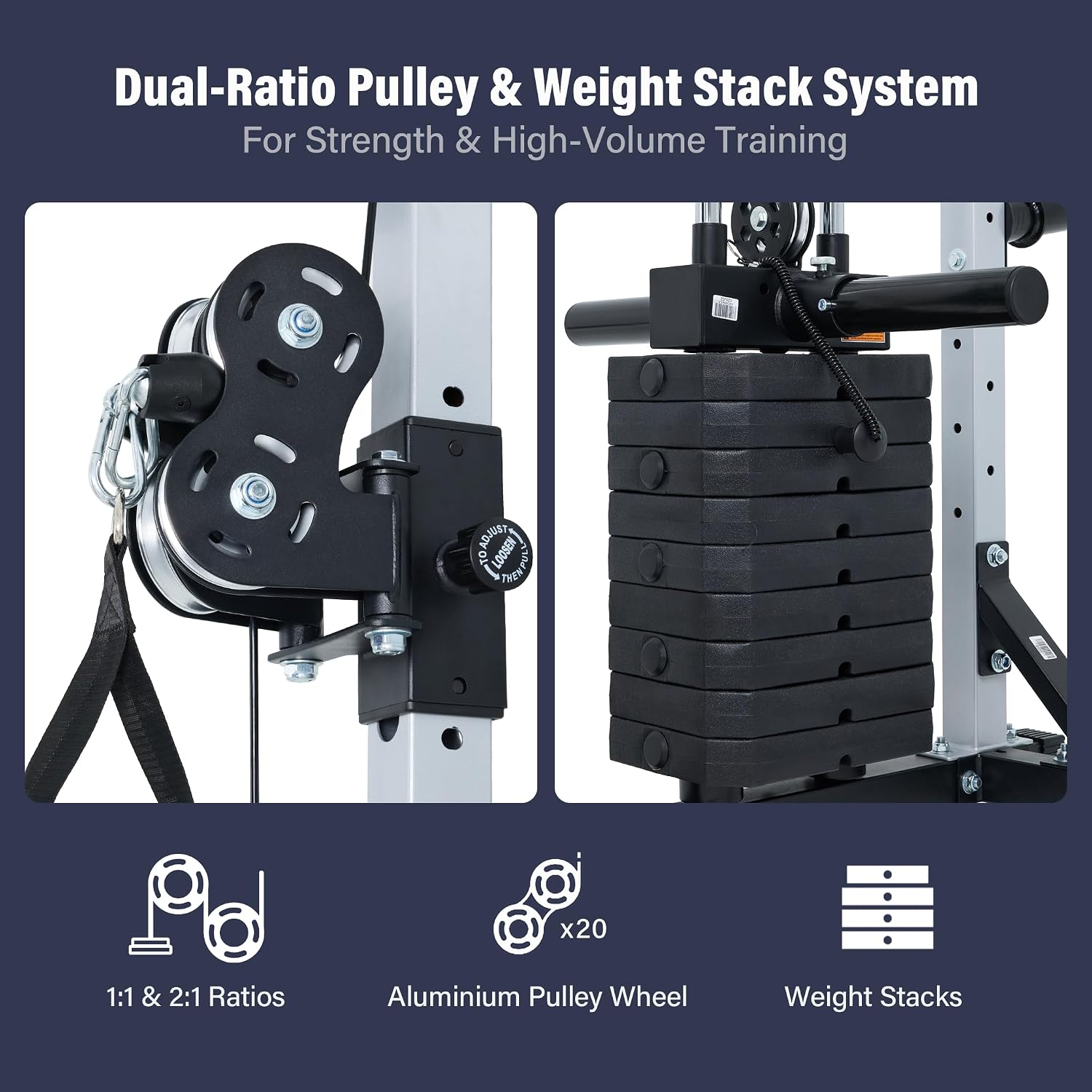
Figure 5.1: Dual-ratio pulley and weight stack system for versatile training.
5.3. Example Exercises
The Drone MAX supports a wide range of exercises. Always maintain proper form and control during movements.
- Squats: Use J-cups and safety spotter arms for barbell squats.
- Bench Press: Use J-cups and safety spotter arms with a weight bench (sold separately).
- Lat Pulldowns: Attach a lat bar to the upper pulley and use the integrated seat.
- Cable Crossovers: Use both cable pulleys for chest flyes.
- Rows: Use the low row station with a V-bar or straight bar attachment.
- Pull-Ups/Chin-Ups: Utilize the multi-grip pull-up bar.

Figure 5.2: User performing squats with the power rack.

Figure 5.3: User performing bench press with the power rack.

Figure 5.4: User performing lat pulldowns with the power rack.
6. Maintenance
Regular maintenance ensures the longevity and safe operation of your Drone MAX Power Rack.
- Daily: Wipe down the equipment with a damp cloth after each use to remove sweat and dust.
- Weekly: Inspect all cables for fraying or damage. Check pulleys for smooth operation.
- Monthly: Verify all bolts, nuts, and connections are tight. Re-tighten as necessary. Lubricate moving parts (e.g., guide rods for weight stacks) with a silicone-based lubricant if needed.
- Annually: Conduct a thorough inspection of the entire frame for any signs of rust, cracks, or structural fatigue.
7. Troubleshooting
| Problem | Possible Cause | Solution |
|---|---|---|
| Equipment feels unstable or wobbly. | Loose bolts or uneven flooring. | Ensure all assembly bolts are fully tightened. Place equipment on a level surface or use shims if necessary. |
| Cables are not moving smoothly. | Lack of lubrication, debris in pulleys, or damaged cable. | Lubricate guide rods and pulleys with silicone spray. Clean any debris from pulley grooves. Inspect cables for damage; replace if frayed. |
| Weight plates are sticking. | Guide rods are dirty or unlubricated. | Clean guide rods and apply a thin layer of silicone lubricant. |
8. Specifications
- Model: Drone MAX Power Rack
- Material: 2"x2" 14-gauge Alloy Steel
- Overall Capacity: 2500 lbs
- J-Cup Positions: 18
- Pulley Height Settings: 18
- Pulley Ratios: 1:1 and 2:1
- Color: Silver
- Dimensions (Assembled): Approximately 62.9" W x 60.4" D x 85.6" H
- Included Components: Power Cage, Dual Lat Pulldown/Low Row, Multi-Grip Pull-Up Bar, Integrated Weight Stacks
9. Warranty and Support
The MAJOR FITNESS Drone MAX Power Rack comes with a 1-year warranty. For detailed warranty information, please refer to the warranty card included with your product or visit the official MAJOR FITNESS website.
For technical assistance, parts replacement, or any questions regarding your product, please contact MAJOR FITNESS customer support:
- Customer Support: Available 24/7
- Website: Visit the MAJOR FITNESS Store on Amazon