
Introduction
Welcome to the instruction manual for your ECOVACS DEEBOT X12 OMNICYCLONE Robot Vacuum and Mop. This advanced cleaning system is designed to provide comprehensive floor care, combining powerful vacuuming with effective mopping. Please read this manual thoroughly to ensure proper setup, operation, and maintenance of your device.
What's in the Box
Your ECOVACS DEEBOT X12 OMNICYCLONE package includes the following components:
- DEEBOT X12 OmniCyclone Robot (1)
- OMNI Station (1)
- Auxiliary compartment auto-fill module (1)
- DEEBOT cleaning solution (260ml) (1)
- Heavy Duty Cleaning Solution (260ml) (1)
- Filter (1)
- Main brush (1)
- Ordinary Roller Mop (1)
- Power cord (black) (1)
- Quick guide (1)
- Side brush (1)
- Clean water tank (1)
- Dirty water tank (1)
- Instruction Guide (1)
Setup
Follow these steps to set up your ECOVACS DEEBOT X12 OMNICYCLONE for first use:
- Unpacking: Carefully remove all components from the packaging. Ensure all protective films and tapes are removed from the robot and OMNI Station.
- Position the OMNI Station: Place the OMNI Station against a wall in an open area with good Wi-Fi signal, ensuring sufficient space around it for the robot to dock and maneuver. Plug the power cord into the station and a wall outlet.
- Install the Ramp: Attach the small plastic ramp to the front of the OMNI Station to facilitate the robot's movement.
- Fill Water Tanks: Open the top cover of the OMNI Station. Remove the clean water tank and fill it with fresh water. Fill the small cleaning solution tanks with the provided DEEBOT cleaning solution and heavy-duty cleaning solution, located behind a hidden panel on the left side of the robot. Reinsert all tanks securely.
- Place the Robot: Place the DEEBOT robot onto the OMNI Station to begin charging. Ensure the robot is properly aligned with the charging contacts.
- Download the ECOVACS HOME App: Download the ECOVACS HOME app from your smartphone's app store.
- Connect to App: Open the robot's lid and turn on the red power switch. Follow the in-app instructions to scan the QR code on the robot and pair it with your phone. The app will guide you through the initial setup and mapping process.

Operating Your DEEBOT
Your DEEBOT X12 OmniCyclone is equipped with advanced features for efficient and thorough cleaning:
Initial Mapping
Before its first cleaning cycle, the robot will perform an initial mapping run to create a detailed map of your home. This map is essential for efficient navigation and allows for customized cleaning zones via the app.
FocusJet + OZMO Roller 3.0 Mopping
The FocusJet system pre-treats stubborn stains by spraying pressurized water up to 46,000Pa, softening spills before the OZMO Roller 3.0 mops them away. The OZMO Roller 3.0 continuously scrubs and washes itself during cleaning, preventing the spread of dirty water.


22,000Pa BLAST Suction + ZeroTangle 4.0
Experience powerful vacuuming with 22,000Pa high-airflow suction. The ZeroTangle 4.0 technology pulls dust, crumbs, and pet hair directly into the airflow path, preventing hair wrap and maintaining strong pickup on all floor types.

TruEdge 3.0 Extreme Edge Cleaning
The TruEdge 3.0 feature extends the roller up to 0.59 inches beyond the robot body, allowing it to reach baseboards and corners for thorough edge cleaning, eliminating dust lines often missed by other robotic cleaners.

True Dry-Wet Separation for Carpets
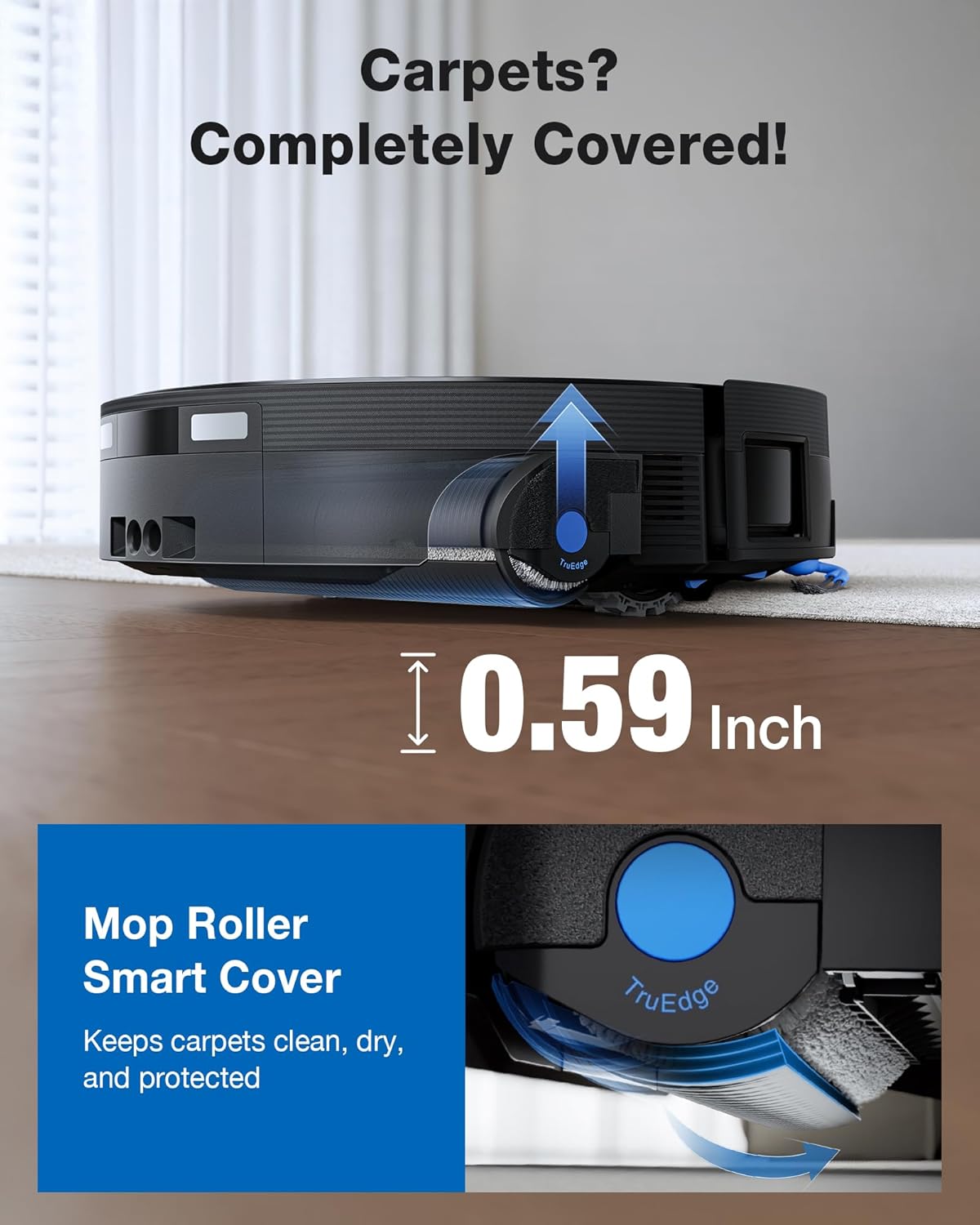
When carpets are detected, the mop roller automatically lifts 0.59 inches and a protective shield deploys to keep carpet fibers dry. The 'Carpets First' mode vacuums carpets before mopping hard floors, preventing cross-contamination.

TruePass 4-Wheel Drive Climbing
Enhanced 4-wheel-drive traction allows the robot to smoothly cross thresholds and uneven transitions, ensuring uninterrupted cleaning across different rooms and mixed flooring surfaces.

AIVI 3D 4.0 + YIKO AI Assistant
Advanced structured-light sensors enable the robot to detect and avoid obstacles like cables, toys, and pet items for smoother navigation. The AGENT YIKO AI assistant provides voice control, smart cleaning suggestions, and simplifies daily operation.

PowerBoost Fast Charging & Adaptive Charging Strategy
During cleaning, PowerBoost charging restores up to 13% battery in just 3 minutes, minimizing interruptions. The Adaptive Charging Strategy estimates power needs based on home size and cleaning mode, optimizing performance for large homes up to 10,760 sq ft.

Maintenance
Regular maintenance ensures optimal performance of your DEEBOT X12 OmniCyclone:
OMNICYCLONE Bagless Station
The OMNICYCLONE station uses cyclone dust separation, eliminating the need for disposable dust bags. Simply empty the dustbin when full. This reduces long-term maintenance costs and is more environmentally friendly.

Self-Washing Roller Mop
The OMNI Station automatically cleans the OZMO Roller 3.0 with heated high-pressure spray and then dries it with 63°C air, ensuring it's always fresh and ready for the next cleaning cycle. Empty the dirty water tank and refill the clean water tank as prompted by the robot or app.


General Cleaning
- Clean the main brush and side brushes regularly to remove tangled hair and debris.
- Wipe the robot's sensors and charging contacts with a dry cloth to ensure proper function.
- Clean the filter periodically to maintain optimal suction performance.
Troubleshooting
If you encounter any issues with your DEEBOT X12 OmniCyclone, refer to the following common solutions:
- Robot not charging: Ensure the OMNI Station is plugged in and the robot is correctly docked with charging contacts aligned. Check for any obstructions.
- Robot getting stuck: Clear any loose cables, small objects, or thick rugs that might obstruct the robot's path. The AIVI 3D 4.0 navigation should minimize this, but manual intervention may be needed for complex environments.
- Poor cleaning performance: Check if the dustbin is full, the filter is clogged, or the main/side brushes are tangled. Clean or replace components as necessary. Ensure water tanks are filled and cleaning solution is present.
- Mop not cleaning effectively: Verify that the OZMO Roller 3.0 is clean and properly installed. Ensure the clean water tank is full and the dirty water tank is empty.
- App connectivity issues: Ensure your Wi-Fi network is stable and the robot is within range. Restart the app and the robot if necessary.
For more detailed troubleshooting, please consult the full instruction guide or contact ECOVACS customer support.
Specifications
| Feature | Detail |
|---|---|
| Brand | ECOVACS |
| Model Name | DEEBOT X12 OmniCyclone |
| Surface Recommendation | Hardwood floor, Carpet, Tile |
| Special Feature | OZMO ROLLER Instant Self-Washing Mopping, FocusJet Stain Pre-dissolving Technology |
| Suction Power | 22,000Pa |
| Navigation Technology | AIVI 3D 4.0 AI Navigation |
| Edge Cleaning | TruEdge 3.0 |
| Dust Collection | OMNICYCLONE Bagless Station |
| Battery Life | 200 minutes |
| Battery Type | Lithium Ion |
| Control Method | App Control, Button Control, Voice Control (YIKO AI Assistant) |
| Item Dimensions (L x W x H) | 14.96"L x 19.41"W x 18.31"H |
| Item Weight | 35.2 Pounds |
Warranty and Support
For warranty information and customer support, please refer to the official ECOVACS website or the contact details provided in your product packaging. Keep your purchase receipt as proof of purchase for any warranty claims.


