
Introduction
Welcome to the Milavan Smart Health Ring 2.0 user manual. This guide provides detailed instructions for setting up, operating, and maintaining your smart ring to help you effectively monitor your health and fitness activities. The Milavan 2.0 is designed with a slim, scratch and fingerprint-resistant design, featuring an efficient chip for comprehensive health tracking.
The ring monitors heart rate, blood oxygen, blood pressure, sleep patterns, and steps, and is waterproof for daily use. It is compatible with both Android and iOS devices.
What's in the Box
- Smart Ring x 1
- Charging Case x 1
- USB Type-C charging cable x 1
- Magnetic USB charging cable x 1
- User Manual x 1
Setup Guide
1. Determine Your Ring Size
Before using your Milavan 2.0 Smart Ring, ensure you have the correct size for a comfortable and accurate fit. We recommend using a sizing kit for precise measurement. Alternatively, refer to the size chart below and measure your finger circumference.

Image Description: A visual guide demonstrating how to measure finger circumference using a string and ruler, alongside a detailed size chart. The chart lists ring models (6# to 14#) with corresponding inner diameters (16.5mm to 23.4mm) and circumferences (49-51mm to 71-74mm).

Image Description: A comprehensive size chart for the Milavan Smart Ring, detailing inner diameter and circumference for sizes 6# through 14#.
2. Charging the Ring
The Milavan 2.0 Smart Ring comes with a charging case. Before first use, fully charge both the ring and the charging case. The ring charges in 1-2 hours and provides 3-5 days of battery life on a single charge. The upgraded charging case has a 500mAh battery, extending the total battery life to over 75 days when used together.

Image Description: A comparison image showing the Milavan 1.0 and Milavan 2.0 charging cases, emphasizing the upgraded stability, larger 500mAh battery, increased battery health durability, and inclusion of dual data cables for the 2.0 version.
3. Download and Install the App
Download the official Milavan app (H RING App) from the App Store (for iOS) or Google Play Store (for Android). The app is free to use and does not require a subscription.

Image Description: A smartphone displaying the Milavan app interface, with prominent icons for downloading the app from the App Store and for Android devices.
4. Pairing the Ring with the App
Once the app is installed, open it and follow the on-screen instructions to pair your Milavan 2.0 Smart Ring via Bluetooth. After successful pairing, you can begin your health monitoring journey.

Image Description: A smartphone screen displaying the Milavan app's health data and device settings, indicating the start of the health monitoring process after pairing.
Operating Instructions
Health Monitoring
The Milavan 2.0 Smart Ring continuously monitors various health metrics using its advanced 5.0 sensor and upgraded AB2026B3 chip. Data is automatically measured and synced to the app.
- Heart Rate & HRV: Auto-measures heart rate and Heart Rate Variability (HRV) every 30 minutes, providing insights into heart health.
- Blood Oxygen & Blood Pressure: Continuously monitors blood oxygen and blood pressure every 30 minutes for comprehensive wellness insights.
- Stress Tracking: Monitors stress levels in real-time, helping you understand your current state.
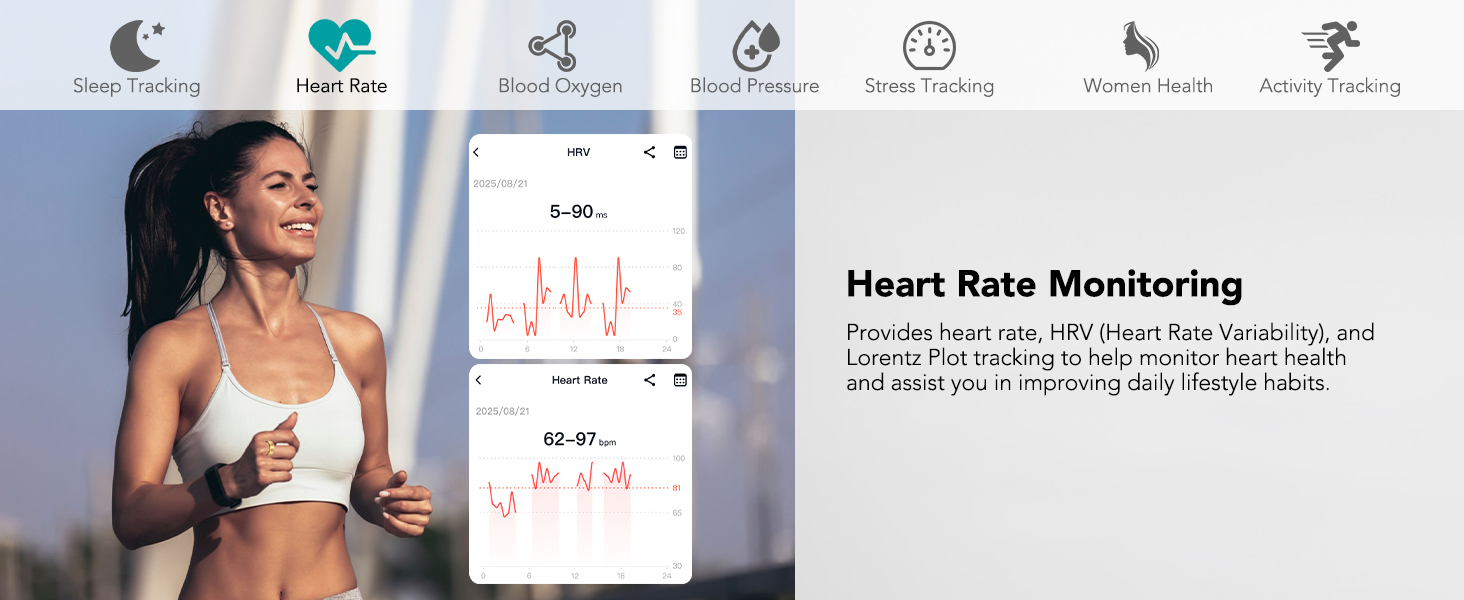
Image Description: A woman running, with a smartphone screen showing the Milavan app's heart rate and HRV monitoring graphs, illustrating continuous heart health tracking.

Image Description: A man meditating, with a smartphone screen showing the Milavan app's blood oxygen and blood pressure readings, indicating continuous monitoring of these vital signs.

Image Description: A man working on a laptop, with a smartphone screen showing the Milavan app's stress tracking data, illustrating real-time stress level monitoring.
Intelligent Sleep Tracking
The ring supports 24-hour automatic sleep monitoring, providing precise tracking of deep sleep, light sleep, rapid eye movement (REM) stages, and wake times. This offers a comprehensive understanding of your sleep quality and rhythm.

Image Description: A person sleeping peacefully, with a smartphone screen showing the Milavan app's detailed sleep tracking interface, including sleep stages and duration.
Activity and Sports Tracking
The Milavan 2.0 supports 187 sports modes, including running, walking, boxing, ball games, water sports, and ice sports. It automatically records exercise data and syncs it to the app. Activate sport mode in the app to receive more effective workout guidance.

Image Description: A collage of images depicting various sports activities like running, golf, skiing, climbing, and yoga, with the Milavan app displaying activity tracking metrics such as heart rate, calories, distance, pace, and time.

Image Description: A man lifting weights, with a smartphone screen showing the Milavan app's detailed workout data, including duration, heart rate, calories burned, pace, speed, cadence, and steps.
Women's Health Management
If you select the female gender option in the app, you can unlock an exclusive women's health management feature. This allows you to manually record menstrual cycles, pregnancy preparation plans, and pregnancy status, aiding in tracking body changes and managing daily life.

Image Description: A smiling woman, with a smartphone screen showing the Milavan app's calendar interface for women's health management, allowing tracking of menstrual cycles and other related data.
Remote Shooting and Friends Feature
The app supports remote camera control, allowing you to take photos remotely. It also includes a device-finding function to locate your ring easily. The friends feature enables sharing of health data with family and friends.

Image Description: A family enjoying time together, with a smartphone screen showing the Milavan app's health sharing feature, allowing users to link accounts and access health data of family or friends.
Maintenance and Care
Waterproof Performance
The Milavan 2.0 Smart Ring has an IP68 rating and is water-resistant up to 50 meters. This allows it to handle daily routines such as hand washing, showering, and swimming. However, avoid prolonged exposure to hot water or steam, as this may affect its performance.

Image Description: The Milavan Smart Ring partially submerged in water droplets, illustrating its IP68 waterproof performance and suitability for daily water exposure.
Cleaning and Durability
The ring features a micro-matte finish that resists fingerprints and scratches, ensuring long-lasting elegance. To clean, wipe gently with a soft, dry cloth. Avoid abrasive materials or harsh chemicals.
Crafted with premium stainless steel and resin, the Milavan 2.0 is designed for durability and comfort. Its ultra-lightweight and ergonomic design ensures it is gentle on sensitive skin and comfortable for all-day wear.
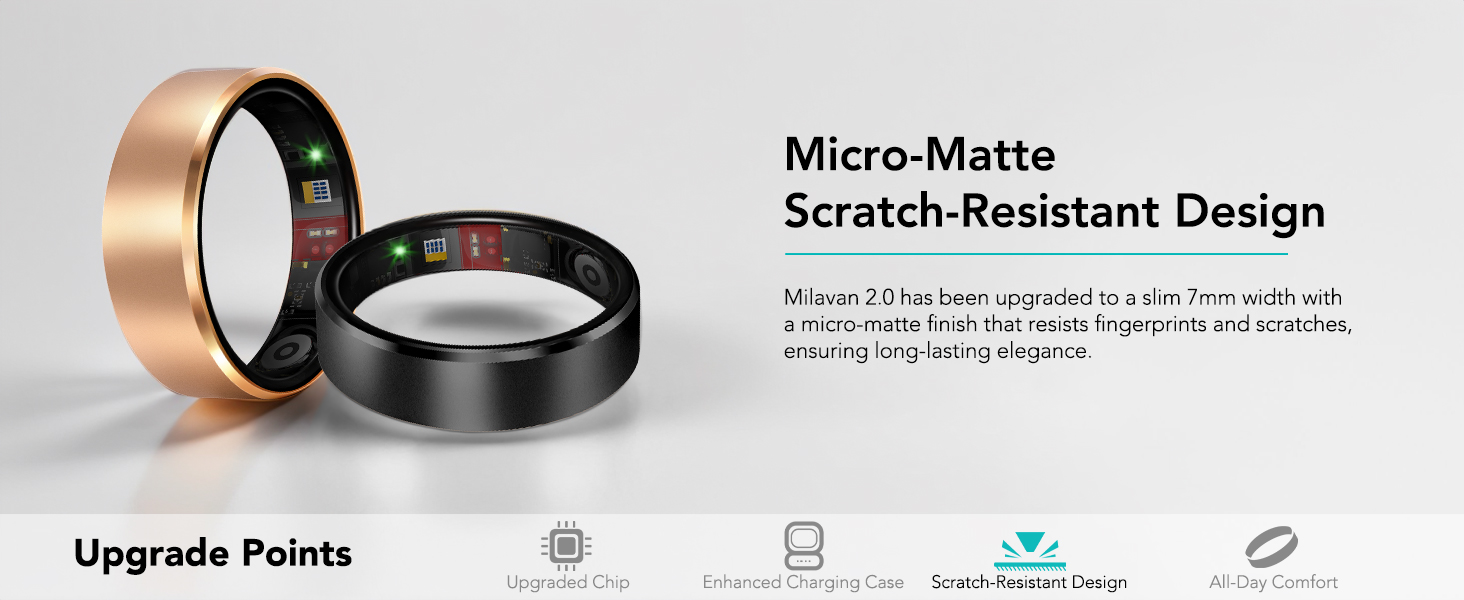
Image Description: A close-up view of the Milavan Smart Ring, emphasizing its micro-matte finish and scratch-resistant properties, designed for durability and aesthetic appeal.
Troubleshooting
- Ring not connecting to app: Ensure Bluetooth is enabled on your smartphone and the ring is charged. Restart both the ring (by placing it in the charging case and removing it) and the app. If issues persist, try unpairing and re-pairing the device in the app settings.
- Inaccurate readings: Ensure the ring is worn correctly and snugly on your finger. Clean the sensors on the inside of the ring. Environmental factors or improper fit can affect accuracy.
- Battery draining quickly: Ensure all background apps are closed. Turn off sports mode after use to prevent excessive battery drain. Check for app updates, as software improvements can optimize battery usage.
- App glitches: If the app becomes unresponsive or shows incorrect data, close and reopen the app. If the problem continues, clear the app's cache or reinstall it. Your data remains accessible after the ring disconnects and reconnects, as long as you don't clear the app's history cache.
Specifications
| Feature | Detail |
|---|---|
| Model Name | Smart Ring |
| Brand | Milavan |
| Item Model Number | TK20 |
| Connectivity Technology | Bluetooth |
| Operating System | Android, iOS |
| Special Feature | Activity Tracker (Heart Rate, Blood Oxygen, Blood Pressure, Sleep, Steps) |
| Battery Capacity | 15 Milliamp Hours (Ring), 500mAh (Charging Case) |
| Battery Life | 3-5 days (Ring), 75+ days (with Charging Case) |
| Charging Time | 1-2 hours |
| Water Resistance | IP68, up to 50 meters |
| Item Weight | 3.85 Ounces |
| Material | Premium Stainless Steel, Resin |
| Manufacturer | Dongguan Huikang Intelligent Technology Co., Ltd. |
Warranty Information
Please refer to the product packaging or the official Milavan website for specific warranty details. Typically, electronic devices come with a limited manufacturer's warranty covering defects in materials and workmanship for a specified period from the date of purchase. Keep your proof of purchase for warranty claims.
Customer Support
For technical assistance, troubleshooting, or general inquiries regarding your Milavan Smart Health Ring 2.0, please visit the official Milavan website or contact their customer support team. Contact information can usually be found on the product packaging or within the app's settings.
Online Resources: Milavan Official Store on Amazon