
1. Introduction
Thank you for choosing the Hwagol AI Smart Glasses. These innovative smart glasses integrate multiple advanced functions, including 4K HD video recording, 8MP photo capture, audio recording, music playback, voice calls, voice control, and an AI assistant. Designed for convenience and versatility, they feature IP65 water and sweat resistance, open-ear bone conduction audio for situational awareness, and a lightweight design for comfortable extended wear. This manual provides essential information for proper setup, operation, and maintenance of your device.
2. Safety Information
- Do not expose the device to extreme temperatures, direct sunlight, or high humidity.
- Avoid dropping or subjecting the glasses to strong impacts.
- Although IP65 rated for water resistance, do not submerge the glasses in water. Wipe dry immediately if exposed to liquids.
- Use only the provided charging cable and a compatible power adapter.
- Do not attempt to disassemble, repair, or modify the device yourself. Contact customer support for assistance.
- When using the open-ear audio feature, be aware of your surroundings, especially in traffic or other potentially hazardous environments.
- Keep out of reach of children.
3. Package Contents
Verify that all items are present in the package:
- Hwagol AI Smart Glasses (Main Unit)
- Charging Cable
- Quick Start Guide
- Glasses Pouch
- Cleaning Cloth

Image: Contents of the Hwagol AI Smart Glasses package, showing the glasses, charging cable, quick start guide, pouch, and cleaning cloth.
4. Product Overview
The Hwagol AI Smart Glasses are designed for seamless integration into your daily life, offering a range of features for communication, entertainment, and hands-free recording.
Key Features:
- 8MP Camera: Capture 2K photos and 1080P videos with Electronic Image Stabilization (EIS).
- Dual Microphone with ENC: Enhanced Noise Cancellation for clear calls and audio recording.
- Bluetooth 5.3: Stable and low-power connectivity for audio and data transfer.
- AI Voice Assistant: Hands-free control and intelligent assistance.
- Real-time Translation: Supports 139 languages for seamless communication.
- AI Image Recognition: Analyze objects and scenes in real-time.
- IP65 Water & Sweat Resistance: Durable for daily use and outdoor activities.
- Lightweight Design: Weighs only 45g for comfortable, long-term wear.
- Photochromic Lenses: Automatically adjust tint based on light conditions. Lenses are also exchangeable.
Components:

Image: Diagram illustrating the various components and control points of the smart glasses, including the front camera, rear button, right touchbar for music and volume, and AI assistant activation.
- Front Camera: Located on the front frame for photo and video capture.
- Rear Button: Controls power on/off.
- Right Touchbar: Used for music playback, volume control, and AI assistant activation.
- Microphones: Integrated for calls, recording, and voice commands.
- Speakers: Open-ear design for audio output.
- Charging Port: Magnetic charging port located on the temple.
5. Setup
5.1 Charging the Glasses
Before first use, fully charge your Hwagol AI Smart Glasses. The glasses are equipped with a 270mAh battery and take approximately 2 hours to fully charge.
- Connect the provided charging cable to the magnetic charging port on the glasses.
- Connect the other end of the cable to a USB power adapter (not included) or a computer USB port.
- The indicator light will show charging status (refer to Quick Start Guide for specific light indications).

Image: The smart glasses connected to a magnetic charging cable, highlighting the 300mAh battery capacity, IP65 waterproof rating, 2-hour charging time, 4-hour call time, and 7-hour music playback time.
5.2 App Installation (HeyCyan)
To unlock the full functionality of your smart glasses, download and install the 'HeyCyan' app on your iOS or Android smartphone.
- Enable Bluetooth on your smartphone.
- Scan the QR code provided in the Quick Start Guide or search for 'HeyCyan' in the App Store (iOS) or Google Play Store (Android).
- Follow the on-screen instructions to install the app.

Image: Screenshots of the HeyCyan app interface on a smartphone, demonstrating the process of enabling Bluetooth and downloading the app from Google Play or the App Store.
5.3 Bluetooth Pairing
Pair your smart glasses with your smartphone via Bluetooth for full connectivity.
- Ensure the glasses are charged and powered on.
- Open the 'HeyCyan' app on your smartphone.
- Follow the app's instructions to search for and connect to your Hwagol AI Smart Glasses.
- Confirm the pairing on both devices if prompted.

Image: A visual representation of the dual-mode Bluetooth 5.4 chip, emphasizing its role in providing high-quality audio and efficient power consumption, along with ENC noise cancellation for clear communication.
6. Operating Instructions
6.1 Power On/Off
- Power On: Press and hold the rear button for 2 seconds.
- Power Off: Press and hold the rear button for 5 seconds.
6.2 Camera Functions (Photo & Video)
The glasses feature an 8MP camera capable of capturing 2K photos and stable 1080P videos.
- Take Photo: Double-tap the front button.
- Start Video Recording: Double-tap the front button.
- Stop/Save Video: Single-tap the front button during recording. (Maximum recording time per session is 12 minutes).

Image: A person wearing the smart glasses, demonstrating hands-free recording from a first-person perspective, allowing the user to enjoy the moment without holding a device.

Image: Screenshots from the HeyCyan app displaying camera settings, photo album, and options for adjusting recording duration for the 8MP camera, with a maximum recording time of 12 minutes per session.
6.3 Audio Functions (Music & Calls)
Enjoy music and make calls with the open-ear audio system.
- Play/Pause Music: Single-tap the right touchbar.
- Next Track: Long press the right touchbar or triple-tap.
- Previous Track: Triple-tap the right touchbar.
- Volume Control: Slide your finger along the side of the frame (right temple).
- Answer/End Call: Single-tap the front button.
- Reject Call: Double-tap the front button.

Image: A person wearing the smart glasses while cycling, illustrating the open-ear audio design that allows enjoyment of music without blocking ambient sounds, enhancing safety.

Image: The smart glasses in use for one-tap recording during a meeting and one-tap calling, showcasing the dual-microphone ENC noise cancellation that reduces background noise for clear audio transmission.
6.4 AI Assistant & Translation
Access your AI assistant and real-time translation features through voice commands and gestures.
- Activate AI Assistant: Say "Hey Cyan" or single-tap the right touchbar.
- AI Image Recognition: Double-tap the right touchbar to analyze objects in your view.
- Real-time Translation: The AI assistant supports real-time voice translation for 139 languages. Use voice commands via the 'HeyCyan' app.

Image: A user wearing the smart glasses engaging in a conversation in a restaurant, demonstrating the real-time translation feature that supports 139 languages, facilitating communication in foreign environments.

Image: A user asking "Hey Cyan, what kind of architecture is this?" while wearing the smart glasses, and the AI assistant providing real-time image recognition and information about a building, acting as a personal advisor.

Image: A user interacting with the AI assistant by saying "Hey Cyan, tell me about Charles Bridge?", with the response displayed on a smartphone screen, indicating integration with AI models like ChatGPT.
7. Maintenance
7.1 Cleaning
Regular cleaning helps maintain the clarity of your lenses and the overall appearance of your glasses.
- Use the provided cleaning cloth to gently wipe the lenses and frame.
- For stubborn smudges, use a lens cleaning spray designed for optical lenses.
- Avoid using abrasive materials or harsh chemicals that could damage the lenses or frame.
7.2 Water Resistance
The glasses are IP65 rated, meaning they are protected against dust and low-pressure water jets. This makes them suitable for daily use and light outdoor activities.
- If the glasses get wet, wipe them dry immediately with a soft cloth.
- Do not expose them to strong water jets or submerge them in water.
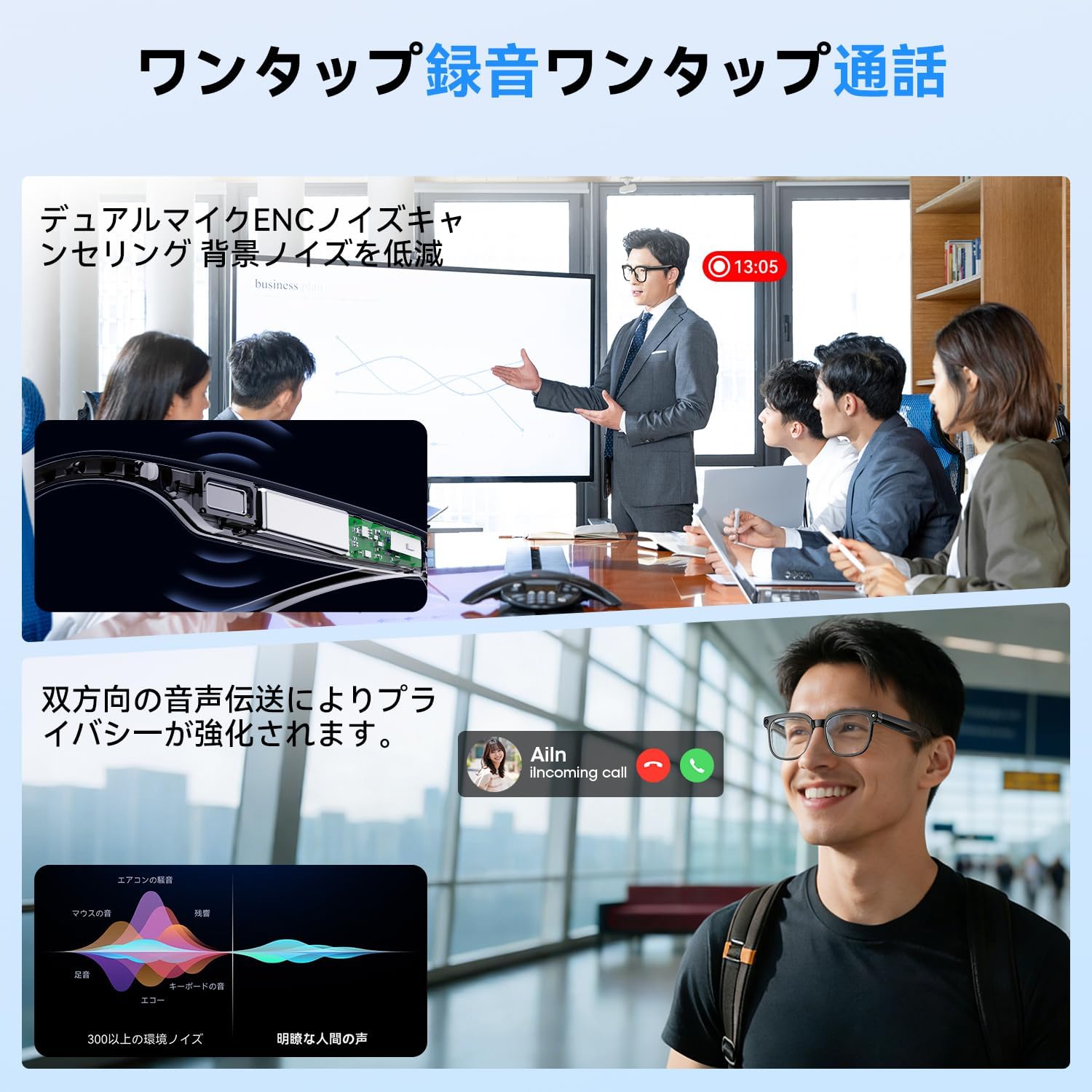
Image: The smart glasses emphasizing their IP65 waterproof rating and durable construction using TR90 for the frame, ABS+PMMA for the temples, and PC for the lenses, ensuring resistance to sweat and rain.
7.3 Lens Care & Exchange
The glasses feature photochromic lenses that automatically adjust to light conditions. The lenses are also designed to be exchangeable.
- Handle lenses with care to avoid scratches.
- Refer to the Quick Start Guide or manufacturer's website for instructions on how to safely exchange lenses.
8. Troubleshooting
If you encounter issues with your Hwagol AI Smart Glasses, try the following solutions:
| Problem | Possible Solution |
|---|---|
| Glasses do not power on. | Ensure the glasses are fully charged. Press and hold the rear button for 2 seconds. |
| Cannot pair with smartphone. | Ensure Bluetooth is enabled on your phone and the glasses are in pairing mode. Restart both devices and try again. Check the 'HeyCyan' app for pairing instructions. |
| No sound or poor audio quality. | Check the volume level on both the glasses and your smartphone. Ensure the glasses are properly positioned on your head. Reconnect Bluetooth. |
| Camera not recording or taking photos. | Ensure sufficient battery life. Check the 'HeyCyan' app for camera settings and storage availability. Restart the glasses. |
| AI Assistant not responding. | Ensure the glasses are connected to the 'HeyCyan' app and have an active internet connection. Speak clearly and ensure the microphone is not obstructed. |
9. Specifications
| Feature | Specification |
|---|---|
| Brand | Hwagol |
| Model | B0GL2P71LT |
| Operating System Compatibility | Android & iOS |
| Memory Storage | 2 GB |
| Connectivity | Bluetooth 5.3 |
| Battery Capacity | 270 mAh |
| Charging Time | Approx. 2 hours |
| Music Playback Time | Up to 7 hours |
| Call Time | Up to 4 hours |
| Waterproof Rating | IP65 |
| Weight | 45g |
| Camera Resolution | 8MP (2K photos, 1080P video at 30fps) |
| Frame Material | TR90 |
| Temple Material | ABS+PMMA |
| Lens Material | PC (Photochromic, Exchangeable) |

Image: A diagram illustrating the ultra-lightweight design of the smart glasses (45g) and key dimensions such as frame width (14.6cm), bridge width (1.5cm), lens width (5cm), lens height (5cm), and temple length (16cm).
10. Warranty and Support
Your Hwagol AI Smart Glasses come with a one-year manufacturer's warranty from the date of purchase.
- This warranty covers manufacturing defects under normal use.
- It does not cover damage caused by misuse, accidents, unauthorized repairs, or normal wear and tear.
- For warranty claims or technical support, please contact Hwagol customer service through the contact information provided on the official website or your purchase platform.