
1. Introduction
This manual provides detailed instructions for the installation, operation, and maintenance of your Consciot 44-inch Smart Ceiling Fan with RGBCW Lights, Model CFL00174. Please read this manual thoroughly before installation and use, and retain it for future reference.
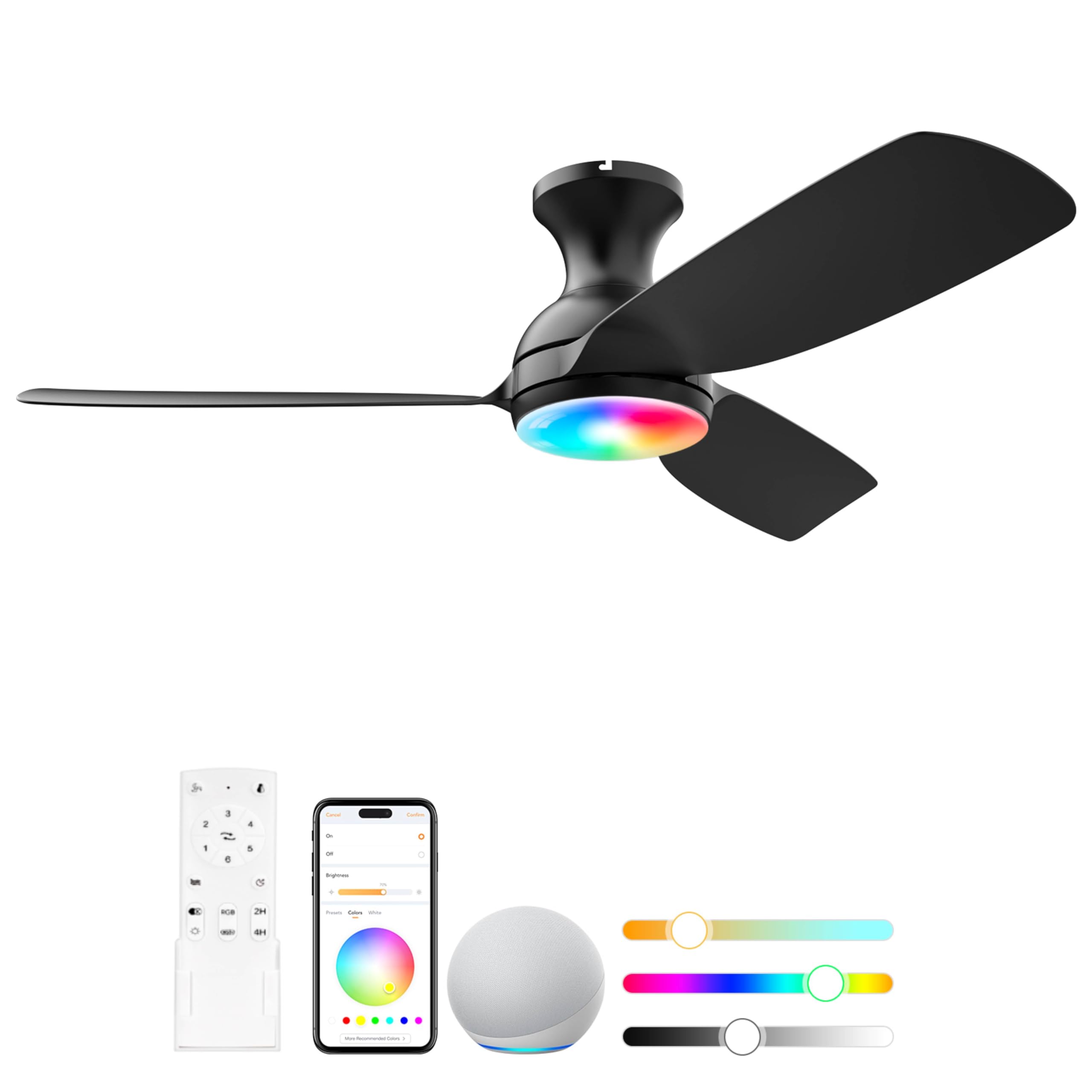
Image: The Consciot 44-inch Smart Ceiling Fan, featuring a sleek black design with integrated RGBCW lighting.
2. Key Features
- Mighty Airflow: Delivers a maximum airflow of 4909 CFM with 6-speed settings. Includes natural, direct, and sleep wind modes for customized comfort.
- Smart Home Integration: Matter certified and works with Alexa, Apple Home, Google Home, and SmartThings. Control via the AiDot app, voice commands, or the included remote.
- RGBCW Lighting: Features a 1600LM light with millions of RGBCW colors, adjustable from warm white (2700K) to cool white (6500K). Supports multi-dynamic scenes.
- WiFi & Bluetooth Group Control: Allows for seamless control of multiple fans and lights within groups using the AiDot app.
- Quiet Operation: Operates at a low noise level of 43 decibels.
- Reversible DC Motor: Provides downdraft mode for cooling in summer and updraft mode for circulating warm air in winter.
- Damp Rated: Suitable for indoor use and covered outdoor areas.
3. Package Contents
Verify that all components are present before beginning installation:
- Consciot Matter Ceiling Fan with Light
- Remote Control
- Mounting Hardware and Accessories
- User Manual (this document)
4. Safety Information
Please read and understand all safety instructions before installing or operating this fan. Failure to do so may result in electric shock, fire, or personal injury.
- Ensure the power is disconnected at the circuit breaker before installation or servicing.
- All wiring must be in accordance with national and local electrical codes. If you are unfamiliar with wiring, consult a qualified electrician.
- The mounting structure must be capable of supporting the weight of the fan (approximately 4.7 pounds).
- Do not operate the fan with damaged wiring or if the fan is visibly damaged.
- Keep hands, clothing, and other objects clear of the fan blades during operation.
- This fan is damp rated for indoor and covered outdoor use only. Do not expose to direct water spray.
5. Installation
The Consciot Smart Ceiling Fan is designed for quick and easy installation. Clear instructions and pre-marked components are provided to simplify the process. For electrical wiring, professional installation is recommended if you are not experienced.

Image: Detailed view of the fan's components, including the LED light, flush mount, 3 matte ABS blades, and DC motor.
- Prepare for Installation: Turn off power at the circuit breaker. Ensure the mounting location is secure and can support the fan's weight.
- Mount the Bracket: Secure the mounting bracket to the ceiling junction box.
- Assemble the Fan: Attach the fan blades and light kit according to the detailed instructions provided in the included user manual.
- Wire the Fan: Connect the electrical wires from the fan to the household wiring. Follow the color-coded wiring diagram in the manual.
- Secure the Fan: Lift the fan assembly and secure it to the mounting bracket.
- Restore Power: Turn the power back on at the circuit breaker.
6. Smart Feature Setup
Your Consciot Smart Ceiling Fan offers advanced control options through the AiDot app and integration with popular smart home platforms.
6.1. AiDot App Download and Connection
The AiDot app is essential for unlocking the full smart capabilities of your fan.

Image: Steps to download the official AiDot app from the App Store or Google Play, emphasizing verification of the official app.
- Download the App: Search for "AiDot" in the Apple App Store (for iOS) or Google Play Store (for Android). Ensure you download the official AiDot app.
- Create Account: Open the app and follow the prompts to create a new account or log in.
- Add Device: Follow the in-app instructions to add your Consciot Smart Ceiling Fan. The fan uses both WiFi (2.4GHz) and Bluetooth for initial connection.
6.2. Integrating with Alexa, Google Home, or SmartThings
After connecting your fan to the AiDot app, you can link it to your preferred smart home ecosystem.

Image: A visual guide showing the process of linking the AiDot app with Alexa, Google Home, or SmartThings for integrated control.
- Navigate to Integration: In the AiDot app, go to the 'Integration' section.
- Select Platform: Choose Amazon Alexa, Google Home, or SmartThings.
- Link Accounts: You will be redirected to the chosen platform's app or website to log in and authorize the connection with your AiDot account.
- Confirm Link: Once linked, your fan will appear in your smart home platform, ready for voice or app control.
6.3. Group Control
The AiDot app allows you to group multiple Consciot smart devices for synchronized control.

Image: An illustration of a house with multiple smart ceiling fans, demonstrating how the AiDot app can control them in groups without needing a separate hub.
- Open the AiDot app and navigate to the 'Groups' section.
- Create a new group and add your desired fans and lights.
- Control all devices in the group simultaneously with a single tap or voice command.
6.4. Scheduling and Timer Functions
Automate your fan and light operation with schedules and timers via the AiDot app.

Image: A bedroom scene illustrating the 24-hour auto change and timer function, showing the light gradually turning off at 10:00 PM and gradually brightening at 8:00 AM.
- In the AiDot app, access the 'Schedule' or 'Timer' settings for your fan.
- Set specific times for the fan and light to turn on/off, adjust speed, or change light settings.
- Utilize the 'Go to Sleep' feature to gradually dim the light and reduce fan speed for a comfortable sleep environment.
7. Operating Instructions
Control your Consciot Smart Ceiling Fan using the included remote, the AiDot app, or voice commands.
7.1. Remote Control
The remote control provides direct access to all fan and light functions.

Image: The remote control for the Consciot Smart Ceiling Fan, highlighting the reversible button for changing fan direction.
- Power Button: Turns the fan and light on/off.
- Fan Speed: Adjusts fan speed from 1 to 6.
- Wind Modes: Select between Natural, Direct, or Sleep wind modes.
- Light Control: Turns the light on/off, adjusts brightness (dimmable), and changes color temperature (warm to cool white).
- RGB Color: Activates RGBCW color-changing mode.
- Reversible Button: Changes the direction of the fan blades for summer (downdraft) or winter (updraft) operation.
7.2. App Control (AiDot App)
The AiDot app offers comprehensive control and customization options.
- Fan Control: Adjust fan speed (1-6), select wind modes, and change fan direction.
- Light Control: Turn light on/off, adjust brightness (0-100%), change color temperature (2700K-6500K), and select from millions of RGBCW colors.
- Scene Modes: Choose from pre-set lighting scenes or create custom scenes.
- Scheduling: Set timers and schedules for automated operation.
7.3. Voice Control
Once integrated with Alexa, Google Home, or SmartThings, you can control your fan using voice commands.

Image: A bedroom scene demonstrating voice control capabilities, with examples like 'Activate the reverse mode of the fan,' 'Turn off both the fan and the light,' and 'Set the fan speed to level six.' The image also shows compatibility with AiDot App, Apple Home, Alexa, and Google Home.
Example commands:
- "Alexa, turn on the ceiling fan."
- "Hey Google, set the fan speed to 4."
- "Alexa, change the ceiling fan light to blue."
- "Hey Google, dim the ceiling fan light to 50%."
7.4. Reversible DC Motor
The fan's reversible motor allows for year-round comfort.

Image: An illustration showing the reversible DC motor function, with blue arrows indicating downdraft mode for summer cooling and orange arrows indicating updraft mode for winter air circulation.
- Summer Mode (Downdraft): Blades rotate counter-clockwise, pushing cool air down.
- Winter Mode (Updraft): Blades rotate clockwise, pulling cool air up and pushing warm air down from the ceiling.
8. Maintenance
Regular maintenance ensures optimal performance and longevity of your ceiling fan.
- Cleaning: Dust the fan blades and motor housing periodically with a soft, damp cloth. Do not use abrasive cleaners or solvents.
- Blade Inspection: Check fan blades for any cracks or damage. Ensure they are securely fastened.
- Light Cover: Clean the light cover with a soft, dry cloth.
- No Lubrication Needed: The fan's motor is permanently lubricated and does not require additional oiling.
9. Troubleshooting
If you encounter issues with your fan, refer to the following common problems and solutions:
| Problem | Possible Cause | Solution |
|---|---|---|
| Fan does not start | No power to the fan; Loose wire connections; Remote control battery low. | Check circuit breaker; Verify all wire connections are secure; Replace remote control battery. |
| Fan wobbles | Loose fan blades; Improperly balanced blades; Loose mounting bracket. | Tighten blade screws; Use balancing kit (if included); Ensure mounting bracket is secure. |
| Light does not work | Loose wire connection; Light setting off in app/remote. | Check light kit wiring; Ensure light is turned on via app or remote. |
| Cannot connect to app/smart home | Incorrect WiFi password; 5GHz WiFi network; Bluetooth off; App not linked. | Verify WiFi password; Ensure 2.4GHz WiFi is used; Turn on Bluetooth; Re-link AiDot app to smart home platform. |
10. Specifications
| Brand | Consciot |
| Model Name | CFL00174 |
| Product Dimensions | 44"D x 44"W x 14"H |
| Item Weight | 4.7 Pounds |
| Color | Black |
| Material | ABS Plastic |
| Power Source | AC/DC |
| Wattage | 75 watts |
| Air Flow Capacity | 4909 Cubic Feet Per Minute |
| Number of Speeds | 6 |
| Noise Level | 43 Decibels |
| Control Method | App, Remote |
| Special Features | 16 Million Colors, Certified by Matter, Go to Sleep, Group Control, Work With Alexa |
| Room Type | Bedroom, Home Office, Living Room |
| Indoor/Outdoor Usage | Indoor (Damp Rated for covered outdoor) |
| UPC | 810175713397 |
11. Product Videos
Smart Ceiling Fans Matter Ceiling Fan Work with Alexa
Video: This video demonstrates the smart features of the Consciot ceiling fan, including Matter certification and compatibility with Alexa, Apple Home, Google Home, and SmartThings. It showcases the 16 million color options, app control, and voice control capabilities, along with the fan's powerful airflow and dimmable lighting.
12. Warranty and Support
Consciot stands behind the quality of its products. For any product problems, please contact our after-sales team.
- Warranty Information: Please refer to the warranty card included with your product for specific terms and conditions.
- Customer Support: For technical assistance, troubleshooting, or warranty claims, please visit the official Consciot website or contact their customer service directly.
