
1. Introduction
The adorcam Wireless Window Camera G3 is designed for indoor security monitoring, offering a wire-free solution with a long-lasting battery and easy installation. This manual provides detailed instructions for setting up, operating, and maintaining your camera.
1.1 What's in the Box
- 1 x adorcam Wireless Window Camera
- 1 x USB-C Charging Cable
- 2 x Magnetic Mounts with Washable Adhesive
- 1 x Quick Start Guide
1.2 Key Features
- 4MP Ultra HD Resolution: Provides clear video footage.
- 45-Day Battery Life: Integrated 4000mAh battery for extended wireless operation.
- 105° Wide-Angle View: Captures a broad area with reduced glare.
- Full-Color Night Vision: Offers clear visibility in low-light conditions.
- AI Person Detection: Minimizes false alerts by focusing on human movement.
- Two-Way Audio: Allows for communication through the camera.
- Dual Storage: Supports local microSD card (up to 256GB) and optional cloud storage.
- Magnetic Mount: Tool-free installation on glass surfaces.
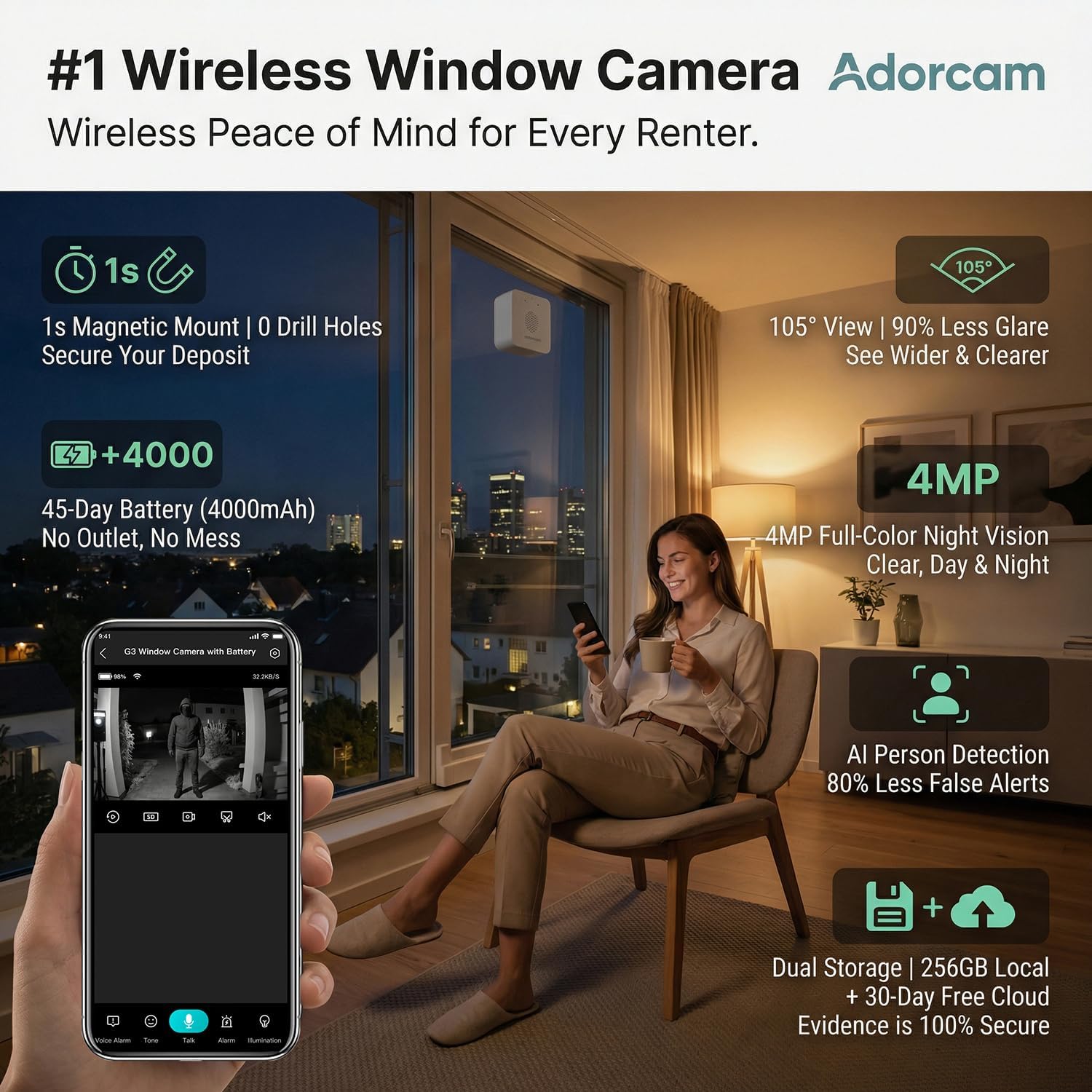
Image 1.1: The adorcam Wireless Window Camera G3 highlighting its main features.
2. Setup
2.1 Charging the Camera
Before initial use, fully charge the camera using the provided USB-C cable and a standard 5V/1A USB power adapter (not included). The charging indicator light will show the charging status.
2.2 App Download and Account Creation
Download the 'Adorbee' app from the Apple App Store (for iOS devices) or Google Play Store (for Android devices). Follow the in-app instructions to create an account and log in.
2.3 Camera Pairing
- Open the 'Adorbee' app and tap 'Add Device' or the '+' icon.
- Select your camera model from the list.
- Follow the on-screen prompts to connect the camera to your 2.4GHz Wi-Fi network. Ensure your phone is connected to the same 2.4GHz Wi-Fi network during setup.
- Scan the QR code displayed on your phone screen with the camera lens. A voice prompt will confirm successful pairing.
2.4 Installation
The adorcam G3 features a magnetic mount for easy, drill-free installation on windows or glass surfaces.
- Clean: Wipe the window glass thoroughly to ensure it is clean and dry.
- Stick: Peel the protective film from the adhesive side of the magnetic mount and press it firmly onto the desired location on the window.
- Snap: Attach the camera magnetically to the mount. Ensure the camera lens faces outwards for optimal viewing.

Image 2.1: Visual guide for the 3-step installation process.

Image 2.2: Comparison of a wireless window camera setup versus a traditional wired camera setup.
3. Operating Instructions
Once installed and paired, you can access and control your adorcam G3 through the 'Adorbee' app.
3.1 Live View
Open the 'Adorbee' app and select your camera from the device list to access the live video feed. You can view real-time footage from your window.
3.2 Motion Detection and Alerts
The camera utilizes AI Person Detection to identify human figures, reducing false alarms from pets or environmental factors. When motion is detected, the camera records a video clip and sends an instant alert to your smartphone. You can adjust motion sensitivity and detection zones within the app settings.
3.3 Night Vision
The adorcam G3 features 4MP Full-Color Night Vision, providing clear and detailed images even in low-light conditions without visible infrared LEDs.
3.4 Two-Way Audio
Use the two-way audio feature in the app to listen to the environment around the camera or speak through the camera's built-in speaker.
3.5 Storage Options
The camera supports two storage methods for recorded events:
- Local Storage: Insert a microSD card (up to 256GB, sold separately) into the camera's slot for local recording. This option does not require a subscription.
- Cloud Storage: A 30-day free trial of cloud storage is included. After the trial, a subscription is required for cloud backup. Cloud storage ensures your video evidence is secure even if the camera is physically compromised.

Image 3.1: The Adorbee app interface displaying live camera feed and control options.

Image 3.2: Explanation of the dual storage feature, combining local microSD and cloud backup.

Image 3.3: Examples of camera usage for monitoring plants, babies, and outdoor wildlife.
4. Maintenance
4.1 Battery Charging
The camera's 4000mAh battery provides approximately 45 days of usage based on 100 events per day. When the battery level is low, the app will notify you. Recharge the camera using the provided USB-C cable.
4.2 Cleaning
To maintain optimal performance, periodically clean the camera lens and body with a soft, dry cloth. Avoid using harsh chemicals or abrasive materials.
4.3 Magnetic Mount Care
The washable adhesive on the magnetic mount can be cleaned with water to restore its stickiness if it becomes dirty. Ensure it is completely dry before re-applying.
5. Troubleshooting
5.1 Common Issues and Solutions
- Camera not connecting to Wi-Fi:
- Ensure your Wi-Fi network is 2.4GHz. The camera does not support 5GHz Wi-Fi.
- Verify the Wi-Fi password is correct.
- Move the camera closer to your Wi-Fi router during setup.
- Reset the camera (refer to the Quick Start Guide for reset instructions) and attempt pairing again.
- Short battery life:
- Frequent motion detection events or continuous live viewing can reduce battery life. Adjust motion sensitivity settings in the app.
- Ensure the camera is fully charged.
- False motion alerts:
- Adjust the motion detection sensitivity in the app.
- Define specific detection zones to exclude areas with frequent non-human movement.
- Poor image quality:
- Ensure the camera lens and the window glass are clean.
- Check your Wi-Fi signal strength; a weak signal can affect streaming quality.
5.2 Why is the camera designed for indoor installation only?
The adorcam Wireless Window Camera is designed for indoor installation, looking outwards through a window. It is not weatherproof and should not be exposed to outdoor elements. Installing it indoors protects it from theft, weather damage, and potential privacy concerns with neighbors, while also preventing damage to exterior walls.
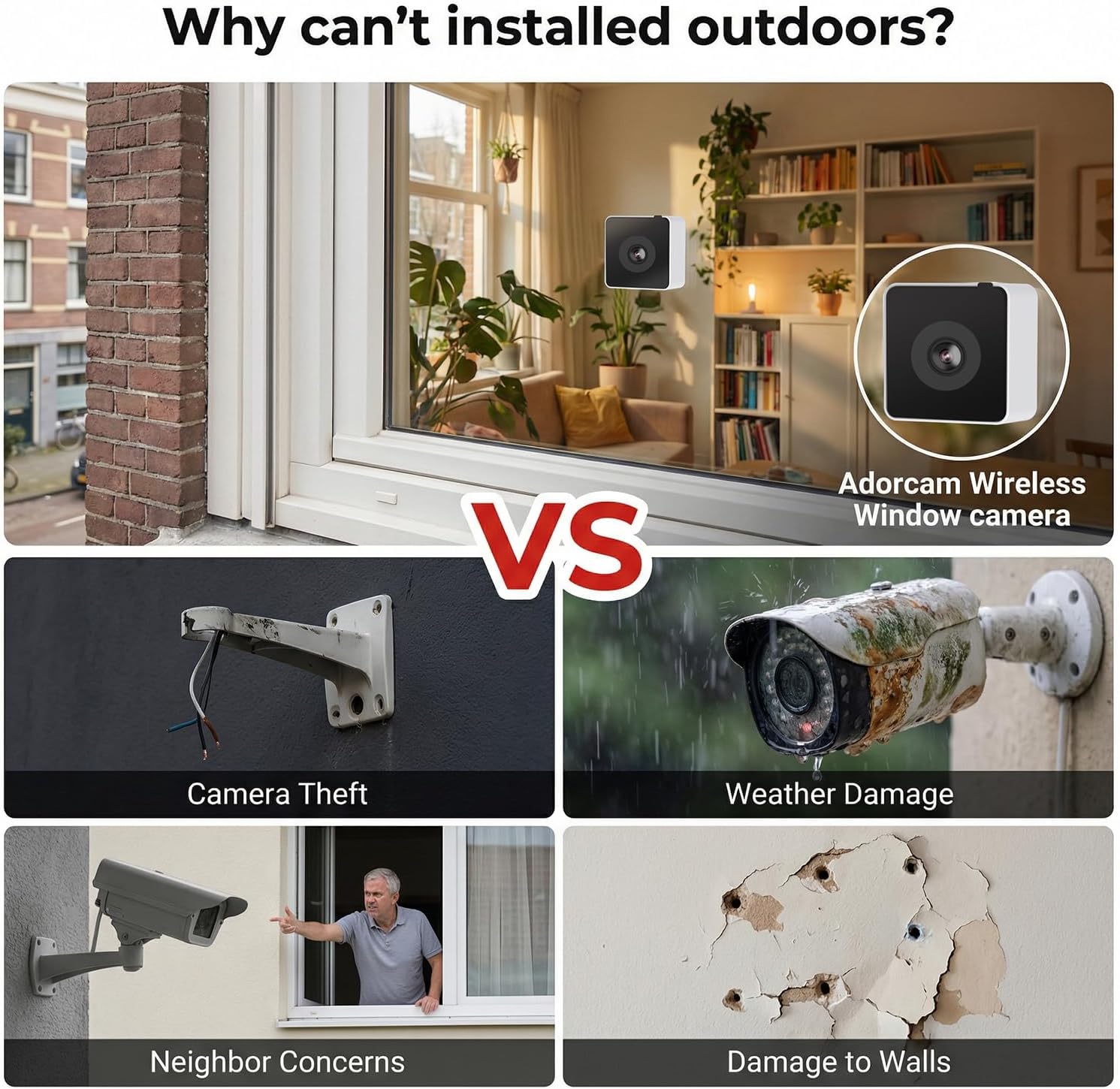
Image 5.1: Illustration of reasons for indoor-only installation.
6. Specifications
| Feature | Specification |
|---|---|
| Model Name | Window Camera with Battery for Indoor (G3) |
| Resolution | 4MP (2560x1440) |
| Field of View | 105 Degrees |
| Battery Capacity | 4000mAh |
| Battery Life | Up to 45 days (based on 100 events/day) |
| Connectivity | 2.4GHz Wi-Fi |
| Night Vision | Full-Color Night Vision |
| Audio | Two-Way Audio |
| Storage | MicroSD card (up to 256GB), Cloud Storage (optional subscription) |
| Motion Detection | AI Person Detection |
| App Compatibility | Adorbee App (iOS/Android) |
| Mount Type | Magnetic Window Mount |
| Color | White |
| Dimensions | 0.21 x 0.1 x 0.21 inches (approximate) |
| Weight | 0.32 Pounds (approximate) |
7. Warranty and Support
7.1 Product Warranty
The adorcam Wireless Window Camera G3 comes with a 2-year manufacturer's warranty. Please retain your proof of purchase for warranty claims.
7.2 Technical Support
For technical assistance, troubleshooting, or warranty inquiries, please contact adorcam customer support through the contact information provided in your Quick Start Guide or on the official adorcam website.