
1. Introduction
Thank you for choosing the BougeRV CRX3 23 Quart Portable Refrigerator. This manual provides essential information for the safe and efficient operation, maintenance, and troubleshooting of your new portable refrigerator. Please read this manual thoroughly before use and retain it for future reference.
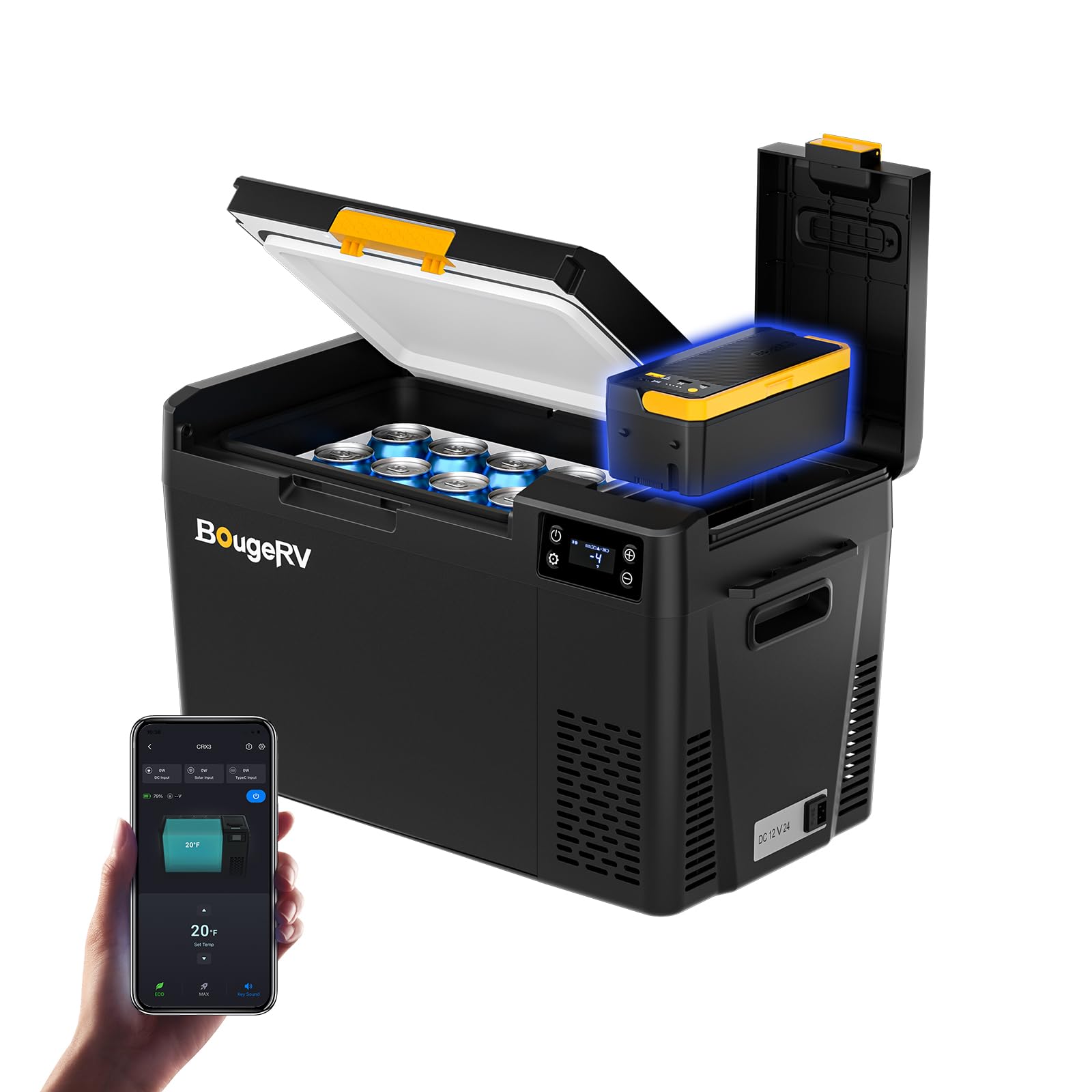
Image: The BougeRV CRX3 23 Quart Portable Refrigerator.
2. Safety Information
To ensure safe operation, please observe the following precautions:
- Do not operate the appliance if it is visibly damaged.
- Do not block the ventilation openings. Ensure adequate airflow around the unit.
- Avoid placing the refrigerator near heat sources or in direct sunlight for prolonged periods.
- Do not use electrical devices inside the refrigerator unless recommended by the manufacturer.
- Ensure the power cables are not pinched or damaged.
- Disconnect the power supply before cleaning or performing maintenance.
- This appliance is not intended for use by persons (including children) with reduced physical, sensory or mental capabilities, or lack of experience and knowledge, unless they have been given supervision or instruction concerning use of the appliance by a person responsible for their safety.
3. Package Contents
Verify that all items are included in your package:
- 1 x BougeRV CRX3 Portable Refrigerator (23 Quart)
- 1 x 240Wh Detachable LiFePO4 Battery
- 1 x 12V/24V DC Power Cord
- 1 x 100-240V AC Adapter
- 1 x User Manual

Image: Visual representation of the items included in the box.
4. Product Overview
The BougeRV CRX3 23 Quart Portable Refrigerator is designed for versatile cooling on the go. Key features include:
- Detachable 240Wh LiFePO4 Battery: Provides up to 29 hours of runtime in ECO mode. Features a pogo pin connection for easy installation and can also function as a power bank for other devices.
- Fast Cooling: Achieves 32℉ from 77℉ in approximately 14 minutes using advanced compressor technology.
- Energy-Saving Operation: Operates at less than 35W in ECO mode. Compatible with 12V/24V DC and 100-240V AC power sources.
- Quiet Operation: Designed for low noise, operating at approximately 35dB, ensuring a peaceful environment.
- Built-in LED Light: For convenient access to contents in low-light conditions.
- APP Control: Adjust temperature, select modes, and monitor power via the BougeRV App within a 32 ft range.
- Reversible Lid: The lid can be removed and reversed to switch door opening direction.
- Locking Latch Design: Ensures the door stays securely closed, even on rough terrain.
Video: This video demonstrates the key features of the BougeRV CRX3 portable refrigerator, including its power modes and general usage.
5. Setup
5.1 Initial Battery Activation
Before first use, the 240Wh LiFePO4 battery requires activation. Refer to the specific instructions provided with the battery for the activation procedure. Incorrect activation may result in error messages.
5.2 Power Connection
Your BougeRV CRX3 refrigerator supports multiple power options:
- DC Power (12V/24V): Connect the provided DC power cord to your vehicle's cigarette lighter socket or a compatible 12V/24V power source.
- AC Power (100-240V): Use the provided AC adapter to connect the refrigerator to a standard wall outlet.
- Battery Power: The detachable 240Wh LiFePO4 battery provides portable power. Ensure it is properly installed and charged.

Image: The three power options for the BougeRV CRX3 portable refrigerator: solar panel (sold separately) and battery for outdoor use, AC (110-240V) for indoor use, and DC (12V/24V) for car use.
5.3 Battery Installation
The 240Wh LiFePO4 battery connects via a pogo pin design. Simply align the battery with its compartment and press firmly until it clicks into place. No additional cables are required for internal connection.

Image: A hand inserting the 240Wh LiFePO4 battery into its dedicated compartment on the BougeRV CRX3 refrigerator.
6. Operating Instructions
6.1 Control Panel Overview
The refrigerator features a simple and clear display panel for easy control.

Image: A close-up of the refrigerator's control panel, displaying temperature and control buttons.
6.2 Powering On/Off
Press and hold the power button on the control panel to turn the refrigerator on or off.
6.3 Temperature Adjustment
Use the '+' and '-' buttons on the control panel to set your desired temperature. The temperature range is -4℉ to 68℉ (-20℃ to 20℃).

Image: The refrigerator with various food items, demonstrating the flexibility of temperature adjustment.
6.4 ECO and MAX Modes
The refrigerator offers two operating modes:
- ECO Mode: For energy-efficient operation, consuming less than 35W. Ideal for extended use when power conservation is important.
- MAX Mode: For rapid cooling, consuming up to 60W. Use this mode when you need to reach the desired temperature quickly.

Image: The refrigerator in a natural setting, emphasizing its energy-saving ECO mode.
6.5 Fast Cooling Performance
The CRX3 can cool from 77℉ to 32℉ in approximately 14 minutes (in Max mode, empty unit, at 77℉ ambient temperature).

Image: A graph illustrating the rapid cooling capability of the BougeRV CRX3 refrigerator.
6.6 Quiet Operation
The refrigerator operates at a low noise level of approximately 35dB in ECO mode, ensuring minimal disturbance.

Image: A person sleeping undisturbed next to the refrigerator, highlighting its quiet operation.
6.7 APP Control
Download the BougeRV App to control your refrigerator remotely. The app allows you to adjust temperature, select modes, and monitor the unit's status from your smartphone within a 32 ft range.

Image: A smartphone screen showing the BougeRV app, used for remote control and monitoring of the refrigerator.
6.8 Reversible Lid
The lid of the CRX3 is removable and reversible, allowing you to change the opening direction to suit your setup.

Image: Instructions demonstrating the process of removing and reversing the refrigerator lid.
6.9 Internal LED Light
A built-in LED light illuminates the interior, making it easy to find items even in the dark.

Image: The illuminated interior of the refrigerator, showing its contents clearly.
6.10 Battery as Power Bank
The detachable 240Wh LiFePO4 battery can also be used to charge other devices via its USB-C port, functioning as a portable power bank.

Image: A smartphone charging from the refrigerator's detachable battery, demonstrating its power bank capability.
7. Maintenance
7.1 Cleaning
Regular cleaning helps maintain the refrigerator's efficiency and hygiene.
- Disconnect the power supply before cleaning.
- Wipe the interior and exterior surfaces with a damp cloth and a mild detergent.
- Do not use abrasive cleaners or harsh chemicals.
- Ensure all surfaces are dry before reconnecting power.
7.2 Defrosting
The CRX3 features manual defrost. Frost buildup can reduce cooling efficiency.
- Turn off the refrigerator and disconnect it from the power source.
- Remove all contents.
- Leave the lid open to allow frost to melt naturally.
- Wipe away melted water with a clean cloth.
- Do not use sharp objects to remove ice, as this can damage the cooling elements.
7.3 Storage
When storing the refrigerator for an extended period:
- Ensure the unit is clean and dry.
- Leave the lid slightly ajar to prevent odors and mold growth.
- Store in a dry, well-ventilated area, away from direct sunlight and extreme temperatures.
8. Troubleshooting
If you encounter issues with your refrigerator, refer to the following common problems and solutions:
| Problem | Possible Cause | Solution |
|---|---|---|
| Refrigerator does not turn on | No power supply; Damaged power cord; Battery not activated or discharged | Check power connection; Replace damaged cord; Activate or charge battery. |
| Cooling performance is poor | Ventilation blocked; Excessive frost; High ambient temperature; Lid not sealed properly | Ensure clear vents; Defrost unit; Move to cooler area; Check lid seal. |
| Unusual noise | Unit not level; Fan obstruction | Place on a flat surface; Check for obstructions around the fan. |
| App control not working | Bluetooth disconnected; App outdated | Ensure Bluetooth is on and connected; Update the BougeRV App. |
9. Specifications
Detailed specifications for the BougeRV CRX3 23 Quart Portable Refrigerator:
| Feature | Detail |
|---|---|
| Model Number | CRX302301B |
| Capacity | 23 Quarts |
| Product Dimensions (D x W x H) | 23.7" x 12.6" x 13.8" |
| Item Weight | 31.1 Pounds |
| Cooling Method | Compressor |
| Temperature Range | -4℉ to 68℉ (-20℃ to 20℃) |
| Power Source | Battery Powered (12V/24V DC, 100-240V AC) |
| Battery Type | 240Wh LiFePO4 (Detachable) |
| Noise Level | Approximately 35dB (in ECO mode) |
| Defrost System | Manual Defrost |
| Special Features | Portable, APP Control, Built-in LED Light, Reversible Lid |

Image: A visual guide to the interior and exterior dimensions of the 23-quart refrigerator, including examples of items it can hold.
10. Warranty and Support
The BougeRV CRX3 12V refrigerator comes with a 2-year technical support. For any product questions, technical assistance, or warranty claims, please contact BougeRV customer service. Refer to the contact information provided in your purchase documentation or on the official BougeRV website.


