
1. Introduction
The JOC H1011BT portable radio is designed to provide a versatile audio experience, combining traditional FM radio with modern digital media playback capabilities. This device allows you to enjoy your favorite music and radio programs anywhere, offering seamless connectivity via Bluetooth, USB, and TF card. Its compact design and rechargeable battery make it an ideal companion for home, office, or travel.
2. Safety Information
- Do not expose the device to water or excessive moisture.
- Avoid disassembling the device. Repairs should only be performed by qualified personnel.
- Use only the specified charging cable and power source to prevent damage.
- Keep the device away from extreme temperatures and direct sunlight.
- Do not block the speaker grille during operation to ensure optimal sound quality.
3. Package Contents
Please check the package for the following items:
- JOC H1011BT Portable Digital FM Radio
- USB Charging Cable
- Carry Strap
- Owner's Manual (this document)
- 1 x Lithium-ion battery (pre-installed or separate)

Figure 3.1: Product Packaging
4. Product Overview
The JOC H1011BT is a compact and feature-rich portable radio. It includes a digital display, easy-to-use control buttons, and multiple connectivity options for diverse audio playback.
4.1 Front View
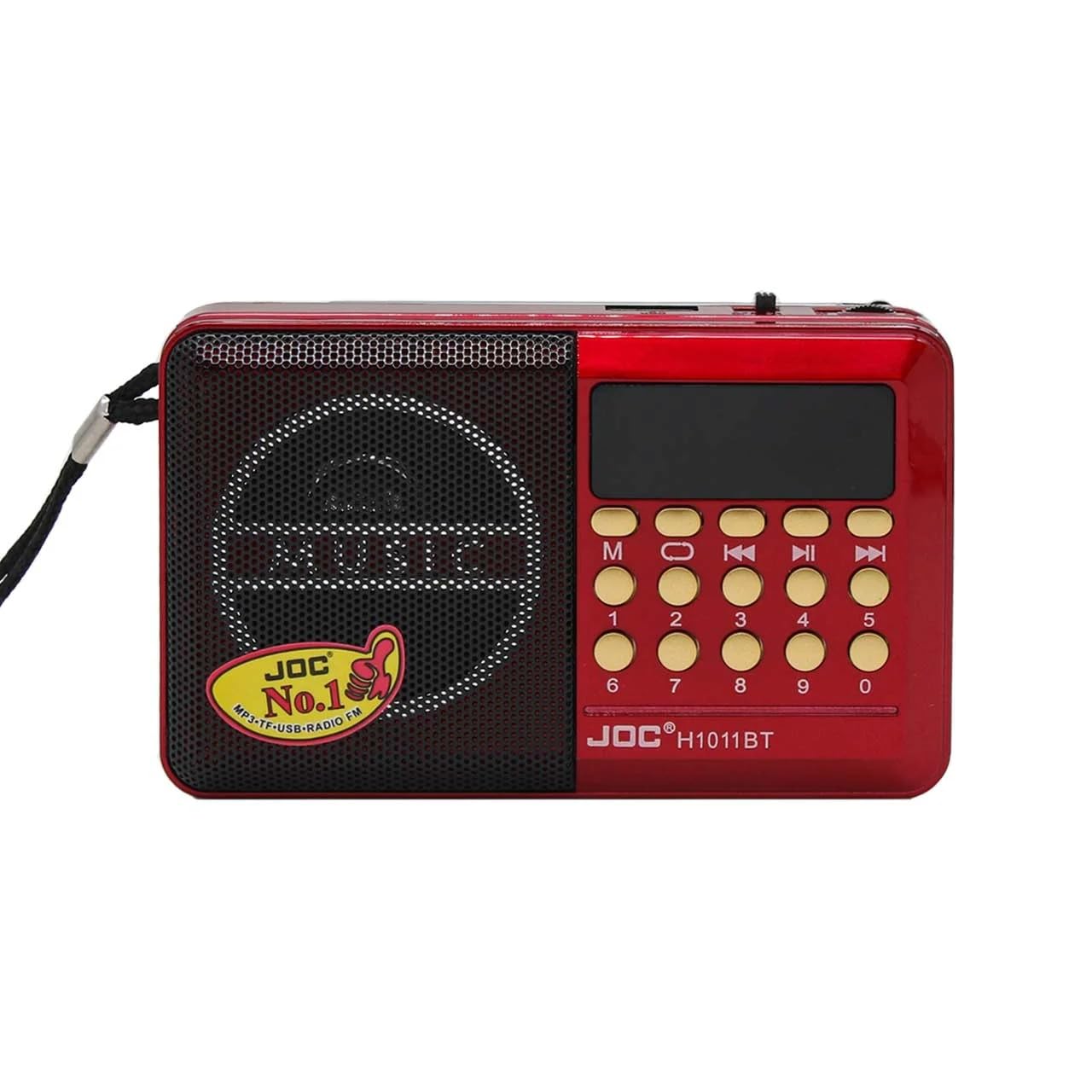
Figure 4.1: Front View of the Radio
This image displays the main interface of the radio, including the speaker, digital screen, and numeric keypad for direct frequency input or track selection.
4.2 Side View and Ports
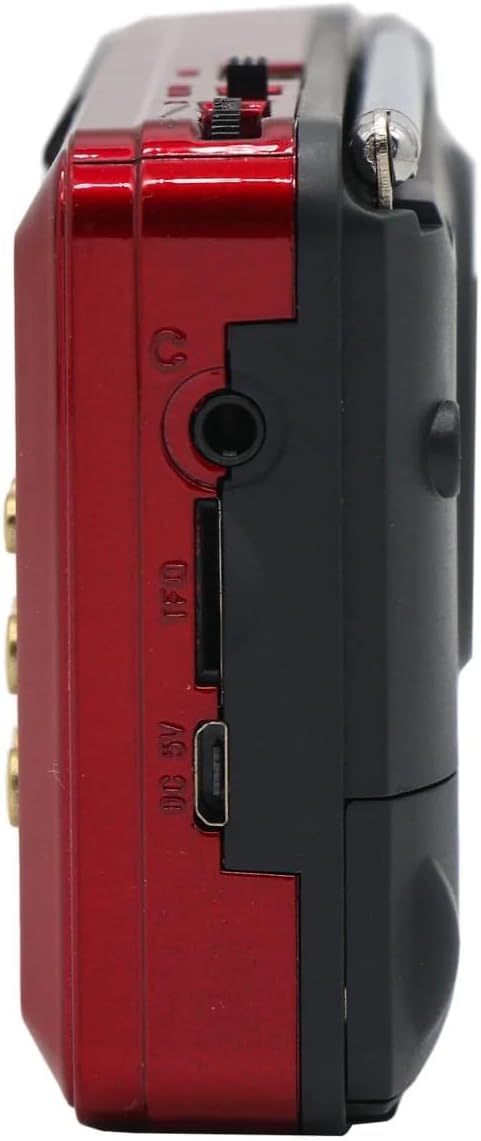
Figure 4.2: Side Ports and Connections
The side of the radio features essential ports: a DC 5V micro-USB charging port, a TF (MicroSD) card slot for memory card playback, a USB-A port for USB drive playback, and a 3.5mm headphone jack for private listening.
4.3 Antenna and Portability

Figure 4.3: Radio with Extended Antenna
This view shows the radio with its telescopic antenna extended, crucial for optimal FM reception. The compact size and included carry strap enhance its portability.
4.4 Compact Design

Figure 4.4: Demonstrating Portability
This image illustrates the radio's ergonomic and lightweight design, making it comfortable to hold and carry for on-the-go use.
5. Setup
5.1 Charging the Battery
- Locate the DC 5V charging port on the side of the radio (refer to Figure 4.2).
- Connect the provided USB charging cable to the radio's charging port.
- Connect the other end of the USB cable to a standard USB power adapter (5V, not included) or a computer's USB port.
- The charging indicator light (if present) will illuminate during charging and turn off or change color when fully charged.
- Allow approximately 2-3 hours for a full charge before first use.
5.2 Initial Power On
After charging, slide the power switch (usually located on the side or top) to the 'ON' position. The digital display will light up, and the radio will typically start in FM radio mode or the last used mode.
6. Operating Instructions
6.1 Power On/Off and Volume Control
- Power: Slide the power switch to 'ON' or 'OFF' to turn the device on or off.
- Volume: Use the dedicated volume knob or buttons (usually '+' and '-') to adjust the sound level.
6.2 FM Radio Operation
- Switch to FM Mode: Press the 'M' (Mode) button until 'FM' appears on the display.
- Automatic Scan: Press and hold the 'Play/Pause' button (often labeled with a play symbol) to initiate an automatic scan for FM stations. The radio will scan and save available stations.
- Manual Tuning: Use the 'Previous' (<<) or 'Next' (>>) buttons to manually tune to frequencies or navigate through saved stations.
- Direct Frequency Input: Use the numeric keypad (0-9) to directly enter an FM frequency (e.g., 102.5).
- Antenna: Extend the telescopic antenna for better FM reception (refer to Figure 4.3).
6.3 Bluetooth Playback
- Switch to Bluetooth Mode: Press the 'M' (Mode) button until 'BT' or 'Bluetooth' appears on the display. The radio will enter pairing mode, indicated by a flashing Bluetooth icon or sound.
- Pairing: On your smartphone or other Bluetooth-enabled device, search for available Bluetooth devices and select 'H1011BT' (or similar name).
- Playback: Once paired, you can play music from your device, and the audio will stream through the radio. Use the radio's 'Previous' (<<), 'Next' (>>), and 'Play/Pause' buttons to control playback.
6.4 USB/TF Card Playback
- Insert Media: Insert a USB flash drive into the USB port or a TF (MicroSD) card into the TF card slot (refer to Figure 4.2). Ensure audio files (MP3, WAV, etc.) are stored on the media.
- Switch to Media Mode: The radio should automatically switch to USB or TF card playback mode. If not, press the 'M' (Mode) button until the corresponding indicator appears.
- Playback Control: Use the 'Previous' (<<), 'Next' (>>), and 'Play/Pause' buttons to navigate tracks and control playback.
7. Maintenance
- Cleaning: Use a soft, dry cloth to clean the exterior of the radio. Do not use liquid cleaners or abrasive materials.
- Storage: When not in use for extended periods, store the radio in a cool, dry place, away from direct sunlight and extreme temperatures.
- Battery Care: To prolong battery life, avoid fully discharging the battery frequently. Charge it regularly, even if not in use.
8. Troubleshooting
| Problem | Possible Cause | Solution |
|---|---|---|
| Radio does not power on. | Battery is discharged. Power switch is off. | Charge the battery. Ensure the power switch is in the 'ON' position. |
| No sound or low volume. | Volume is too low. Mute is active. | Increase the volume. Check if the device is muted. |
| Poor FM reception. | Antenna not extended. Weak signal area. | Fully extend the telescopic antenna. Try moving the radio to a different location. |
| Bluetooth not connecting. | Radio not in BT mode. Device not discoverable. | Ensure the radio is in Bluetooth pairing mode. Make sure Bluetooth is enabled on your device and it's discoverable. |
| USB/TF card not playing. | Incorrect file format. Media not inserted correctly. | Ensure audio files are in a supported format (e.g., MP3). Reinsert the USB drive or TF card. |
9. Specifications
| Feature | Detail |
|---|---|
| Brand Name | Joc |
| Model Number | H1011BT |
| Color | Red |
| Special Features | Bluetooth, FM Radio, Digital Music Player, USB Support, TF Card Support |
| Connectivity Technology | USB, TF Card, Bluetooth, FM Radio |
| Product Dimensions (L x W x H) | 16 cm x 5 cm x 8 cm |
| Tuner Technology | Digital FM Radio |
| Style | Modern Portable Digital |
| Power Source | Rechargeable Lithium-Ion Battery / Electric |
| Radio Bands Supported | AM, FM |
| Included Components | Carry Strap, Owner's Manual, Joc H1011bt Radio, USB Charging Cable |
| Compatible Devices | Smartphones, Tablets, Laptops, MP3 Players, any Bluetooth-enabled device |
| Maximum Speaker Output Power | 3 Watts |
| Number of Batteries | 1 Lithium-ion battery (Included) |
| Materials | Plastic, Metal |
| Recommended Product Uses | Outdoor use, Office use, Home use, FM radio listening, Personal entertainment, Travel, Music playback |
| Item Weight | 250 grams |
10. Warranty and Support
Warranty: The product's warranty description is N/A. Please refer to your retailer's return and warranty policy at the time of purchase.
Support: For any issues or questions regarding your JOC H1011BT radio, please contact the retailer or point of purchase for assistance. Keep your purchase receipt as proof of purchase.


