
1. Introduction
This manual provides essential instructions for the assembly, operation, and maintenance of your VEVOR Ergonomic Kneeling Chair with Backrest & Wheels, Model MST005-1A. This chair is designed to promote an improved sitting posture by aligning the back, shoulders, and neck, thereby helping to reduce muscle tension and slouching.

Image 1.1: User demonstrating proper posture on the VEVOR Ergonomic Kneeling Chair.
2. Safety Information
WARNING: Always follow assembly instructions carefully. Do not exceed the maximum weight limit of 265 lbs (120 kg).
- Ensure all components are securely fastened before use.
- Do not stand on the chair.
- Use on a flat, stable surface.
- Keep children away from the chair during assembly and adjustment.
- It is recommended to adjust your posture or take a standing break after using this product for an hour or if you feel any discomfort.
3. Package Contents
Verify that all components are present before beginning assembly.
- 1 x VEVOR Ergonomic Kneeling Chair (includes frame, seat cushion, knee cushion, backrest, casters, and adjustment mechanisms)

Image 3.1: Fully assembled VEVOR Ergonomic Kneeling Chair.
4. Setup and Assembly
Assembly requires no complex tools. Follow the steps below for quick setup.
- Step 1: Insert the connecting rod into the specified holes on the chair frame.
- Step 2: Attach the casters (wheels) to the base of the chair frame. Ensure they are securely clicked into place.
- Step 3: Secure the seat and knee cushions to the frame using the provided fasteners.
- Step 4: Attach the backrest to the designated support on the chair frame.

Image 4.1: Visual assembly instructions for the kneeling chair.
5. Operating Instructions
5.1 Adjusting Chair Height
The chair features an adjustable design to accommodate various user heights and desk configurations. Use the lifting handle located beneath the seat to adjust the chair's height. There are five distinct height positions available.

Image 5.1: Chair height adjustment mechanism.
5.2 Proper Sitting Posture
The ergonomic design encourages a posture where your back, shoulders, and neck are aligned. Sit with your shins resting on the knee pads and your buttocks on the seat cushion. This open hip angle helps to reduce pressure on your lower back.

Image 5.2: Posture comparison: Kneeling chair vs. traditional chair.
5.3 Usage Recommendations
While the kneeling chair promotes better posture, prolonged use in any single position can lead to discomfort. It is recommended to adjust your posture frequently or take short standing breaks every hour to maintain comfort and circulation.
5.4 Mobility
The chair is equipped with 360° swivel casters for easy movement around your workspace. These casters are designed to roll smoothly and are suitable for various floor types without leaving marks.

Image 5.3: Chair stability and mobility features.
6. Maintenance
To maintain the longevity and appearance of your VEVOR Ergonomic Kneeling Chair:
- Cleaning: Wipe clean with a damp cloth. Avoid harsh chemicals or abrasive cleaners that may damage the PVC leather.
- Inspection: Periodically check all bolts and fasteners to ensure they are tight. Re-tighten if necessary.
- Cushions: The thick foam cushions are designed for durability. The leather cover is easy to clean and helps maintain shape.

Image 6.1: Cushion material and features.
7. Troubleshooting
If you encounter any issues with your VEVOR Ergonomic Kneeling Chair, please refer to the following common concerns:
- Chair feels unstable: Ensure all assembly bolts are tightened. Check that the casters are fully inserted into the base.
- Difficulty adjusting height: Verify that the lifting handle is fully engaged when attempting to adjust. Ensure no obstructions are preventing movement.
- Casters not rolling smoothly: Check for any debris or hair caught in the wheels. Clean as necessary.
- Discomfort during use: This chair encourages a different sitting posture. Gradually increase usage time. Ensure you are taking regular breaks and adjusting your position. If discomfort persists, consult a healthcare professional.
For further assistance, please contact VEVOR customer support.
8. Specifications
| Feature | Detail |
|---|---|
| Brand: | VEVOR |
| Model Name: | Ergonomic Kneeling Chair with Backrest & Wheels |
| Model Number: | MST005-1A |
| Material: | PVC + Carbon Steel + Multi-Layer Board + Foam |
| Color: | Black |
| Product Dimensions (D x W x H): | 31.7" x 18.5" x 36.4" (80.5 x 47 x 92.5 cm) |
| Item Weight: | 20.9 lbs (9.5 kg) |
| Maximum Weight Recommendation: | 265 lbs (120 kg) |
| Seat Cushion Dimensions: | 15.7" x 11.6" (40 x 29.5 cm) |
| Seat Cushion Thickness: | 3.1" (8 cm) |
| Number of Height Positions: | 5 |
| Casters: | 360° Swivel |
| Assembly Required: | Yes |
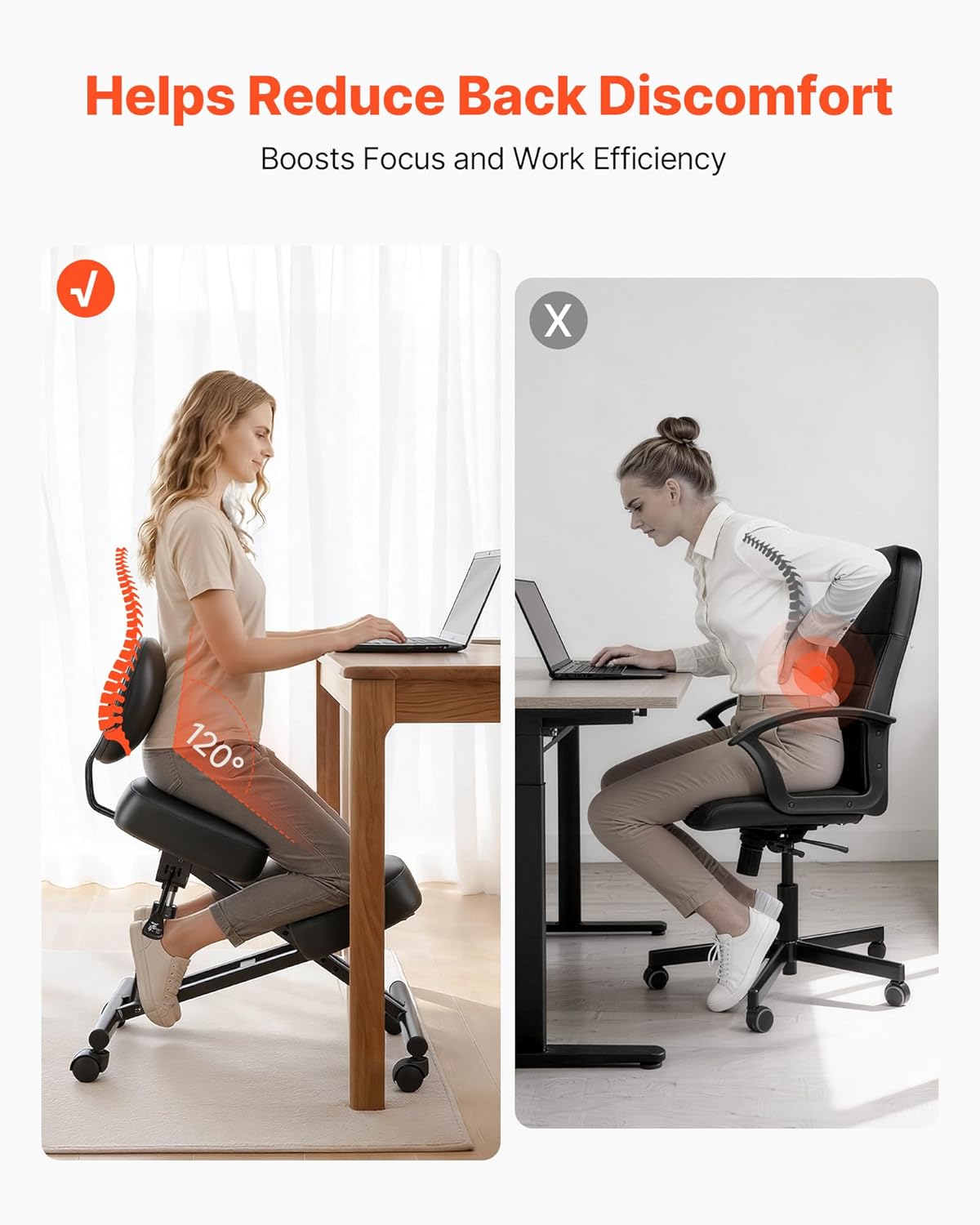
Image 8.1: Product dimensions and specifications diagram.
9. Warranty and Support
For warranty information or technical support, please contact VEVOR directly through their official website or the retailer where the product was purchased. Please have your model number (MST005-1A) and purchase date available when contacting support.
VEVOR Official Website: www.vevor.com