
1. Introduction
The FG-300 Signal Generator is a versatile device designed for generating various waveforms, including sine, square, and chamfered square waves. It offers a wide frequency adjustment range from 0.01 Hz to 200,000 Hz, with a default Schumann resonance frequency of 7.83 Hz. This generator is suitable for electronic equipment testing, instrument calibration, scientific experiments, and other applications requiring precise signal generation in laboratory and studio environments. Its compact size and USB power supply ensure portability and ease of use.
2. Safety Information
Please read and understand all safety instructions before operating the device. Failure to follow these instructions may result in electric shock, fire, or damage to the product.
- Power Source: Use only a 5V USB power source. Do not use power adapters with higher voltage outputs.
- Environment: Operate the device in a dry environment. Avoid exposure to moisture, water, or extreme temperatures.
- Handling: Handle the device with care. Do not drop or subject it to strong impacts.
- Modifications: Do not attempt to disassemble, repair, or modify the device. Refer all servicing to qualified personnel.
- Ventilation: Ensure proper ventilation around the device during operation.
3. Package Contents
Verify that all items listed below are included in your package:
- 1 x FG-300 Adjustable Sine Wave Resonator Generator with Acrylic Case
- 1 x USB Data Cable
- 1 x User Manual
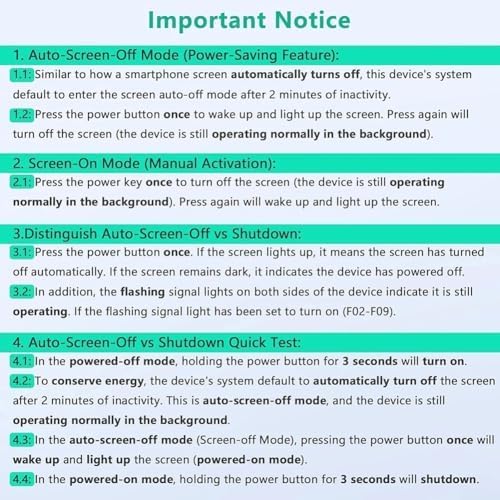
Image: The FG-300 Signal Generator shown with its USB data cable, a stylus for screen interaction, and the user manual.
4. Product Overview
The FG-300 Signal Generator features a compact design with an acrylic case, making it durable and portable. It includes a display screen for frequency and waveform settings, and a keypad for input. The device is powered via a standard USB connection.
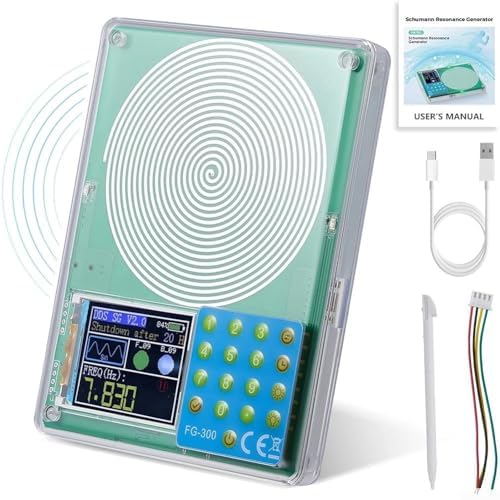
Image: A clear view of the FG-300 Signal Generator, highlighting its main components including the spiral coil, digital display, and control keypad.

Image: The FG-300 device labeled as an FM783 Schumann Resonance Generator, illustrating its function in generating a frequency field.

Image: The FG-300 device being placed into a bag, emphasizing its small and convenient design for portability.
5. Setup
To set up your FG-300 Signal Generator, follow these simple steps:
- Unpack: Carefully remove all components from the packaging.
- Connect Power: Connect the provided USB data cable to the USB port on the FG-300 device. Plug the other end of the USB cable into a compatible 5V USB power source (e.g., a computer USB port, a USB wall adapter, or a power bank).
- Power On: The device should power on automatically or can be activated by pressing the power button. Refer to the 'Operating Instructions' section for details on screen activation.
6. Operating Instructions
This section details how to operate your FG-300 Signal Generator, including power management, frequency adjustment, and waveform selection.
6.1. Power Management and Screen Control

Image: An important notice outlining the device's screen-off modes, manual activation, and how to distinguish between auto-screen-off and full shutdown.
- Auto-Screen-Off Mode (Power-Saving): The device's system will automatically enter screen auto-off mode after 2 minutes of inactivity. The device continues to operate normally in the background.
- Screen-On Mode (Manual Activation): Press the power button once to wake up and light up the screen. Pressing it again will turn off the screen, but the device remains operational.
- Distinguishing Auto-Screen-Off vs. Shutdown:
- Press the power button once. If the screen lights up, the device was in auto-screen-off mode.
- If the screen remains dark, the device has powered off.
- Flashing signal lights on both sides of the device indicate it is still operating (if the flashing signal light has been set to turn on, F02-F09).
- Shutdown: In powered-on mode, hold the power button for 3 seconds to shut down the device.
6.2. Frequency Adjustment
The FG-300 allows for precise frequency adjustment across a broad range.
- Frequency Range: The adjustable frequency range is 0.01 Hz to 200,000 Hz.
- Default Frequency: The default Schumann resonance frequency is 7.83 Hz.
- Preset Frequencies: The device can also be adjusted to specific higher frequencies such as 174 Hz, 285 Hz, 396 Hz, 417 Hz, 528 Hz, 639 Hz, 741 Hz, 852 Hz, and 963 Hz.
- Adjustment: Use the keypad and display interface to input and set the desired frequency. Refer to the on-screen prompts for navigation.
6.3. Waveform Selection
The FG-300 supports multiple waveform outputs to suit various applications.

Image: A visual representation of the multiple waveform outputs available from the device, including sine, square, triangle, forward sawtooth, reverse sawtooth, ECG, half wave, Lorentz, Gauss, Singer, exponential rise, exponential fall, and 7.83Hz for Schumann wave.
- Available Waveforms: Sine wave, square wave, and chamfered square wave.
- Selection: Use the device's interface to select the desired waveform. The display will show the currently active waveform.
- Output Amplitudes: Sine wave signal voltage amplitude is approximately 3 V. Square wave signal voltage amplitude is approximately 5 V.
7. Maintenance
Proper maintenance ensures the longevity and optimal performance of your FG-300 Signal Generator.
- Cleaning: Use a soft, dry cloth to clean the device's exterior. Do not use liquid cleaners or solvents, as they may damage the acrylic case or internal components.
- Storage: When not in use, store the device in a cool, dry place, away from direct sunlight and extreme temperatures.
- Handling: Avoid dropping or subjecting the device to physical shocks.
8. Troubleshooting
This section addresses common issues you might encounter with your FG-300 Signal Generator.
- Device does not power on:
- Ensure the USB cable is securely connected to both the device and a working 5V USB power source.
- Try a different USB cable or power source to rule out cable/power supply issues.
- Screen is dark but device is operating:
- The device may be in Auto-Screen-Off Mode. Press the power button once to reactivate the screen.
- Check if the flashing signal lights (if enabled, F02-F09) are active, indicating background operation.
- Incorrect waveform or frequency output:
- Verify the settings on the display screen. Use the keypad to adjust frequency and waveform as needed.
- Ensure the device is not in a mode that overrides manual settings.
9. Specifications
| Part Name | Generator |
| Brand | Generic |
| Model Number | Generic54 |
| Material | PCB |
| Color | Primarily Green |
| Dimensions (L x W x H) | Approximately 12.7 x 9.9 x 2 cm (5 x 3.9 x 0.8 inches) |
| Item Weight | Approximately 190 g (0.42 lbs) |
| Frequency Range | 0.01 Hz to 200,000 Hz |
| Default Frequency | 7.83 Hz (Schumann Resonance) |
| Power Supply Voltage | 5 V (USB powered) |
| Sine Wave Signal Voltage Amplitude | 3 V |
| Square Wave Signal Voltage Amplitude | 5 V |
10. Warranty & Support
Information regarding product warranty and customer support is not available in the provided data. Please refer to the seller or manufacturer's website for details on warranty coverage and support options.


