
1. Product Overview
The Klanata HS2234 is a non-contact digital tachometer designed for measuring rotational speeds without physical contact. It features an LED backlit display for clear readings in various lighting conditions and is constructed from durable ABS material. This handheld device offers a wide measuring range and high resolution, making it suitable for diverse industrial applications.

Figure 1: Klanata HS2234 Digital Tachometer, front view. This image shows the overall design of the device, including the display and control buttons.
Key Features:
- Non-Contact Measurement: Utilizes a laser for accurate rotational speed measurement without physical contact.
- LED Backlit Display: Ensures clear visibility of readings in low-light environments.
- Durable Construction: Made from ABS material for resistance against wear and oxidation.
- Wide Measuring Range: Accommodates diverse industrial measurement requirements.
- High Resolution: Provides precise and reliable measurement results.
- Handheld Design: Easy to operate for rapid measurements in various technical applications.
2. Safety Information
Please read and understand all safety instructions before operating the device. Failure to follow these instructions may result in injury or damage to the device.
- Do not look directly into the laser beam. The laser emitted by this device is a Class II laser product.
- Do not aim the laser at people or animals.
- Keep the device away from water and moisture.
- Do not attempt to open or modify the device. Refer all servicing to qualified personnel.
- Ensure batteries are inserted with correct polarity. Remove batteries if the device will not be used for an extended period.
- Dispose of batteries and the device according to local regulations.
3. Package Contents
Verify that all items are present and in good condition upon opening the package:
- 1 x Klanata HS2234 Digital Tachometer
- 1 x User Manual (this document)
- 3 x Reflective Tape strips
4. Setup
4.1 Battery Installation
- Locate the battery compartment cover on the back of the tachometer.
- Slide the cover downwards to open the compartment.
- Insert two (2) AAA batteries (not included) into the compartment, ensuring correct polarity (+/-).
- Close the battery compartment cover by sliding it upwards until it clicks into place.
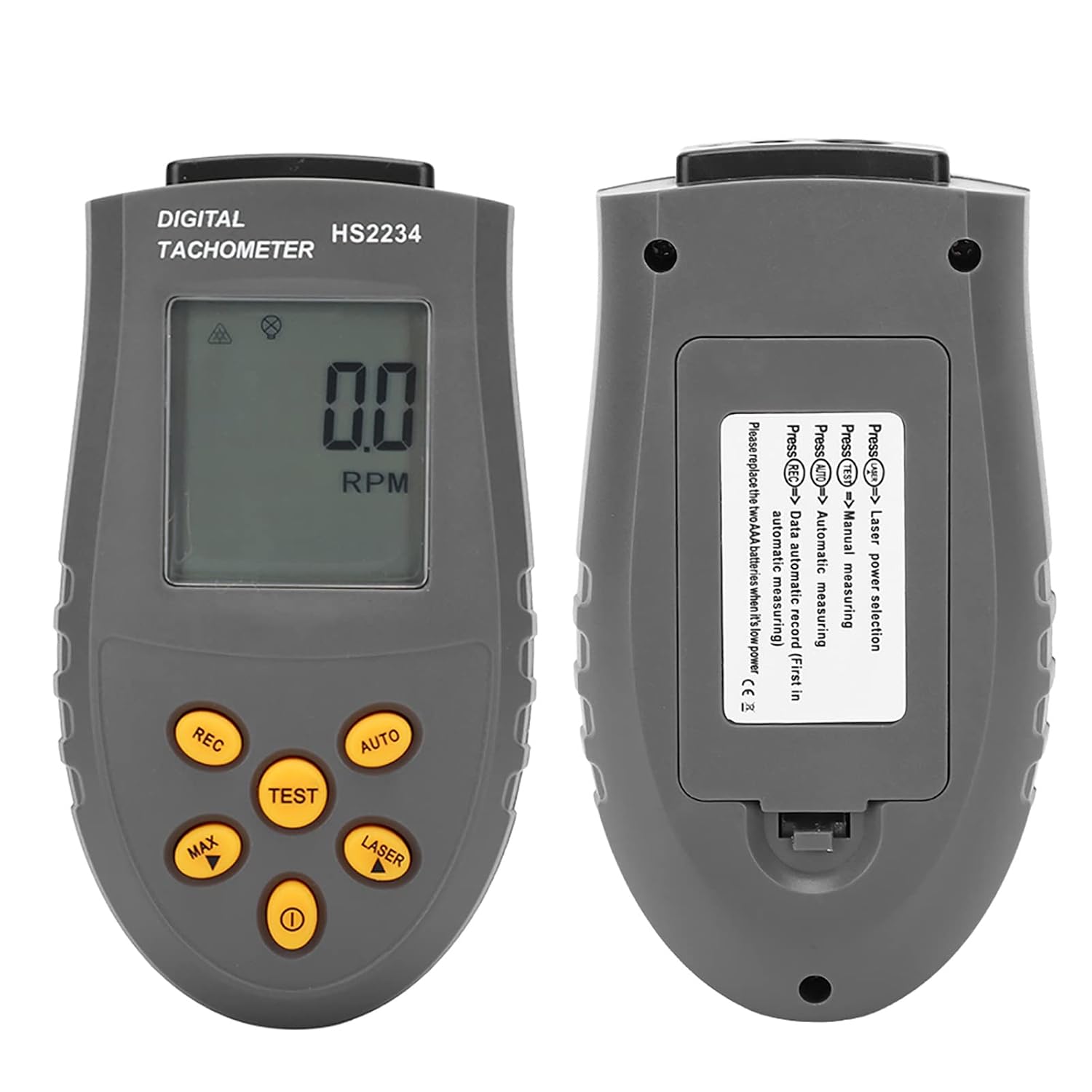
Figure 2: Front and back view of the HS2234 Tachometer. The back view clearly shows the battery compartment and button labels.
4.2 Preparing the Target Surface
For accurate non-contact measurements, a reflective surface is required on the rotating object. Use the provided reflective tape or a similar reflective material.
- Clean the target surface of the rotating object to ensure it is free from dust, oil, or grease.
- Apply a small piece of the reflective tape to the rotating shaft or disk. Ensure the tape is flat and securely adhered.
- The reflective tape should be positioned so that the laser beam can easily strike it during rotation.
5. Operating Instructions
5.1 Powering On/Off
- Press the Power button (
 ) to turn the tachometer on. The LCD display will illuminate.
 - To turn off the device, press and hold the Power button for a few seconds until the display turns off. The device also features an auto-off function to conserve battery power.
5.2 Taking a Measurement
- Ensure the target object has reflective tape applied (refer to Section 4.2).
- Turn on the tachometer.
- Press the LASER button to activate the laser pointer. A red laser dot will appear from the front of the device.
- Aim the laser beam at the reflective tape on the rotating object. Maintain an effective measuring distance of 50mm to 500mm.
- Press the TEST button to begin measurement. The RPM reading will be displayed on the LCD screen.
- Release the TEST button to stop measurement. The last reading will be held on the display.
Figure 3: Close-up of the HS2234 display and control buttons. This image highlights the various buttons used for operation.
5.3 Button Functions
- Power (): Turns the device on/off.
- LASER: Activates/deactivates the laser pointer.
- TEST: Initiates measurement when pressed and held.
- MAX: Displays the maximum measured RPM value. Press again to cycle through MAX, MIN, AVG.
- REC: Enters data record mode. Press to start/stop recording.
- AUTO: Toggles between automatic and manual measurement modes. In automatic mode, the device continuously measures.
5.4 Backlight Operation
The LCD display features an integrated LED backlight. The backlight typically activates automatically when the device is powered on or a button is pressed, ensuring readability in low-light conditions.
6. Maintenance
6.1 Cleaning
- Wipe the device with a soft, dry cloth.
- Do not use abrasive cleaners or solvents, as these may damage the ABS housing or display.
- Keep the laser emission and reception lenses clean for accurate measurements.
6.2 Storage
- Store the tachometer in a cool, dry place, away from direct sunlight and extreme temperatures.
- If storing for an extended period, remove the batteries to prevent leakage and damage to the device.
6.3 Battery Replacement
When the low battery indicator appears on the display, replace the AAA batteries as described in Section 4.1.
7. Troubleshooting
| Problem | Possible Cause | Solution |
|---|---|---|
| Device does not power on. | Dead or incorrectly installed batteries. | Replace batteries or check polarity. |
| No RPM reading or unstable reading. |
|
|
| Display is dim or flickering. | Low battery power. | Replace batteries. |
8. Specifications

Figure 4: Graphic illustrating the high precision and key features of the HS2234 Digital Tachometer.
| Parameter | Value |
|---|---|
| Model | HS2234 |
| Material | ABS |
| Effective Measuring Distance | 50~500mm |
| Display | 5-bit LCD backlight display |
| Measuring Range | 2.5-99999 RP/Second (RPM) |
| Measurement Resolution | 0.1 RPM |
| Measurement Accuracy | ±0.05% |
| Sampling Rate | 0.5 seconds |
| Time Base | Quartz crystal |
| Operating Temperature | 0~50℃ |
| Storage Temperature | -20~70℃ |
| Batteries | 2 x AAA batteries (not included) |
| Power Consumption | About 25-40mA |
| Item Weight | 5.1 ounces |
| Package Dimensions | 7.87 x 5.12 x 1.97 inches |
9. Warranty Information
Klanata products are manufactured to high quality standards. For specific warranty terms and conditions, please refer to the documentation provided with your purchase or contact Klanata customer support.
10. Customer Support
If you encounter any issues or have questions regarding your Klanata HS2234 Digital Tachometer, please contact our customer support team. For the most up-to-date contact information, please visit the official Klanata website or refer to your purchase documentation.
You can also visit the Klanata Store on Amazon: Klanata Store