
Introduction
This manual provides comprehensive instructions for the installation, operation, and maintenance of your Cooler Master MasterFrame 400 Mesh Silver Open Frame PC Case (MF400M-SHNN-S00). Please read this manual carefully before beginning assembly to ensure proper setup and optimal performance.

Image: Front-side view of the Cooler Master MasterFrame 400 Mesh Silver PC Case, showcasing its open frame design and mesh panels.
Setup and Installation
The MasterFrame 400 Mesh is designed for flexible component installation and layout. Follow these steps for proper assembly.
1. Unboxing and Inspection
Carefully remove all components from the packaging. Inspect for any damage during transit. Ensure all accessories listed in the packing list are present.
2. Motherboard Installation
This case supports Micro-ATX and Mini-ITX motherboards. Secure your motherboard to the designated standoffs using the provided screws.

Image: Internal view of the MasterFrame 400 Mesh, showing the motherboard tray and internal structure before component installation.
3. Power Supply Unit (PSU) Installation
Install your ATX power supply in the bottom mount position. Ensure proper cable routing for optimal airflow.
4. Drive Installation
The case supports one 3.5-inch drive (shared with 2.5-inch) and one additional 2.5-inch drive. Install your storage devices in the available bays.
5. Graphics Card (GPU) Installation
Install your graphics card into the appropriate PCIe slot. The case supports GPUs up to 390mm in length. Utilize the included graphics card holder for additional support, especially for larger cards.
6. Cooling System Installation
The MasterFrame 400 Mesh supports extensive cooling configurations:
- Case Fans: Supports up to 9 fans. Compatible sizes include 120mm, 140mm, 180mm, and 200mm depending on the mounting location (front, top, rear, bottom). One 120mm ARGB SickleFlow fan is included at the rear.
- Radiators: Supports radiators up to 360mm/280mm/240mm at the top, and 120mm at the rear.
- CPU Cooler: Accommodates CPU coolers up to 190mm in height.
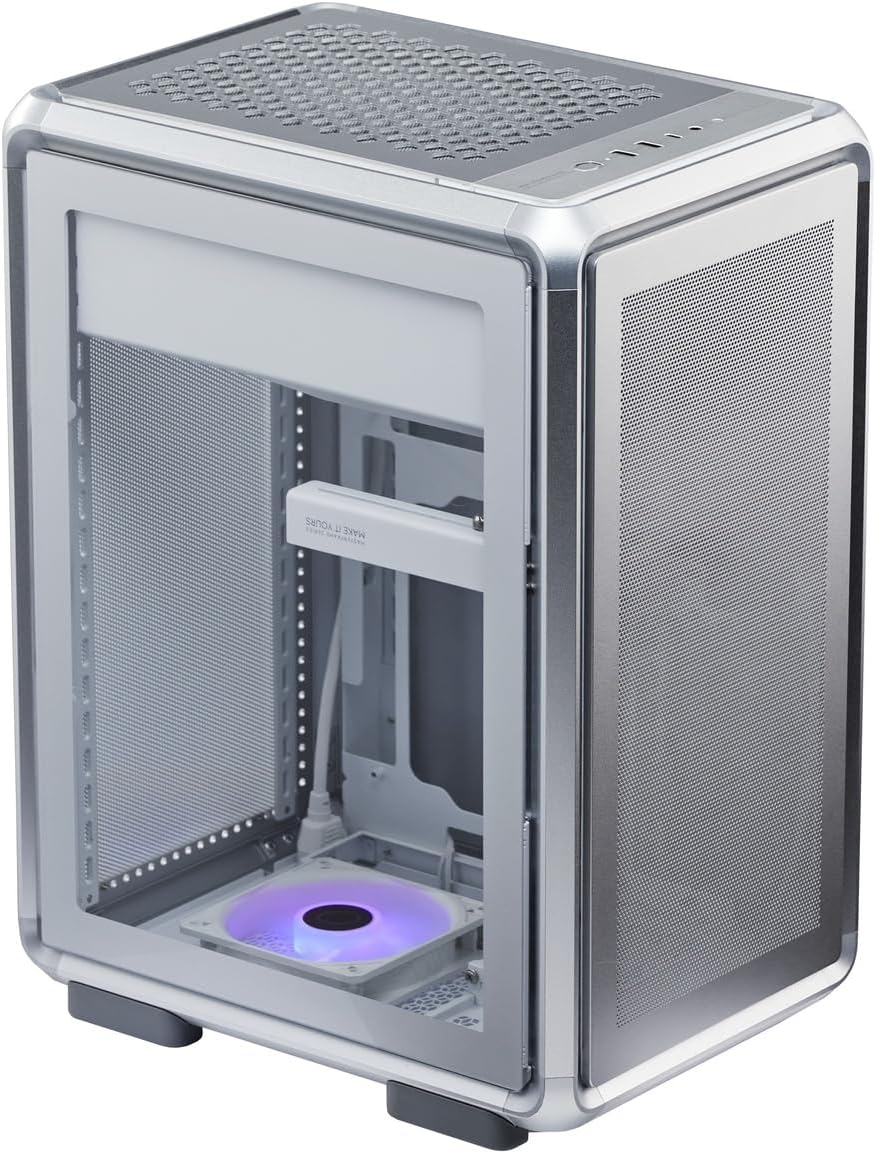
Image: A view of the MasterFrame 400 Mesh with internal components such as a motherboard, GPU, and fans installed, demonstrating component compatibility.
7. Cable Management
Route all cables neatly to ensure optimal airflow and a clean build. Utilize the cable routing options provided by the case design.
8. Layout Configuration
The MasterFrame 400 Mesh supports both portrait and landscape layouts. Adjust the case orientation as desired to suit your installation environment and application.
Operating Instructions
Once all components are installed and secured, connect your peripherals and power cable.
1. Front Panel Connections
The front panel provides convenient access to various ports:
- 1 x USB 20Gbps Type-C port
- 2 x USB 5Gbps Type-A ports
- 1 x Audio Jack

Image: Close-up view of the front panel I/O, showing the USB Type-C, USB Type-A ports, and audio jack.
2. Powering On
Press the power button located on the front panel to turn on your system. Ensure all power cables are securely connected.
3. ARGB Lighting Control
The included SickleFlow 120mm ARGB fan can be controlled via your motherboard's ARGB software or a compatible ARGB controller (not included unless specified). Refer to your motherboard manual for ARGB header connection and software instructions.
Maintenance
Regular maintenance helps ensure the longevity and optimal performance of your PC case.
1. Dust Filter Cleaning
The MasterFrame 400 Mesh includes dust filters on the front and side panels. Periodically remove and clean these filters to prevent dust buildup and maintain efficient airflow. Use compressed air or a soft brush to remove dust.
2. General Cleaning
Wipe the exterior surfaces of the case with a soft, damp cloth. Avoid using harsh chemicals or abrasive materials that could damage the finish.
Troubleshooting
If you encounter issues, consider the following basic troubleshooting steps:
- No Power: Ensure all power cables (PSU to wall, PSU to motherboard, CPU, GPU) are securely connected. Check the power button connection to the motherboard.
- Fan Noise: Verify that all fans are properly mounted and free from obstructions. Ensure fan speeds are set appropriately in BIOS/UEFI or fan control software.
- Component Fit: If a component does not fit, double-check its dimensions against the case specifications and ensure correct orientation during installation.
- USB/Audio Ports Not Working: Confirm that the front panel USB and audio headers are correctly connected to your motherboard.
For more complex issues, consult the manuals for your individual PC components or contact Cooler Master support.
Specifications
| Brand | Cooler Master |
| Model Name | MasterFrame 400 Mesh |
| Model Number | MF400M-SHNN-S00 |
| Case Type | Mini-Tower (Open Frame) |
| Color | Silver |
| Material | Aluminum, Tempered Glass, Galvanized Steel Plate, Mesh |
| Dimensions (D x W x H) | 18.54" x 10.28" x 14.72" (471 x 261 x 373.8 mm) |
| Item Weight | 17.6 lbs (8.0 kg) |
| Motherboard Compatibility | Micro-ATX, Mini-ITX |
| Power Supply Support | ATX (Bottom Mount), up to 160mm length |
| Drive Bays | 1 x 3.5" (shared with 2.5"), 1 x 2.5" (shared with 3.5") |
| Expansion Slots | 4 |
| Included Case Fan | Rear: 1 x 120mm SickleFlow ARGB White |
| Compatible Case Fans | Front: 2x 120mm, 1x 140mm, 1x 180mm, 1x 200mm Top: 3x 120mm, 2x 140mm, 2x 180mm, 2x 200mm Rear: 1x 120mm Bottom: 3x 120mm, 2x 140mm, 2x 180mm, 2x 200mm |
| Compatible Radiators | Top: 360mm / 280mm / 240mm Rear: 120mm |
| Clearance - CPU Cooler | Up to 190mm height |
| Clearance - GPU Length | Up to 390mm |
| I/O Ports | 1 x USB 20Gbps Type-C, 2 x USB 5Gbps Type-A, 1 x Audio Jack |
| Dust Filters | Front, Side |

Image: Rear view of the MasterFrame 400 Mesh, showing the expansion slots, rear fan mount, and power input.
Warranty Information
Cooler Master products are backed by a limited warranty. For detailed warranty terms and conditions, please refer to the official Cooler Master website or the warranty card included with your product. Keep your proof of purchase for warranty claims.
Support
For technical assistance, product inquiries, or to download the latest drivers and software, please visit the official Cooler Master support website:
You may also find helpful resources and community forums on the Cooler Master website.


