
1. Introduction
This manual provides detailed instructions for the setup, operation, and maintenance of your MUFU Dual 2K Helmet Camera, Model V40T. Please read this manual thoroughly before using the device to ensure proper function and safety. The MUFU V40T is designed to capture high-quality video from both front and rear perspectives during various activities such as motorcycling, biking, skiing, snowboarding, and skateboarding.

Figure 1.1: MUFU V40T Helmet Camera mounted on a helmet.
2. What's in the Box
Verify that all the following items are included in your package:
- MUFU V40T Camera (Main Unit)
- Helmet Mount
- Power Key
- 64GB Micro SD Card
- USB Type-C Cable
- User Manual (this document)
- Warranty Card
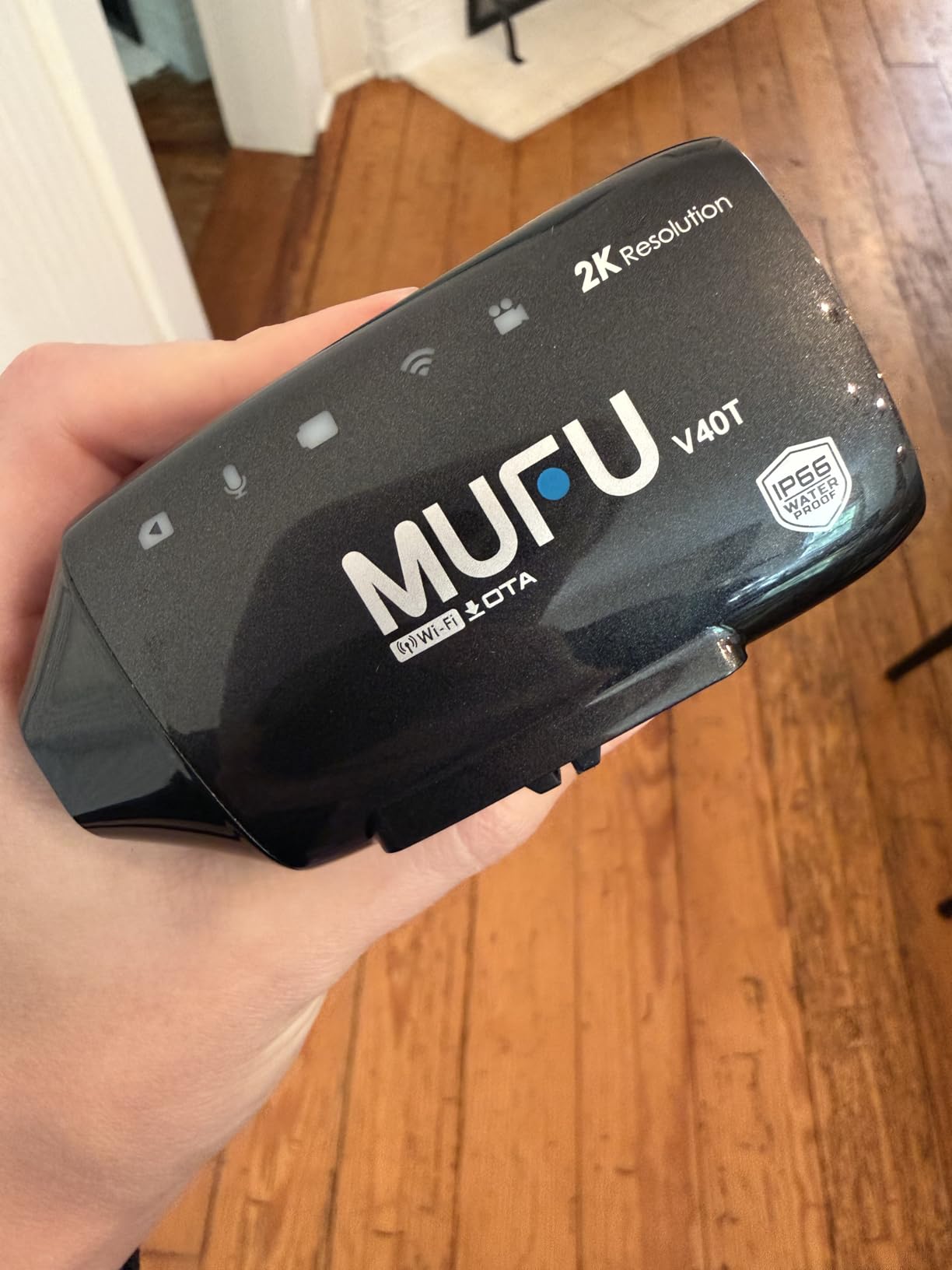
Figure 2.1: Package Contents.
3. Product Overview
3.1 Device Dimensions
The MUFU V40T camera is compact, measuring approximately 93.3 mm in length, 49.6 mm in width, and 41.2 mm in depth, weighing 128g. Its small size allows for discreet helmet mounting.

Figure 3.1: MUFU V40T Dimensions.
3.2 Camera Lenses and Indicators
The V40T features dual 2K cameras, one front-facing and one rear-facing, each with a 140-degree wide-angle lens and an F1.7 aperture for clear video capture. LED indicators on the camera body provide immediate feedback on battery levels, recording status, microphone status, and Wi-Fi connectivity.

Figure 3.2: Front and Rear Lenses with LED Indicators.
4. Setup
4.1 Mounting the Camera
The MUFU V40T uses a quick-release helmet mount for easy installation and removal. Ensure the helmet surface is clean and dry before attaching the adhesive base.
- Prepare the Mount: Attach the adhesive pad to the right side of your helmet. This works best on smooth 3/4 face or full-face helmets. Allow sufficient time for the adhesive to bond securely.
- Insert Micro SD Card: Before attaching the camera, insert the provided 64GB Micro SDXC card into the designated slot.
- Snap & Lock the Camera: Buckle the camera body onto the main unit mount. Ensure it clicks securely into place.

Figure 4.1: Camera Installation Steps.
4.2 Initial Charging
Before first use, fully charge the camera using the provided USB Type-C cable. Connect the cable to the camera and a standard USB power adapter (not included). The battery indicator LED will show charging status.
5. Operating Instructions
5.1 Power On/Off
The V40T features a quick power-on/off design:
- Power On: Clip the camera onto its helmet mount. The device will automatically power on.
- Power Off: Remove the camera from its helmet mount. The device will automatically power off.
The camera also includes intelligent motion detection. If no action is detected for 3 minutes, it enters Sleep Mode (automatically powers off). Moving your helmet will automatically wake the camera and power it on.

Figure 5.1: Quick Power On/Off and Motion Detection.
5.2 Recording Functions
- Continuous Loop Recording: The camera automatically records in a continuous loop, overwriting the oldest footage when the memory card is full. This ensures you always have the most recent recordings.
- Emergency Lock: The V40T features intelligent tilt detection. In the event of a sudden impact or significant tilt, the current footage is automatically locked and saved, preventing it from being overwritten.
5.3 LED Indicators
High-visibility LED indicators on the camera body provide real-time status updates:
- Battery Level: Indicates the remaining battery charge.
- Recording Status: Shows if the camera is actively recording.
- Microphone Status: Indicates if audio recording is active.
- Wi-Fi Status: Shows Wi-Fi connection status.
5.4 Smartphone App Control
Connect your MUFU V40T to your smartphone via Wi-Fi for advanced control and media management:
- Download App: Download the "MUFU Video" app from the Google Play Store or Apple App Store.
- Connect via Wi-Fi: Enable Wi-Fi on your camera and connect your smartphone to the camera's Wi-Fi network.
- Real-Time Video: View live footage from the camera on your smartphone.
- Manage Footage: Download, edit, and share recorded videos and photos directly from the app without removing the SD card.
- Settings: Adjust camera settings and preferences through the app interface.

Figure 5.2: MUFU Video App Interface.
6. Key Features
6.1 Dual 2K Front and Rear Cameras with Night Vision
The V40T captures video in 2K resolution from both front and rear perspectives, ensuring comprehensive coverage. The large F1.7 aperture and advanced low-light sensor provide superior night vision, delivering clear and noise-free recordings even in low-light conditions or tunnels.

Figure 6.1: Day and Night Vision Performance.
6.2 Long-Lasting 4000mAh Battery
Equipped with a 4000mAh Li-polymer battery, the V40T offers up to 8 hours of continuous recording on a full charge. This high-capacity battery is designed with high-temperature protection, making it suitable for extended use in various environments.

Figure 6.2: Battery Specifications.
6.3 IP66 Waterproof and Heat Resistant Design
The V40T is rated IP66, providing protection against dust and powerful water jets. This makes it suitable for use in various weather conditions, including rain, mud, and snow. The Li-polymer battery's high-temperature design ensures stable and reliable operation even in hot climates.

Figure 6.3: IP66 Waterproof Rating.
7. Maintenance
- Cleaning: Use a soft, damp cloth to clean the camera body and lenses. Avoid abrasive materials or harsh chemicals.
- Storage: Store the camera in a cool, dry place away from direct sunlight when not in use.
- Battery Care: For optimal battery life, avoid fully discharging the battery frequently. Charge the camera regularly, especially if storing for extended periods.
- Firmware Updates: Check the MUFU website or app periodically for firmware updates to ensure optimal performance and new features.
8. Troubleshooting
| Problem | Possible Cause | Solution |
|---|---|---|
| Camera does not power on. | Low battery; Not properly mounted. | Charge the battery; Ensure camera is securely clipped onto the mount. |
| Recording stops unexpectedly. | Memory card full; Battery low; Card error. | Check memory card space (loop recording should prevent this unless card is faulty); Charge battery; Format or replace SD card. |
| Wi-Fi connection issues. | Incorrect password; Out of range; Camera Wi-Fi off. | Verify Wi-Fi password; Move closer to camera; Check camera's Wi-Fi indicator. |
| Poor video quality. | Dirty lens; Low light conditions; Incorrect settings. | Clean lenses; Ensure adequate lighting; Check app settings for resolution. |
9. Specifications
| Feature | Detail |
|---|---|
| Brand | MUFU |
| Model Number | V40T |
| Video Capture Resolution | 2K (1666P) |
| Photo Sensor Technology | CMOS |
| Maximum Aperture | F1.7 |
| Viewing Angle | 170 Degrees |
| Flash Memory Type | Micro SDXC (64GB included, V30 speed class) |
| Battery Type | 4000mAh Lithium Ion (Li-polymer) |
| Battery Average Life | Up to 8 Hours |
| Water Resistance Level | IP66 Waterproof |
| Connectivity Technology | USB, Wi-Fi |
| Features | Internal Memory, Lightweight, Night Vision, Loop Recording, Emergency Lock |
| Item Dimensions (L x W x H) | 93.3mm x 49.6mm x 41.2mm (approx.) |
| Weight | 128g (approx.) |
10. Warranty and Support
The MUFU V40T Helmet Camera comes with a 1-Year Manufacturer's Warranty. For warranty claims, technical support, or any inquiries regarding your product, please refer to the contact information provided on the warranty card included in your package or visit the official MUFU website.
11. Official Product Video
Video 11.1: MUFU V40 - Built for Every Rider. This video provides an overview of the MUFU V40T camera's features and applications.


