
Introduction
This manual provides detailed instructions for the safe and proper installation, operation, and maintenance of your BEISHI Long Arm Full Motion TV Wall Mount. Please read all instructions carefully before installation and retain this manual for future reference.
The BEISHI Long Arm Full Motion TV Wall Mount is designed to securely hold televisions ranging from 26 to 65 inches, with a maximum weight capacity of 77 lbs (35 kg). It supports VESA mounting patterns up to 400x400mm.
Important Safety Information
WARNING: Failure to read and follow these instructions may result in serious personal injury, property damage, or voiding your warranty. If you have any questions, please contact customer support.
- Do not install on drywall alone. This mount requires installation into wood studs, concrete, or brick walls.
- Ensure the wall structure can safely support the combined weight of the mount and your television.
- Do not exceed the maximum weight capacity of 77 lbs (35 kg).
- Verify your TV's VESA pattern is compatible with the mount (Min 100x100mm, Max 400x400mm).
- Use all provided hardware. Do not substitute parts.
- Always use a stud finder to locate wood studs accurately.
- If mounting to concrete or brick, use appropriate anchors (not always included, may need to be purchased separately).
- Installation should be performed by at least two people to ensure safety.
Package Contents
Please check to ensure all parts are present and undamaged before beginning installation. If any parts are missing or defective, contact customer support.
(Specific list of parts not provided in JSON, general statement used)
Setup and Installation
1. Compatibility Check
- TV Size: Ensure your TV is between 26 and 65 inches.
- TV Weight: Confirm your TV weighs no more than 77 lbs (35 kg).
- VESA Pattern: Check the four mounting holes on the back of your TV. Measure the horizontal and vertical distance between them. This mount supports VESA patterns from 100x100mm to 400x400mm.
- Wall Type: This mount is suitable for wood studs, concrete, and brick walls. Do not mount on drywall alone.

This image illustrates the compatibility requirements for the wall mount, including suitable wall types (single stud, concrete/brick), TV size (26-65 inches), TV weight (max 77 lbs), VESA range (100x100mm to 400x400mm), and a note about potential cable blockage.
2. Wall Mounting
The wall plate must be securely fastened to a sturdy wall structure. Use a stud finder to locate the center of wood studs or ensure you have appropriate anchors for concrete/brick.

This image demonstrates the wall mount's compatibility with different wall types: wood studs and brick/concrete walls. It emphasizes that anchors are required for brick/concrete and that the mount should not be installed on drywall alone.
- Mark the desired height for the top of your TV on the wall.
- Position the wall plate template (if provided) or the wall plate itself at the marked height and level it.
- Mark the drilling locations for the mounting screws.
- Drill pilot holes according to the instructions provided with your hardware.
- Secure the wall plate to the wall using the appropriate screws and washers.
3. Attaching TV Brackets
- Carefully place your TV face down on a soft, clean surface.
- Identify the correct screws and spacers for your TV's VESA holes.
- Attach the TV brackets to the back of your television, ensuring they are centered and securely tightened.
4. Hanging the TV
- With assistance, carefully lift the TV and hook the attached brackets onto the wall plate.
- Secure the TV to the mount using the safety screws or locking mechanisms.
- Perform a gentle pull test to ensure the TV is securely seated on the mount.
Operating the TV Wall Mount
This full-motion mount allows for various adjustments to optimize your viewing experience.
Extension and Retraction
The mount features an extra-long extension arm that can extend from 2.6 inches to 40.9 inches from the wall. Gently pull or push the TV to achieve the desired distance.

This image illustrates the mount's ability to retract back to 1.7 inches from the wall and extend out to 36.2 inches, providing flexible viewing options.
Swivel Adjustment
The mount allows for a 180° left-right swivel. Gently pivot the TV to the desired angle. This is useful for viewing from different areas of a room or for corner mounting.

This image demonstrates the mount's swivel capability, allowing the TV to be rotated up to ±90 degrees horizontally to enhance the viewing experience from various positions.
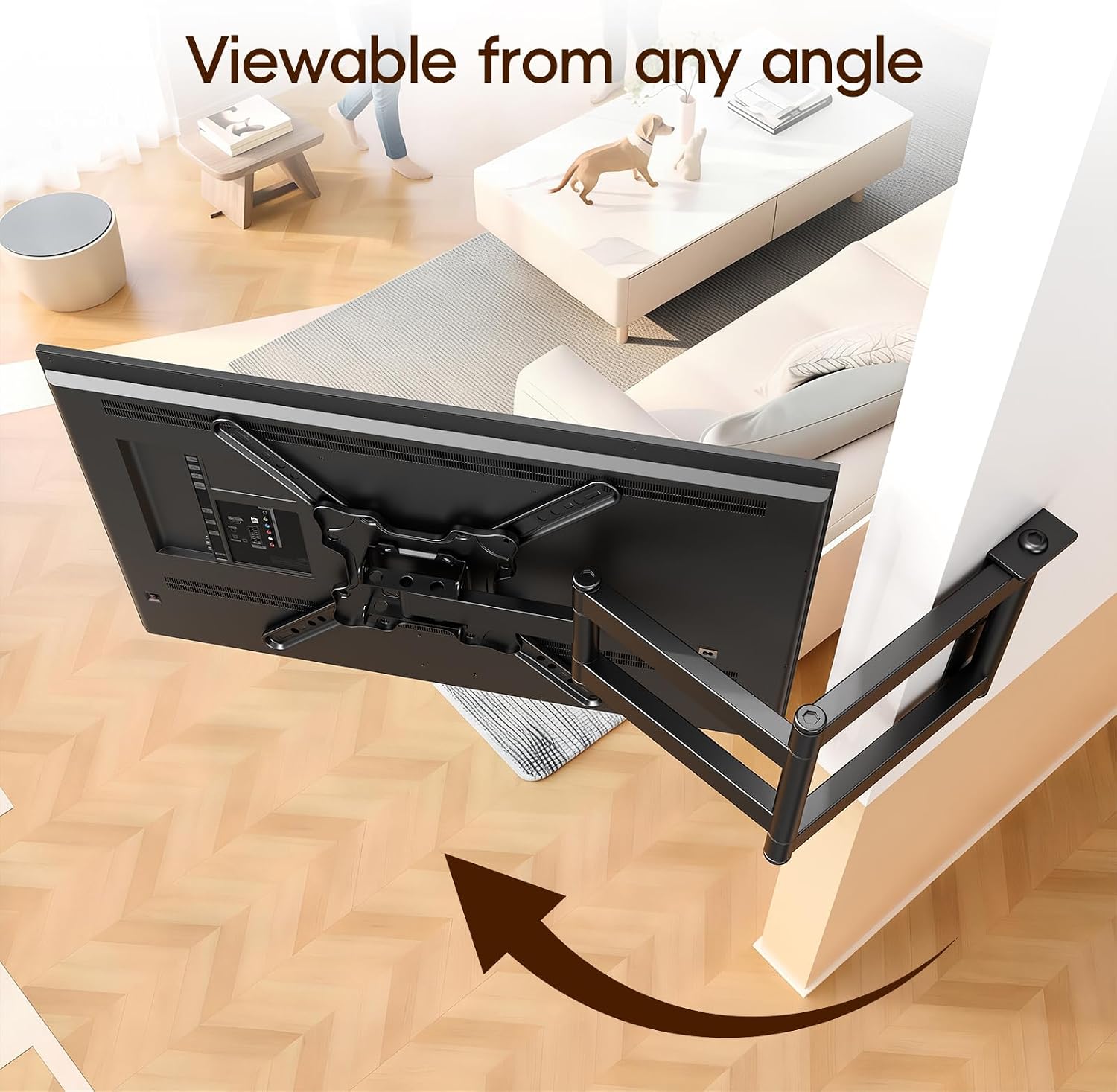
This image highlights the mount's suitability for corner installation, enabling the TV to be viewed from virtually any angle within the room.
Tilt Adjustment
Adjust the vertical tilt of your TV by +5° to -20°. This helps reduce glare and achieve an optimal viewing angle, preventing neck and eye strain. Loosen the tilt adjustment knobs, set the angle, and re-tighten.

This image illustrates the tilt adjustment feature, allowing the TV to be angled +5° to -15° to prevent neck and eye strain and optimize viewing comfort.
TV Screen Rotation (90°)
The TV screen can be rotated 90° for switching between horizontal and vertical orientations. This feature is ideal for specific applications like live broadcasting, online meetings, or gaming setups.
Maintenance
- Cleaning: Wipe the mount with a soft, dry cloth. Do not use abrasive cleaners or solvents.
- Periodic Checks: Periodically check all screws and connections to ensure they remain tight and secure.
- Lubrication: If movement becomes stiff, a small amount of silicone-based lubricant can be applied to the pivot points.
Troubleshooting
| Problem | Possible Cause | Solution |
|---|---|---|
| TV is not level after installation. | Wall plate or TV brackets are not level. | Adjust the leveling screws on the TV brackets (if available) or re-install the wall plate ensuring it is perfectly level. |
| Mount feels loose or unstable. | Screws are not fully tightened; incorrect wall type used; wall structure is weak. | Ensure all mounting screws are securely tightened. Verify the wall type is appropriate and structurally sound. If unsure, consult a professional. |
| Difficulty moving the TV (swivel/tilt/extension). | Joints are too tight or require lubrication. | Loosen any adjustable tension bolts slightly. Apply a small amount of silicone-based lubricant to the moving parts. |
| Missing parts. | Packaging error. | Contact BEISHI customer support for replacement parts. |
Specifications
- Model: B0GKNZWRSX
- Compatible TV Sizes: 26 - 65 inches
- Maximum Weight Capacity: 77 lbs (35 kg)
- VESA Compatibility: 100x100mm to 400x400mm
- Extension Range: 2.6 inches to 40.9 inches
- Tilt Angle: +5° / -20°
- Swivel Angle: 180° (±90°)
- Screen Rotation: 90°
- Material: Iron
- Color: Black
- Mounting Type: Wall Mount
- Compatible Wall Types: Wood Studs, Concrete, Brick (Do not mount on drywall alone)

This diagram provides key dimensions of the BEISHI Long Extension TV Mount, including arm lengths, wall plate size, and VESA plate dimensions, with an item weight of 10.91 lbs.
Warranty Information
This BEISHI product comes with a One Month warranty from the date of purchase. This warranty covers manufacturing defects and material flaws under normal use. It does not cover damage caused by improper installation, misuse, accidents, or unauthorized modifications.
Please retain your proof of purchase for warranty claims.
Customer Support
If you have any questions, require assistance with installation, or need to report a missing/defective part, please contact BEISHI customer support through the retailer's platform or the official BEISHI website.
For the quickest resolution, please have your product model number (B0GKNZWRSX) and proof of purchase ready when contacting support.


