
Introduction
This manual provides detailed instructions for the installation, operation, and maintenance of your Briidea Smart RV Leveler. This device is designed to assist in leveling RVs, travel trailers, fifth-wheel trailers, and campers using Bluetooth app control and an integrated LCD display. Please read this manual thoroughly before using the product to ensure proper function and safety.
Safety Information
- Always read and understand all instructions before operating the device.
- Ensure the device is securely mounted on a vertical surface with arrows pointing upwards as specified in the installation section.
- Connect the device to a stable 12V DC power source in your RV.
- Do not expose the device to extreme temperatures outside its operating range.
- Keep the device away from water or excessive moisture unless specifically designed for such exposure.
- Do not attempt to disassemble or repair the device yourself. Contact customer support for assistance.
Package Contents
Verify that all items are present in the package:
- Briidea Smart RV Leveler Unit (Model HX-211)
- Mounting Screws
- Wall Anchors
- User Manual (this document)

Image: Briidea Smart RV Leveler unit with included mounting hardware.
Setup and Installation
Mounting the Unit
The Briidea Smart RV Leveler unit must be mounted on a stable, vertical surface within your RV. Ensure the unit is oriented with the arrows on the device pointing upwards for accurate readings.
- Step 1: Remove the top shell. Carefully open the device by removing the top cover.
- Step 2: Fix with screws. Use the provided screws and wall anchors to secure the base of the unit through the mounting holes on both sides to your chosen vertical surface.
- Step 3: Close the product lid. Reattach the top shell securely after mounting.
- Step 4: Arrive at your destination. Park your RV in the desired location.
- Step 5: Open the GeniLife APP or connect via Bluetooth. Ensure Bluetooth is enabled on your smartphone and open the GeniLife app to connect to the leveler.
- Step 6: Level your rig from your seat in real time. Follow the app's guidance to level your RV.

Image: Step-by-step guide for installing the RV leveler and connecting to the app.
Power Connection
The device features a dual power supply system. It has a built-in rechargeable lithium battery and supports direct connection to a 12V RV power supply. For continuous operation and to charge the backup battery, both power sources must be connected. Connect the device to your RV's 12V power system according to standard RV electrical practices.

Image: Diagram illustrating the dual power supply connection for the RV leveler.
App Installation and Bluetooth Pairing
Download the "GeniLife" app from your smartphone's app store (available for iOS and Android). Enable Bluetooth on your smartphone and open the GeniLife app. The app will guide you through the pairing process to connect with your Briidea Smart RV Leveler.
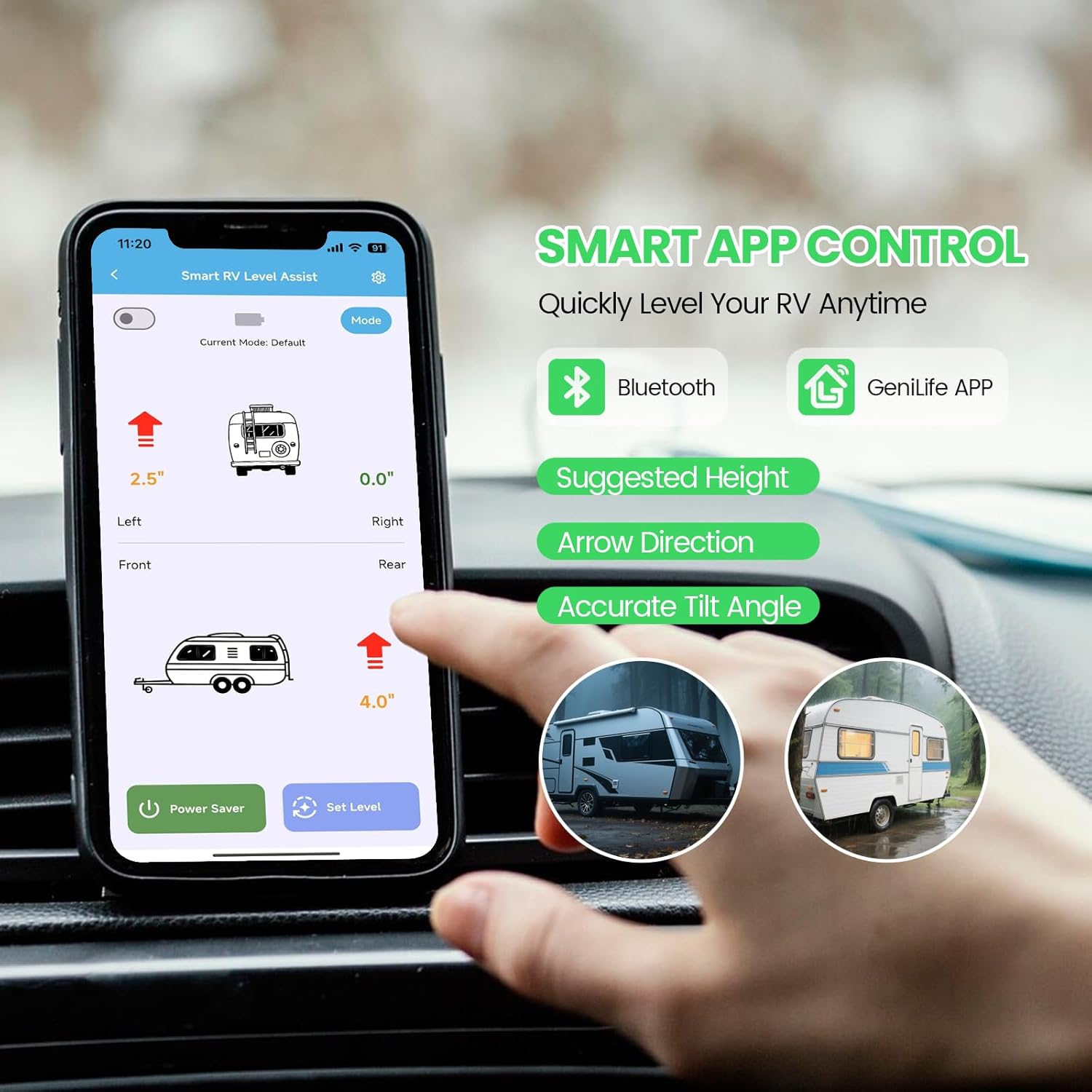
Image: Smartphone screen displaying the GeniLife app interface for smart RV leveling control.
Operating Instructions
Real-Time Leveling Data
Once connected, the LCD screen on the device and the GeniLife app will synchronously display real-time vehicle angle and height suggestions. The app supports switching among top view, side view, and rear view, allowing you to easily identify the leveling direction and handle different terrains or parking spaces.
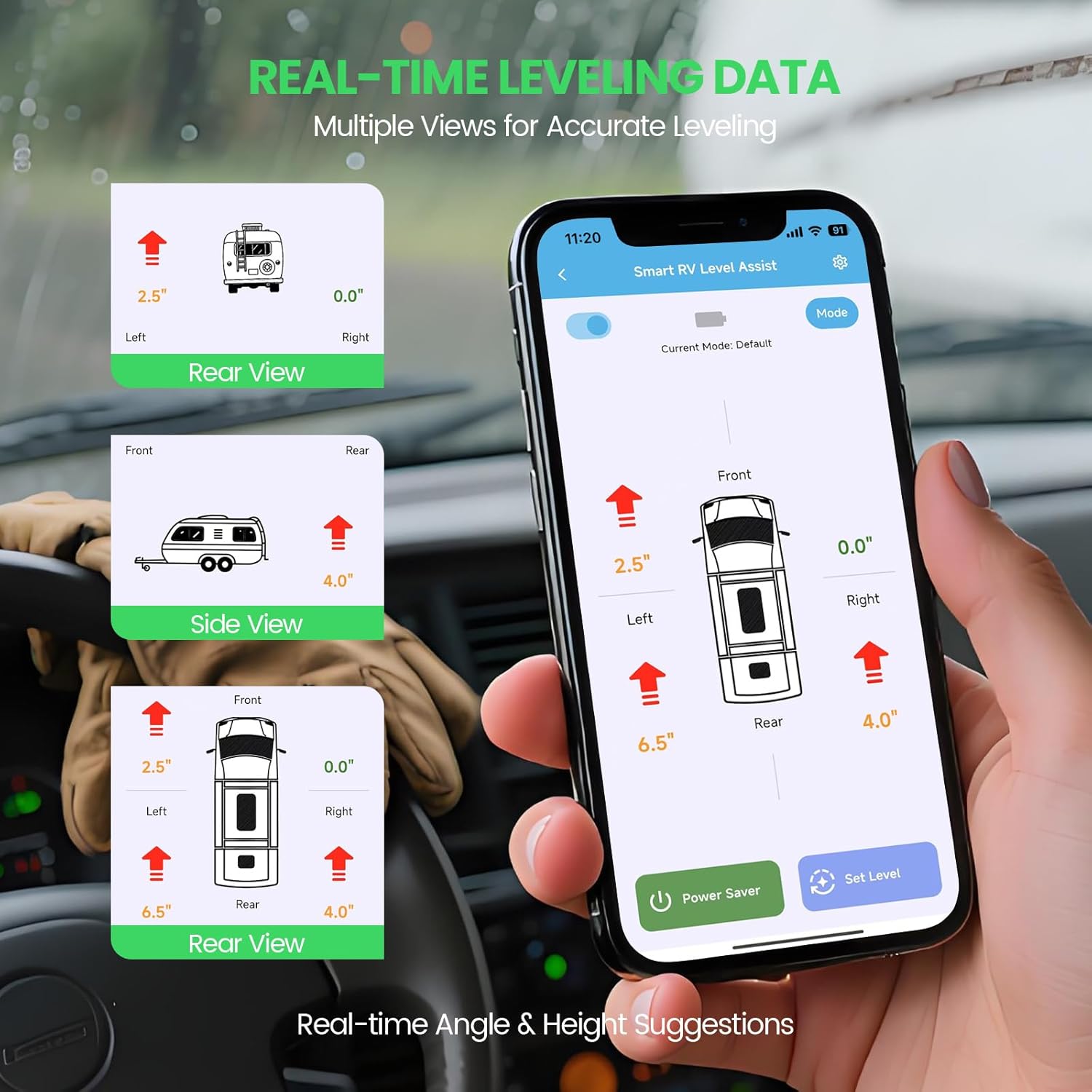
Image: Multiple views of RV leveling data displayed on the GeniLife app.
Using Preset Modes
The system supports saving up to 5 sets of leveling data. This feature is useful for recalling preferred leveling configurations for different campsites, locations, or slide-out extension conditions. Access these modes through the GeniLife app for quick and worry-free leveling.

Image: GeniLife app interface showing options to save and select from 5 leveling profiles.
Power Management
The built-in rechargeable lithium battery provides approximately 10-20 hours of continuous screen-on use and can last 3-5 months in standby mode. The device is equipped with automatic screen-off and standby modes to extend battery endurance and ensure long battery life. It takes about 1 hour to fully charge the internal battery when connected to the 12V RV power supply.
Maintenance
To ensure the longevity and optimal performance of your Briidea Smart RV Leveler, follow these maintenance guidelines:
- Cleaning: Gently wipe the device with a soft, dry cloth. Avoid using abrasive cleaners or solvents that could damage the casing or screen.
- Environmental Protection: While designed for outdoor environments, avoid prolonged exposure to extreme weather conditions when possible.
- Connection Checks: Periodically inspect all power connections to ensure they are secure and free from corrosion.
- Software Updates: Check the GeniLife app regularly for any available software or firmware updates for the device to ensure the best performance and features.
Troubleshooting
Device Not Powering On
- Check the 12V power connection to your RV. Ensure it is securely connected and receiving power.
- Verify that the internal rechargeable battery has sufficient charge. Connect to the 12V RV power supply for at least an hour to charge the battery.
App Connectivity Issues
- Ensure Bluetooth is enabled on your smartphone.
- Restart the GeniLife app and the RV Leveler device.
- Make sure your smartphone is within close proximity to the RV Leveler unit.
- If issues persist, try unpairing and re-pairing the device through your phone's Bluetooth settings and the GeniLife app.
Inaccurate Readings
- Confirm that the unit is mounted vertically with the arrows pointing directly upwards. Incorrect orientation will lead to inaccurate measurements.
- Ensure the mounting surface is stable and not subject to vibrations that could affect readings.
Continuous Power Requirement
Note: While the unit has a rechargeable battery, it is primarily for backup and portable use. The device requires a hardwired connection to the RV's 12V power supply for continuous operation and to charge the backup battery. The internal battery alone is not intended for long-term primary power.
Specifications
| Feature | Specification |
|---|---|
| Brand | briidea |
| Model Number | HX-211 |
| Material | Plastic |
| Color | Black |
| Product Dimensions (L x W) | 4.1" x 2.6" |
| Style | Digital |
| Operation Mode | Automatic |
| Level Measurement Units | Degree |
| Power Supply | Dual (Built-in rechargeable lithium battery, 12V RV power) |
| Battery Standby Time | 3-5 months |
| Battery Continuous Use (screen on) | 10-20 hours |
Warranty Information
The Briidea Smart RV Leveler (Model HX-211) comes with a 2-year manufacturer's warranty. This warranty covers defects in materials and workmanship under normal use. Please retain your proof of purchase for all warranty claims. The warranty does not cover damage caused by misuse, accident, unauthorized modification, or improper installation.
Customer Support
For technical assistance, troubleshooting, or warranty inquiries regarding your Briidea Smart RV Leveler, please contact Briidea customer support. You can find more information and contact details by visiting the official Briidea store page: