
1. Introduction
This manual provides essential information for setting up, operating, and maintaining your XIAOMI POCO M8 Pro 5G smartphone. Please read this guide thoroughly to ensure proper use and to maximize the device's capabilities.
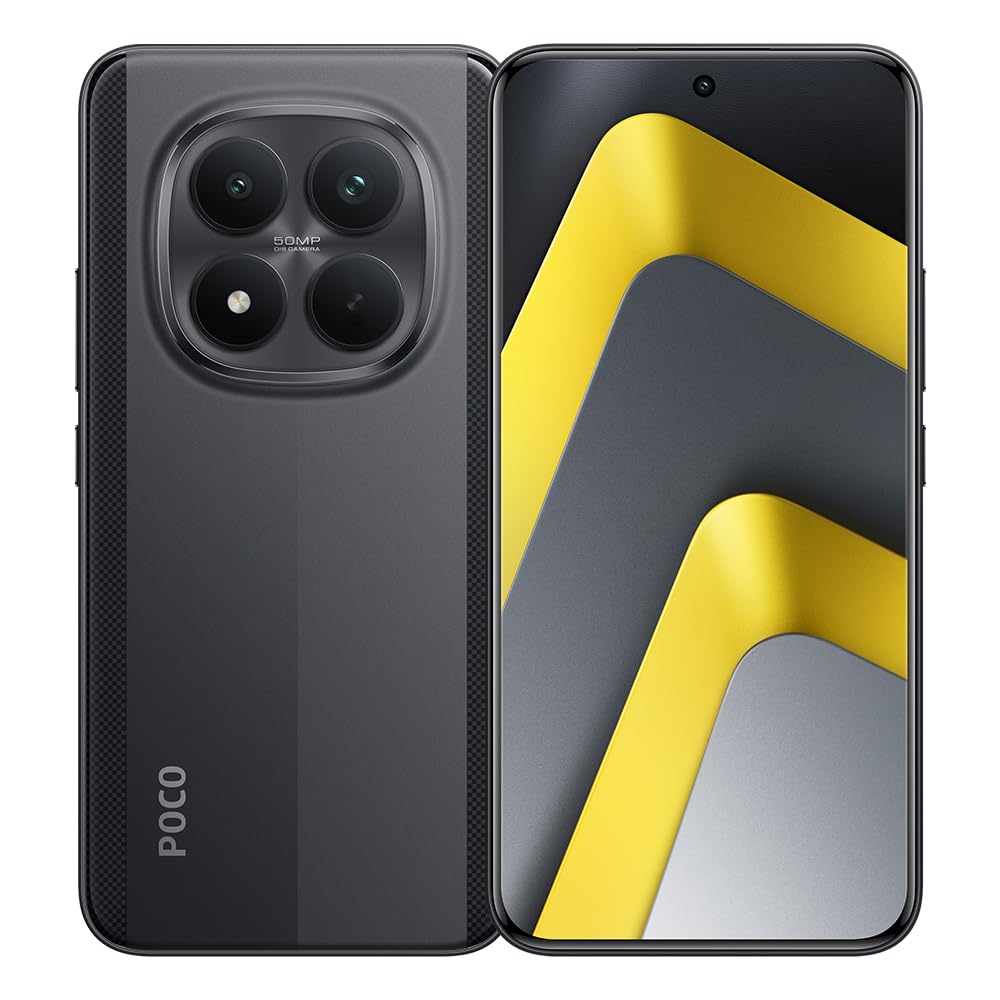
Figure 1.1: Front and back view of the POCO M8 Pro 5G smartphone.

Figure 1.2: Overview of the POCO M8 Pro 5G highlighting its massive battery, CrystalRes AMOLED display, and Snapdragon processor.
Product Overview Video
Video 1.1: An official overview of the POCO M8 Pro series, demonstrating key features and design elements.
2. Initial Setup
2.1 Package Contents
Ensure your package contains the following items:
- XIAOMI POCO M8 Pro 5G Smartphone
- Charger
- USB Cable
- SIM Ejector Tool
- Quick Start Guide
2.2 Inserting the SIM Card
- Locate the SIM card tray on the side of the device.
- Insert the SIM ejector tool into the small hole next to the tray and press gently until the tray pops out.
- Place your Nano-SIM card(s) into the tray with the gold contacts facing down. This model supports a single SIM.
- Carefully push the tray back into the slot until it is flush with the device.
2.3 Charging the Device
Before first use, fully charge your POCO M8 Pro 5G. Connect the charger to the USB-C port at the bottom of the phone and plug it into a power outlet. The device supports 100W HyperCharge for ultra-fast charging.

Figure 2.1: The POCO M8 Pro 5G supports 100W HyperCharge for rapid battery replenishment.
2.4 Powering On and Initial Configuration
Press and hold the Power button until the screen lights up. Follow the on-screen instructions to select your language, connect to Wi-Fi, and set up your Google account. The device runs on Android 15.
3. Operating Your Smartphone
3.1 Battery Management
The POCO M8 Pro 5G is equipped with a 6500 mAh silicon-carbon battery, designed for extended usage and excellent endurance even in low temperatures. After 1600 charge cycles, the battery retains 80% or more of its original capacity.
- 100W HyperCharge: For rapid charging.
- 22.5W Reverse Charging: Allows the phone to act as a power bank to charge other devices.

Figure 3.1: Illustration of the 6500mAh battery, providing extended usage time.

Figure 3.2: The POCO M8 Pro 5G can reverse charge other devices at 22.5W.
3.2 Display Features
Experience vibrant visuals on the 6.83-inch CrystalRes 1.5K AMOLED display. With an exceptional brightness of 3200 nits and eye protection features, the display remains clear in various lighting conditions. The 120Hz refresh rate ensures smooth scrolling and responsiveness.

Figure 3.3: The 6.83-inch CrystalRes 1.5K AMOLED display offers high brightness and a smooth 120Hz refresh rate.
3.3 Camera System
Capture stunning photos and videos with the advanced camera system:
- 50MP Light Fusion 800 Main Camera: Features a professional sensor with high dynamic range and Optical Image Stabilization (OIS) for clear, detailed images.
- 8MP Ultra-wide Camera: For expansive landscape shots.
- 4K Video Recording: Record vivid videos with high resolution.

Figure 3.4: Detail of the 50MP main camera and 8MP ultra-wide camera lenses.

Figure 3.5: The Light Fusion 800 sensor enables cinematic dynamic range for detailed photos in high-contrast situations.
3.4 Performance
The POCO M8 Pro 5G is powered by the Snapdragon 7s Gen 4 processor, built on a 4nm architecture. This powerful octa-core processor ensures faster overall performance, smooth multitasking, and enhanced power efficiency for prolonged battery life.

Figure 3.6: The Snapdragon 7s Gen 4 processor provides fluid performance and efficient power management.
4. Maintenance and Care
4.1 Dust and Water Resistance
The POCO M8 Pro 5G is IP68 rated for dust and water resistance. This means it is protected against dust ingress and can withstand immersion in water up to 1.5 meters for 30 minutes. While resistant, it is not waterproof. Avoid intentional submersion and exposure to high-pressure water jets.

Figure 4.1: The POCO M8 Pro 5G features IP68 dust and water resistance for enhanced durability.
4.2 Cleaning Your Device
To clean your smartphone, use a soft, lint-free cloth. Avoid abrasive materials, solvents, or aerosol sprays. If necessary, slightly dampen the cloth with water. Do not use excessive moisture or submerge the device.
4.3 Storage and Handling
Store your device in a cool, dry place away from direct sunlight and extreme temperatures. Avoid dropping the phone or exposing it to strong impacts, as this can damage internal components or the screen.
5. Troubleshooting
If you encounter issues with your POCO M8 Pro 5G, try the following basic troubleshooting steps:
- Device not powering on: Ensure the battery is charged. Connect the charger and wait a few minutes before attempting to power on again.
- Screen unresponsive: Try restarting the device by holding the Power button for about 10-15 seconds.
- Apps crashing: Clear the cache of the problematic app or reinstall it. Ensure your operating system is up to date.
- Poor network connectivity: Check if your SIM card is properly inserted. Try restarting the device or toggling airplane mode on and off.
- Overheating: Avoid using the phone in direct sunlight or while charging for extended periods during heavy usage. Close background applications.
For more complex issues, please refer to the official XIAOMI support website or contact customer service.
6. Technical Specifications
| Feature | Specification |
|---|---|
| Brand | XIAOMI |
| Model Name | POCO M8 Pro 5G |
| Operating System | Android 15 |
| Memory Storage Capacity | 256 GB |
| Screen Size | 6.83 Inches |
| Resolution | 1500 x 720 pixels (Display: 1520 x 720 pixels) |
| Refresh Rate | 120 Hz |
| Cellular Technology | 5G |
| Color | Black |
| Number of SIM Card Slots | Single SIM |
| Water Resistance Level | IP68 (Impermeable) |
| Headphone Jack | 3.5 mm |
| Rear Camera Photo Sensor Resolution | 50 Megapixels |
| Battery Capacity | 6500 Milliampere-hour (mAh) |
| Battery Description | Lithium-polymer |
| Effective Video Resolution | 4 Kilopixels |
| Frame Rate | 60 fps |
| Processor | Snapdragon 7s Gen 4 |
7. Warranty and Support
7.1 Product Warranty
The XIAOMI POCO M8 Pro 5G comes with a 1-year manufacturer's warranty. This warranty covers defects in materials and workmanship under normal use. Please retain your proof of purchase for warranty claims.
7.2 Customer Support
For technical assistance, warranty service, or additional information, please visit the official XIAOMI support website or contact their customer service. You can also visit the XIAOMI Store on Amazon for more product details.


