
1. Product Overview
The RetroAudio C7 is a versatile portable CD player designed for home use, featuring a retro suitcase design. It supports multiple audio sources including CD, Bluetooth (input and output), USB playback, and AUX input. The device comes with built-in speakers and can be operated via a remote control.
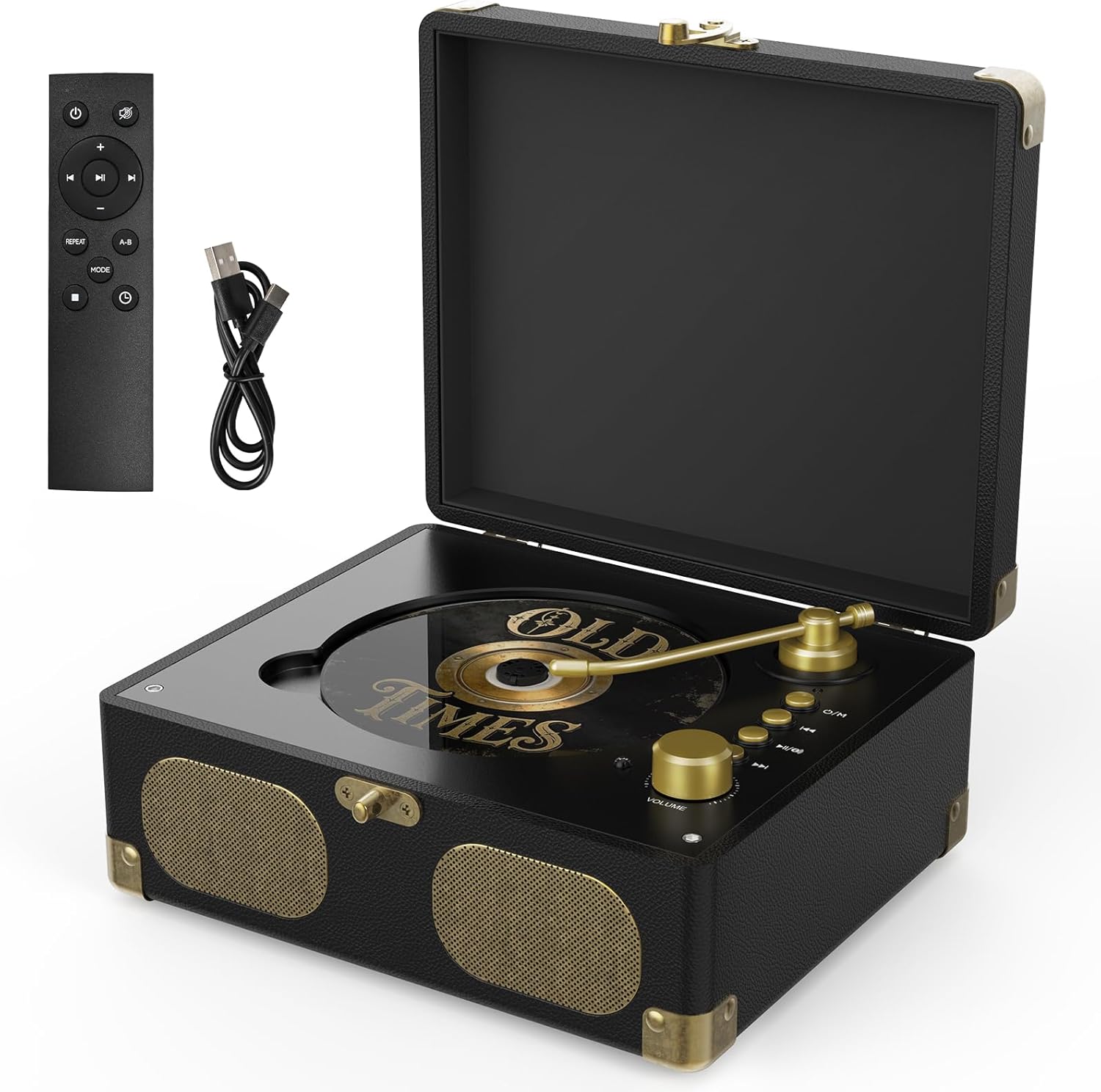
Image: RetroAudio C7 Portable CD Player (Black)
What's in the Box:
- 1 x RetroAudio C7 CD Player
- 1 x Remote Control (Batteries not included)
- 1 x Charging Cable
- 1 x Instruction Manual (This document)
2. Safety Information
- Do not expose the device to rain or moisture.
- Do not disassemble the unit. Refer all servicing to qualified personnel.
- Avoid placing the unit near heat sources or in direct sunlight.
- Use only the specified charging cable.
- Keep out of reach of children.
3. Product Components and Controls
Familiarize yourself with the various parts and controls of your RetroAudio C7 CD Player.
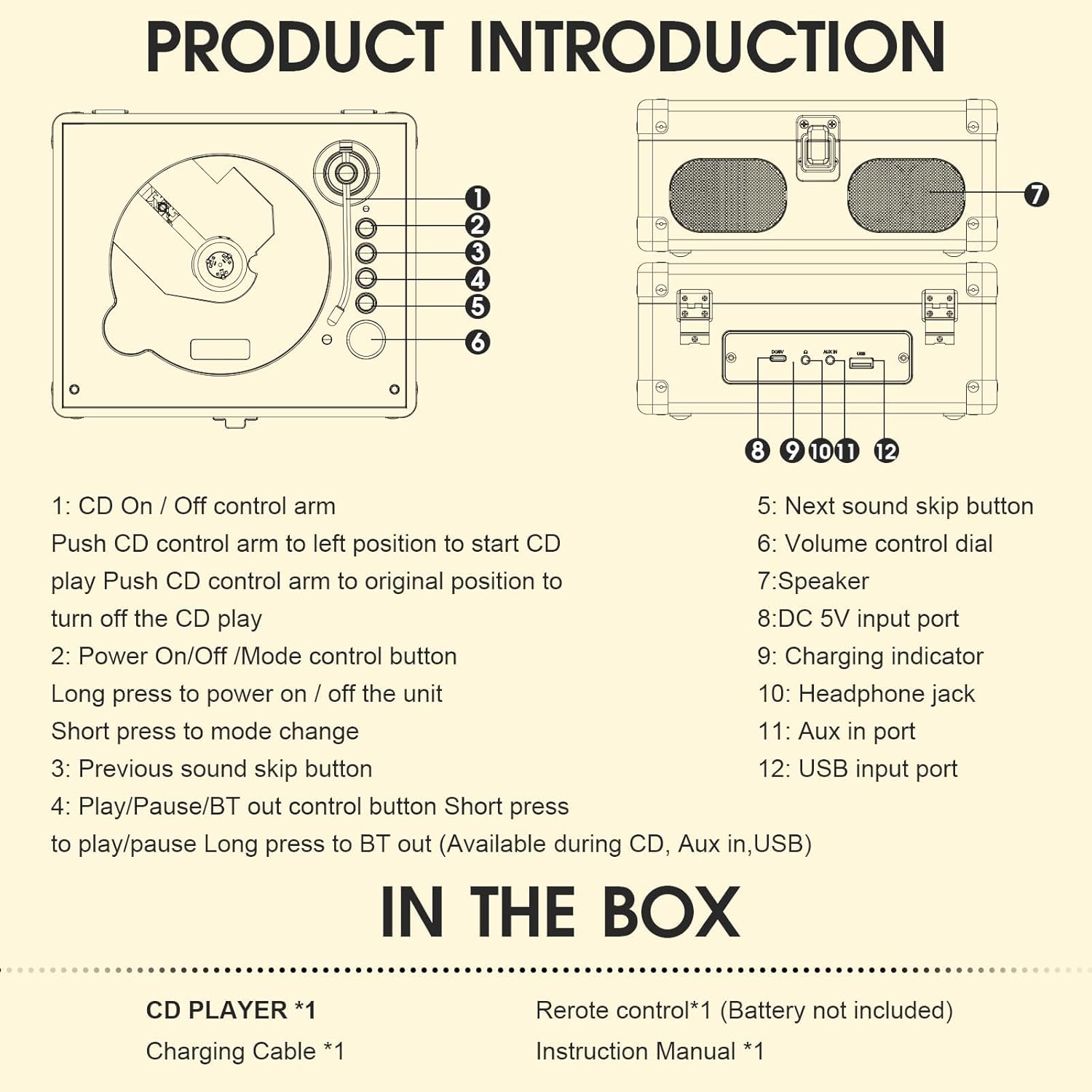
Image: Product Introduction Diagram
- CD On/Off Control Arm: Push to the left to start CD playback. Return to original position to turn off CD playback.
- Power On/Off / Mode Control Button: Long press to power on/off the unit. Short press to change playback mode (CD, Bluetooth, USB, AUX).
- Previous Track Skip Button: Skips to the previous track.
- Play/Pause / Bluetooth Out Button: Short press to play/pause. Long press to activate Bluetooth output (available during CD, AUX, or USB modes).
- Next Track Skip Button: Skips to the next track.
- Volume Control Dial: Adjusts the playback volume.
- Speakers: Built-in stereo speakers for audio output.
- DC 5V Input Port (Type-C): For charging the device.
- Charging Indicator: LED light indicating charging status.
- Headphone Jack: 3.5mm output for headphones.
- AUX In Port: 3.5mm input for external audio devices.
- USB Input Port: For USB playback.
4. Setup
4.1 Initial Charging
Before first use, it is recommended to fully charge the CD player for 0.5 to 1 hour using the provided charging cable. Connect the Type-C end of the charging cable to the DC 5V Input Port (8) on the device and the other end to a compatible USB power adapter (not included).

Image: CD Player with Remote Control and Battery Life Information
Battery Life:
- CD mode: Approximately 4 hours at full volume.
- Bluetooth mode: Approximately 5 hours at full volume.
4.2 Remote Control Setup
Insert two AAA batteries (not included) into the remote control. The remote control operates within a range of 0 to 5 meters from the player.
5. Operating Instructions
5.1 Power On/Off
Long press the Power On/Off / Mode Control Button (2) to turn the unit on or off.
5.2 CD Playback
- Open the lid of the CD player.
- Place a compatible CD (CD, CD-R, CD-RW, MP3, WMA, WAV formats supported) onto the spindle.
- Push the CD On/Off Control Arm (1) to the left to start playback.
- Adjust volume using the Volume Control Dial (6) or the remote control.
- Use the Previous Track Skip Button (3) or Next Track Skip Button (5) to navigate tracks.
- To pause/resume, short press the Play/Pause button (4) or on the remote.
- To stop playback, return the CD On/Off Control Arm (1) to its original position.
Note: This CD Player does not support playing DVD discs.
5.3 Bluetooth Input (Using as a Bluetooth Speaker)
- Power on the CD player.
- Short press the Mode Control Button (2) until the Bluetooth mode is selected. The device will enter pairing mode.
- On your external Bluetooth device (phone, laptop), search for "RetroAudio C7" in the Bluetooth settings and pair.
- Once connected, audio from your external device will play through the CD player's speakers.
Video: Demonstration of RetroAudio CD Player features, including Bluetooth input and output.
5.4 Bluetooth Output (Connecting to External Bluetooth Speakers/Headphones)
- Ensure the CD player is in CD, AUX, or USB playback mode.
- Long press the Play/Pause / Bluetooth Out Button (4) to activate Bluetooth output. The device will search for external Bluetooth devices.
- Put your external Bluetooth speaker or headphones into pairing mode.
- The CD player will automatically connect to the nearest discoverable Bluetooth audio device.
- Audio will now be transmitted wirelessly to your external Bluetooth device.
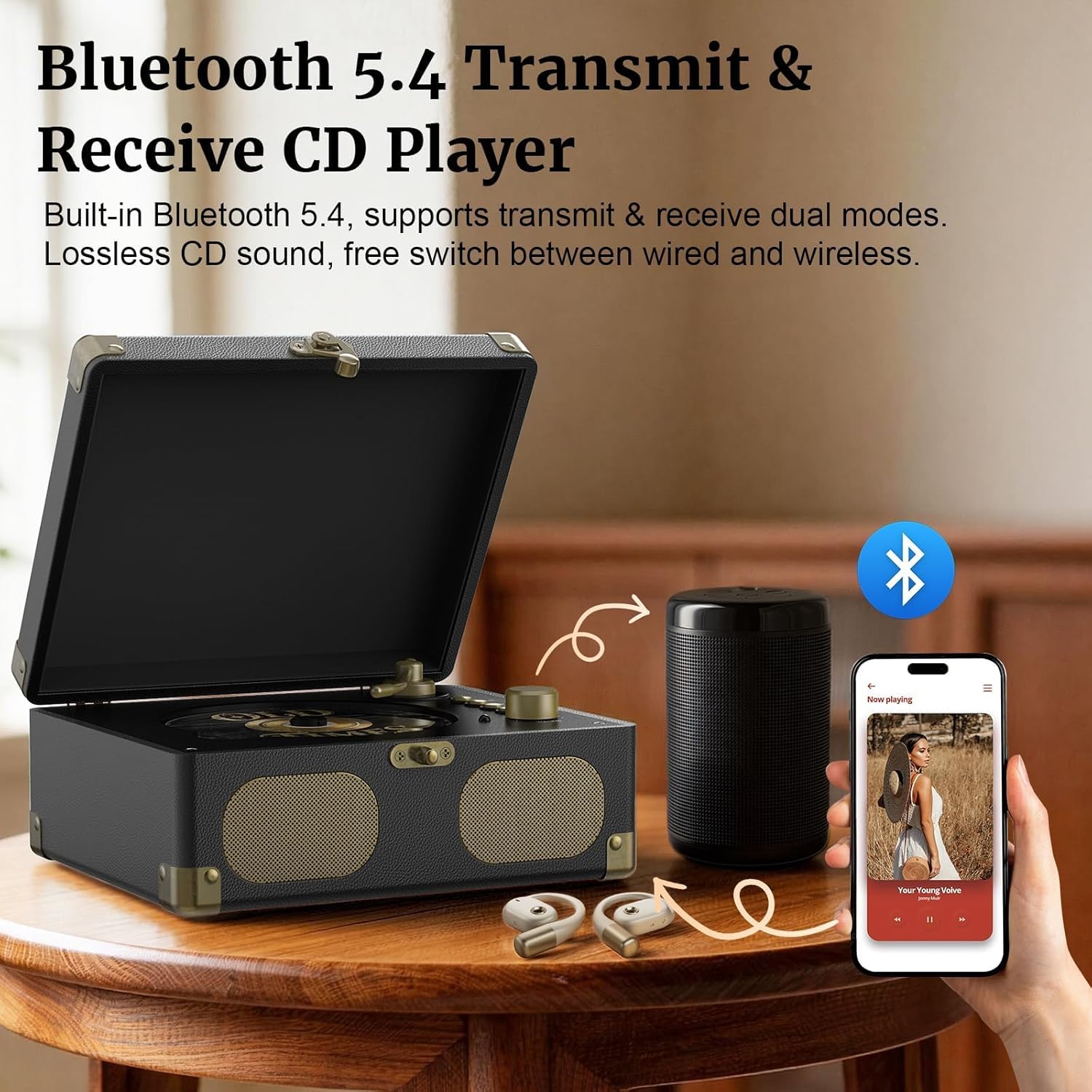
Image: Bluetooth 5.4 Transmit & Receive Functionality
5.5 USB Playback
- Insert a USB flash drive into the USB Input Port (12).
- Short press the Mode Control Button (2) until USB mode is selected.
- The player will automatically begin playing compatible audio files (MP3, WMA, WAV).
- Use the track skip and play/pause buttons for control.
5.6 AUX Input
- Connect an external audio device (e.g., phone, laptop) to the AUX In Port (11) using a 3.5mm audio cable (not included).
- Short press the Mode Control Button (2) until AUX mode is selected.
- Play audio from your external device. The sound will be output through the CD player's speakers.
6. Maintenance
- Cleaning: Use a soft, dry cloth to clean the exterior of the unit. Do not use liquid cleaners or abrasive chemicals.
- CD Care: Handle CDs by their edges. Keep them clean and free of scratches. Store them in their cases when not in use.
- Storage: When not in use for extended periods, store the CD player in a cool, dry place, away from direct sunlight and extreme temperatures.
7. Troubleshooting
| Problem | Possible Cause | Solution |
|---|---|---|
| No power | Battery is depleted. | Charge the device using the provided charging cable. |
| CD not playing | CD is dirty, scratched, or incompatible format. CD arm not in position. | Clean the CD. Try a different CD. Ensure the CD On/Off Control Arm is pushed to the left. |
| No sound from speakers | Volume is too low. Device is in headphone mode. | Increase volume. Ensure headphones are not plugged in. |
| Bluetooth pairing failed | Device not in pairing mode. External device too far or not in pairing mode. | Ensure the CD player is in Bluetooth input/output mode. Place devices closer. Put external device in pairing mode. |
| Remote control not working | Batteries are dead or incorrectly inserted. Player is off. | Replace AAA batteries. Ensure batteries are inserted correctly. Power on the CD player manually first. |
8. Specifications
- Brand: RetroAudio
- Model: C7
- Color: Black
- Connectivity: Bluetooth V5.4 (Input & Output), AUX In, USB Playback
- Supported Audio Formats: CD, CD-R, CD-RW, MP3, WMA, WAV
- Speakers: Built-in Stereo Speakers (Full-Range)
- Headphone Jack: 3.5mm
- Power Input: DC 5V (Type-C)
- Included Components: CD Player, Remote Control, Charging Cable
- Dimensions: Approximately 8.07" (L) x 6.77" (W) x 3.54" (H)

Image: Vintage Suitcase CD Player Dimensions
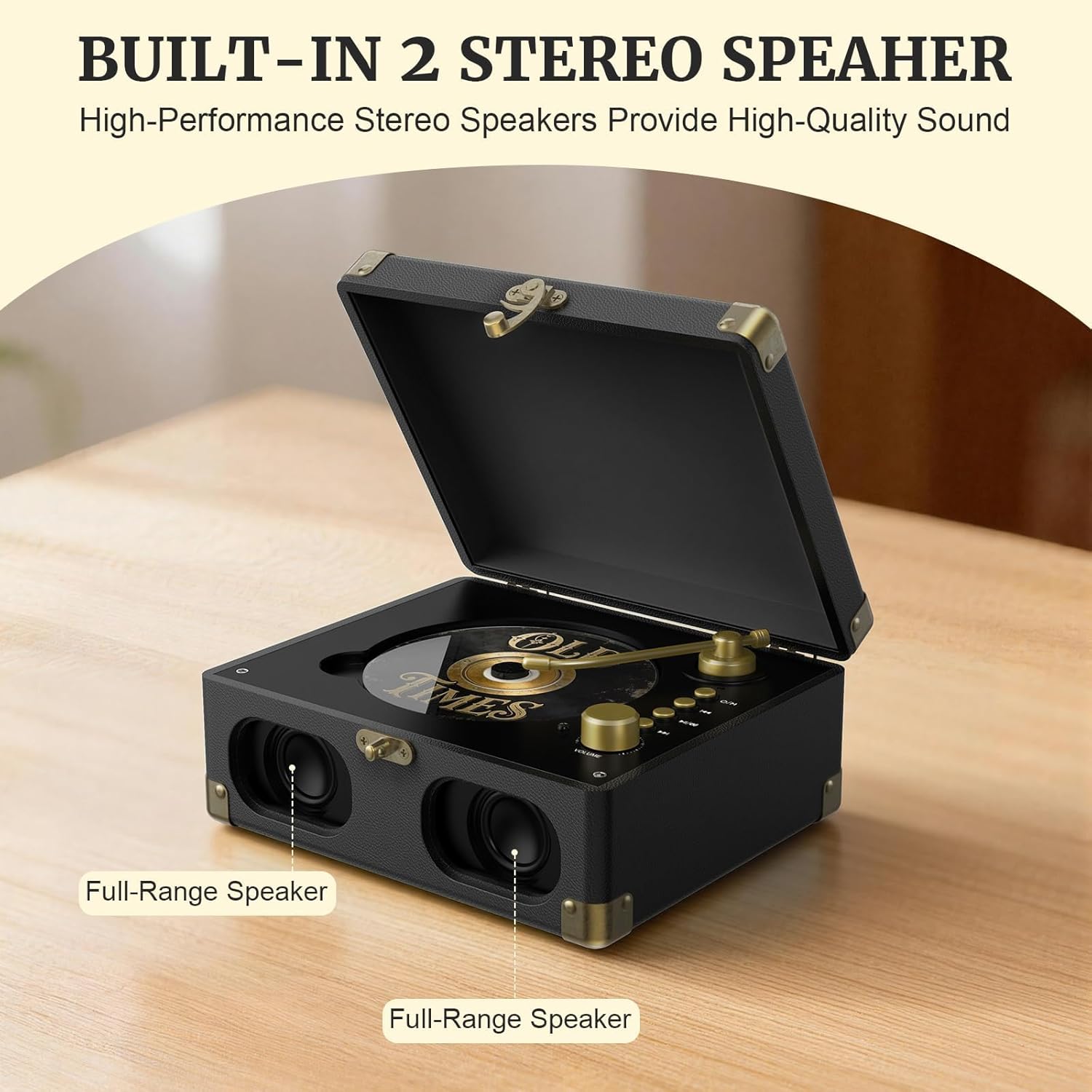
Image: Built-in Stereo Speakers
9. Warranty and Support
This RetroAudio C7 Portable CD Player comes with a 1 Year Manufacturer Warranty.
For technical support, warranty claims, or further assistance, please contact RetroAudio customer service through the retailer where the product was purchased or visit the official RetroAudio website.
You can also visit the RetroAudio Store on Amazon for more information.