
1. Product Overview
The DUMOS 62-Inch L-Shaped Gaming Desk is designed for versatile use in home offices or gaming setups. It features an integrated charging station, two removable monitor stands, a fabric file drawer, and adjustable storage shelves. Its robust metal frame and durable surface ensure stability and longevity.
For a detailed PDF version of this manual, please refer to the Official User Manual (PDF).
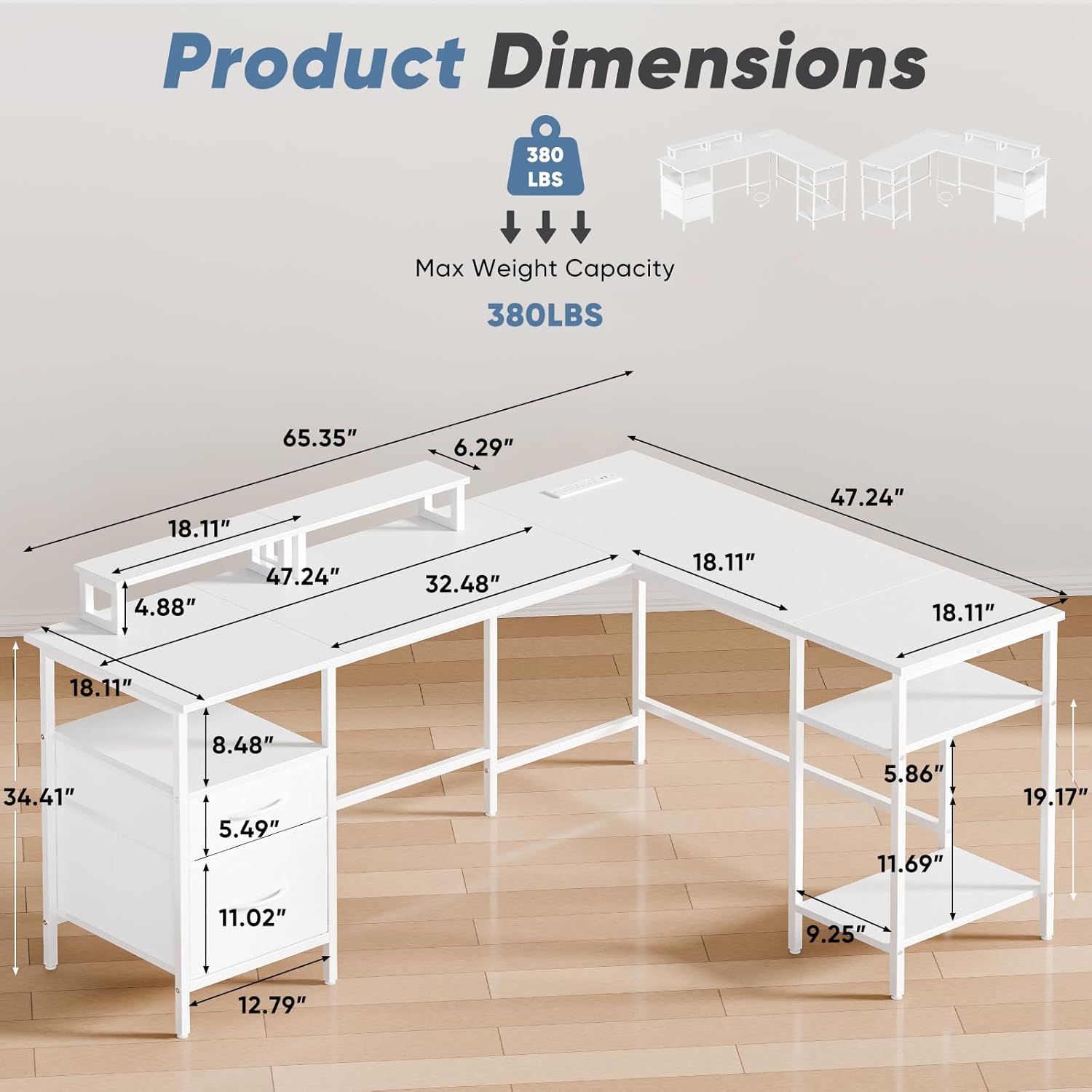
Image 1.1: The DUMOS 62-Inch L-Shaped Gaming Desk, showcasing its spacious design and integrated features in a typical office environment.
2. Setup and Assembly
This desk is designed for straightforward assembly. All parts are clearly labeled to facilitate the process. The innovative L-shape allows for a reversible layout, enabling you to configure the storage unit on either the left or right side to best suit your room's arrangement.
2.1 Before You Begin
- Unpack all components and verify against the parts list provided in the packaging.
- Ensure you have the necessary tools (typically a screwdriver and wrench, often included).
- Assemble on a soft, clean surface to prevent scratches.
2.2 Assembly Steps
- Attach the metal frame components according to the diagram.
- Secure the desktop panels to the frame.
- Install the monitor stands onto the desktop.
- Assemble the fabric file drawer and integrate it into the designated slot.
- Place the adjustable storage shelves as desired.
- Connect the charging station to a power source after the desk is fully assembled and stable.

Image 2.1: Illustration of the easy assembly process, highlighting that all parts are labeled for quick setup.
3. Operating Instructions
3.1 Integrated Charging Station
The desk includes a built-in charging hub to power your devices. It features:
- 3 AC Outlets: 120V / 12A
- 1 Type-C Port: 5V-2A
- 1 USB Port: 5V-2A
To use, plug the desk's power cord into a wall outlet. Then, connect your devices to the available outlets or USB ports. Ensure devices are compatible with the provided voltage and amperage.

Image 3.1: The integrated charging station, showing the AC outlets, Type-C, and USB ports in use.
3.2 Ergonomic Dual Monitor Stands
The two included monitor stands are removable and adjustable. They are designed to elevate your screens to a healthier eye level, promoting better posture and reducing strain during extended use. Simply place your monitors on the stands. Adjust their position on the desk as needed for optimal viewing.
3.3 Storage Organization
The desk offers flexible storage options:
- Fabric File Drawer: Use for organizing documents and office supplies.
- Adjustable Open Shelves: Reconfigure these shelves to store a computer tower, books, or display items.

Image 3.2: The multifunctional file cabinet, illustrating the storage drawer and large file drawer for organization.
4. Maintenance
To ensure the longevity and appearance of your DUMOS L-Shaped Gaming Desk, follow these maintenance guidelines:
- Cleaning: The desk surface is water-resistant and easy to clean. Use a soft, damp cloth with mild soap and water for general cleaning. Avoid harsh chemicals or abrasive cleaners.
- Spills: Wipe up spills immediately to prevent water damage, especially around the charging station area.
- Protection: While the surface is scratch-resistant, using coasters for drinks and pads for heavy or sharp objects is recommended to prevent potential damage.
- Frame Care: The metal frame can be wiped clean with a damp cloth. Ensure it is dried thoroughly to prevent rust.
- Tighten Fasteners: Periodically check and tighten all screws and bolts to maintain stability.
5. Troubleshooting
If you encounter any issues with your DUMOS L-Shaped Gaming Desk, please refer to the following common solutions:
5.1 Stability Issues
- Wobbling: Ensure all screws and bolts are securely tightened. Check that the desk is on a level surface.
- Uneven Legs: If your floor is uneven, consider using furniture pads or shims under the desk legs to stabilize it.
5.2 Charging Station Not Functioning
- No Power: Verify that the desk's main power cord is securely plugged into a functional wall outlet. Test the outlet with another device.
- Device Not Charging: Ensure your device's charging cable is properly connected to the charging station. Check if the device itself is functioning correctly.
- Overload: Avoid plugging in too many high-power devices simultaneously, which could trip a circuit breaker.
5.3 Missing or Damaged Parts
If you find any parts missing or damaged upon unboxing, please contact DUMOS customer support immediately with your purchase details and a description of the issue.
6. Specifications

Image 6.1: Detailed product dimensions and maximum weight capacity of the DUMOS L-Shaped Gaming Desk.
| Feature | Detail |
|---|---|
| Brand | DUMOS |
| Model Number | KADUFH-LXZ2C0D-62WT-ZYX-1 |
| Product Dimensions (D x W x H) | 65.35" x 47.24" x 34.41" |
| Item Weight | 57.7 pounds |
| Max Weight Capacity | 380 lbs |
| Color | White |
| Top Material Type | Wood |
| Base Material | Metal |
| Number of Drawers | 1 (Fabric File Drawer) |
| Number of Shelves | 2 (Adjustable) |
| Charging Station | 3 AC Outlets, 1 Type-C Port, 1 USB Port |
| Special Feature | Ergonomic, Reversible Layout |
7. Warranty and Support
7.1 Warranty Information
The DUMOS 62-Inch L-Shaped Gaming Desk comes with a Limited Warranty. Please refer to the product packaging or contact DUMOS customer support for specific terms and conditions regarding warranty coverage.
7.2 Customer Support
For any questions, concerns, or assistance with your product, please contact DUMOS customer support. You can often find contact information on the product packaging, the DUMOS official website, or through the retailer where you purchased the desk.
Visit the DUMOS Store on Amazon for more information and support resources.