
1. Introduction and Overview
This manual provides instructions for the assembly, operation, and maintenance of your Garvee Kitchen Island with Power Outlet and two accompanying Bar Stools. This versatile furniture piece is designed to enhance your kitchen, dining room, living room, or apartment space, functioning as a kitchen island, bakers rack, microwave stand, or coffee bar table.
The unit features a spacious tabletop, a drawer basket, three open shelves, and five S-shaped hooks for organized storage. It also includes a built-in power hub with AC outlets and USB ports for convenient device charging and appliance use.
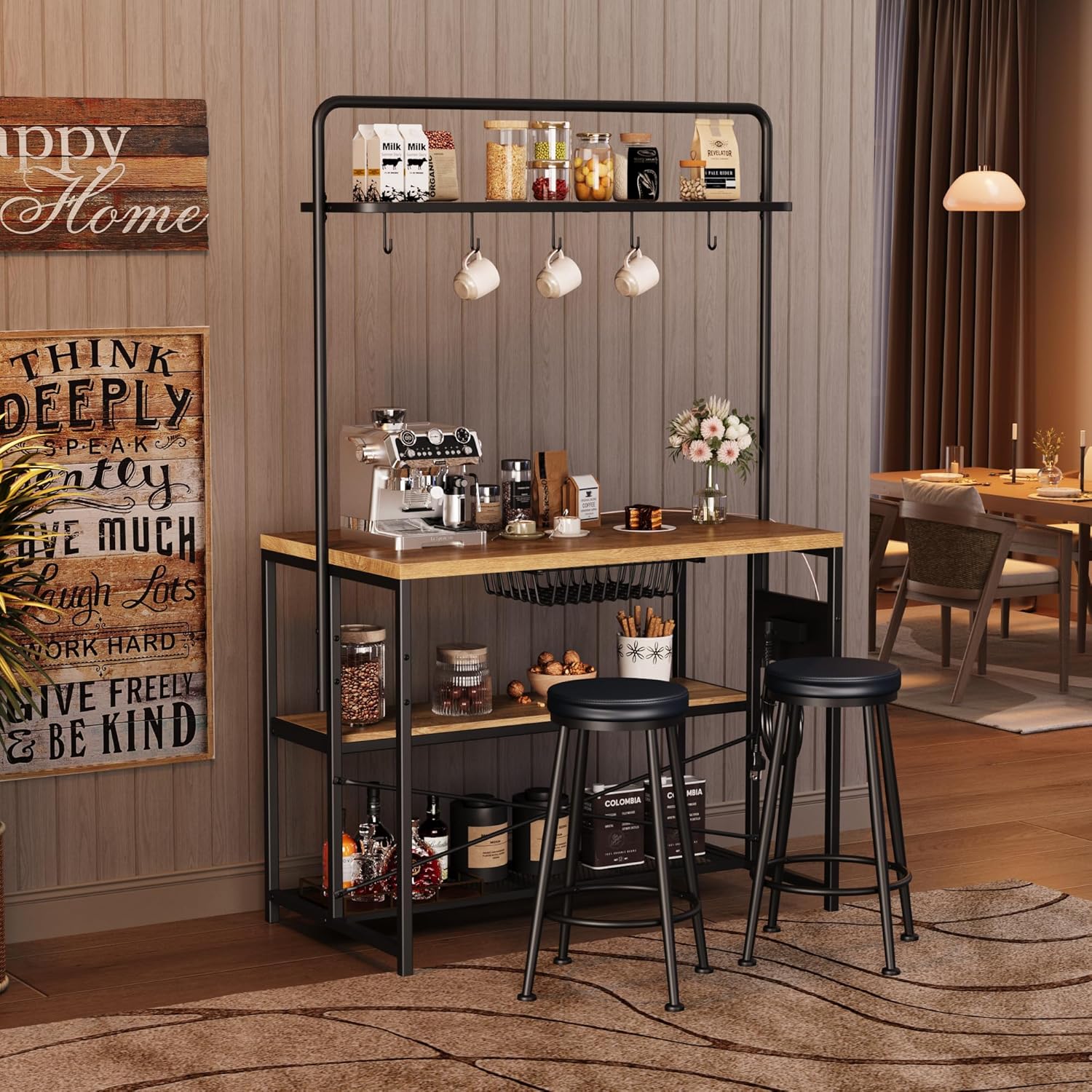
Image 1.1: The Garvee Kitchen Island with Power Outlet and 2 Bar Stools in a home setting.
2. Safety Information
- Read all instructions carefully before assembly and use.
- Keep all small parts and packaging materials away from children and pets to prevent choking hazards.
- Ensure all screws and bolts are securely tightened before use. Do not overtighten to avoid damaging the material.
- Place the kitchen island on a flat, stable surface to prevent tipping.
- Do not overload shelves or the tabletop. Refer to the specifications for weight capacity.
- For electrical safety, ensure the power cord is not pinched or damaged. Do not plug in appliances that exceed the rated capacity of the outlets.
- Unplug the unit from the power source before cleaning or moving.
3. Package Contents
Before beginning assembly, verify that all components are present and undamaged. If any parts are missing or damaged, contact customer support.
- Kitchen Island Frame Components
- Wooden Shelves and Tabletop
- Power Outlet Unit with Cord
- Drawer Basket
- S-shaped Hooks (5 pieces)
- Bar Stools (2 pieces)
- Assembly Hardware (screws, bolts, Allen wrench)
- Instruction Manual (this document)
4. Assembly Instructions (Setup)
Assembly of the Garvee Kitchen Island is designed to be straightforward. A detailed step-by-step assembly guide with diagrams is included in your package. Please follow those instructions carefully.
- Unpack and Identify Parts: Lay out all components on a clean, soft surface to prevent scratches. Compare each part to the parts list in the separate assembly guide.
- Assemble the Frame: Begin by connecting the main metal frame components as instructed. Ensure all connections are finger-tight before final tightening.
- Attach Shelves and Tabletop: Secure the wooden shelves and tabletop to the frame using the provided hardware.
- Install Power Outlet: Mount the power outlet unit to the designated area on the frame.
- Assemble Bar Stools: Follow the separate instructions for assembling the two bar stools.
- Final Tightening: Once all components are in place, systematically tighten all screws and bolts using the provided Allen wrench. Do not overtighten.
- Attach Hooks and Basket: Install the S-shaped hooks on the upper rail and place the drawer basket.
- Adjust Leveling Feet: The island is equipped with adjustable feet. Turn them to ensure the unit is stable and level on uneven floors.
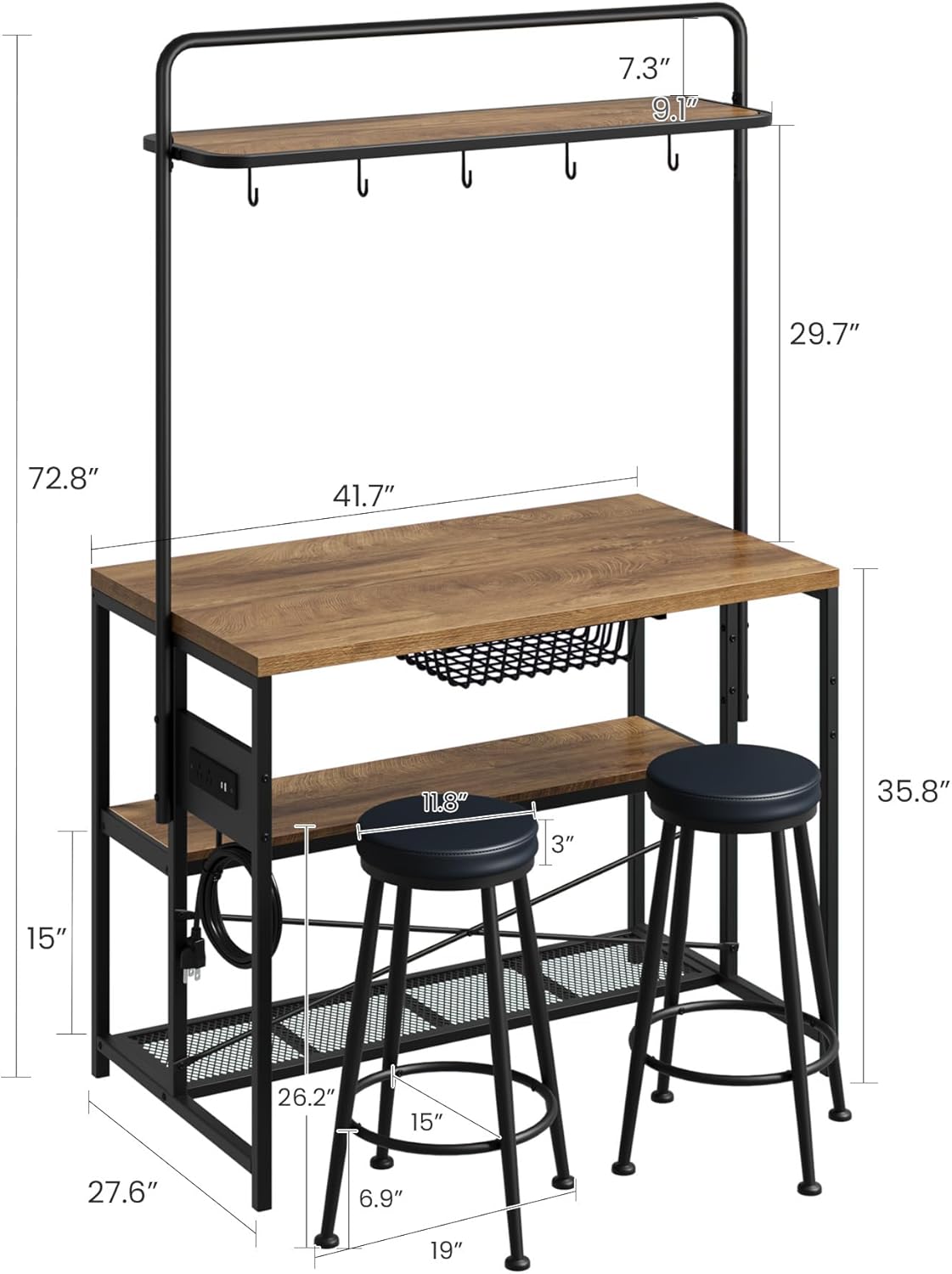
Image 4.1: Product dimensions for planning placement.

Image 4.2: Detail of adjustable feet, sturdy X-shaped structure, and robot vacuum-friendly base.
5. Operating Instructions
5.1 Using the Power Outlet
The integrated power hub provides convenient access to electricity for your kitchen appliances and electronic devices.
- Plug the island's main power cord (4.92 ft) into a standard wall outlet.
- The unit features 2 AC outlets (120V/12A) and 2 USB ports (5V/2A).
- Connect blenders, coffee makers, laptops, or mobile devices directly to the available outlets.
- Always ensure the total power draw of connected devices does not exceed the unit's maximum capacity.

Image 5.1: Close-up of the integrated power outlet with AC and USB ports.
5.2 Utilizing Storage Features
The kitchen island offers various storage solutions:
- Tabletop: Use as a primary work surface, dining area, or coffee bar. It supports up to 400 lbs.
- Drawer Basket: Ideal for storing smaller items, fruits, or vegetables.
- Open Shelves (3-tier): Suitable for microwaves, toasters, pots, pans, cookbooks, or decorative items.
- S-shaped Hooks: Hang utensils, towels, mugs, or other kitchen tools for easy access.
5.3 Using the Bar Stools
The two included bar stools provide comfortable seating for dining or working at the island.
- Position the stools beneath the island when not in use to save space.
- Ensure stools are placed on a stable surface before sitting.

Image 5.2: The kitchen island with its two matching bar stools.
6. Maintenance and Care
- Cleaning: Wipe surfaces with a soft, damp cloth. Avoid using harsh chemicals, abrasive cleaners, or polishes that may damage the finish.
- Spills: Clean up spills immediately to prevent staining or damage to the engineered wood.
- Hardware: Periodically check all screws and bolts to ensure they remain tight. Retighten as necessary to maintain stability.
- Electrical Components: Keep the power outlet unit dry. Do not immerse in water. Inspect the power cord for any signs of damage regularly.
- Placement: Avoid placing the unit in direct sunlight or near heat sources to prevent warping or discoloration of the wood.
7. Troubleshooting
- Issue: The island feels wobbly or unstable.
Solution: Check that all assembly screws and bolts are securely tightened. Adjust the leveling feet on the bottom of the frame to compensate for uneven flooring. - Issue: Power outlets are not working.
Solution: Ensure the main power cord is securely plugged into a functional wall outlet. Verify that the wall outlet itself has power by testing it with another device. Check if the total power draw of connected devices exceeds the unit's capacity. - Issue: Missing or damaged parts during assembly.
Solution: Do not proceed with assembly. Contact Garvee customer support immediately for assistance and replacement parts.
8. Specifications
| Product Dimensions | 44.09"D x 27.56"W x 70.87"H |
| Item Weight | 79.8 pounds |
| Material | Engineered Wood, Metal |
| Power Outlets | 2 AC Outlets (120V/12A), 2 USB Ports (5V/2A) |
| Power Cord Length | 4.92 ft |
| Tabletop Weight Capacity | Up to 400 lbs |
| Model Number | yzcA2ORU4IyLcKHrn2O1dA5V |
| UPC | 822200100812 |
9. Product Video
Watch this video for a visual overview of the Garvee Kitchen Island and its features.
Video 9.1: Official product video showcasing the Garvee Kitchen Island with Stools.
10. Warranty and Support
For warranty information, please refer to the documentation included with your purchase or visit the official Garvee website. If you encounter any issues or have questions regarding your product, please contact Garvee customer support. Ensure you have your model number (yzcA2ORU4IyLcKHrn2O1dA5V) and purchase details available when contacting support.