
Introduction
Thank you for choosing the TICYACK Handheld Steam Cleaner Model ZQJ-03. This manual provides essential information for the safe and effective use, maintenance, and troubleshooting of your new steam cleaner. Please read it thoroughly before first use and keep it for future reference.
Important Safety Information
Always follow basic safety precautions when using electrical appliances to reduce the risk of fire, electric shock, or injury. This appliance generates high-temperature steam. Exercise extreme caution.
- Read All Instructions: Before operating the appliance.
- Hot Steam: Steam is extremely hot and can cause burns. Keep hands, face, and body away from the steam nozzle. Do not direct steam at people, pets, or electrical appliances.
- Child Lock: The steam cleaner features a child lock function for added safety. Ensure it is engaged when not in use or when children are present.
- Electrical Safety: Do not immerse the appliance in water or other liquids. Do not operate with a damaged cord or plug.
- Water Tank: Only use clean tap water. Do not add detergents, perfumes, or other chemicals to the water tank, as this can damage the appliance and void the warranty.
- Unplug When Not in Use: Always unplug the steam cleaner from the electrical outlet before filling, cleaning, or performing maintenance.
- Storage: Store the appliance indoors in a cool, dry place.
Product Components and Accessories
Your TICYACK Handheld Steam Cleaner comes with a variety of attachments designed for different cleaning tasks.

Image: TICYACK Handheld Steam Cleaner with its full set of 14 accessories, including brushes, nozzles, and extension tools.
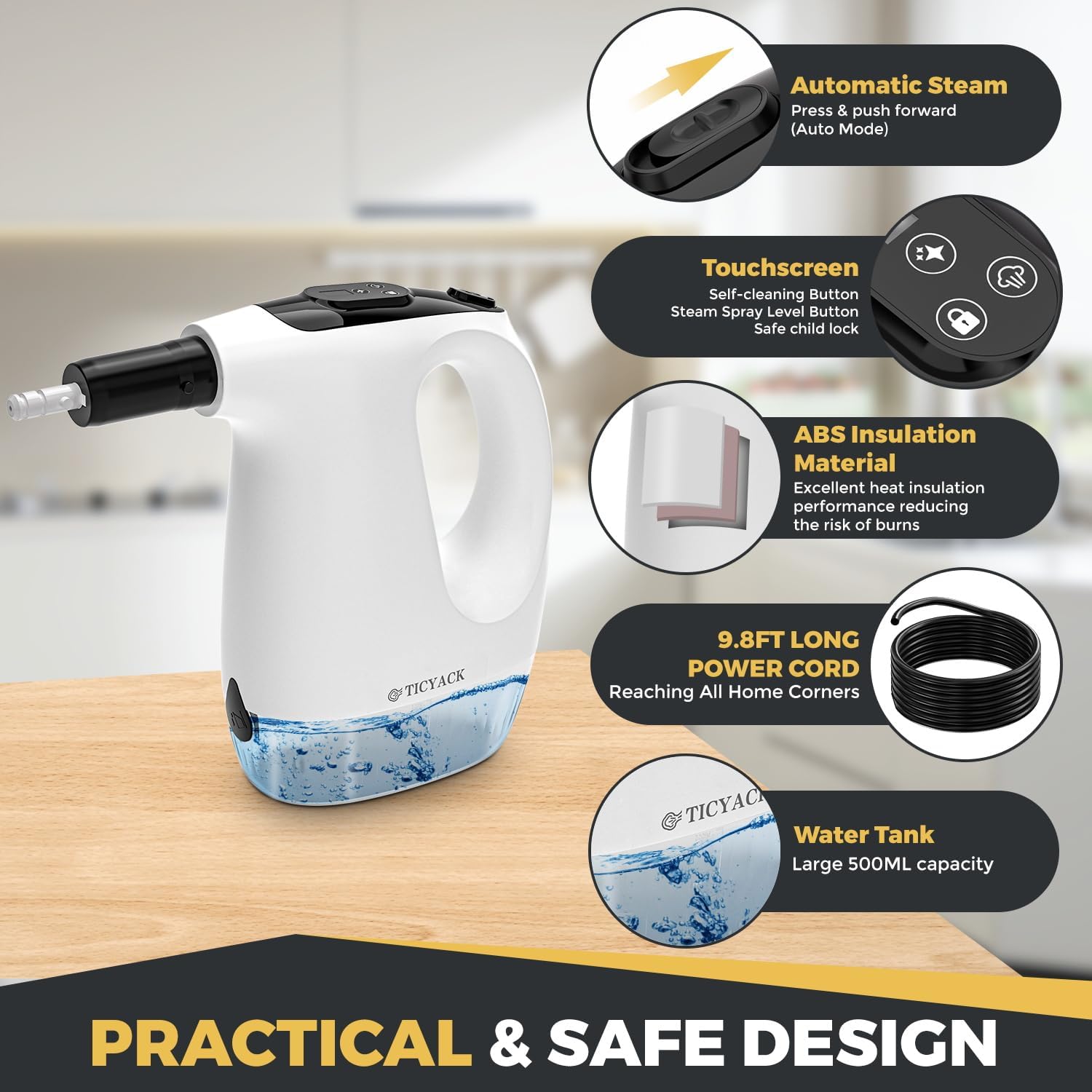
Image: Diagram highlighting key features like automatic steam, touchscreen controls, ABS insulation, 9.8ft power cord, and 500ml water tank.
Included Accessories:
- Main Unit: Handheld steam cleaner with 500ml water tank.
- Extension Hose: For extended reach in tight spaces.
- Bent Nozzle: Ideal for corners and hard-to-reach areas like toilet rims.
- Round Brushes (various types): For scrubbing tough grime on surfaces like stovetops, grout, and sinks.
- Fabric Steamer Tool with Cloth: For cleaning and refreshing fabrics like sofas, curtains, and toys.
- Window Cleaning Cove: For streak-free cleaning of glass surfaces, mirrors, and tiles.
- Measuring Cup & Funnel: For easy and precise water filling.
- Other specialized nozzles and brushes: For comprehensive cleaning tasks.
Setup Instructions
- Unpack: Carefully remove all components from the packaging.
- Fill Water Tank:
- Ensure the appliance is unplugged.
- Open the water tank cap.
- Use the provided measuring cup and funnel to fill the water tank with clean tap water. Do not overfill.
- Securely close the water tank cap.
Video: Demonstrates how to fill the water tank and attach accessories to the TICYACK Handheld Steam Cleaner.
- Attach Accessories: Select the appropriate cleaning attachment for your task and securely attach it to the steam cleaner nozzle.
- Connect Power: Plug the power cord into a grounded electrical outlet.
Operating Instructions
- Power On and Heating:
- Hold the Lock button for 3 seconds to power on the device.
- The indicator '1' will flash while the unit is heating. It heats rapidly in approximately 15 seconds.
- The indicator will become steady when the steam cleaner is ready for use.
- Adjust Steam Modes:
- Press the steam mode button (cloud icon) to cycle through 3 adjustable steam levels: Low, Medium, and High.
- Select the appropriate mode for your cleaning task. Low mode is suitable for delicate fabrics, Medium for general dusting, and High for tough grease and grime.
- Continuous Steam (Auto Mode):
- Push the steam trigger forward to engage the automatic steam mode, eliminating the need for constant holding.
- Cleaning:
- Direct the steam nozzle towards the surface to be cleaned.
- For best results, hold the nozzle close to the surface. Steam cools quickly over distance.
- Use appropriate brush attachments for scrubbing.
- Wipe away loosened dirt and moisture with a clean cloth.

Image: The steam cleaner effectively removing grease from a kitchen stovetop using a brush attachment.

Image: The steam cleaner with a window cleaning attachment removing grime from a window surface.
- Child Lock: Engage the child lock button (lock icon) to prevent accidental operation.
Maintenance
Regular maintenance ensures optimal performance and extends the lifespan of your steam cleaner.
- Self-Cleaning Function:
- Press the Star button to enter self-cleaning mode.
- The indicator 'A' will flash during preheating and become steady when ready to flush.
- Press the Star button again to exit self-cleaning mode.
- Empty Water Tank: After each use, unplug the appliance and allow it to cool. Empty any remaining water from the tank.
- Clean Accessories: Wash removable accessories with warm, soapy water and rinse thoroughly. Allow them to air dry completely before storing.
- Wipe Exterior: Wipe the exterior of the steam cleaner with a soft, damp cloth. Do not use abrasive cleaners or solvents.
- Descaling (if necessary): If you notice reduced steam output or mineral buildup, descale the unit according to instructions for steam appliances.
Troubleshooting
| Problem | Possible Cause | Solution |
|---|---|---|
| No steam or low steam output. |
|
|
| Water leaking from nozzle. |
|
|
| Power indicator not lighting up. |
|
|
If you encounter issues not listed here, please contact TICYACK customer support.
Specifications
- Brand: TICYACK
- Model Name: ZQJ-03
- Wattage: 1200 watts
- Heat Time: 15 Seconds
- Maximum Temperature: 230 Degrees Fahrenheit
- Power Source: Corded Electric
- Form Factor: Handheld
- Special Feature: Compact Design
- Surface Recommendation: Tile (also suitable for various other surfaces with appropriate attachments)
- Included Components: Funnel (and other accessories as listed above)