
1. Introduction
Thank you for choosing the HoneyGuaridan RFID Automatic Cat Feeder SF35. This device is designed to provide personalized and controlled feeding for your cats, especially in multi-pet households or for pets with specific dietary needs. By utilizing RFID collar tags, the feeder ensures that only the designated pet can access its food, preventing food theft and promoting healthy eating habits. This manual provides detailed instructions for setup, operation, maintenance, and troubleshooting to ensure optimal performance of your feeder.
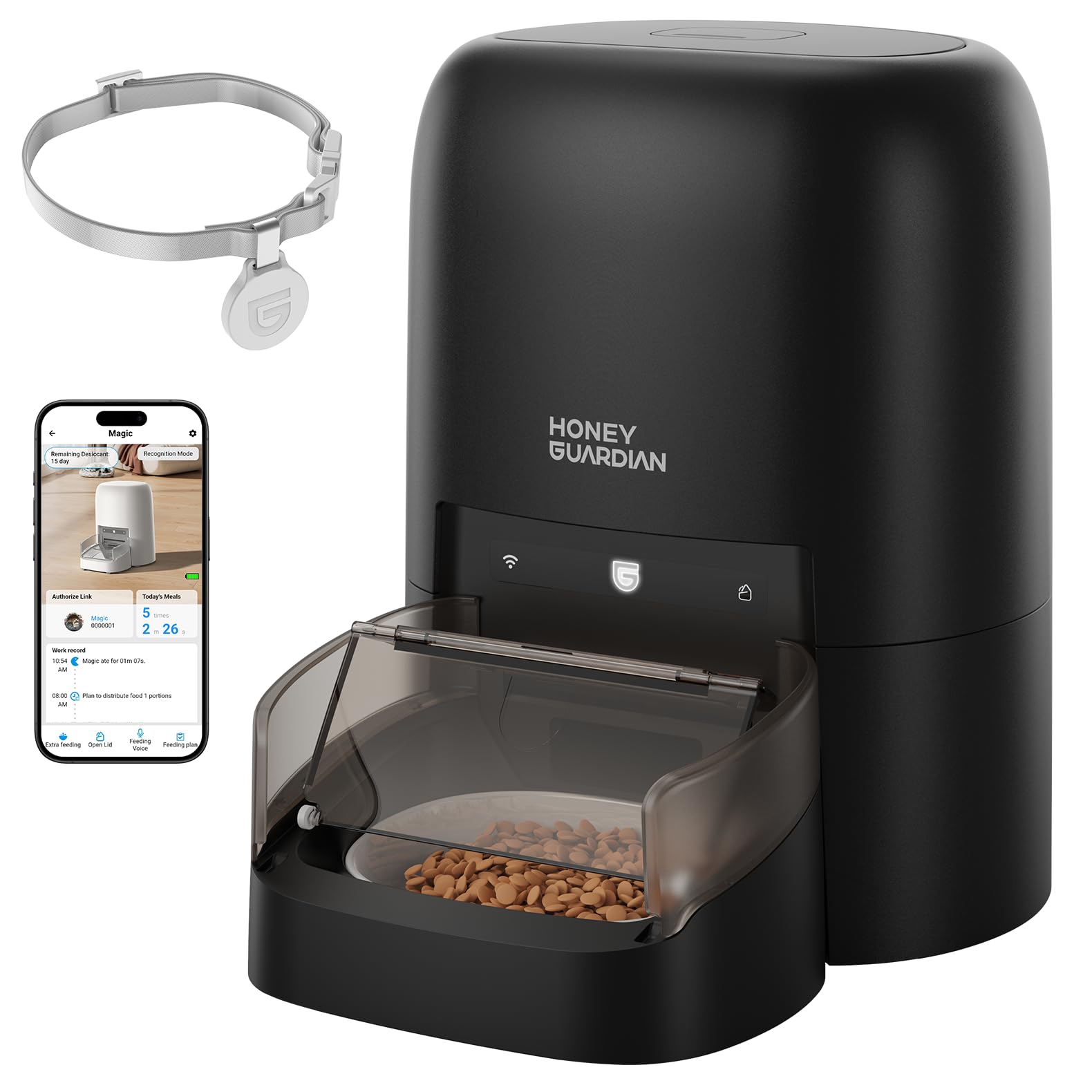
Image 1.1: HoneyGuaridan RFID Automatic Cat Feeder SF35. This image shows the complete feeder unit, highlighting its sleek design and compact size.
2. Product Overview
The HoneyGuaridan SF35 feeder incorporates several key components and features to deliver a reliable and personalized feeding experience.
Key Features:
- RFID-Enabled Feeding: Uses a lightweight RFID collar tag to identify your cat and unlock the food bowl lid.
- Anti-Theft Design: Prevents other pets from accessing food meant for a specific cat, ideal for managing special diets or weight.
- App Control (2.4G/5GHz Wi-Fi): Set feeding schedules, track eating habits, and receive alerts via a dedicated mobile application.
- Multiple Power Options: Operates via 5V power cord, 4 AA batteries (not included), or a lithium battery (not included).
- Large Capacity: 4.6L (19-cup) food storage, sufficient for approximately 3 weeks for one cat.
- Sealed Freshness: Five-layer protection system (airproof silicone strips, sealed food tank lid, desiccant pouch, silicone sealing rotor, food bowl cover) keeps food fresh.
- Ceramic Bowl: Promotes healthier eating and is easy to clean.

Image 2.1: Diagram illustrating the feeder's components, including the food bucket, silicone rotor, and sealed lid system for freshness.
3. Setup Instructions
3.1 Unpacking and Assembly
- Carefully remove all components from the packaging.
- Ensure all parts are present: feeder unit, ceramic bowl, 5V power adapter, and RFID collar tag.
- Place the ceramic bowl into the designated slot in the feeder base.
3.2 Power Supply
The feeder supports three power modes:
- 5V Power Cord: Connect the braided power cord to the feeder and a wall outlet. This is the primary power source.
- 4 AA Batteries (Not Included): Install 4 AA batteries for backup power. In battery-only mode, Wi-Fi connectivity is disabled, but the feeder will dispense food according to the set schedule.
- Lithium Battery (Not Included): Install a lithium battery for cord-free operation with Wi-Fi connectivity.

Image 3.1: Visual representation of the three power supply options: 5V power adapter, 4 AA dry batteries, and lithium battery.
3.3 App Installation and Wi-Fi Connection
- Download the HoneyGuaridan app from your smartphone's app store.
- Register an account and log in.
- Follow the in-app instructions to add your SF35 feeder. The feeder supports dual-band 2.4G/5GHz Wi-Fi for a stable connection.
3.4 RFID Collar Tag Pairing
The feeder comes with one RFID collar tag. Additional tags can be purchased separately for multiple pets.
- Attach the RFID tag to your cat's collar. Ensure it is lightweight and comfortable.
- Open the HoneyGuaridan app and navigate to the feeder settings.
- Select the option to pair a new RFID tag.
- Follow the on-screen prompts to bind the tag to a specific pet profile within the app. This allows the feeder to recognize your cat and track its eating habits.

Image 3.2: The lightweight RFID collar tag with a quick-release breakaway feature and an anti-loss QR code. The image also shows the 'Scan to Connect' feature in the app, linking the tag to a pet profile.
4. Operating Instructions
4.1 Filling the Food Bucket
- Open the top lid of the feeder.
- Pour dry kibble into the 4.6L food bucket. Ensure the kibble size is between 2-12mm.
- Close the lid securely to maintain freshness.

Image 4.1: Examples of applicable kibble sizes (2-12mm) and dry food types suitable for the feeder, including dry food, freeze-dried food, mixed food, and air-dried food.
4.2 Setting Feeding Schedules via App
Use the HoneyGuaridan app to customize your pet's feeding plan:
- Create daily feeding plans for each day of the week.
- Specify meal times and portion sizes.
- The app records which cat ate, when, and for how long, providing valuable diet tracking data.
4.3 RFID-Activated Feeding
When a cat wearing a paired RFID collar tag approaches the feeder, the RFID reader verifies the tag and unlocks the food bowl lid. The lid opening speed can be adjusted for your cat's comfort. The lid will close automatically after the cat finishes eating or moves away.

Image 4.2: A cat with an RFID collar tag eating from the feeder, demonstrating the personalized feeding mechanism.
4.4 Manual Feeding
A button on the front of the feeder allows for manual dispensing of kibble. This can also be done via the app.
4.5 Multi-Pet Households
For homes with multiple pets, each cat requiring personalized feeding should have its own feeder and a paired RFID collar tag. This prevents food theft and ensures each pet adheres to its specific diet.

Image 4.3: Comparison showing how the RFID feeder prevents one pet from stealing another's food, ensuring controlled portions and schedules for each pet.
5. Maintenance
5.1 Cleaning the Ceramic Bowl
The ceramic bowl is dishwasher safe and easy to clean. Regular cleaning is recommended to maintain hygiene.

Image 5.1: Comparison highlighting the benefits of the ceramic bowl (no rust, easy cleaning, odorless, lead-free) over traditional metal bowls.
5.2 Cleaning the Feeder Unit
Wipe the exterior of the feeder with a damp cloth. Do not submerge the main unit in water. Ensure the food bucket and dispensing mechanism are free of debris.
5.3 Desiccant Pouch Replacement
The feeder includes a desiccant pouch to absorb moisture and keep food fresh. Replace the desiccant pouch periodically (e.g., every 1-2 months) for optimal freshness.
6. Troubleshooting
- Feeder not connecting to Wi-Fi: Ensure the feeder is within range of your Wi-Fi router. Check that your Wi-Fi network is 2.4G or 5GHz. If using AA batteries, Wi-Fi functionality is disabled; switch to power cord or lithium battery.
- Lid not opening for pet: Verify the RFID collar tag is properly paired in the app. Ensure the tag is securely attached to the cat's collar and is within range of the feeder's sensor. Check for low battery alerts for the RFID tag.
- Food not dispensing: Check if the food bucket is empty. Ensure kibble size is within the 2-12mm range to prevent blockages. Clean the dispensing mechanism if necessary.
- Low-food or low-battery alerts: These alerts are sent via the app. Refill food or replace batteries as indicated.
- Other pets accessing food: Ensure all pets have their own RFID tags and feeders if individual feeding is required. The feeder is designed to prevent access by non-tagged pets.
7. Specifications
| Feature | Detail |
|---|---|
| Product Dimensions | 7.48 x 13.39 x 14.17 inches; 3.86 Pounds |
| Item Model Number | SF35 |
| Material | Ceramic (bowl) |
| Target Species | Cat |
| Brand | HoneyGuaridan |
| Special Feature | RFID, App Control |
| Included Components | Collars Tags (one included) |
| Batteries Required | Yes (4 AA or Lithium, not included) |
| Operation Mode | Automatic |
| Smart Home Compatibility | Smart Home Compatible |
| Capacity | 4.6 Liters (19 cups) |
| Item Weight | 1.75 Kilograms |
8. Official Product Video
Video 8.1: An official product video from HoneyGuaridan demonstrating the features and benefits of the RFID Automatic Cat Feeder, including its personalized feeding capabilities and multi-pet suitability.
9. Warranty and Support
For warranty information, technical support, or customer service inquiries, please refer to the contact details provided with your product packaging or visit the official HoneyGuaridan website. Keep your purchase receipt for warranty claims.