
1. Introduction
The SORAN JME-02 Dual Stomp Lite is a compact and versatile multi-effects guitar pedal designed for both guitar and bass players. It features advanced DSM modeling technology for realistic amplifier and cabinet simulations, a wide array of effects, and practical functions for practice, performance, and recording.

Image 1.1: The SORAN JME-02 Dual Stomp Lite Multi-Effects Guitar Pedal, showcasing its compact design and intuitive interface.
Key Features:
- High-Precision DSM Modeling: Utilizes DSM technology with black-box models and neural network algorithms for accurate tube amp dynamic response.
- 10 Independent Modules: Equipped with 10 simultaneous independent effect modules, covering classic overdrive to modern distortion.
- 99 Presets & 125 Effects: Offers 99 dedicated preset patches and 125 professional effects for guitar and bass.
- Expandable Tone Library: Supports NFILE (NAM) and third-party IR file import with 20 customizable slots.
- All-In-One Practical Functions: Includes a built-in tuner, 40-second looper, and 100 drum rhythms.
- USB Audio Interface: 48kHz/24bit USB audio interface for recording, stereo output, headphone output, and TRRS AUX IN.
- Portable Power: High-capacity 2000mAh rechargeable lithium battery provides up to 6 hours of continuous operation.
Video 1.1: An overview of the SORAN Dual Stomp Lite Multi-Effects Guitar Pedal, demonstrating its features and sound capabilities.
2. Setup
2.1 Powering the Device
The JME-02 Dual Stomp Lite is powered by an internal 2000mAh rechargeable lithium battery. To charge the device, connect a USB-C cable to the USB port on the pedal and to a suitable USB power adapter (not included) or a computer. A full charge provides approximately 6 hours of playtime.

Image 2.1: The Dual Stomp Lite connected to a power source via USB-C for charging. The display shows the battery charge status.
2.2 Connecting Your Instrument and Audio Devices
Refer to the diagram below for proper connection of your guitar or bass, headphones, and external audio devices.
- Input: Connect your guitar or bass to the 1/4" INPUT jack.
- Output: Use the 1/4" OUTPUT R and L (MONO) jacks to connect to an amplifier, mixer, or audio interface.
- Headphones: Connect headphones to the 1/8" HEADPHONE OUT jack for silent practice.
- AUX IN: Use the 1/8" AUX IN (TRRS) for connecting external audio sources like smartphones for playback or mobile recording/streaming.
- USB-C Port: Connect to a computer for USB audio interface functionality and charging.

Image 2.2: A diagram illustrating various connection possibilities for the Dual Stomp Lite, including instrument input, audio outputs, and USB connection.
2.3 Software Installation
To manage presets, import NAM/IR files, and update firmware, download the Stomp Manager software from the official SORAN website. The software is available for Windows and Mac operating systems. NAM and IR file import is only supported via the computer software, not the mobile application.
3. Operating the Pedal
3.1 Controls Overview
The JME-02 features a 2-inch color display and a combination of knobs and buttons for intuitive control.
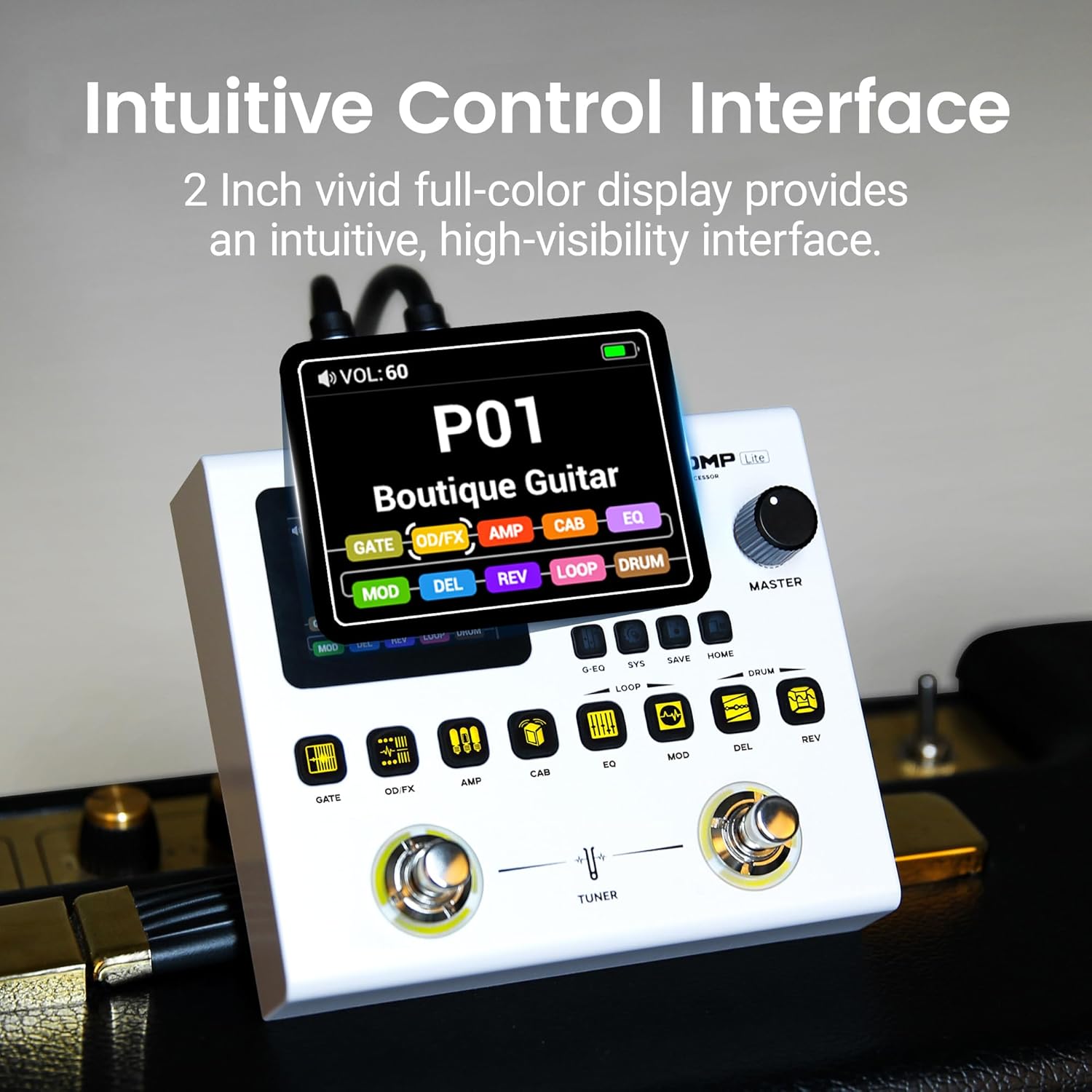
Image 3.1: Close-up of the Dual Stomp Lite's control panel, highlighting the 2-inch color display and various buttons.
- Edit Knob: Used for navigating menus and adjusting parameter values.
- Master Knob: Controls the overall output volume.
- Effect Module Buttons: Dedicated buttons for GATE, OD/FX, AMP, CAB, EQ, MOD, DEL, REV, LOOP, and DRUM modules. Press to activate/deactivate or enter module settings.
- Footswitches: Two multi-functional footswitches for preset switching, tuner activation, and looper control.
3.2 Navigating Presets
Rotate the Edit knob to scroll through the 99 available presets. The display will show the preset number and name. Instant sound switching is available via knob rotation or one-touch button operation.
3.3 Effect Modules
The JME-02 features 10 independent effect modules. Press the corresponding button to access and adjust parameters for each module:
- GATE: Noise gate to reduce unwanted noise.
- OD/FX: Overdrive and other effects.
- AMP: Amplifier models.
- CAB: Cabinet simulations.
- EQ: Equalization settings.
- MOD: Modulation effects (e.g., chorus, flanger).
- DEL: Delay effects.
- REV: Reverb effects.
- LOOP: 40-second looper.
- DRUM: 100 drum rhythms.
3.4 NAM and IR File Import
The pedal supports NFILE (NAM) and third-party IR file import, offering 20 customizable slots (10 for NAM, 10 for IR). This feature allows you to expand your tonal palette significantly. To import these files, you must use the Stomp Manager software on a computer. Mobile apps do not support this function.
Video 3.2: A detailed guide on how to import NAM and IR files into your SORAN Stomp Series pedal using the Stomp Manager software on a computer.
3.5 Looper and Drum Rhythms
Activate the 40-second looper by pressing the EQ and MOD buttons simultaneously. The 100 drum rhythms can be accessed by pressing the DEL and REV buttons simultaneously. These features are ideal for practice and creative sound layering.
3.6 Tuner Function
To activate the built-in tuner, press both footswitches simultaneously. The display will show the tuning interface, allowing you to accurately tune your instrument.
3.7 System Settings
Access system settings by pressing the SYS button. Here you can configure options such as Global EQ, Wireless connectivity, and Loopback settings. Navigate these options using the Edit knob and confirm selections with the footswitches or relevant buttons.
4. Maintenance
- Battery Care: To maximize battery life, avoid fully discharging the pedal frequently. Charge the device regularly using the provided USB-C port.
- Cleaning: Use a soft, dry cloth to clean the pedal's exterior. Avoid abrasive cleaners or solvents.
- Storage: Store the pedal in a dry, cool environment away from direct sunlight and extreme temperatures.
- Handling: While durable, avoid dropping the pedal or subjecting it to excessive force to prevent damage to internal components or the display.
5. Troubleshooting
- No Sound Output: Check all cable connections (input, output, power). Ensure the Master volume knob is turned up and that any active effect modules are not bypassed or set to zero output.
- Software Installation Issues: If experiencing difficulties installing Stomp Manager (e.g., on Windows 11), ensure your operating system is up to date and try running the installer as an administrator. Check the official SORAN website for updated drivers or software versions.
- Unsatisfactory Preset Sounds: Many users find creating custom presets more effective than relying solely on factory presets. Experiment with different effect modules and parameters to tailor sounds to your preference.
- Short Battery Life: While rated for 6 hours, actual battery life can vary based on usage (e.g., continuous looping, high-gain effects). Ensure the device is fully charged before use. If battery life significantly degrades, contact customer support.
- NAM/IR Import Failure: Confirm you are using the Stomp Manager computer software for import, as mobile apps do not support this feature. Ensure the NAM/IR files are in a compatible format.
6. Specifications
| Feature | Specification |
|---|---|
| Brand | SORAN |
| Style | Multi-effects |
| Color | White |
| Product Dimensions | 5.31"L x 4.57"W x 1.89"H |
| Item Weight | 14.08 ounces |
| Voltage | 9 Volts |
| Amperage | 12 Amps |
| Controls Type | Knob and Button |
| Model Number | JME-02 |
| Manufacturer | SORAN |
7. Warranty
The SORAN JME-02 Dual Stomp Lite Multi-Effects Guitar Pedal comes with a 2-year manufacturer's warranty. Please retain your proof of purchase for warranty claims. For detailed warranty terms and conditions, refer to the official SORAN website or contact customer support.
8. Support
For further assistance, technical support, or to download the latest version of the Stomp Manager software and firmware updates, please visit the official SORAN website. You can also contact SORAN customer service directly for personalized support.
