1. Introduction
The Lumisky TITAN Solar LED Floodlight is a high-power outdoor lighting solution designed for various applications. This manual provides essential information for the safe and efficient installation, operation, and maintenance of your floodlight. Please read these instructions carefully before use and retain them for future reference.
2. Product Features
- Exceptional Brightness: Delivers up to 1400 lumens, suitable for illuminating large outdoor areas.
- Adjustable Color Temperature: Offers a range from warm white (2700K) to cool white (6500K) to suit different ambiance requirements.
- Remote Solar Panel: Equipped with a 5-meter cable for flexible placement of the solar panel, ensuring optimal sun exposure.
- Long Autonomy: Provides up to 12 hours of continuous illumination on a full charge.
- Remote Control: Includes a remote for convenient control of power, brightness, and color temperature.
- Durable and Weather-Resistant: IP65 certified, ensuring resistance to dust and water jets for reliable outdoor use.
- Material: Constructed from durable aluminum.
3. Package Contents
Please check the package to ensure all components are present:
- Lumisky TITAN LED Floodlight
- Remote Solar Panel with 5-meter cable
- Remote Control
- Mounting Hardware (screws, anchors)
- Instruction Manual
4. Safety Instructions
- Ensure the product is installed by a qualified person if you are unsure about the process.
- Do not look directly into the LED light when it is on, as it can cause eye strain or damage.
- Keep the solar panel clean to ensure optimal charging efficiency.
- Do not attempt to disassemble or modify the product, as this will void the warranty and may cause damage or injury.
- Keep away from flammable materials.
- Ensure all connections are secure and waterproof.
5. Setup and Installation
Follow these steps for proper installation of your Lumisky TITAN Solar LED Floodlight:
5.1. Choosing an Installation Location
- For the Solar Panel: Select a location that receives direct sunlight for at least 6-8 hours daily. Avoid shaded areas from trees, buildings, or other obstructions. The 5-meter cable allows flexibility to place the solar panel away from the floodlight if needed.
- For the Floodlight: Choose a sturdy surface (wall, pole) where the light can effectively illuminate the desired area. Ensure it is within the 5-meter cable range of the solar panel.
5.2. Mounting the Components
- Mount the Solar Panel: Use the provided mounting hardware to securely attach the solar panel to your chosen location. Adjust its angle to face the sun for maximum exposure.
- Mount the Floodlight: Securely attach the floodlight to its desired position using the provided mounting hardware. Ensure it is stable and can be adjusted to the correct angle.

Image: Lumisky TITAN floodlight and solar panel mounted on an outdoor wall, demonstrating typical installation.
5.3. Connecting the Solar Panel to the Floodlight
Connect the cable from the solar panel to the input port on the floodlight. Ensure the connection is firm and the waterproof cap is securely fastened to prevent water ingress.

Image: Diagram illustrating the solar panel absorbing sunlight, connected to the floodlight, and controlled by a remote.
5.4. Initial Charging
Allow the solar panel to charge the floodlight's internal battery for at least 8-10 hours in direct sunlight before first use. This ensures optimal battery performance.
6. Operating Instructions
The Lumisky TITAN floodlight operates automatically at dusk and can be controlled manually using the included remote control.
6.1. Automatic Operation
The floodlight features a built-in light sensor. It will automatically turn on at dusk and turn off at dawn, provided there is sufficient battery charge.
6.2. Using the Remote Control
The remote control allows you to manually adjust the floodlight's settings:

Image: The remote control for the Lumisky TITAN floodlight, showing buttons for power, brightness, and color temperature adjustment.
- ON/OFF Button: Press to manually turn the floodlight on or off.
- Brightness Adjustment: Use the '+' and '-' buttons to increase or decrease the light intensity.
- Color Temperature (CCT) Adjustment: Buttons labeled with color temperatures (e.g., 2700K, 4000K, 6500K) or 'Warm'/'Cool' allow you to switch between different light hues.
- Timer Function: If available, use timer buttons (e.g., 3H, 6H) to set the duration the light remains on.
- Auto Mode: Activates the dusk-to-dawn sensor for automatic operation.
7. Maintenance
Regular maintenance ensures the longevity and optimal performance of your floodlight:
- Cleaning the Solar Panel: Periodically wipe the solar panel surface with a soft, damp cloth to remove dust, dirt, or debris. A clean panel ensures maximum sunlight absorption.
- Cleaning the Floodlight: Clean the floodlight's lens and housing with a soft, damp cloth. Do not use abrasive cleaners or solvents.
- Check Connections: Occasionally inspect the cable connection between the solar panel and the floodlight to ensure it remains secure and waterproof.
- Battery Care: The internal battery is designed for long life. For best performance, ensure the unit receives adequate sunlight for charging. Avoid prolonged storage in a completely discharged state.
8. Troubleshooting
If you encounter issues with your Lumisky TITAN floodlight, refer to the following common problems and solutions:
| Problem | Possible Cause | Solution |
|---|---|---|
| Light does not turn on at night. | Insufficient charge; Solar panel is dirty or shaded; Faulty connection; Remote control battery low. | Ensure solar panel receives direct sunlight for 8-10 hours. Clean the solar panel. Check cable connection. Replace remote control battery. |
| Light is dim or only stays on for a short period. | Insufficient charge; Battery degradation (after long-term use). | Ensure solar panel receives maximum sunlight. If battery degradation is suspected after several years, consider replacing the unit. |
| Remote control is not working. | Remote control battery is dead; Obstruction between remote and floodlight; Remote not paired (if applicable). | Replace the battery in the remote control. Ensure clear line of sight. Refer to specific remote pairing instructions if provided with the product. |
| Light flickers. | Low battery charge; Loose connection. | Allow the unit to charge fully. Check and secure all cable connections. |
9. Specifications
| Feature | Specification |
|---|---|
| Model Number | TITAN |
| Brand | Lumisky |
| Light Source | LED |
| Luminous Flux | 1400 Lumens |
| Color Temperature | 2700K - 6500K (Adjustable) |
| Power Source | Solar Energy |
| Autonomy | Up to 12 hours |
| Solar Panel Cable Length | 5 meters |
| Material | Aluminum |
| Dimensions (Floodlight) | 30.5 cm (L) x 26 cm (W) x 4 cm (H) |
| Weight | 2.6 kg (approx.) |
| IP Rating | IP65 (Dust and water jet resistant) |
| Special Features | Anti-rust, Energy Efficient, Waterproof |
Energy Label Information
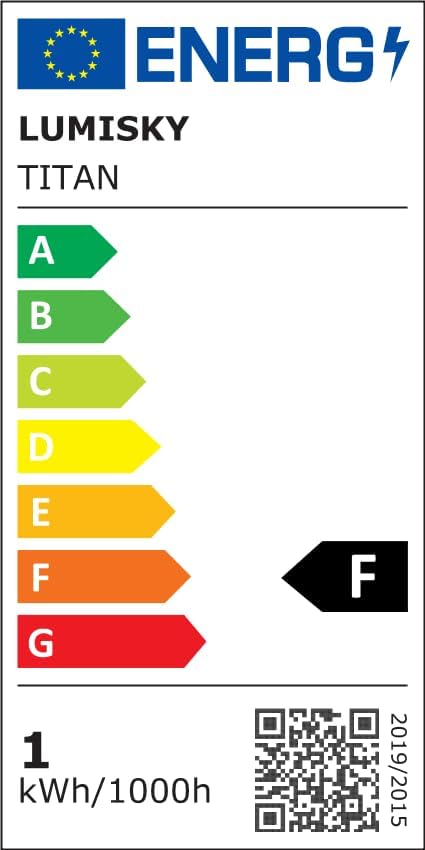
Image: EU Energy Label for the Lumisky TITAN Floodlight, indicating an energy efficiency class of F.
For detailed energy information, visit the EPREL database.
10. Warranty and Support
Your Lumisky TITAN Solar LED Floodlight comes with a standard manufacturer's warranty. Please refer to the warranty card included in your package for specific terms and conditions. For technical support, troubleshooting assistance, or warranty claims, please contact your retailer or Lumisky customer service through their official channels.


