
Introduction
Thank you for choosing the HLDIRECT 44-Inch Gaming Desk. This manual provides essential information for the safe assembly, operation, and maintenance of your new desk. Please read these instructions carefully before beginning assembly and retain them for future reference.
This gaming desk is designed to enhance your gaming or work setup with features such as integrated power outlets, dynamic LED lighting, and versatile storage solutions including fabric drawers, a PC tower stand, and side hooks.
Safety Information
No specific safety warnings are provided for this product. However, please observe the following general safety guidelines:
- Ensure all screws and fasteners are securely tightened during assembly and periodically check for tightness.
- Do not overload the desk or shelves beyond their intended weight capacity.
- Keep liquids away from electrical outlets and components.
- Place the desk on a level surface to prevent tipping.
- Keep small parts away from children during assembly to prevent choking hazards.
Package Contents
Before assembly, verify that all components listed below are present and undamaged. If any parts are missing or damaged, please contact HLDIRECT customer support.
- Desk Panels (Main desktop, monitor stand, side shelves)
- Metal Frame Components
- 3 Fabric Drawers
- LED Light Strip with Controller
- Integrated Power Strip (2 AC outlets, 3 USB ports)
- 4 Side Hooks
- Assembly Hardware (screws, bolts, Allen wrench)
- Instruction Manual
Setup and Assembly
This desk is designed for straightforward assembly. It is recommended to have two people for certain steps to ensure stability and ease of construction.
Preparation
- Clear a spacious area for assembly.
- Lay out all components and hardware, comparing them with the parts list in the included manual.
- Keep the included Allen wrench and any other necessary tools handy.
Assembly Steps
- Begin by assembling the main metal frame according to the diagrams in your separate assembly manual. Ensure all connections are finger-tightened initially.
- Attach the main desktop panel to the frame.
- Assemble the side storage unit. Note that this unit can be configured on either the left or right side of the main desk. Refer to your assembly manual for specific instructions on reversible orientation.
- Insert the fabric drawers into the designated slots in the side storage unit.
- Install the monitor stand and the PC tower stand/side shelf.
- Secure the integrated power strip into its cutout on the desktop.
- Attach the side hooks to the frame as desired.
- Once all components are in place, fully tighten all screws and fasteners.
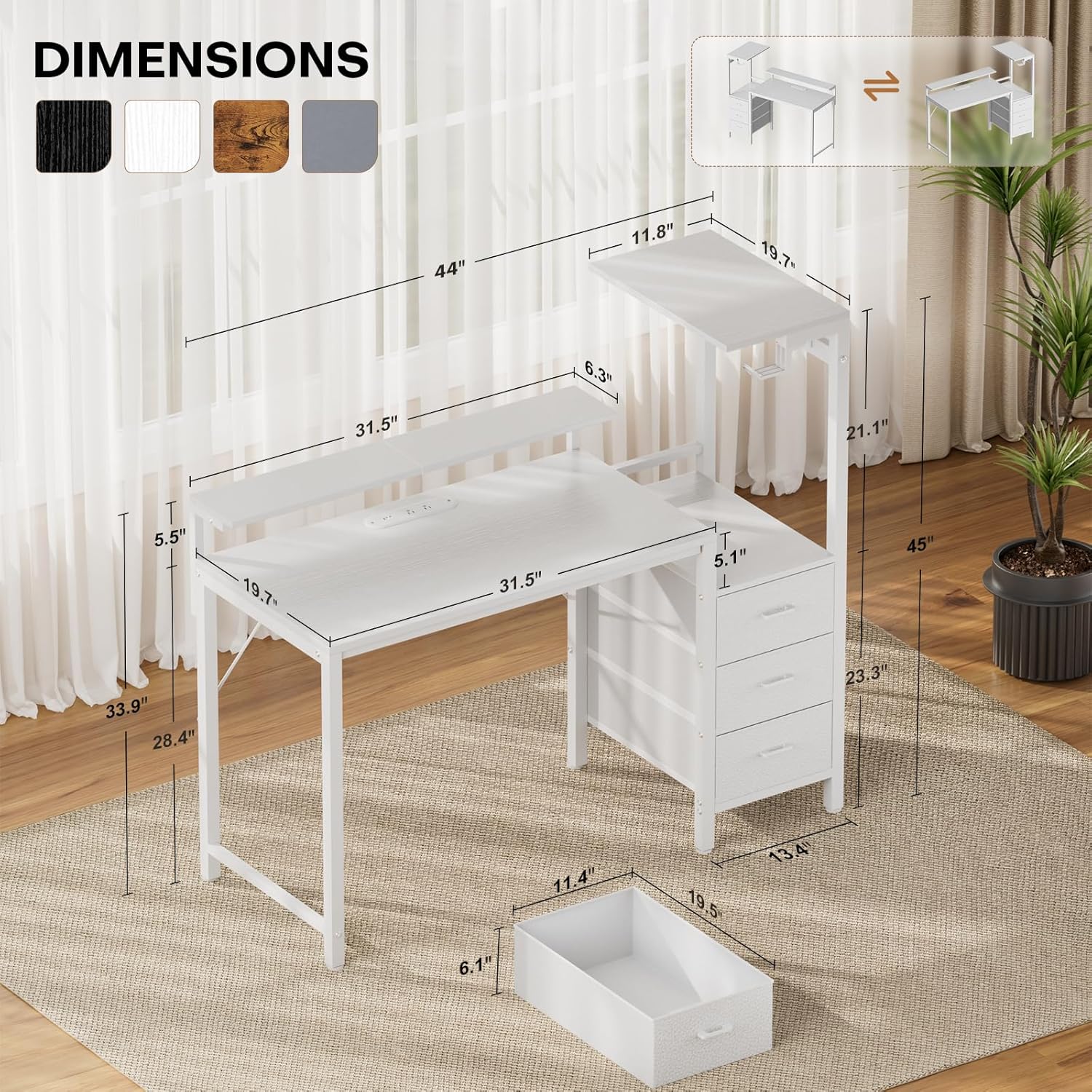
Image: Detailed dimensions of the HLDIRECT 44-inch gaming desk, showing height, width, and depth of various components including the main desktop, monitor stand, and side storage unit.

Image: The HLDIRECT 44-inch gaming desk set up in a modern room, showcasing its white finish, monitor stand, and side storage with a gaming PC and peripherals.
Operating Instructions
LED Lighting System
Your gaming desk features a dynamic RGB LED lighting system. To operate:
- Connect the LED light strip to a power source.
- Use the included controller or a compatible smartphone application (if applicable, refer to the LED light manual for app details) to switch the lights on/off, change colors, adjust brightness, and select various dynamic effects.
- Explore different modes to match your mood or gaming environment.

Image: Close-up of the HLDIRECT gaming desk's RGB LED light strip, illustrating various control options including switch, dynamic modes, brightness adjustment, color selection, microphone control, music sync, timing function, and app control.
Integrated Charging Station
The desk includes a built-in power strip for convenient device charging and power access:
- Plug the desk's main power cord into a wall outlet.
- Use the 2 AC outlets (120V/12A) for larger electronics like monitors or laptops.
- Utilize the 3 high-speed USB ports (2 USB-A 5V/2A, 1 USB-C 5V/2A) to charge smartphones, tablets, controllers, and other USB-powered devices.

Image: A detailed view of the integrated power strip on the HLDIRECT gaming desk, showing 2 AC outlets, 2 USB-A ports, and 1 USB-C port, with devices plugged in.
Storage Features
Optimize your workspace using the desk's storage components:
- Fabric Drawers: The three fabric drawers provide ample space for organizing documents, accessories, and personal items. They are designed for easy access and durability.
- PC Tower Stand: The dedicated raised platform is ideal for housing your gaming PC tower, keeping it off the floor and allowing for better airflow and display.
- Side Shelf: Use the top panel of the side storage unit to display collectibles, audio equipment, or other decorative items.
- Side Hooks: Utilize the four side hooks for hanging headphones, cables, or other accessories, keeping your desktop clutter-free.
- Monitor Stand: The elevated monitor stand helps position your screen at an ergonomic height, reducing neck and eye strain.

Image: Three wear-resistant fabric drawers of the HLDIRECT gaming desk, shown open with various items stored inside, highlighting their ample storage space and ease of use.

Image: The innovative PC case stand of the HLDIRECT gaming desk, providing dedicated space for a computer case or other devices, ensuring proper display and ventilation.

Image: The ergonomic monitor stand feature of the HLDIRECT gaming desk, showing a monitor placed at an elevated height for improved posture and reduced strain.
Maintenance
To ensure the longevity and appearance of your HLDIRECT Gaming Desk, follow these maintenance guidelines:
- Cleaning: Wipe surfaces with a soft, damp cloth. Avoid harsh chemicals or abrasive cleaners, which can damage the finish.
- Spills: Immediately wipe up any spills to prevent water damage to the engineered wood.
- Hardware: Periodically check all screws and fasteners to ensure they remain tight. Re-tighten if necessary.
- Fabric Drawers: The fabric drawers can be spot cleaned with a mild detergent and damp cloth. Allow to air dry completely.
- Electrical Components: Ensure the power strip and LED lights are kept dry and free from dust.
Troubleshooting
If you encounter issues with your HLDIRECT Gaming Desk, refer to the following common problems and solutions:
Assembly Issues
- Parts don't align: Double-check the assembly manual to ensure you are using the correct parts for each step and that they are oriented correctly. Sometimes, parts may appear similar but have subtle differences.
- Desk feels wobbly: Ensure all screws are fully tightened. Verify that the desk is on a level surface. Adjustable footrests can be used to compensate for uneven floors.
LED Lights Not Working
- No power: Check if the LED light strip is securely connected to its power source and if the power source is active.
- Remote/App not responding: Ensure the remote control has working batteries or that your smartphone app is correctly paired and within range.
Power Outlets Not Functioning
- No power: Verify that the desk's main power cord is securely plugged into a functional wall outlet. Test the wall outlet with another device.
- Overload: If too many high-power devices are connected, the power strip's circuit breaker might have tripped. Unplug some devices and reset the power strip if it has a reset button.
If these solutions do not resolve your issue, please contact HLDIRECT customer support for further assistance.
Specifications
| Feature | Detail |
|---|---|
| Brand | HLDIRECT |
| Model Number | 1203 |
| Product Dimensions (D x W x H) | 20"D x 44"W x 45"H |
| Color | White |
| Material | Alloy Steel, Engineered Wood |
| Item Weight | 15.4 kg |
| Power Outlets | 2 AC Outlets (120V/12A) |
| USB Ports | 2 USB-A (5V/2A), 1 USB-C (5V/2A) |
| Special Features | Built-In USB Outlet, Monitor Stand, RGB LED Lighting, 3 Fabric Drawers, 4 Side Hooks, PC Tower Stand |
Warranty and Support
For warranty information and customer support, please refer to the documentation included with your purchase or contact HLDIRECT directly through their official website or the retailer where the product was purchased.
Please have your model number (1203) and purchase date available when contacting support.