
1. Introduction
Thank you for purchasing the HLDIRECT 60-Inch Gaming Desk. This desk is designed to enhance your gaming or work experience with integrated features such as power outlets, USB ports, LED lighting, and ample storage. This manual provides essential information for assembly, operation, maintenance, and troubleshooting to ensure optimal performance and longevity of your product. Please read this manual thoroughly before assembly and use, and retain it for future reference.
2. Safety Instructions
- Read All Instructions: Before assembly and use, read all instructions carefully.
- Keep Children Away: Keep children and pets away during assembly. Small parts can be a choking hazard.
- Use Correct Tools: Use only the tools provided or recommended for assembly.
- Assemble on a Soft Surface: Assemble the desk on a soft, non-abrasive surface (e.g., carpet) to prevent scratches.
- Do Not Overtighten: Do not overtighten screws, as this may damage the material.
- Check Connections: Periodically check all connections and tighten them if necessary.
- Weight Capacity: Do not exceed the recommended weight capacity for any part of the desk.
- Electrical Safety: Ensure the power strip is connected to a grounded outlet. Do not overload the outlets. Keep liquids away from electrical components.
- Stable Placement: Place the desk on a level surface to prevent tipping.
3. Package Contents
Please verify that all parts listed below are present before beginning assembly. If any parts are missing or damaged, please contact customer support.
- Desktop Panels
- Metal Frame Components (Legs, Supports)
- Monitor Stand Shelf
- Fabric Drawers (3 units)
- Side Hooks (4 units)
- Integrated Power Strip (2 AC outlets, 3 USB ports)
- RGB LED Light Strip
- Assembly Hardware (Screws, Bolts, Allen Wrench)
- Instruction Manual
4. Setup and Assembly
Follow these steps carefully for proper assembly. It is recommended to have two people for certain steps.
- Unpack and Identify Parts: Lay out all components on a clean, soft surface and compare them with the parts list.
- Assemble Frame: Attach the desk legs to the main frame using the provided screws. Tighten them securely with the included tool.
- Attach Desktop: Carefully place the desktop panels onto the assembled frame and secure them with bolts.
- Install Drawer Slides: Insert the drawer slides into the designated slots on the side panels of the desk.
- Assemble Drawers: Fold and assemble the fabric drawers according to their individual instructions. Insert them into the drawer slides.
- Attach Monitor Stand: Secure the monitor stand shelf to the main desktop frame.
- Install Side Hooks: Attach the four side hooks to the designated areas on the desk frame.
- Connect Power Strip: Place the integrated power strip into its designated slot on the desktop. Route the power cord safely.
- Install LED Lights: Adhere the RGB LED light strip to the underside of the monitor stand or desired location. Connect it to the power source as instructed.
- Final Check: Ensure all screws and bolts are tightened, and the desk is stable.

Figure 4.1: Product Dimensions. This image illustrates the overall dimensions of the HLDIRECT 60-inch Gaming Desk, including the main desktop, monitor stand, and drawer unit, providing a visual guide for space planning.
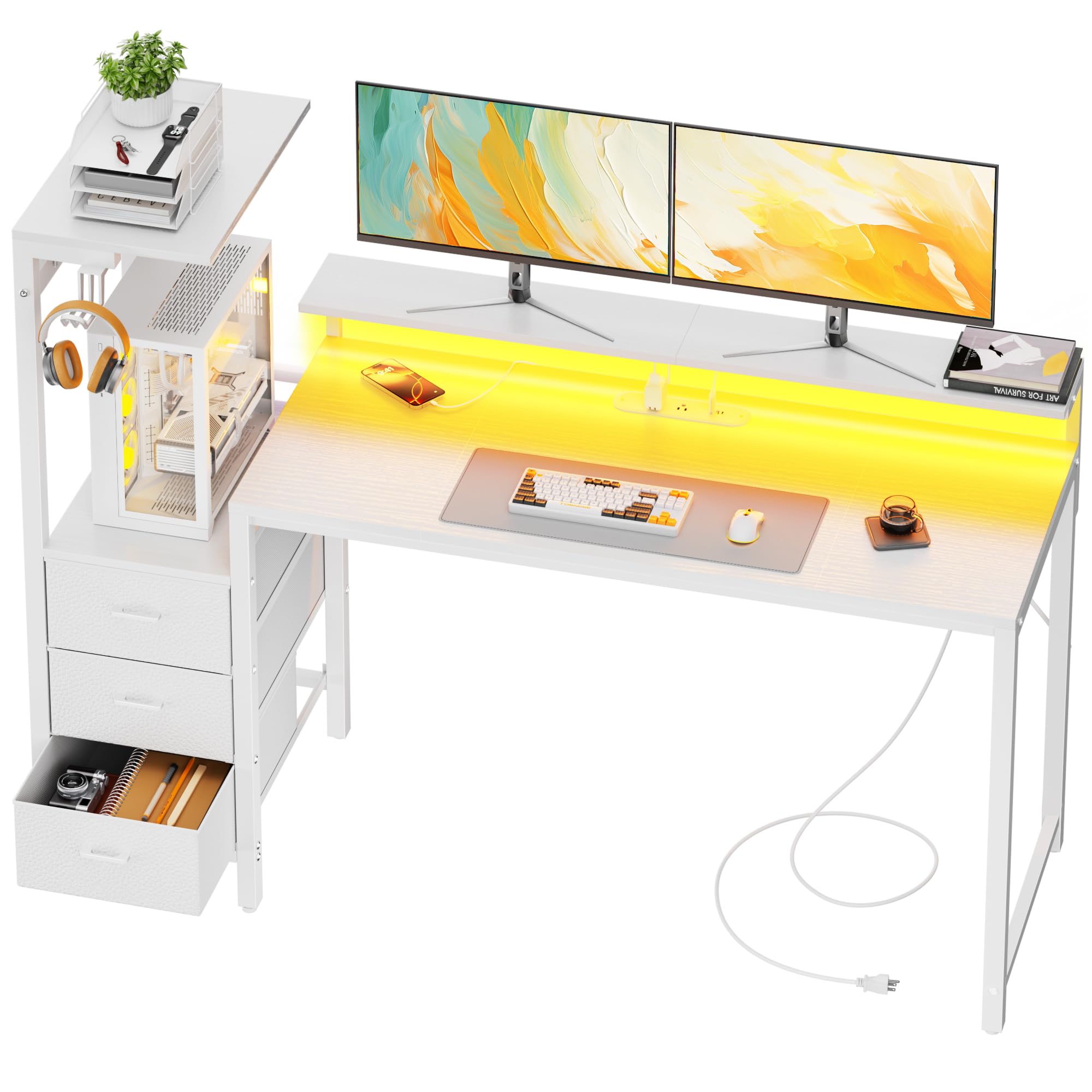
Figure 4.2: Assembled Desk View. A complete view of the HLDIRECT 60-inch Gaming Desk in a typical setup, showcasing the monitor stand, PC tower placement, drawers, and overall aesthetic.
5. Operating Instructions
5.1. RGB LED Lighting System
The desk features a dynamic RGB LED lighting system to enhance your environment.
- Power On/Off: Use the integrated switch to turn the LED lights on or off.
- Color and Effect Control: The LED lights can be controlled via a dedicated mobile application (refer to the LED light manual for app download and pairing instructions). This allows for selection from a wide array of colors, dynamic modes, brightness adjustment, and music synchronization.
- Timing Function: Set schedules for the lights to turn on or off automatically through the app.

Figure 5.1: RGB LED Light Strip. This image displays the RGB LED light strip integrated into the desk, along with icons representing its smart control features such as dynamic modes, color selection, music sync, and app control.
5.2. Built-in Charging Station
The integrated power strip provides convenient access to power for your devices.
- AC Outlets: Two standard AC outlets (120V/12A) are available for powering monitors, PCs, or other electronics.
- USB Ports: Three high-speed USB ports (2 USB-A, 1 USB-C, all 5V/2A) are provided for charging smartphones, tablets, controllers, and other USB-powered devices.
- Safety: Do not exceed the maximum power rating of the strip. Ensure devices are compatible with the provided voltage and current.

Figure 5.2: Integrated Sockets. A close-up view of the built-in power strip on the desk, highlighting the two AC outlets, two USB-A ports, and one USB-C port, along with their respective power specifications.
5.3. Storage and Organization
- Fabric Drawers: Three wear-resistant fabric drawers provide ample storage for office supplies, gaming accessories, or personal items. They are designed for easy access and organization.
- Side Hooks: Four side hooks are available for hanging headphones, cables, bags, or other small items, keeping your desktop clear.
- Monitor Stand: The raised monitor stand provides an ergonomic viewing height and additional space underneath for small items or cable management.
- PC Case Stand: A dedicated elevated platform is provided for your PC tower, promoting better airflow and keeping it off the floor.

Figure 5.3: Fabric Drawers. This image showcases the three fabric drawers, illustrating their capacity for storing various items and their easy-to-use design.

Figure 5.4: Innovative PC Case Stand. A visual representation of the dedicated PC case stand, demonstrating how it elevates the computer tower for display and improved ventilation.
5.4. Ergonomic Monitor Stand
The integrated monitor stand is designed to elevate your display to an optimal viewing height, promoting better posture and reducing neck strain during long sessions.

Figure 5.5: Ergonomic Monitor Stand. This image highlights the ergonomic benefits of the monitor stand, comparing correct posture with the stand versus incorrect posture without it, emphasizing reduced spinal strain.
6. Maintenance
- Cleaning: Wipe the desk surfaces with a soft, damp cloth. Avoid using harsh chemicals or abrasive cleaners, as they may damage the finish.
- Spills: Immediately wipe up any spills to prevent staining or damage to the wood and electrical components.
- Hardware Check: Periodically check all screws and bolts to ensure they are tight. Retighten if necessary to maintain stability.
- Electrical Components: Keep the power strip and LED lights free from dust. Do not attempt to repair electrical components yourself; contact qualified personnel if issues arise.
- Fabric Drawers: The fabric drawers can be spot cleaned with a mild detergent and water. Allow them to air dry completely.
7. Troubleshooting
- Desk is Wobbly:
- Ensure all screws and bolts are securely tightened.
- Check if the desk is on a level surface. Adjust footrests if available.
- LED Lights Not Working:
- Verify the power connection to the LED strip.
- Check if the power outlet is functional.
- Ensure the LED controller is properly connected and powered.
- Power Outlets/USB Ports Not Working:
- Confirm the main power cord for the integrated strip is plugged into a working wall outlet.
- Check if the wall outlet has power (test with another device).
- Ensure no circuit breaker has tripped.
- Drawers Not Sliding Smoothly:
- Ensure the drawer slides are correctly installed and aligned.
- Check for any obstructions in the drawer tracks.
8. Specifications
| Feature | Detail |
|---|---|
| Brand | HLDIRECT |
| Model Number | 1203 |
| Product Dimensions (D x W x H) | 20"D x 60"W x 45"H (19.69 x 59.06 x 44.88 inches) |
| Color | White |
| Material | Alloy Steel, Engineered Wood |
| Item Weight | 18.1 kg (39.9 lbs) |
| Desk Design | Computer Desk |
| Number of Drawers | 3 (Fabric) |
| Power Outlets | 2 AC Outlets (120V/12A) |
| USB Ports | 2 USB-A, 1 USB-C (all 5V/2A) |
| Special Features | Built-In USB Outlet, Monitor Stand, RGB LED Lights, Side Hooks, PC Case Stand |
| Room Type | Bedroom, Living Room, Office, Study Room |
9. Warranty Information
This HLDIRECT Gaming Desk comes with a 1-year warranty from the date of purchase. The warranty covers manufacturing defects in materials and workmanship under normal use. It does not cover damage caused by misuse, accidents, unauthorized modifications, or normal wear and tear. Please retain your proof of purchase for warranty claims.
10. Customer Support
If you have any questions, require assistance with assembly, or encounter any issues not covered in this manual, please contact HLDIRECT customer support. For the most up-to-date contact information, please visit the official HLDIRECT website or refer to your purchase documentation.