
1. Product Overview
The CLEVAST Small Dehumidifier (Model CL-DH04) is designed to efficiently remove excess moisture from small enclosed spaces, improving air quality and comfort. Utilizing semiconductor condensation technology, it operates quietly and is energy-efficient. This compact unit features a 30 oz (800 ml) water tank and an automatic shut-off function for safe and convenient use.

Figure 1: Front view of the CLEVAST Small Dehumidifier.
2. Safety Instructions
Please read all safety instructions carefully before operating the dehumidifier to prevent injury or damage.
- Placement: Place the dehumidifier on a stable, level surface. Ensure there is at least 4 inches (10 cm) of clear space around the air inlet (rear) and air outlet (top) for proper air circulation. Do not block these openings.
- Power: Use only the provided power adapter. Ensure the power cord is not damaged, pinched, or placed under heavy objects. Do not operate the unit with a damaged cord or plug.
- Water Tank: Always ensure the water tank is correctly inserted before operation. Empty the water tank when the auto shut-off indicator illuminates. Do not drink the collected water.
- Operation: Do not immerse the unit in water or other liquids. Do not operate the unit in extremely high or low temperatures outside the recommended range (68–86°F / 20–30°C).
- Cleaning: Disconnect the power before cleaning. Use a soft, damp cloth to clean the exterior. Do not use abrasive cleaners or solvents.
- Children and Pets: Keep the appliance out of reach of children and pets.
3. Product Components
Familiarize yourself with the main parts of your dehumidifier:
- 1. Air Outlet: Located on the top, where dry air is expelled.
- 2. Control Button: One-touch button for power ON/OFF and indicator light.
- 3. Air Inlet: Located on the rear, where moist air is drawn in.
- 4. Water Tank: Removable tank for collecting condensed water.
- 5. Power Port: For connecting the power adapter.
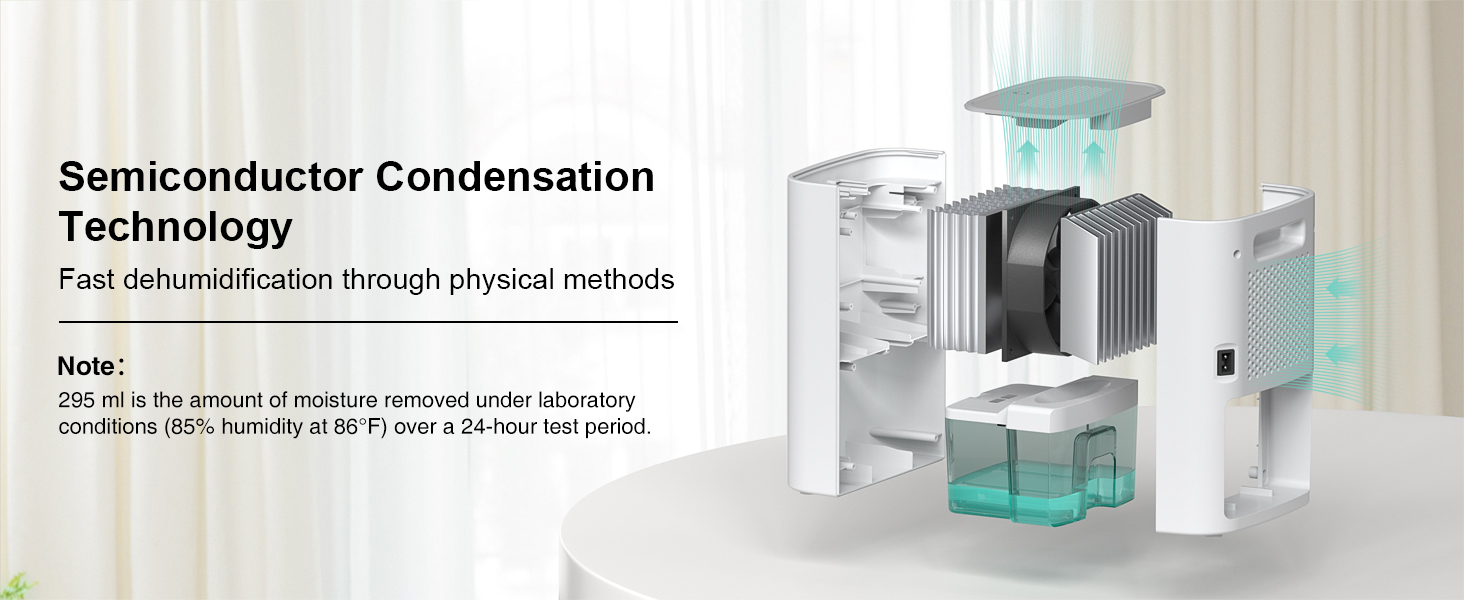
Figure 2: Internal components and air circulation path.
4. Setup Instructions
- Unpack: Carefully remove the dehumidifier and all accessories from the packaging.
- Placement: Place the unit upright on a firm, level surface in the desired location (e.g., bedroom, bathroom, closet, RV). Ensure adequate space around the unit for optimal airflow.
- Power Connection: Connect the power adapter to the power port on the back of the dehumidifier, then plug the adapter into a suitable electrical outlet.
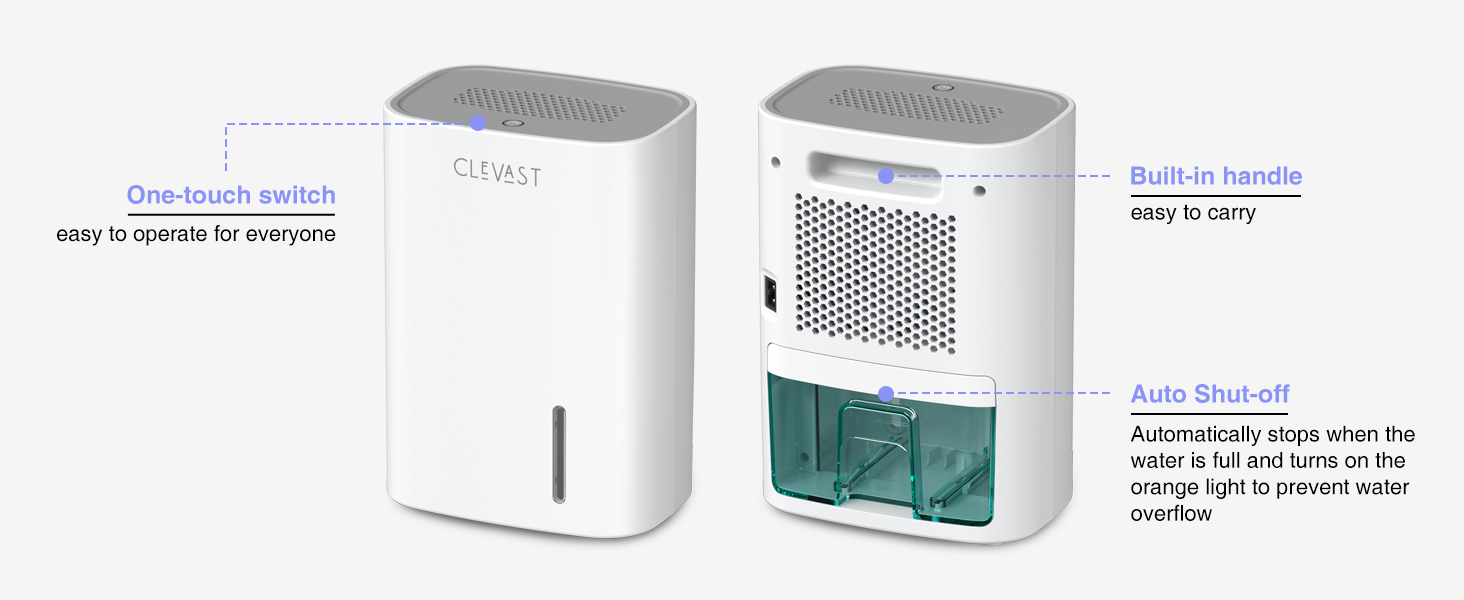
Figure 3: Examples of suitable placement in small spaces.
5. Operating Instructions
- Power On: Once plugged in, press the power button on the top of the unit. The indicator light will turn blue, signifying the dehumidifier is operating.
- Continuous Operation: The unit will begin continuous moisture removal.
- Auto Shut-Off: When the 30 oz (800 ml) water tank is full, the dehumidifier will automatically stop operating, and the indicator light will change from blue to orange. This prevents water overflow.
- Emptying the Water Tank:
- Gently pull out the water tank from the rear of the unit.
- Carefully pour out the collected water.
- Slide the empty water tank back into the unit until it clicks into place. The indicator light will return to blue, and the dehumidifier will resume operation.
- Power Off: To turn off the dehumidifier, press the power button again. The indicator light will turn off.

Figure 4: Top control button for operation.

Figure 5: Rear view with removable water tank.
Video 1: Demonstrates the portable design, one-button control, semiconductor condensation technology, efficient dehumidification, 30oz water tank, visible water level window, auto shut-off, and easy water pouring. This video provides a visual guide to the dehumidifier's key features and operation.
6. Maintenance
Regular maintenance ensures the longevity and efficiency of your dehumidifier.
- Cleaning the Water Tank: Empty and rinse the water tank with clean water every 2-4 weeks, or more frequently if used in dusty environments. Do not use harsh chemicals.
- Cleaning the Exterior: Wipe the exterior of the unit with a soft, damp cloth as needed.
- Air Inlet/Outlet: Periodically check the air inlet and outlet for dust or debris accumulation. Use a soft brush or vacuum cleaner to gently remove any blockages. Ensure the unit is unplugged before cleaning.
- Storage: If storing the unit for an extended period, ensure the water tank is empty and clean. Unplug the unit and store it in a cool, dry place away from direct sunlight.
7. Troubleshooting
If you encounter issues, refer to the following common problems and solutions:
| Problem | Possible Cause | Solution |
|---|---|---|
| Dehumidifier does not turn on. | No power, power button not pressed, water tank full. | Check power connection. Press power button. Empty water tank if indicator is orange. |
| Unit is running but not collecting water. | Room temperature too low, humidity too low, air inlets/outlets blocked. | Ensure room temperature is within 68–86°F (20–30°C). Check room humidity. Clear any obstructions from air inlets/outlets. |
| Indicator light is orange. | Water tank is full. | Empty the water tank. |
| Unusual noise during operation. | Unit not on a level surface, internal component issue. | Place the unit on a stable, level surface. If noise persists, contact customer support. |
If the problem persists after trying these solutions, please contact CLEVAST customer support.
8. Specifications
| Feature | Detail |
|---|---|
| Brand | CLEVAST |
| Model Number | CL-DH04 (EF8897) |
| Product Dimensions (D x W x H) | 4.57" x 6.5" x 9.25" (11.6cm x 16.5cm x 23.5cm) |
| Item Weight | 2.1 Pounds (0.95 kg) |
| Water Tank Capacity | 30 oz (0.8 Liters / 800 Milliliters) |
| Dehumidification Capacity | Up to 10 oz (295 ml) per 24 hours (at 86°F, 85% RH) |
| Coverage Area | Up to 60 sq. ft. |
| Wattage | 27 Watts |
| Operation Mode | Continuous |
| Special Features | Automatic Shutoff, Overheat Protection, Portable, Quiet Operation (24 dB), Removable Tank |
| Material | Plastic |

Figure 6: Product dimensions.
9. Warranty and Support
CLEVAST products are manufactured to high-quality standards. For warranty information, technical support, or any questions regarding your dehumidifier, please refer to the warranty card included with your purchase or visit the official CLEVAST website. Please have your model number (CL-DH04) and purchase date ready when contacting support.
