
1. Introduction
Welcome to the user manual for your truke TruClips Wireless Open Ear Buds (Model S45). These earbuds are designed to provide a comfortable and immersive audio experience with their open-ear design, custom drivers, and advanced features. This manual will guide you through the setup, operation, and maintenance of your new device.
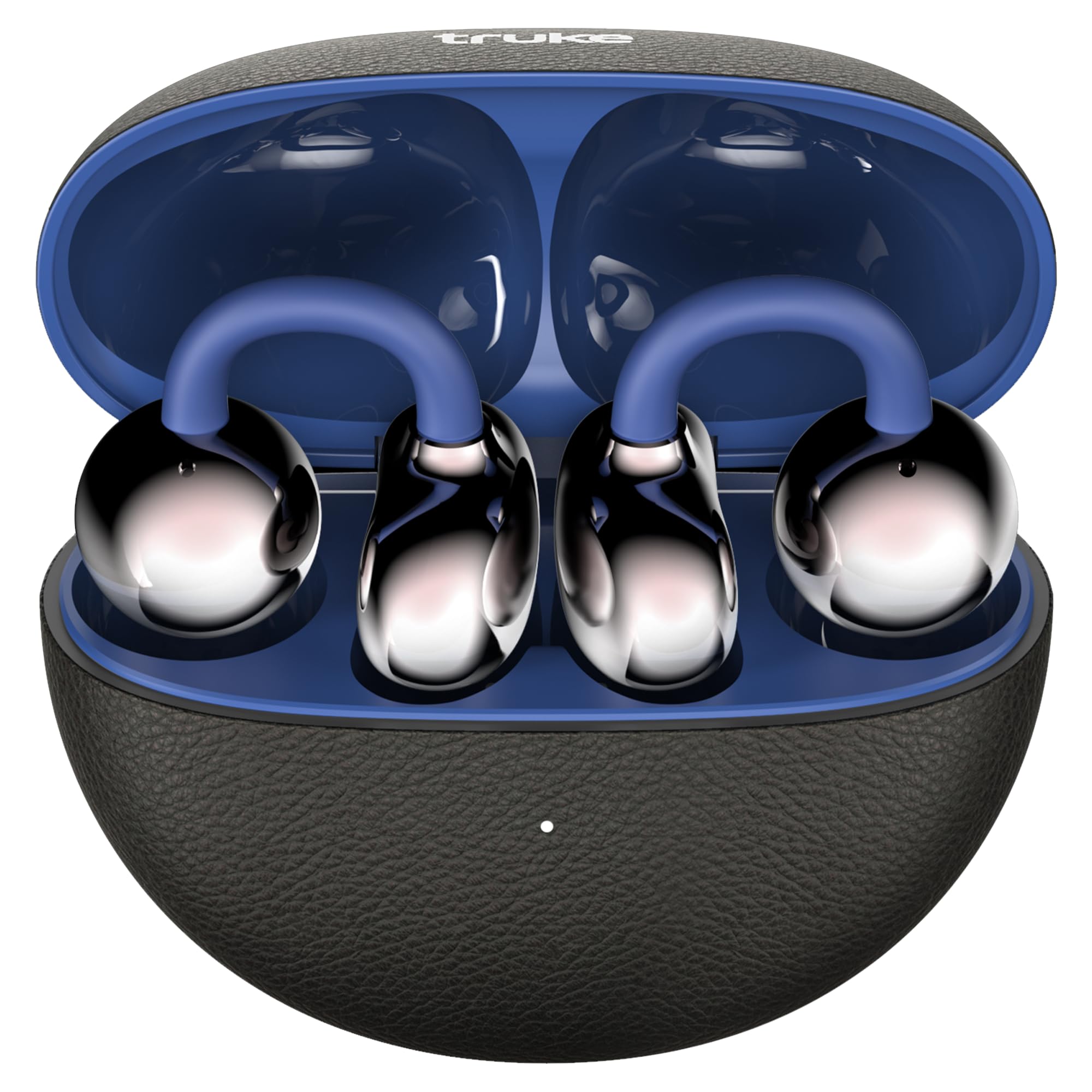
Image: truke TruClips Wireless Open Ear Buds in Onyx Blue, showcasing the sleek design.

Image: Close-up of the truke TruClips charging case, highlighting its premium leather-like finish.
2. Setup
2.1 What's in the Box
- truke TruClips Earbuds
- Type-C Charging Cable
- User Manual
2.2 Charging the Earbuds and Case
Before first use, fully charge your truke TruClips.
- Place the earbuds into the charging case.
- Connect the Type-C charging cable to the charging port on the case and to a power source.
- The indicator light on the case will show charging status. A full charge provides up to 55 hours of total playtime with the charging case.

Image: Visual representation of the 55-hour total playtime capability of the TruClips earbuds and charging case.
2.3 Pairing with Your Device
- Open the charging case. The earbuds will automatically enter pairing mode.
- On your device (smartphone, tablet, etc.), enable Bluetooth.
- Search for "truke TruClips" in the list of available Bluetooth devices and select it to connect.
- Once connected, you will hear an audio prompt, and the indicator light on the earbuds will change.
2.4 Wearing the Earbuds
The truke TruClips feature an open-ear design for comfort and ambient awareness.
- Gently place the earbuds onto your ears, ensuring the clip rests securely.
- Adjust for a comfortable fit. The open-ear design allows you to hear your surroundings while enjoying audio.

Image: Diagram illustrating the true open-ear design of the TruClips, showing how it sits comfortably without blocking the ear canal.
3. Operation
3.1 Touch Controls
The truke TruClips feature intuitive touch controls for easy management of music, calls, and voice assistants. Specific touch gestures may vary; refer to the quick start guide for detailed commands.
- Play/Pause: Single tap on either earbud.
- Next Track: Double tap on the right earbud.
- Previous Track: Double tap on the left earbud.
- Answer/End Call: Single tap on either earbud.
- Reject Call: Long press on either earbud.
- Activate Voice Assistant: Triple tap on either earbud.
3.2 Audio Features
- 12mm Custom Drivers: Experience deep bass and high-fidelity acoustics.
- Spatial Audio: Immerse yourself in a 360-degree soundstage for a cinematic audio experience.
- Quad Mic PureVoice ENC: Ensures crystal-clear calls by reducing environmental noise.

Image: Exploded view diagram of the 12mm customised titanium drivers, illustrating components like the speaker, sound tube, graphene diaphragm, and bass reflector.

Image: Graphic depicting 24-bit 360-degree spatial audio, showing sound waves emanating around the earbuds.

Image: Illustration of Quad Mic PureVoice ENC technology, showing its effectiveness in various environments like indoor, street, and metro stations for clear calls.

Image: Diagram showing Smart Directional Sound Technology within the earbud, highlighting the placement of the call mic and crystal clear windproof audio components.
3.3 Special Modes
- Ambient Awareness: The open-ear design naturally allows you to stay aware of your surroundings, ideal for commuting or outdoor activities.
- Ultra-Low Latency Mode (Battle Mode): For gaming, activate this mode to minimize audio lag, providing an instant response for an immersive experience.

Image: Graphic illustrating the Ultra Low Latency feature, showing earbuds connected to a gaming setup for reduced audio delay.
4. Maintenance
4.1 Cleaning
To ensure optimal performance and hygiene, regularly clean your earbuds.
- Use a soft, dry, lint-free cloth to wipe the earbuds and charging case.
- Do not use abrasive cleaners, solvents, or aerosol sprays.
- Avoid getting moisture in any openings.
4.2 Water Resistance (IPX5)
The truke TruClips are rated IPX5 for water and sweat resistance. This means they are protected against sweat and heavy splashes of water.
- Do not submerge the earbuds in water.
- Ensure the earbuds are dry before placing them back into the charging case to prevent damage.
5. Troubleshooting
If you encounter any issues with your truke TruClips, please refer to the following common solutions:
| Problem | Solution |
|---|---|
| Earbuds not pairing |
|
| No sound or low volume |
|
| Microphone not working |
|
| Earbuds not charging |
|
6. Specifications
| Feature | Detail |
|---|---|
| Brand | truke |
| Model Name | truke TruCLips earbuds |
| Model Number | S45 |
| Ear Placement | Open Ear |
| Form Factor | Open Ear |
| Colour | Onyx Blue |
| Drivers | 12mm Custom Drivers |
| Playtime | Up to 55 hours (with charging case) |
| Microphone | Quad Mic with ENC |
| Water Resistance | IPX5 |
| Connectivity | Bluetooth (latest stable technology) |
| Item Weight | 42 Grams |
| Country of Origin | India |
7. Warranty and Support
7.1 Warranty Information
Your truke TruClips earbuds come with a 12-month warranty from the date of purchase. This warranty covers manufacturing defects. Please retain your proof of purchase for warranty claims.
7.2 Customer Support
For technical assistance, warranty claims, or any other inquiries, please contact truke customer support.
- Manufacturer: STAUNCH ELECTRONICS INDIA LLP
- Importer: Eccentric Enterprises Private Limited
- Refer to the official truke website or your purchase documentation for the most current contact details.
8. Product Overview Video
Video: A hands-on demonstration of the truke TruClips Wireless Open Ear Buds, showing their design, how they are worn, and key features like touch controls and open-ear design. This video provides a practical overview of the product's functionality and comfort.


