
1. Introduction
The CONTEC CMS50D2 Digital Finger Pulse Oximeter is designed for non-invasive spot-check measurement of functional oxygen saturation of arterial hemoglobin (SpO2), pulse rate (PR), and Perfusion Index (PI). This device is suitable for use at home, in clinics, and hospitals. It features a clear display with adjustable brightness, pulse waveform, and automatic power-saving standby.
Key Features:
- Accurate SpO₂ Monitoring: Real-time blood oxygen saturation (SpO₂) display helps track oxygen levels quickly and reliably.
- Pulse Rate with Waveform & Bar Graph: Displays pulse rate (PR) along with a visual bar graph and pulse waveform.
- Perfusion Index (PI) Display (Optional): Provides insight into blood circulation and signal strength.
- Smart Battery Indicators: Low-battery alert and battery power level display.
- Auto Power-Saving Standby: Automatically switches to standby mode when not in use.
- Multiple Display Modes & Adjustable Brightness: User-friendly screen with adjustable brightness for clear visibility.
2. Safety Information
- Consult a medical professional for interpretation of readings. This device is not intended for continuous monitoring or self-diagnosis.
- Do not use the oximeter in an MRI or CT environment.
- Keep out of reach of children.
- Do not use on infants or individuals with very small fingers.
- Avoid using the device on the same arm as a blood pressure cuff or arterial catheter.
- Do not immerse the device in water or other liquids.
- Dispose of batteries according to local regulations.
3. Product Components
The CONTEC CMS50D2 Digital Finger Pulse Oximeter package includes:
- One (1) CONTEC CMS50D2 Oximeter
- One (1) User Manual

Figure 1: Detailed diagram of the CONTEC CMS50D2 Pulse Oximeter. This image labels key components and display elements including the Oxygen Saturation Level, Pulse Rate, Pulse Rate Bar Graph, Battery Indicator, One-Button Operation button, Plethysmograph, and Battery Cover.
4. Setup
4.1 Battery Installation
- Locate the battery cover on the back of the device.
- Slide the battery cover open.
- Insert two (2) AAA batteries into the battery compartment, ensuring correct polarity (+ and -).
- Close the battery cover by sliding it back into place until it clicks.
Note: Batteries are not included with the device.
5. Operating Instructions
5.1 Powering On
- Press the power button located on the top of the device.
5.2 Finger Placement
- Open the clamp of the oximeter.
- Insert one finger (preferably the index finger) into the rubber opening of the oximeter, ensuring the fingernail is facing upwards towards the display.
- Release the clamp.
- Keep your hand still during measurement.

Figure 2: The CONTEC CMS50D2 Digital Finger Pulse Oximeter in use, showing a finger inserted and the clear LCD display presenting SpO2 (blood oxygen saturation), PR (pulse rate), and a real-time pulse waveform.
5.3 Reading the Display
- The device will automatically begin measurement.
- The display will show your SpO2 percentage, Pulse Rate (PR) in beats per minute (bpm), and a pulse waveform. If enabled, the Perfusion Index (PI) will also be displayed.

Figure 3: This image highlights the device's capability for clinically accurate vital monitoring, showing the oximeter display alongside icons representing Pulse Rate, SpO2 Range, and Perfusion Index (PI), indicating its comprehensive measurement features.
5.4 Adjusting Settings
- While the device is on, short press the power button to cycle through display modes or adjust brightness. Refer to the full user manual for detailed instructions on specific setting adjustments.
5.5 Powering Off
- The device will automatically power off after approximately 8 seconds of inactivity (auto standby feature).
- Alternatively, remove your finger and the device will power off automatically.
6. Maintenance and Storage
6.1 Cleaning
- Clean the surface of the oximeter with a soft cloth dampened with 70% isopropyl alcohol.
- Do not spray cleaning solutions directly onto the device.
- Ensure the device is completely dry before use.
6.2 Battery Replacement
- When the low-battery indicator appears on the display, replace the batteries promptly. Follow the battery installation steps in Section 4.1.
6.3 Storage
- Store the oximeter in a cool, dry place, away from direct sunlight and extreme temperatures.
- If the device will not be used for an extended period, remove the batteries to prevent leakage.
7. Troubleshooting
- No Reading or Inaccurate Reading:
- Ensure the finger is fully inserted into the oximeter.
- Check that the fingernail is facing upwards.
- Keep the hand still during measurement.
- Verify battery levels and replace if necessary.
- Avoid strong ambient light.
- Ensure the finger is not too cold or has nail polish.
- Display is Dim:
- Adjust the brightness setting.
- Check battery levels and replace if low.
- Device Does Not Power On:
- Check battery installation and polarity.
- Replace batteries with new ones.
8. Specifications
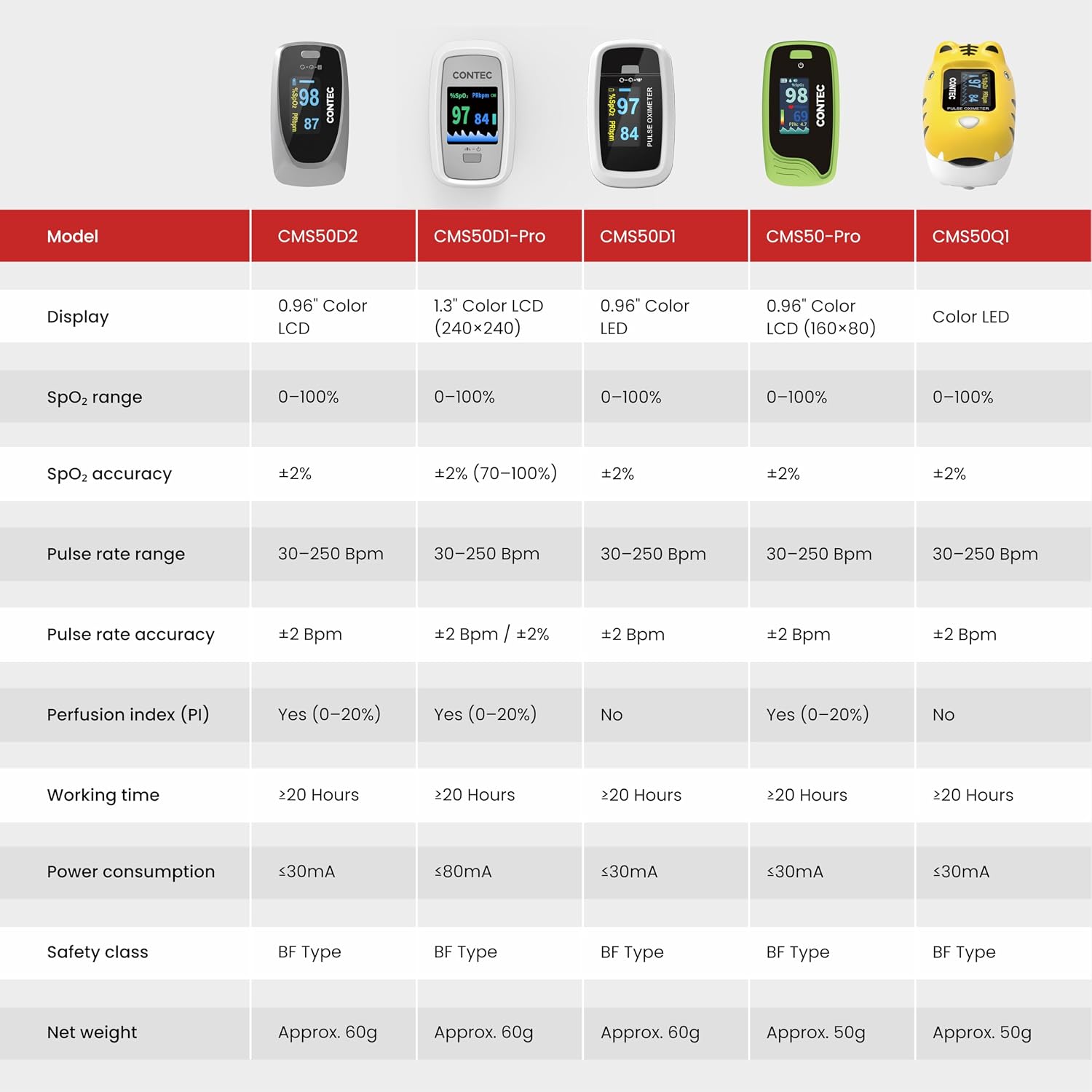
Figure 4: This image presents a table detailing key technical specifications of the CONTEC Pulse Oximeter, including SpO2 measurement range (0% - 100%) with ±2% accuracy, Pulse Rate Range (30 - 250 Bpm) with ±2 Bpm / ±2% accuracy, and PI Measurement Range (0% - 20%) with ±1% or ±0.2% accuracy.
General Specifications:
| Parameter | Specification |
|---|---|
| Brand | CONTEC |
| Model Number | CMS50D2 |
| Product Dimensions (L x W x H) | 6L x 4W x 4H Centimeters |
| Item Weight | 50 Grams |
| Batteries Included | No |
| Number of Items | 1 |
| Included Components | Oximeter, User Manual |
| Manufacturer | Contec |
| Country of Origin | China |
9. Warranty and Support
Manufacturer: Contec Medical Systems Co., Ltd.
Importer (India): Contec Medical Systems India Private Limited, No B14, Guindy Industrial Estate, Guindy, Chennai- 600032
For detailed warranty information and technical support, please refer to the warranty card included with your product or contact the manufacturer/importer directly using the provided contact information.