1. Introduction
Welcome to the user manual for your PEJE AI Smart Glasses with Camera. These smart glasses integrate an 8MP camera for high-definition recording, Bluetooth 5.4 for audio and calls, AI-powered translation, and intelligent features for a seamless user experience. This manual provides essential information for setup, operation, maintenance, and troubleshooting to help you maximize the functionality of your device.
2. What's in the Box
Upon unboxing your PEJE AI Smart Glasses, please ensure all items are present:
- PEJE AI Smart Glasses with Camera
- Charging Cable
- User Manual (this document)

Image: The PEJE AI Smart Glasses and included accessories, such as the charging cable, cleaning cloth, and documentation, neatly arranged in their packaging.
3. Product Overview
The PEJE AI Smart Glasses are designed for versatility and ease of use. Key components include:
- Integrated Camera: 8MP sensor for 1080P/2K HD video recording.
- Microphones: Dual microphones with ENC noise reduction for clear audio.
- Speakers: Discreetly integrated for music playback and calls.
- Control Buttons: Multifunctional physical buttons on the frame for various operations.
- Replaceable Lenses: Allows for customization, including prescription lenses and blue light protection.
- Magnetic Charging Port: For convenient and fast charging.
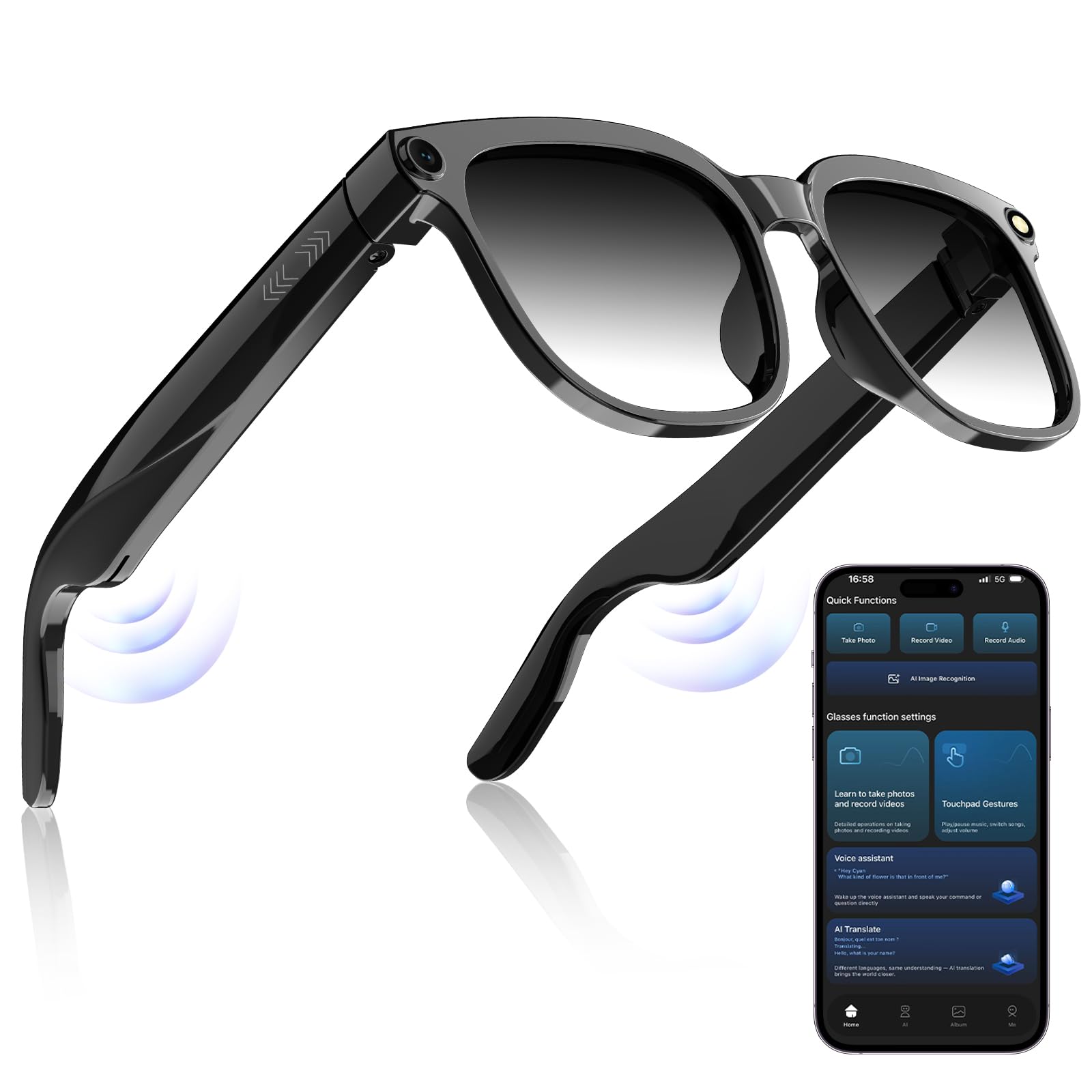
Image: A close-up view of the PEJE AI Smart Glasses, highlighting the integrated camera lens on the frame and the sleek design.

Image: An illustrative graphic showcasing the various functions of the smart glasses, including music, video recording, camera, AI assistant, call, voice recording, translation, and Bluetooth connectivity.
4. Setup
4.1 Charging the Glasses
Before first use, fully charge your PEJE AI Smart Glasses.
- Connect the provided magnetic charging cable to the charging port on the glasses.
- Connect the other end of the charging cable to a USB power adapter (not included) or a computer's USB port.
- The charging indicator light will illuminate. A full charge takes approximately 2 hours.
- Once fully charged, the glasses can provide up to 7 hours of continuous translation or music playback.

Image: An illustration detailing the battery specifications, including a 290mAh capacity, 2-hour charging time, 6 hours of music playback, and 2 hours of call time.
4.2 Bluetooth Pairing
To use audio features, connect your glasses to a smartphone or other Bluetooth-enabled device.
- Ensure the glasses are charged and powered on.
- Activate Bluetooth on your smartphone or device.
- Search for available Bluetooth devices. The glasses should appear as "PEJE Smart Glasses" or similar.
- Select the glasses to pair. A confirmation sound or indicator will signify successful pairing.
4.3 Mobile Application Installation
For AI features like translation and advanced camera controls, download the dedicated mobile application.
- Scan the QR code provided in the quick start guide (if applicable) or search for "PEJE Smart Glasses App" in your device's app store.
- Install the application and follow the on-screen instructions to connect it with your glasses.

Image: A screenshot of the mobile application interface, displaying quick access functions for photo, video, audio recording, AI image recognition, and various settings for the smart glasses.
5. Operating Instructions
The PEJE AI Smart Glasses feature intuitive controls for various functions.
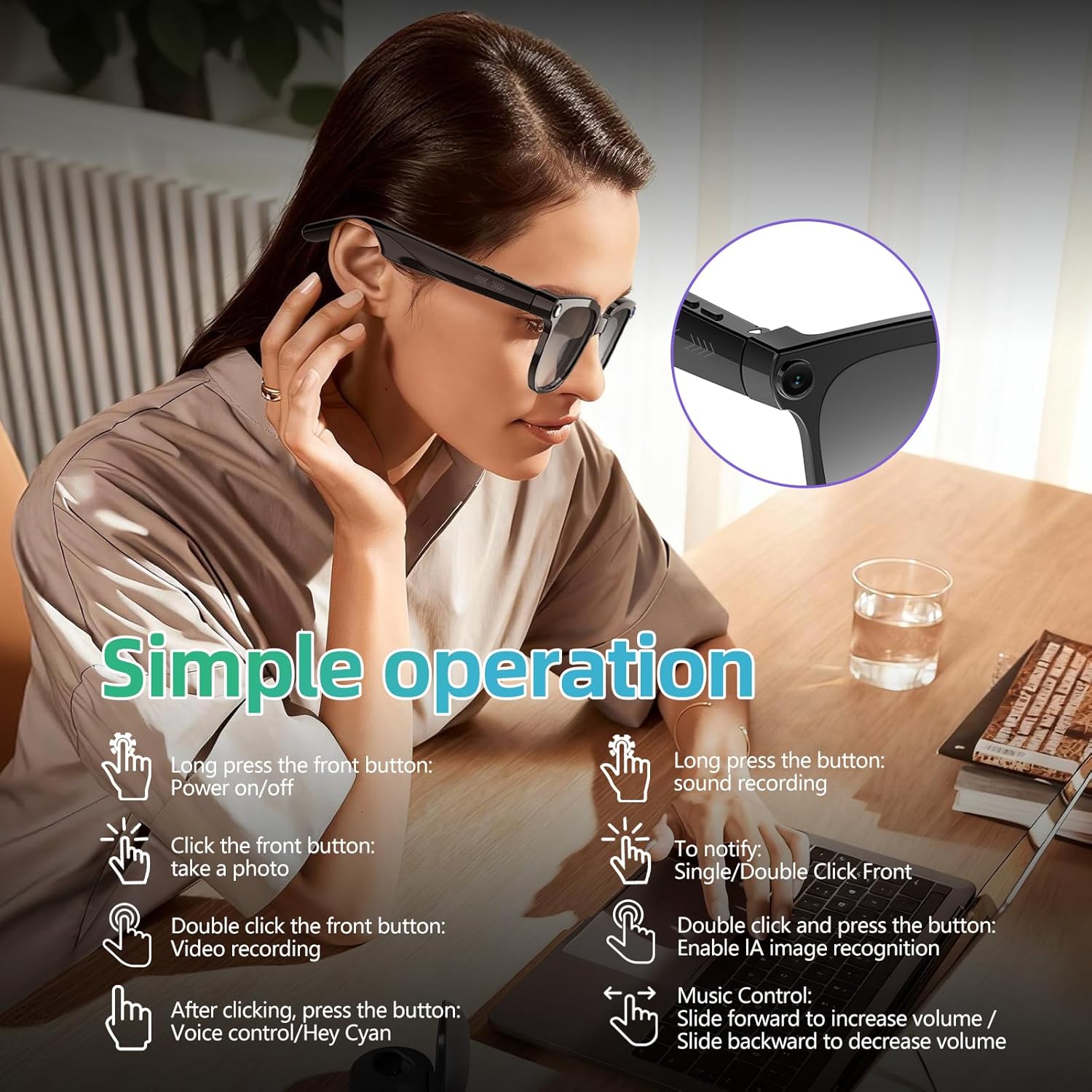
Image: A visual guide to the smart glasses' controls, detailing actions for power, photo, video, voice control, sound recording, notifications, AI image recognition, and volume adjustment.
5.1 Power On/Off
- Power On: Long press the front button until the indicator light illuminates.
- Power Off: Long press the front button until the indicator light turns off.
5.2 Camera and Video Recording
Capture moments with the integrated 8MP camera.
- Take a Photo: Click the front button once.
- Record Video: Double-click the front button to start recording. Double-click again to stop. The glasses support 1080P/2K 30fps recording with image stabilization.

Image: An illustration highlighting the camera capabilities of the smart glasses, featuring an 8MP camera that records 1080p HD/2K video at 30 frames per second with image stabilization for clear footage.
5.3 Audio Functions (Music, Calls, Voice Recording)
Enjoy clear audio for music and calls with Bluetooth 5.4 and ENC noise reduction.
- Music Playback/Pause: Use the physical buttons or app controls.
- Answer/End Calls: Use the physical buttons.
- Volume Adjustment: Slide your finger forward on the temple to increase volume, slide backward to decrease volume.
- Sound Recording: Long press the designated button for sound recording.

Image: A woman wearing the PEJE AI Smart Glasses, with visual cues indicating dual microphone noise reduction technology that ensures crystal-clear sound quality for calls and music.
5.4 AI Features (Voice Control, Translation, Image Recognition)
Leverage advanced AI capabilities through the connected mobile application.
- Voice Control: After clicking a button, press it again to activate voice control or say "Hey Cyan" (if configured).
- Real-time Translation: Pair with the mobile app to enable two-way translation in 140 languages. The app facilitates "listening, translation, and playback."
- AI Image Recognition: Double-click and press the button to enable AI image recognition via the app.

Image: Individuals in a business meeting utilizing the PEJE AI Smart Glasses for real-time language translation, depicted with speech bubbles showing conversations in multiple languages.
5.5 Intelligent Wearing Detection
The glasses automatically detect when they are worn.
- Wearing Glasses: Automatically resumes playback.
- Removing Glasses: Automatically pauses playback, conserving power and preventing accidental operations.
6. Lens Replacement and Care
The lenses are detachable, allowing for customization and easy cleaning.
- Replacing Lenses: The lenses can be replaced with prescription lenses or specialized lenses (e.g., blue light blocking, photochromic). Consult an optician for professional replacement.
- Blue Light Protection: The standard lenses offer blue light protection and UV blocking.
- Photochromic Lenses: Some models may come with photochromic lenses that adapt to light conditions, turning into sunglasses outdoors.
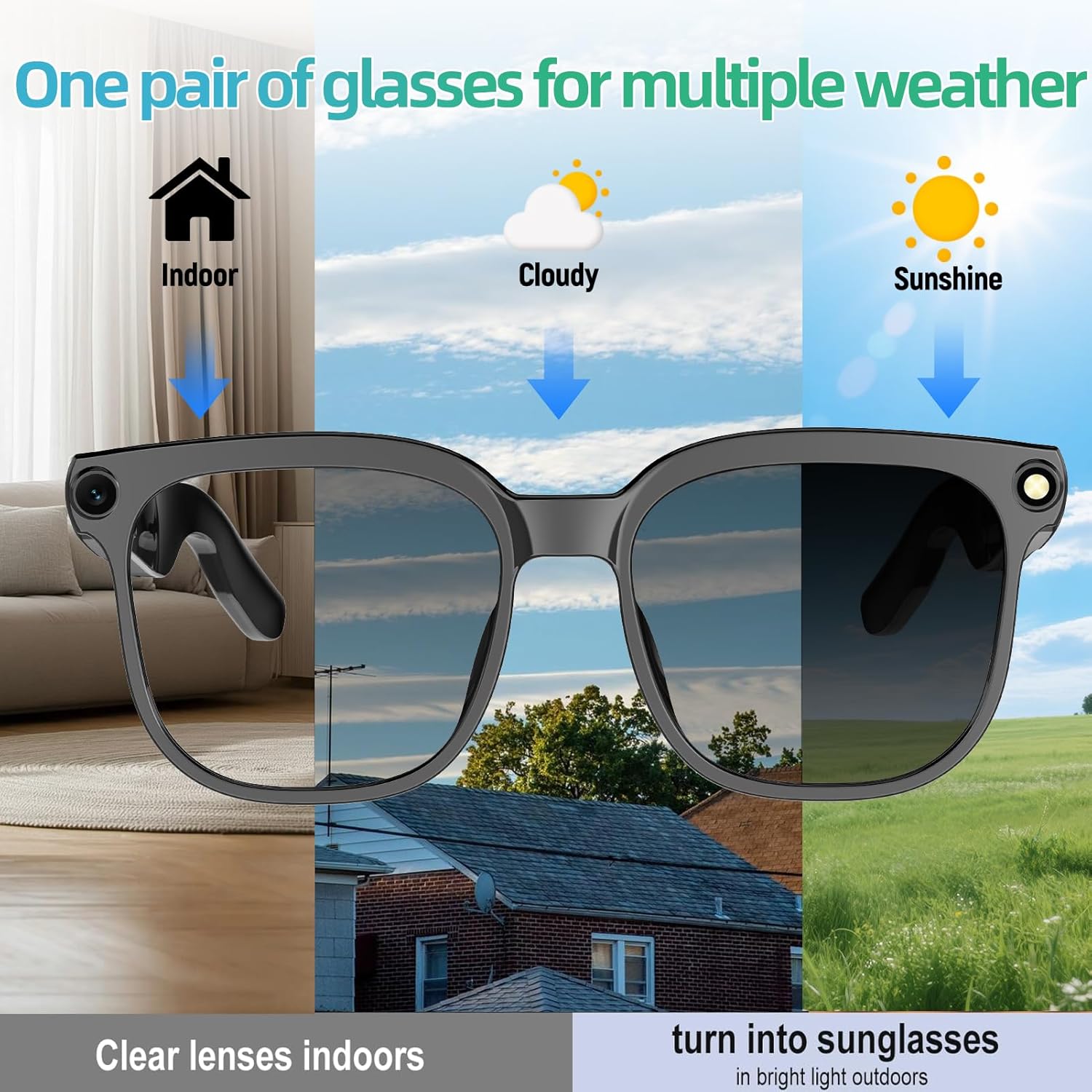
Image: An illustration demonstrating the photochromic lens feature of the PEJE AI Smart Glasses, showing how the lenses remain clear indoors, slightly tint in cloudy conditions, and darken significantly in bright sunlight.
7. Maintenance
Proper care ensures the longevity and optimal performance of your smart glasses.
- Cleaning Lenses: Use a soft, lint-free cloth (preferably microfiber) to clean the lenses. For stubborn smudges, use a specialized lens cleaning spray. Avoid abrasive materials or harsh chemicals.
- Cleaning Frame: Wipe the frame with a soft, damp cloth. Do not submerge the glasses in water.
- Storage: Store the glasses in their protective case when not in use to prevent scratches and damage.
- Avoid Extreme Conditions: Do not expose the glasses to extreme temperatures, direct sunlight for prolonged periods, or high humidity.
8. Troubleshooting
If you encounter issues with your PEJE AI Smart Glasses, refer to the following common solutions.
| Problem | Possible Cause | Solution |
|---|---|---|
| Glasses do not power on. | Low battery. | Charge the glasses fully (approx. 2 hours). |
| Cannot pair via Bluetooth. | Bluetooth is off on device; glasses not in pairing mode; interference. | Ensure Bluetooth is enabled on your device. Restart both devices. Move closer to the device. |
| Poor audio quality. | Low battery; distance from paired device; environmental noise. | Charge glasses. Reduce distance to paired device. Ensure ENC is active. |
| Camera not recording. | Insufficient storage; incorrect operation; low battery. | Check available storage. Ensure correct button presses (double-click front button). Charge glasses. |
| AI features not working. | App not connected; internet connection issues; app permissions. | Ensure the mobile app is open and connected. Check internet connectivity. Verify app permissions for microphone and camera. |
If the problem persists, please contact customer support for further assistance.
9. Specifications
| Feature | Detail |
|---|---|
| Model | B0GK1S55L4 |
| Camera Resolution | 8MP (supports 1080P/2K 30fps video) |
| Connectivity | Bluetooth 5.4 |
| Noise Reduction | Dual Microphone ENC Noise Reduction |
| Battery Capacity | 290 mAh Lithium Polymer |
| Charging Time | Approximately 2 hours (magnetic fast charging) |
| Usage Time | Up to 7 hours (translation/music playback) |
| Weight | 41g (ultra-light ABS material) |
| Memory Storage Capacity | 2 GB |
| Operating System (App) | iOS (compatible with Android via app) |
| Special Features | AI Translation (140 languages), Voice Control, Replaceable Lenses, Intelligent Wearing Detection, Blue Light Protection |
| Package Dimensions | 6.69 x 2.76 x 2.56 inches |
10. Safety Information
Please read and follow these safety guidelines to ensure safe operation and prevent damage to your device or injury.
- Do not attempt to disassemble, repair, or modify the glasses yourself. This may void the warranty and cause damage.
- Keep the glasses away from water and moisture. They are not waterproof.
- Avoid exposing the glasses to extreme temperatures (hot or cold) or direct sunlight for extended periods.
- Use only the provided charging cable. Using unauthorized chargers may damage the battery or device.
- Do not use the glasses while driving or operating heavy machinery if they distract you from safe operation.
- Keep out of reach of children and pets.
11. Warranty and Support
Your PEJE AI Smart Glasses are covered by a manufacturer's warranty. For specific warranty terms and conditions, please refer to the documentation included with your purchase or contact the seller.
For technical support, troubleshooting assistance, or warranty claims, please contact PEJE customer service through the retailer where you purchased the product or visit the official PEJE website for contact information.