
Introduction
This manual provides detailed instructions for the realme Buds Clip Open Ear Wireless Earbuds. It covers product features, setup, operation, maintenance, troubleshooting, and technical specifications. Please read this manual thoroughly before using your earbuds to ensure proper function and longevity.
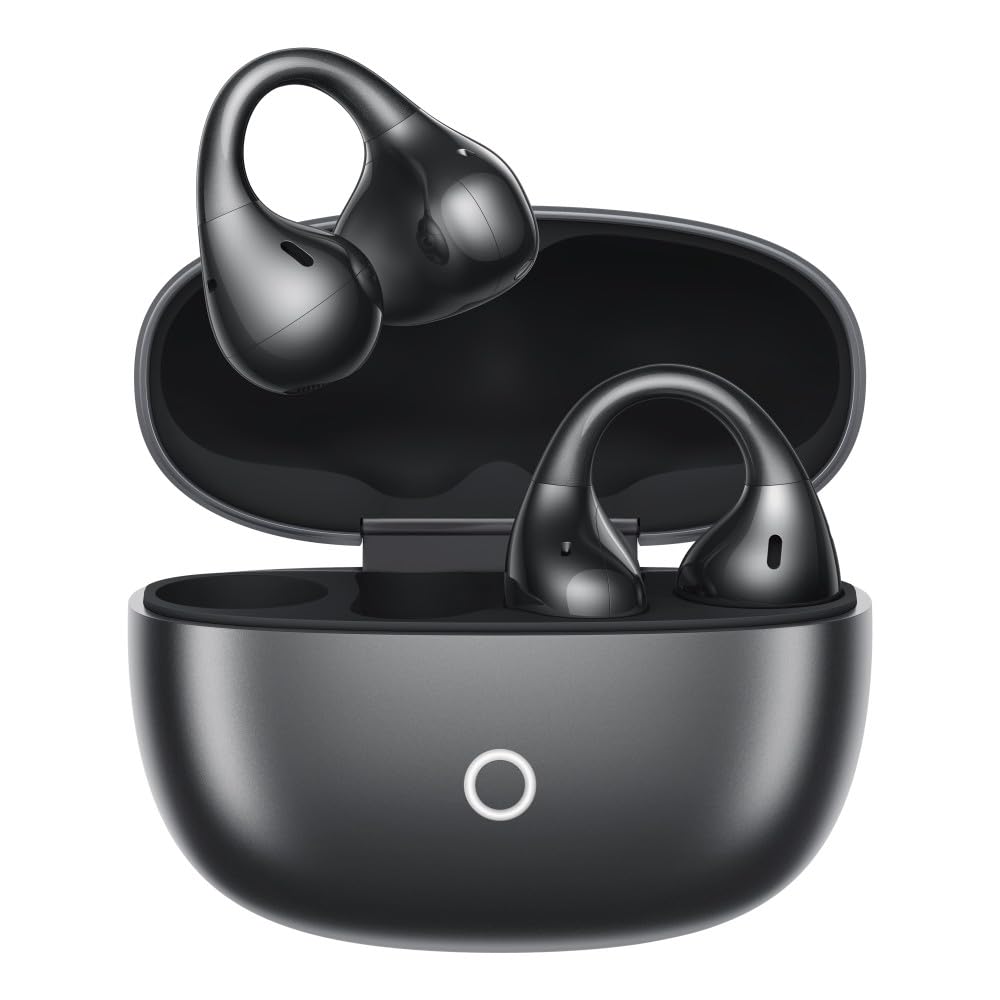
Image: realme Buds Clip earbuds and their charging case.
1. Setup
1.1 Charging the Earbuds and Case
Before first use, fully charge the realme Buds Clip and their charging case.
- Connect the charging case to a power source using a USB-C cable.
- Place the earbuds into the charging case. Ensure they are correctly seated.
- The indicator light on the case will show charging status. A full charge provides up to 36 hours of total playtime.

Image: Illustration of the 36-hour battery life with the charging case.
1.2 Pairing with a Device
- Open the charging case. The earbuds will automatically enter pairing mode (if not already paired).
- On your device (smartphone, tablet, laptop), enable Bluetooth.
- Search for "realme Buds Clip" in the list of available Bluetooth devices and select it to connect.
- Once connected, a confirmation sound or notification will be heard.
Dual-Device Connection: The earbuds support simultaneous connection to two devices via Bluetooth 5.4. To use this feature, pair the earbuds with the first device, then disconnect. Pair with the second device. Reconnect to the first device from its Bluetooth settings. The earbuds will now be connected to both.
1.3 Wearing the Earbuds
The realme Buds Clip feature a Precision C-Bridge Design for a secure and comfortable open-ear fit.
- Gently clip each earbud onto your ear, ensuring the audio driver is positioned correctly near your ear canal.
- Adjust for a snug yet comfortable fit. The lightweight design (5.3g per earbud) minimizes discomfort during extended wear.

Image: A person wearing the realme Buds Clip, demonstrating the open-ear fit.
2. Operating the Earbuds
2.1 Touch Controls
The realme Buds Clip utilize touch controls for various functions. Specific gestures can be customized via the realme Link app.
| Action | Function |
|---|---|
| Double Tap | Play/Pause music, Answer/End call |
| Triple Tap | Next track |
| Long Press (Left Earbud) | Volume Down |
| Long Press (Right Earbud) | Volume Up |
| Long Press Both Earbuds | Enter/Exit Gaming Mode |
Note: These are default controls and may be customized through the realme Link application.
2.2 Audio Features
- 11mm Dual-Magnet Drivers: Experience clear and dynamic audio with enhanced bass response, powered by the NextBass algorithm.
- 3D Spatial Audio: Enjoy an immersive stereo soundstage for a true-to-life listening experience.
- Directional Acoustic System: Sound is directed precisely into the ear canal, minimizing sound leakage and enhancing privacy.
- Open-Ear Situational Awareness: The open-ear design allows you to hear your audio while remaining aware of your surroundings, ideal for outdoor activities and commuting.

Image: Diagram illustrating the 11mm Dual-Magnet Driver technology.

Image: Visual representation of the NextBass Algorithm enhancing audio experience.
2.3 Call Management
The earbuds feature AI Environmental Noise Cancellation (ENC) with dual microphones to ensure clear voice pickup during calls, even in noisy environments or windy conditions (up to 25km/h).
- Answering a Call: Double tap either earbud.
- Ending a Call: Double tap either earbud.
- Rejecting a Call: Long press either earbud.

Image: Depiction of AI Dual-Mic Environmental Noise Cancellation effectiveness in noisy settings like a train station and indoors.
2.4 Gaming Mode
Activate Gaming Mode for an ultra-low latency experience (45ms), ensuring synchronization between audio and video, which is beneficial for mobile gaming and video playback.
- Activate: Long press both earbuds simultaneously.
- Deactivate: Repeat the long press on both earbuds.
3. Maintenance
3.1 Cleaning
- Regularly clean the earbuds and charging case with a soft, dry, lint-free cloth.
- Do not use abrasive cleaners, alcohol, or chemical solvents.
- Ensure charging contacts on both earbuds and case are clean and dry to prevent charging issues.
3.2 Water and Dust Resistance
The realme Buds Clip are IP55 rated for dust and water resistance. This means they are protected against limited dust ingress and low-pressure water jets from any direction.
- Avoid submerging the earbuds in water.
- Do not expose them to saltwater, chlorinated water, or other liquids.
- If the earbuds get wet, wipe them dry thoroughly before placing them back in the charging case or using them.

Image: Visual representation of the IP55 dust and water resistance rating.
3.3 Storage
Store the earbuds in their charging case when not in use to protect them and ensure they remain charged. Keep them in a cool, dry place away from direct sunlight and extreme temperatures.
4. Troubleshooting
4.1 Connectivity Issues
- Earbuds not pairing: Ensure both earbuds are in the charging case, the case lid is open, and they have sufficient charge. Try resetting the earbuds (refer to the realme Link app or product support for specific reset instructions).
- Cannot find "realme Buds Clip" in Bluetooth list: Turn off and on your device's Bluetooth. Ensure the earbuds are in pairing mode.
- Intermittent connection: Ensure there are no obstructions between the earbuds and your device. Keep the device within the Bluetooth range (up to 10 meters).
4.2 Audio Problems
- No sound from one earbud: Place both earbuds back into the charging case, close the lid, wait a few seconds, then open it again. Check if both earbuds are charged.
- Low volume: Adjust the volume on both your connected device and the earbuds (via touch controls or the realme Link app).
- Poor call quality: Ensure the microphones are not obstructed. Check for strong environmental noise.
4.3 Charging Issues
- Earbuds not charging: Ensure the earbuds are correctly seated in the charging case. Clean the charging contacts on both the earbuds and the case.
- Case not charging: Verify the USB-C cable and power adapter are working correctly. Ensure the charging port is clean.
5. Specifications
| Feature | Detail |
|---|---|
| Brand | realme |
| Model Name | Buds Clip |
| Model Number | RMA2418 |
| Ear Placement | Open Ear |
| Form Factor | True Wireless |
| Audio Driver Size | 11 mm |
| Audio Driver Type | Dynamic Driver |
| Impedance | 16 Ohms |
| Frequency Range | 20 Hz - 20,000 Hz |
| Noise Control | Environmental Noise Cancellation (AI ENC) |
| Battery Life (Total) | Up to 36 Hours with charging case |
| Battery Life (Earbuds) | Up to 7 Hours per charge |
| Audio Latency | 45 Milliseconds (Gaming Mode) |
| Bluetooth Version | 5.4 |
| Bluetooth Range | 10 Metres |
| Water Resistance Level | IP55 (Dust & Water Resistant) |
| Control Method | Touch, App Control |
| Weight (per earbud) | 5.3 Grams |
| Compatible Devices | Cellphones, Laptops, Tablets, Television |
| Box Contents | realme Buds Clip, Charging Case, User Manual |
| Country of Origin | India |
6. Warranty and Support
Warranty: The realme Buds Clip come with a 1-year manufacturing warranty. For warranty claims, please carry the product to the nearest realme service center.
Customer Support:
- Email: service@realme.com
- Toll-free Number: 1800 102 2777
For further assistance, please visit the official realme support website.